kaleshnikov
New member
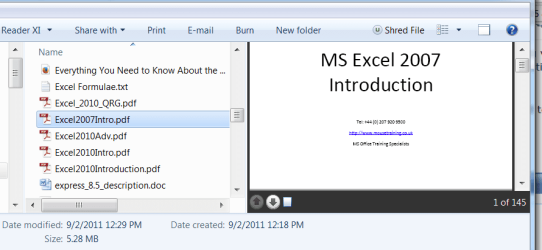
The PDF previewing in Explorer is not working on my PC, and I have tried uninstalling/reinstalling various different PDF clients/handlers including Nitro PDF, Foxit PDF, Sumatra PDF, Acrobat DC, but yet still the previewing is not working.
At present moment, I am only running Acrobat DC and the preview pane is "blank" when I select to preview a PDF.
At present moment, I am only running Acrobat DC and the preview pane is "blank" when I select to preview a PDF.
My Computer
- Computer type
- PC/Desktop
- Computer Manufacturer/Model Number
- Custom Build
- OS
- Windows 7 x64 Ultimate
- CPU
- AMD FX6300
- Motherboard
- Gigabyte GA-970A-D3P rev1.0
- Memory
- 24GB DDR3
- Graphics Card(s)
- XFX Radeon 6670, XFX Radeon 5450
- Sound Card
- Onboard
- Monitor(s) Displays
- (1) Acer X223W, (2) HP LP1965
- Screen Resolution
- 1680x1050, 1280x1024
- Hard Drives
- Samsung SSD 840 EVO 120GB
- PSU
- Cooler Master 550W
- Case
- Bitfenix Merc Beta
- Cooling
- Cooler Master Heatsink & Fan; (2) 120mm Case Fans
- Keyboard
- Microsoft Natural Ergonomic Keyboard 4000
- Mouse
- Delux DLK-618BU
- Internet Speed
- 30/5 Cable
- Browser
- Chrome