Peppermint Live CD/DVD/USB - Create for Emergency Backup

Create Live Peppermint CD/DVD/USB to Backup Data when Windows 7 Will Not Boot

   Information
In some instances, Windows 7 installations can become non-bootable if serious corruption of the system files have taken place, for example through the action of malware. If these corruptions are extremely severe, the installation cannot be repaired and the only course of action left is often to wipe (format) the hard disk and reinstall Windows 7 from scratch. Before you do that, however, you may wish to copy any user data (photo's, music etc.) files from the faulty installation to a backup drive.

This tutorial will show you how to do this in just a few easy steps by creating a free Live PepperMint5 Linux distribution on a bootable USB flash drive or CD.

   Note
There are many free Linux distributions that can accomplish this task, but I have specifically chosen PepperMint5 because:

  • it is a small, lightweight distribution
  • it has a look & feel that will be familiar to Windows-only users
  • it does not require any knowledge of Linux jargon (e.g. sda1, sda2)
  • it is easy for novice users to understand
*** Update ***
I've decided to replace the use of the Lili USB creator originally referenced in this tutorial, with the Rufus USB creator, after some reports of problems with Lili. Special thanks to jumanji who brought this to my attention, and also suggested Rufus as an alternative.

The screen capture images are taken from PepperMint3 -- the distro available at the time of writing this tutorial -- but they are the same for later versions such as PepperMint4 or PepperMint5.


:note: Requirements:
In order to perform an emergency backup, you will need the following :

Hardware:-

  • External USB drive (to store your backed-up data)
  • 1Gb or larger USB thumb/flash drive (to hold your bootable PepperMint5 installation)
Software:-

You will need to know how to boot the troublesome computer from either a CD/DVD or USB drive. The way you do this depends largely on the make of BIOS of your computer. If you aren't sure, just ask.


Step A - Creating the Live Peppermint5 USB/CD/DVD

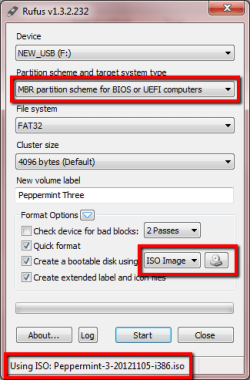
On a working computer download Rufus and the PepperMint5 ISO from the links above. Now run Rufus by double-clicking the Rufus executable.

Replicate the settings shown in the Rufus panel below. Use the CD icon to browse to the location of the PepperMint5 ISO, and confirm that correct ISO is selected as shown at the very bottom of the panel.
r1.png

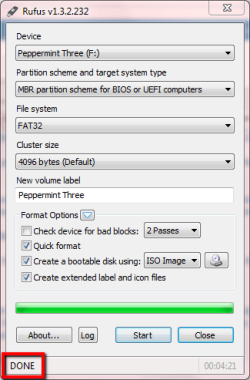
Click Start, and then OK on the warning pop-up to write the ISO and make the USB flash drive bootable. Once complete, a confirmation message is displayed, as shown below.
r2.png
You can now close Rufus and unplug the USB flash drive. You have now created the Live PepperMint5 Linux USB.


Step B - Booting from the Live Peppermint5 USB/CD/DVD

Insert the USB flash drive into a USB2 port (or insert the CD/DVD into the DVD drive) on the problem computer and boot with either device.

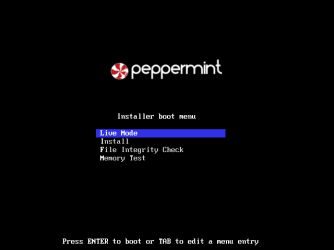
After a few seconds, the PepperMint5 boot screen will appear. Select Live Mode as shown below. and hit enter.
p1.png
PepperMint3 will now boot to the screen shown below.

p3.png


Step C - Copying user data to the external USB drive

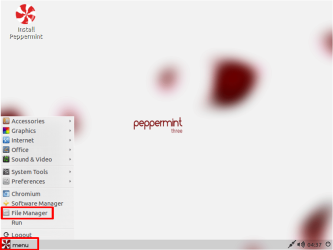
Click Menu and then click File Manager as shown below.
p4.png
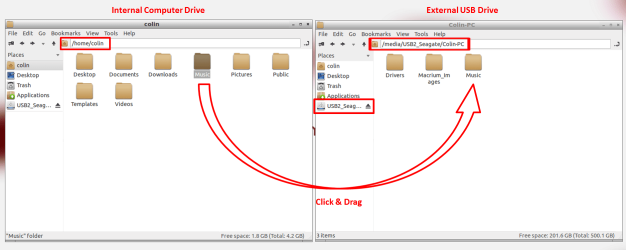
Click on the File Manger that opens, and then type CTRL+N to open a duplicate File Manger Window and arrange them side-by-side.

Use the left-hand file manager window to browse for and locate the files you want to copy. Select your external USB drive in the right-hand side file manager window. Now simple click & drag the files you want to copy from the left-hand window to the one on the right. In the example shown below, I am copying my Music folder to the external USB drive.
p5.png
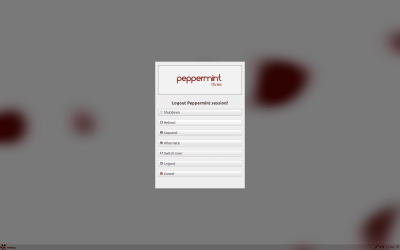
When you are done copying, close the file manger windows, and then select the Logout option from the Menu button. Now select Shutdown as shown below.
p7.png
That's it - your data files are now safely copied to your external USB drive.

Regards,
Golden


Last edited by a moderator:
"You will need to know how to boot the troublesome computer from either a CD/DVD or USB drive. The way you do this depends largely on the make of BIOS of your computer. If you aren't sure, just ask."

Hello, I was inquiring about the above quoted statement. I'm a complete computer novice and I am requiring assistance with my Gateway netbook that is stuck in a start up repair loop. I want to get my files off my netbook before I attept repairs. I was refered to this thread as a way of doing so. Here is a link to the thread I posted: http://www.sevenforums.com/crashes-...op-netbook-windows-7-starter.html#post2154967

Besides trying to understand the requirements mentioned in the quoted statement, I want to double-check to make sure that this method will help me remove or copy my files for safe keeping while I repair my netbook.

Thank you. :)
 

My Computer My Computer

At a glance

Windows 7 Starter
OS
Windows 7 Starter
If you fill in your System Specs it would be easier for us to help you.

Q: How do I access the Boot menu options on my portable computer?

A: In order to access the boot options on this portable computer, press the ESC or F10 key while the Gateway screen is displayed during the startup process. This opens a Boot menu with the option to start the computer to any of the available drives or to enter the BIOS Setup Utility. Use the UP ARROW and DOWN ARROW keys to select a menu option, and then press the ENTER key to start to the selected device.

To "boot" (start) to a CD, DVD, or a floppy disk, the media must be in the drive when starting the computer.
This also includes a USB memory stick.
 

My Computer My Computer

At a glance

Windows 7 Ult x64 - SP1/ Windows 8 Pro x64Intel Core i5-3570K 4.6GHz8GB (2X4GB) DDR3 1600 Corsair Vengeance CL8 1.5vSapphire HD 7770 Vapor-X OC 1GB DDR5
Computer type
PC/Desktop
Computer Manufacturer/Model Number
76~2.0
OS
Windows 7 Ult x64 - SP1/ Windows 8 Pro x64
CPU
Intel Core i5-3570K 4.6GHz
Motherboard
Gigabyte GA-Z77X UD3H, f18
Memory
8GB (2X4GB) DDR3 1600 Corsair Vengeance CL8 1.5v
Graphics Card(s)
Sapphire HD 7770 Vapor-X OC 1GB DDR5
Sound Card
Onboard VIA VT2021
Monitor(s) Displays
22" LCD Dell
Screen Resolution
1680x1050
Hard Drives
Samsung 840Pro 128GB SSD,
Seagate Barracuda 500GB SATA2 7200rpm 32MB cache, Seagate Barracuda 1TB SATA2 7200rpm 32MB cache,
PSU
Corsair HX650W
Case
Cooler Master Storm Scout
Cooling
Corsair H80 2x12cm Noctua NF P12 , 2x14cm case fans
Keyboard
Logitech Wave
Mouse
CM Sentinel
Internet Speed
Dismal
Antivirus
Avast
Browser
Opera Next
Other Info
Haswell laptop: HP Envy 17t-j, i7-4700MQ, GeForce 740M 2GB DDR3, 17.3" Full HD 1920x1080, 16GB RAM, Samsung 840 Pro 128GB, 1TB Hitachi 7200 HDD,
Desktop: eSATA ports,
External eSATA Seagate 500GB SATA2 7200rpm,
External WD USB 500GB
I can give you any information regarding the specs that you might need. That's a little vague for a novice like me. Just let me know what you need and I will get back to you. Thank you so much.
 

My Computer My Computer

At a glance

Windows 7 Starter
OS
Windows 7 Starter

My Computer My Computer

At a glance

Windows 10 Pro x64 ; Xubuntu x64Intel i7 860 @ 2.80 GHz O/C'ed to 4.0GHz16GB Corsair Vengance DDR3 @ 661 MHz Dual Cha...EVGA NVidia GTX 560 1024MB
Computer type
PC/Desktop
Computer Manufacturer/Model Number
Golden Mk. I.4
OS
Windows 10 Pro x64 ; Xubuntu x64
CPU
Intel i7 860 @ 2.80 GHz O/C'ed to 4.0GHz
Motherboard
Gigabyte P55A-UD3R Rev.1. Award BIOS F13
Memory
16GB Corsair Vengance DDR3 @ 661 MHz Dual Channel (9-9-9-24)
Graphics Card(s)
EVGA NVidia GTX 560 1024MB
Sound Card
Realtek Integrated
Monitor(s) Displays
Dual Samsung SyncMaster 2494HS
Screen Resolution
1920*1080 and 1920*1080
Hard Drives
1*Samsung 840 EVO 120GB SSD;
1*OCZ Vertex 2 60GB SSD;
2*Samsung F3 SpinPoint 1TB in RAID0;
1*Samsung F1 SpinPoint 1TB;
2*Western Digital 1TB External USB 3.0
1*Western Digital 500GB External USB 3.0
1*Seagate 500GB External USB 2.0
PSU
Thermaltake ToughPower QFan 750W
Case
Thermaltake Element S VK60001W2Z
Cooling
Corsair H60 Water Cooling, 2*230mm and 2*80mm case fans
Keyboard
Logitech G110
Mouse
Logitech MX518
I'll have to take a closer look at that later. I'm swamped with Thanksgiving coming up, trying to make getting my computer up and running a top priority. I don't know if this helps, but here is my exact comuter model: Gateway offers its LT4004U netbook with Cedar Trail processor | laptoport

I don't know if you can gather anything from that. Thanks for the patience, guys. :) :) :)
 

My Computer My Computer

At a glance

Windows 7 Starter
OS
Windows 7 Starter
Sarah - I posted a reply in your original thread here
 

My Computer My Computer

At a glance

Windows 10 Pro x64 ; Xubuntu x64Intel i7 860 @ 2.80 GHz O/C'ed to 4.0GHz16GB Corsair Vengance DDR3 @ 661 MHz Dual Cha...EVGA NVidia GTX 560 1024MB
Computer type
PC/Desktop
Computer Manufacturer/Model Number
Golden Mk. I.4
OS
Windows 10 Pro x64 ; Xubuntu x64
CPU
Intel i7 860 @ 2.80 GHz O/C'ed to 4.0GHz
Motherboard
Gigabyte P55A-UD3R Rev.1. Award BIOS F13
Memory
16GB Corsair Vengance DDR3 @ 661 MHz Dual Channel (9-9-9-24)
Graphics Card(s)
EVGA NVidia GTX 560 1024MB
Sound Card
Realtek Integrated
Monitor(s) Displays
Dual Samsung SyncMaster 2494HS
Screen Resolution
1920*1080 and 1920*1080
Hard Drives
1*Samsung 840 EVO 120GB SSD;
1*OCZ Vertex 2 60GB SSD;
2*Samsung F3 SpinPoint 1TB in RAID0;
1*Samsung F1 SpinPoint 1TB;
2*Western Digital 1TB External USB 3.0
1*Western Digital 500GB External USB 3.0
1*Seagate 500GB External USB 2.0
PSU
Thermaltake ToughPower QFan 750W
Case
Thermaltake Element S VK60001W2Z
Cooling
Corsair H60 Water Cooling, 2*230mm and 2*80mm case fans
Keyboard
Logitech G110
Mouse
Logitech MX518
I have a question, um when i plug the usb with peppermint on my broken laptop, it shows /home/peppermint and i cant find my files, how would i do that, because everything on there is empty
 

My Computer My Computer

At a glance

Windows 7 64bit
OS
Windows 7 64bit
Hi,

So you are able to boot into PepperMint3, and open the File Manager as shown in Step C?

Regards,
Golden
 

My Computer My Computer

At a glance

Windows 10 Pro x64 ; Xubuntu x64Intel i7 860 @ 2.80 GHz O/C'ed to 4.0GHz16GB Corsair Vengance DDR3 @ 661 MHz Dual Cha...EVGA NVidia GTX 560 1024MB
Computer type
PC/Desktop
Computer Manufacturer/Model Number
Golden Mk. I.4
OS
Windows 10 Pro x64 ; Xubuntu x64
CPU
Intel i7 860 @ 2.80 GHz O/C'ed to 4.0GHz
Motherboard
Gigabyte P55A-UD3R Rev.1. Award BIOS F13
Memory
16GB Corsair Vengance DDR3 @ 661 MHz Dual Channel (9-9-9-24)
Graphics Card(s)
EVGA NVidia GTX 560 1024MB
Sound Card
Realtek Integrated
Monitor(s) Displays
Dual Samsung SyncMaster 2494HS
Screen Resolution
1920*1080 and 1920*1080
Hard Drives
1*Samsung 840 EVO 120GB SSD;
1*OCZ Vertex 2 60GB SSD;
2*Samsung F3 SpinPoint 1TB in RAID0;
1*Samsung F1 SpinPoint 1TB;
2*Western Digital 1TB External USB 3.0
1*Western Digital 500GB External USB 3.0
1*Seagate 500GB External USB 2.0
PSU
Thermaltake ToughPower QFan 750W
Case
Thermaltake Element S VK60001W2Z
Cooling
Corsair H60 Water Cooling, 2*230mm and 2*80mm case fans
Keyboard
Logitech G110
Mouse
Logitech MX518
Hey, and yeah i can do everything shown in step C, but none of my files are there, it just says /home/peppermint, and has folders for downloads, music, etc. Unlike yours that said /home/colin with your stuff.
 

My Computer My Computer

At a glance

Windows 7 64bit
OS
Windows 7 64bit
Hi,

OK - that's because you are viewing the files on the USB you booted from. Click on the Places tab in the File Manager and see what other devices/disks are listed.

Regards,
Golden
 

My Computer My Computer

At a glance

Windows 10 Pro x64 ; Xubuntu x64Intel i7 860 @ 2.80 GHz O/C'ed to 4.0GHz16GB Corsair Vengance DDR3 @ 661 MHz Dual Cha...EVGA NVidia GTX 560 1024MB
Computer type
PC/Desktop
Computer Manufacturer/Model Number
Golden Mk. I.4
OS
Windows 10 Pro x64 ; Xubuntu x64
CPU
Intel i7 860 @ 2.80 GHz O/C'ed to 4.0GHz
Motherboard
Gigabyte P55A-UD3R Rev.1. Award BIOS F13
Memory
16GB Corsair Vengance DDR3 @ 661 MHz Dual Channel (9-9-9-24)
Graphics Card(s)
EVGA NVidia GTX 560 1024MB
Sound Card
Realtek Integrated
Monitor(s) Displays
Dual Samsung SyncMaster 2494HS
Screen Resolution
1920*1080 and 1920*1080
Hard Drives
1*Samsung 840 EVO 120GB SSD;
1*OCZ Vertex 2 60GB SSD;
2*Samsung F3 SpinPoint 1TB in RAID0;
1*Samsung F1 SpinPoint 1TB;
2*Western Digital 1TB External USB 3.0
1*Western Digital 500GB External USB 3.0
1*Seagate 500GB External USB 2.0
PSU
Thermaltake ToughPower QFan 750W
Case
Thermaltake Element S VK60001W2Z
Cooling
Corsair H60 Water Cooling, 2*230mm and 2*80mm case fans
Keyboard
Logitech G110
Mouse
Logitech MX518
Awesome, thanks for the help, greatly appreciated, thanks Golden
 

My Computer My Computer

At a glance

Windows 7 64bit
OS
Windows 7 64bit
No problem - just post back if you need more help.
 

My Computer My Computer

At a glance

Windows 10 Pro x64 ; Xubuntu x64Intel i7 860 @ 2.80 GHz O/C'ed to 4.0GHz16GB Corsair Vengance DDR3 @ 661 MHz Dual Cha...EVGA NVidia GTX 560 1024MB
Computer type
PC/Desktop
Computer Manufacturer/Model Number
Golden Mk. I.4
OS
Windows 10 Pro x64 ; Xubuntu x64
CPU
Intel i7 860 @ 2.80 GHz O/C'ed to 4.0GHz
Motherboard
Gigabyte P55A-UD3R Rev.1. Award BIOS F13
Memory
16GB Corsair Vengance DDR3 @ 661 MHz Dual Channel (9-9-9-24)
Graphics Card(s)
EVGA NVidia GTX 560 1024MB
Sound Card
Realtek Integrated
Monitor(s) Displays
Dual Samsung SyncMaster 2494HS
Screen Resolution
1920*1080 and 1920*1080
Hard Drives
1*Samsung 840 EVO 120GB SSD;
1*OCZ Vertex 2 60GB SSD;
2*Samsung F3 SpinPoint 1TB in RAID0;
1*Samsung F1 SpinPoint 1TB;
2*Western Digital 1TB External USB 3.0
1*Western Digital 500GB External USB 3.0
1*Seagate 500GB External USB 2.0
PSU
Thermaltake ToughPower QFan 750W
Case
Thermaltake Element S VK60001W2Z
Cooling
Corsair H60 Water Cooling, 2*230mm and 2*80mm case fans
Keyboard
Logitech G110
Mouse
Logitech MX518
Um when ever i open my folders, like music it says input/output error, and i got my documents' folder, all my subfolders are there but nothing is inside them
 

My Computer My Computer

At a glance

Windows 7 64bit
OS
Windows 7 64bit
Mmm. That doesn't sound good - what size are the folders? How much information was contained within them?
 

My Computer My Computer

At a glance

Windows 10 Pro x64 ; Xubuntu x64Intel i7 860 @ 2.80 GHz O/C'ed to 4.0GHz16GB Corsair Vengance DDR3 @ 661 MHz Dual Cha...EVGA NVidia GTX 560 1024MB
Computer type
PC/Desktop
Computer Manufacturer/Model Number
Golden Mk. I.4
OS
Windows 10 Pro x64 ; Xubuntu x64
CPU
Intel i7 860 @ 2.80 GHz O/C'ed to 4.0GHz
Motherboard
Gigabyte P55A-UD3R Rev.1. Award BIOS F13
Memory
16GB Corsair Vengance DDR3 @ 661 MHz Dual Channel (9-9-9-24)
Graphics Card(s)
EVGA NVidia GTX 560 1024MB
Sound Card
Realtek Integrated
Monitor(s) Displays
Dual Samsung SyncMaster 2494HS
Screen Resolution
1920*1080 and 1920*1080
Hard Drives
1*Samsung 840 EVO 120GB SSD;
1*OCZ Vertex 2 60GB SSD;
2*Samsung F3 SpinPoint 1TB in RAID0;
1*Samsung F1 SpinPoint 1TB;
2*Western Digital 1TB External USB 3.0
1*Western Digital 500GB External USB 3.0
1*Seagate 500GB External USB 2.0
PSU
Thermaltake ToughPower QFan 750W
Case
Thermaltake Element S VK60001W2Z
Cooling
Corsair H60 Water Cooling, 2*230mm and 2*80mm case fans
Keyboard
Logitech G110
Mouse
Logitech MX518
Well my documents and pictures folders were like a couple of gigs, and my music and video folders were like 100 gigs or more.
 

My Computer My Computer

At a glance

Windows 7 64bit
OS
Windows 7 64bit
What size are the folders now? Did you have problems with your original Windows 7 installation? What happened?
 

My Computer My Computer

At a glance

Windows 10 Pro x64 ; Xubuntu x64Intel i7 860 @ 2.80 GHz O/C'ed to 4.0GHz16GB Corsair Vengance DDR3 @ 661 MHz Dual Cha...EVGA NVidia GTX 560 1024MB
Computer type
PC/Desktop
Computer Manufacturer/Model Number
Golden Mk. I.4
OS
Windows 10 Pro x64 ; Xubuntu x64
CPU
Intel i7 860 @ 2.80 GHz O/C'ed to 4.0GHz
Motherboard
Gigabyte P55A-UD3R Rev.1. Award BIOS F13
Memory
16GB Corsair Vengance DDR3 @ 661 MHz Dual Channel (9-9-9-24)
Graphics Card(s)
EVGA NVidia GTX 560 1024MB
Sound Card
Realtek Integrated
Monitor(s) Displays
Dual Samsung SyncMaster 2494HS
Screen Resolution
1920*1080 and 1920*1080
Hard Drives
1*Samsung 840 EVO 120GB SSD;
1*OCZ Vertex 2 60GB SSD;
2*Samsung F3 SpinPoint 1TB in RAID0;
1*Samsung F1 SpinPoint 1TB;
2*Western Digital 1TB External USB 3.0
1*Western Digital 500GB External USB 3.0
1*Seagate 500GB External USB 2.0
PSU
Thermaltake ToughPower QFan 750W
Case
Thermaltake Element S VK60001W2Z
Cooling
Corsair H60 Water Cooling, 2*230mm and 2*80mm case fans
Keyboard
Logitech G110
Mouse
Logitech MX518
Well the main problem is that when i start my laptop it goes to the starting windows screen, doesn't go pass that, then just always goes to startup repair, which never fixes anything. I tried a solution found on these forums but didnt work, so i was trying to take my files out but it gave the I/O error, which I also got when trying to fix my laptop. The size of the folders i am not sure, because when ever i open any of them it says I/O error. As well all my folders are empty. I was going to re install windows 7, but i stopped because it showed my hard drive stilled had my files, so i stopped, to try and get my files.
 

My Computer My Computer

At a glance

Windows 7 64bit
OS
Windows 7 64bit
Hi,

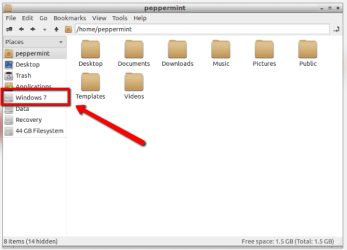
It sounds to me as if you aren't browsing to the correct device using the File Manager. Have a look at the devices available, and then list them here for me please?

Refer to the attached image : in my case I want to browse the Windows 7 device, you should see something similar. Use the Accessories > Screenshot menu to take a screencapture image and post it here so we can have a look at what you are seeing.

capture.PNG

Regards,
Golden
 
Last edited:

My Computer My Computer

At a glance

Windows 10 Pro x64 ; Xubuntu x64Intel i7 860 @ 2.80 GHz O/C'ed to 4.0GHz16GB Corsair Vengance DDR3 @ 661 MHz Dual Cha...EVGA NVidia GTX 560 1024MB
Computer type
PC/Desktop
Computer Manufacturer/Model Number
Golden Mk. I.4
OS
Windows 10 Pro x64 ; Xubuntu x64
CPU
Intel i7 860 @ 2.80 GHz O/C'ed to 4.0GHz
Motherboard
Gigabyte P55A-UD3R Rev.1. Award BIOS F13
Memory
16GB Corsair Vengance DDR3 @ 661 MHz Dual Channel (9-9-9-24)
Graphics Card(s)
EVGA NVidia GTX 560 1024MB
Sound Card
Realtek Integrated
Monitor(s) Displays
Dual Samsung SyncMaster 2494HS
Screen Resolution
1920*1080 and 1920*1080
Hard Drives
1*Samsung 840 EVO 120GB SSD;
1*OCZ Vertex 2 60GB SSD;
2*Samsung F3 SpinPoint 1TB in RAID0;
1*Samsung F1 SpinPoint 1TB;
2*Western Digital 1TB External USB 3.0
1*Western Digital 500GB External USB 3.0
1*Seagate 500GB External USB 2.0
PSU
Thermaltake ToughPower QFan 750W
Case
Thermaltake Element S VK60001W2Z
Cooling
Corsair H60 Water Cooling, 2*230mm and 2*80mm case fans
Keyboard
Logitech G110
Mouse
Logitech MX518
Got a question.

Okay, so let's say I didn't wanna spend money on an external hard drive, but I had a usb cable that could connect my laptop to my computer. Would I be able to transfer it onto my computer?

My laptop is the problem and I'm having the same problem as ZKhan with the infinite startup repair loop..
 

My Computer My Computer

At a glance

Nevada
OS
Nevada
Back
Top