Performance drop 10 minutes after system start & CPU Clocks stuck low

rodali60

New member
Local time
9:56 PM
Messages
6
Performance drop 10 minutes after system start & CPU Clocks stuck low

Hello friends ,

I have a Lenovo Ideapad z510 laptop i5, 6Go Ram, Windows 7 Pro 64x about 5 years old.


Last week , i started having a problem with the battery, the laptop is plugged-in , it says charging but the battery percentage won't go up , stuck at 0%, i tried couple of things like disabling and uninstalling the ACPI Microsoft and the Microsoft adaptor and enabling them again, i tried discharging the pc , but that didn't fix the problem, i guess the battery just died , if you guys have a solution for that , i would appreciate it.


Now i only mentioned the battery problem to give as much informations to help you understand what is going on with my pc.

My major problem now is , that after coming out of sleep mode, the pc become slow and it's like the processor isn't performing as it used to be, for example , can't watch youtube/twitch in 1080p or higher, it doesn't buffer but it lags (stutter) . It only get fixed if i restart the pc. But now the problem is even worse, if i start the pc it works perfectly fine , but after like 10 minutes the lags and stutters beggins, i didn't put it to sleep mode, it just starts becoming slow and when i want to watch high quality videos online,it stutters. I was playing a video game and was having like 130 fps which is normal to me, but then all of sudden it became 20 fps .


After booting ,the computer works perfectly fine, i can watch high quality with no problems , the processor seems to be working fine, i can hear the fan blowing fast because it's hight quailty stream, but when it starts stuttering and the pc in gerneral become slower, the fan speed is so much lower , like the processor is not making an effort .

It's not an over heating problem, because when it works fine, the temperature is around 70Celsius/158Fahrenheit which is how it noramly is when i didn't have problems, but when the problem accure the temperature drops to 53C/127F .
Using HWmonitor, the cpu clocks is at 2996 MHz when everything is fine but when it starts stuttering the cpu clocks drops to 799 MHz.

As i said ,it feels like the processor isn't running at full capacity .


I tried restarting the pc over and over, i run cmd , sfc /scannow and no errors were found, i ran chkdsk commands but the problem wasn't fixed , i reseted the bios to default settings , but still nothing, i updated video drivers , still nothing.


I hope i explained it well enough, sorry if it's not so clear, please feel free to ask me any questions you have.
 

My Computer My Computer

At a glance

Windows 7 Pro 64bits
Computer type
PC/Desktop
OS
Windows 7 Pro 64bits
Can you check resource monitor (accessible via task manager) and show what are taking the most memory? If it's svchost.exe it might be Windows Update, or a broken service for instance. It'd help a lot to see what seems to be taking memory.

Also, scan your computer using MBAM, see if it picks up anything, that's usually a precautionary check.
 

My Computer My Computer

At a glance

Windows 7 Home Premium x64AMD Athlon 64 X2 7450 @ 2.40Ghz2GB DDR2NVIDIA GeForce 8200 (nForce 730a)
Computer type
PC/Desktop
Computer Manufacturer/Model Number
Packard Bell
OS
Windows 7 Home Premium x64
CPU
AMD Athlon 64 X2 7450 @ 2.40Ghz
Memory
2GB DDR2
Graphics Card(s)
NVIDIA GeForce 8200 (nForce 730a)
Hard Drives
Western Digital 1TB HDD
Browser
Internet Explorer 11
Thank you for taking time to reply Jeyneko, I already scanned using MBAM nothing fount.

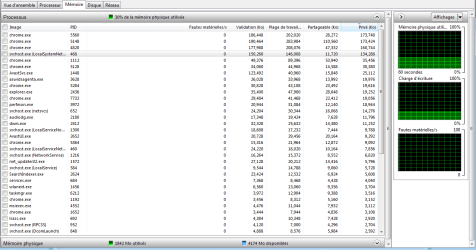
Here is a picture of the resource monitor . svchost.exe is the second one after chrome taking memory.
 

Attachments

  • resource monitor , memory.png
    resource monitor , memory.png
    35.3 KB · Views: 2

My Computer My Computer

At a glance

Windows 7 Pro 64bits
Computer type
PC/Desktop
OS
Windows 7 Pro 64bits
If the battery isn't charging it is dead.
With low battery, when it comes out from sleep, the OS see the battery as low and operate at low power.

As the battery isn't charging, you should take it out to prevent damage to the internal PS/charger. If you damage the internal PS/charger you will need to replace the MoBo.
 

My Computers My Computers

  • At a glance

    Windows 7 HP 64i5 6600K - 800MHz to 4200MHz4+4G GSkill DDR4 3000IG - Intel 530
    Computer type
    PC/Desktop
    Computer Manufacturer/Model Number
    custom build
    OS
    Windows 7 HP 64
    CPU
    i5 6600K - 800MHz to 4200MHz
    Motherboard
    GA-Z170-HD3P
    Memory
    4+4G GSkill DDR4 3000
    Graphics Card(s)
    IG - Intel 530
    Monitor(s) Displays
    Samsung 226BW
    Screen Resolution
    1680x1050
    Hard Drives
    (1) -1 SM951 – 128GB M.2 AHCI PCIe SSD drive for Windows 7 and Lubuntu
    (2) -1 WD SATA 3 - 1T for Data
    (3) -1 WD SATA 3 - 1T for backup
    PSU
    Thermaltake 450W TR2 gold
    Keyboard
    Old and good Chicony mechanical keyboard
    Mouse
    Logitech mX performance - 9 buttons (had to disable some)
    Internet Speed
    500Mb/s
    Browser
    Firefox 64
    Other Info
    TinyWall firewall
  • At a glance

    Windows 7 Proi7-4500U 800MHz to 3.0GHz(4+4)G DDR3 1600IG intel 4400 + NVIDIA GeForce GT 745M
    Computer type
    Laptop
    System Manufacturer/Model Number
    Asus Q550LF
    OS
    Windows 7 Pro
    CPU
    i7-4500U 800MHz to 3.0GHz
    Motherboard
    Asus Q550LF
    Memory
    (4+4)G DDR3 1600
    Graphics Card(s)
    IG intel 4400 + NVIDIA GeForce GT 745M
    Sound Card
    Realtek
    Monitor(s) Displays
    LG Display LP156WF4-SPH1
    Screen Resolution
    1920 x 1080
    Hard Drives
    BX500 120G SSD for Windows and programs +
    1T HDD for data
    Internet Speed
    500 Mb/s
    Browser
    Firefox
    Other Info
    TinyWall firewall
Megahertz07, Thanks for your reply
Well it's not just when it comes out from sleep, even if i restart the laptop, it starts working fine for about 10 minutes then becomes slow .
My battery is a built-in battery, is it okay to remove it?
 

My Computer My Computer

At a glance

Windows 7 Pro 64bits
Computer type
PC/Desktop
OS
Windows 7 Pro 64bits
You're talking about your Lenovo Ideapad z510 laptop, aren't you?
I found this video on Youtube Lenovo ideapad Z510 Battery replace - YouTube.

Very complicated to open the back cover.
Not sure if, on this laptop, you can work without the battery. Ask Lenovo if you can.
 

My Computers My Computers

  • At a glance

    Windows 7 HP 64i5 6600K - 800MHz to 4200MHz4+4G GSkill DDR4 3000IG - Intel 530
    Computer type
    PC/Desktop
    Computer Manufacturer/Model Number
    custom build
    OS
    Windows 7 HP 64
    CPU
    i5 6600K - 800MHz to 4200MHz
    Motherboard
    GA-Z170-HD3P
    Memory
    4+4G GSkill DDR4 3000
    Graphics Card(s)
    IG - Intel 530
    Monitor(s) Displays
    Samsung 226BW
    Screen Resolution
    1680x1050
    Hard Drives
    (1) -1 SM951 – 128GB M.2 AHCI PCIe SSD drive for Windows 7 and Lubuntu
    (2) -1 WD SATA 3 - 1T for Data
    (3) -1 WD SATA 3 - 1T for backup
    PSU
    Thermaltake 450W TR2 gold
    Keyboard
    Old and good Chicony mechanical keyboard
    Mouse
    Logitech mX performance - 9 buttons (had to disable some)
    Internet Speed
    500Mb/s
    Browser
    Firefox 64
    Other Info
    TinyWall firewall
  • At a glance

    Windows 7 Proi7-4500U 800MHz to 3.0GHz(4+4)G DDR3 1600IG intel 4400 + NVIDIA GeForce GT 745M
    Computer type
    Laptop
    System Manufacturer/Model Number
    Asus Q550LF
    OS
    Windows 7 Pro
    CPU
    i7-4500U 800MHz to 3.0GHz
    Motherboard
    Asus Q550LF
    Memory
    (4+4)G DDR3 1600
    Graphics Card(s)
    IG intel 4400 + NVIDIA GeForce GT 745M
    Sound Card
    Realtek
    Monitor(s) Displays
    LG Display LP156WF4-SPH1
    Screen Resolution
    1920 x 1080
    Hard Drives
    BX500 120G SSD for Windows and programs +
    1T HDD for data
    Internet Speed
    500 Mb/s
    Browser
    Firefox
    Other Info
    TinyWall firewall
Well yes , i know how to replace the battery , i already open my laptop to do cleaning and change thermal paste.
I just want to be sure what is causing the low perforamance before i act . Are you sure it's the battery ?

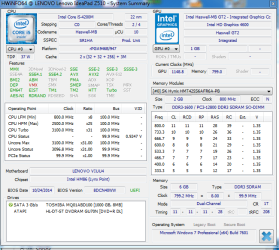
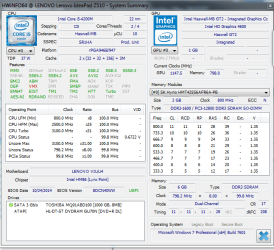
Here are two pictures ; one shows the performance at the start of windows when it works fine and the other after few minutes when the performance drops
 

Attachments

  • overwie.png
    overwie.png
    34.7 KB · Views: 16
  • after.png
    after.png
    34.3 KB · Views: 16

My Computer My Computer

At a glance

Windows 7 Pro 64bits
Computer type
PC/Desktop
OS
Windows 7 Pro 64bits
Only difference I can see is the Uncore status (3100 vs 800). The clock multiplier is changing from 31 to 8 (x100Mhz)

I still think that is the battery.

Try set Power to High performance - Change plan settings - Change advanced power settings
Control Panel\All Control Panel Items\Power Options\Edit Plan Settings
 

My Computers My Computers

  • At a glance

    Windows 7 HP 64i5 6600K - 800MHz to 4200MHz4+4G GSkill DDR4 3000IG - Intel 530
    Computer type
    PC/Desktop
    Computer Manufacturer/Model Number
    custom build
    OS
    Windows 7 HP 64
    CPU
    i5 6600K - 800MHz to 4200MHz
    Motherboard
    GA-Z170-HD3P
    Memory
    4+4G GSkill DDR4 3000
    Graphics Card(s)
    IG - Intel 530
    Monitor(s) Displays
    Samsung 226BW
    Screen Resolution
    1680x1050
    Hard Drives
    (1) -1 SM951 – 128GB M.2 AHCI PCIe SSD drive for Windows 7 and Lubuntu
    (2) -1 WD SATA 3 - 1T for Data
    (3) -1 WD SATA 3 - 1T for backup
    PSU
    Thermaltake 450W TR2 gold
    Keyboard
    Old and good Chicony mechanical keyboard
    Mouse
    Logitech mX performance - 9 buttons (had to disable some)
    Internet Speed
    500Mb/s
    Browser
    Firefox 64
    Other Info
    TinyWall firewall
  • At a glance

    Windows 7 Proi7-4500U 800MHz to 3.0GHz(4+4)G DDR3 1600IG intel 4400 + NVIDIA GeForce GT 745M
    Computer type
    Laptop
    System Manufacturer/Model Number
    Asus Q550LF
    OS
    Windows 7 Pro
    CPU
    i7-4500U 800MHz to 3.0GHz
    Motherboard
    Asus Q550LF
    Memory
    (4+4)G DDR3 1600
    Graphics Card(s)
    IG intel 4400 + NVIDIA GeForce GT 745M
    Sound Card
    Realtek
    Monitor(s) Displays
    LG Display LP156WF4-SPH1
    Screen Resolution
    1920 x 1080
    Hard Drives
    BX500 120G SSD for Windows and programs +
    1T HDD for data
    Internet Speed
    500 Mb/s
    Browser
    Firefox
    Other Info
    TinyWall firewall
The performance is already set to high , And yes the corestatus change , basicly the cpu clocks down from 3000Mhz to 700Mhz , that's t he issue .
 

My Computer My Computer

At a glance

Windows 7 Pro 64bits
Computer type
PC/Desktop
OS
Windows 7 Pro 64bits
Did you open Edit Plan Settings?
There are many options and on the bottom you have a Max CPU (100%) and a min CPU (20%).
Set min to 80 or 100%
 

My Computers My Computers

  • At a glance

    Windows 7 HP 64i5 6600K - 800MHz to 4200MHz4+4G GSkill DDR4 3000IG - Intel 530
    Computer type
    PC/Desktop
    Computer Manufacturer/Model Number
    custom build
    OS
    Windows 7 HP 64
    CPU
    i5 6600K - 800MHz to 4200MHz
    Motherboard
    GA-Z170-HD3P
    Memory
    4+4G GSkill DDR4 3000
    Graphics Card(s)
    IG - Intel 530
    Monitor(s) Displays
    Samsung 226BW
    Screen Resolution
    1680x1050
    Hard Drives
    (1) -1 SM951 – 128GB M.2 AHCI PCIe SSD drive for Windows 7 and Lubuntu
    (2) -1 WD SATA 3 - 1T for Data
    (3) -1 WD SATA 3 - 1T for backup
    PSU
    Thermaltake 450W TR2 gold
    Keyboard
    Old and good Chicony mechanical keyboard
    Mouse
    Logitech mX performance - 9 buttons (had to disable some)
    Internet Speed
    500Mb/s
    Browser
    Firefox 64
    Other Info
    TinyWall firewall
  • At a glance

    Windows 7 Proi7-4500U 800MHz to 3.0GHz(4+4)G DDR3 1600IG intel 4400 + NVIDIA GeForce GT 745M
    Computer type
    Laptop
    System Manufacturer/Model Number
    Asus Q550LF
    OS
    Windows 7 Pro
    CPU
    i7-4500U 800MHz to 3.0GHz
    Motherboard
    Asus Q550LF
    Memory
    (4+4)G DDR3 1600
    Graphics Card(s)
    IG intel 4400 + NVIDIA GeForce GT 745M
    Sound Card
    Realtek
    Monitor(s) Displays
    LG Display LP156WF4-SPH1
    Screen Resolution
    1920 x 1080
    Hard Drives
    BX500 120G SSD for Windows and programs +
    1T HDD for data
    Internet Speed
    500 Mb/s
    Browser
    Firefox
    Other Info
    TinyWall firewall
Yes i edited the settings i put min to 100% , didn't change anything :(
 

My Computer My Computer

At a glance

Windows 7 Pro 64bits
Computer type
PC/Desktop
OS
Windows 7 Pro 64bits
I still think that is the battery.
 

My Computers My Computers

  • At a glance

    Windows 7 HP 64i5 6600K - 800MHz to 4200MHz4+4G GSkill DDR4 3000IG - Intel 530
    Computer type
    PC/Desktop
    Computer Manufacturer/Model Number
    custom build
    OS
    Windows 7 HP 64
    CPU
    i5 6600K - 800MHz to 4200MHz
    Motherboard
    GA-Z170-HD3P
    Memory
    4+4G GSkill DDR4 3000
    Graphics Card(s)
    IG - Intel 530
    Monitor(s) Displays
    Samsung 226BW
    Screen Resolution
    1680x1050
    Hard Drives
    (1) -1 SM951 – 128GB M.2 AHCI PCIe SSD drive for Windows 7 and Lubuntu
    (2) -1 WD SATA 3 - 1T for Data
    (3) -1 WD SATA 3 - 1T for backup
    PSU
    Thermaltake 450W TR2 gold
    Keyboard
    Old and good Chicony mechanical keyboard
    Mouse
    Logitech mX performance - 9 buttons (had to disable some)
    Internet Speed
    500Mb/s
    Browser
    Firefox 64
    Other Info
    TinyWall firewall
  • At a glance

    Windows 7 Proi7-4500U 800MHz to 3.0GHz(4+4)G DDR3 1600IG intel 4400 + NVIDIA GeForce GT 745M
    Computer type
    Laptop
    System Manufacturer/Model Number
    Asus Q550LF
    OS
    Windows 7 Pro
    CPU
    i7-4500U 800MHz to 3.0GHz
    Motherboard
    Asus Q550LF
    Memory
    (4+4)G DDR3 1600
    Graphics Card(s)
    IG intel 4400 + NVIDIA GeForce GT 745M
    Sound Card
    Realtek
    Monitor(s) Displays
    LG Display LP156WF4-SPH1
    Screen Resolution
    1920 x 1080
    Hard Drives
    BX500 120G SSD for Windows and programs +
    1T HDD for data
    Internet Speed
    500 Mb/s
    Browser
    Firefox
    Other Info
    TinyWall firewall
Back
Top