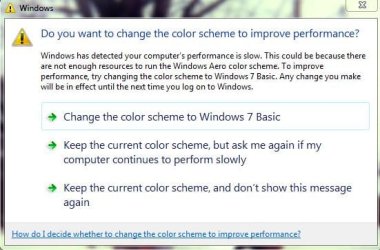
performance

GRB70

New member
Member
VIP
Local time
10:29 PM
Messages
160
Location
ohio
Since I reinstalled world of warcraft, I've been receiving the attached message. Given my specs I don't see why this is happening. My performance under task manager seems ok, so I'm not sure what gives?

I'd appreciate any input
Thx :)
 

My Computer

Computer type
PC/Desktop
OS
Windows 7 Home Premium 64-bit
CPU
i7-2600k
Motherboard
ASUS P8P67 Deluxe
Memory
Corsair Vengence 8GB
Graphics Card(s)
EVGA GTX 570 HD
Hard Drives
120 SSD
1 TB HDD
500 GB HDD
PSU
Corsair Gaming GS800
Case
HAF X
Cooling
Corsair H70
What message?
 

My Computer

Computer type
PC/Desktop
Computer Manufacturer/Model Number
Golden Mk. I.4
OS
Windows 10 Pro x64 ; Xubuntu x64
CPU
Intel i7 860 @ 2.80 GHz O/C'ed to 4.0GHz
Motherboard
Gigabyte P55A-UD3R Rev.1. Award BIOS F13
Memory
16GB Corsair Vengance DDR3 @ 661 MHz Dual Channel (9-9-9-24)
Graphics Card(s)
EVGA NVidia GTX 560 1024MB
Sound Card
Realtek Integrated
Monitor(s) Displays
Dual Samsung SyncMaster 2494HS
Screen Resolution
1920*1080 and 1920*1080
Hard Drives
1*Samsung 840 EVO 120GB SSD;
1*OCZ Vertex 2 60GB SSD;
2*Samsung F3 SpinPoint 1TB in RAID0;
1*Samsung F1 SpinPoint 1TB;
2*Western Digital 1TB External USB 3.0
1*Western Digital 500GB External USB 3.0
1*Seagate 500GB External USB 2.0
PSU
Thermaltake ToughPower QFan 750W
Case
Thermaltake Element S VK60001W2Z
Cooling
Corsair H60 Water Cooling, 2*230mm and 2*80mm case fans
Keyboard
Logitech G110
Mouse
Logitech MX518
sorry
 

Attachments

  • performance.JPG
    performance.JPG
    44.7 KB · Views: 36

My Computer

Computer type
PC/Desktop
OS
Windows 7 Home Premium 64-bit
CPU
i7-2600k
Motherboard
ASUS P8P67 Deluxe
Memory
Corsair Vengence 8GB
Graphics Card(s)
EVGA GTX 570 HD
Hard Drives
120 SSD
1 TB HDD
500 GB HDD
PSU
Corsair Gaming GS800
Case
HAF X
Cooling
Corsair H70
Its simply saying they want you to disable Aero because it may cause your performance to be slow. If the game doesn't lag and you feel you are getting a proper framerate, just use the last option. If you think you're a little slow then disable Aero.
 

My Computer

Computer type
PC/Desktop
Computer Manufacturer/Model Number
Custom
OS
Dual Boot: Windows 8.1 & Server 2012r2 VMs: Kali Linux, Backbox, Matriux, Windows 8.1
CPU
A10 7700 Kavari SteamRoller
Motherboard
ASUS A88XM-PLUS (FM2+ )
Memory
8GB DDR3 SDRAM PC3-8500
Graphics Card(s)
1024MB ATI AMD Radeon R7 Graphics
Sound Card
Realtek High Definition Audio
Monitor(s) Displays
Samsung
Hard Drives
SSD Crucial 120gb
WD VelociRaptor 1tb
PSU
Rosewill Gaming 650w
Case
Rosewill Galaxy 2
Internet Speed
55/12
Antivirus
Malwarebytes, MSE, SAS
Browser
FireFox, Chrome
I'm not experiencing any performance issues. I don't even understand why that would even pop up, I mentioned I have proper specs. But TY

:)
 

My Computer

Computer type
PC/Desktop
OS
Windows 7 Home Premium 64-bit
CPU
i7-2600k
Motherboard
ASUS P8P67 Deluxe
Memory
Corsair Vengence 8GB
Graphics Card(s)
EVGA GTX 570 HD
Hard Drives
120 SSD
1 TB HDD
500 GB HDD
PSU
Corsair Gaming GS800
Case
HAF X
Cooling
Corsair H70
You mean none that you know of. :) Windows will issue that message if graphics or core memory gets low. Increasing the page file may help.

You might try running the Aero Troubleshooter and see if there's a compatibility or resource problem. Could be that WoW is just a resource hog. The selection you make on that screen lasts until you reboot or change user/log off. If you're playing a game, I doubt Aero is necessary anyway. Disabling Aero will free up PC resources too--It is itself a pretty huge resource hog.
 

My Computer

Computer type
PC/Desktop
Computer Manufacturer/Model Number
Built 2/11/2011
OS
Windows 7 Pro-x64
CPU
i7-2600 3.4GHz - 3.8GHz Turbo
Motherboard
Intel DH67BL-B3
Memory
8Gb - 2x4GB, Muskin 991770 PC3-1333
Graphics Card(s)
Integrated Intel HD 2000
Sound Card
Integrated Intel 10.1 HD, RealTek ALC892
Monitor(s) Displays
Asus LCD VH222H, Haier HL24XSL2a
Screen Resolution
1920x1080, 1920x1080
Hard Drives
Crucial SSD C300-128Gb,
Western Digital WD5002AALX - 500Gb,
Western Digital WD7501AALS - 750Gb
PSU
Seasonic 650W 80+ Gold Modular
Case
Rosewill Defender
Cooling
Stock CPU, Four 120mm case fans, PCH fan added
Keyboard
Logitech EX100 Y-RBH94 Wireless
Mouse
Logitech EX100 M-RCE95 Wireless
Internet Speed
3.0/1.5 Mbs
Antivirus
Microsoft Security Essentials
Browser
Microsoft Internet Explorer 11
Other Info
Antec Veris Premier-Multimedia IR Station,
Cyber Accoustics-3602 Speakers,
AFT XM-5U Card Reader,
Hauppauge TV-HVR-2250,
Sony LX300 USB Turntable
i get the same error sometimes. i just ignore it.
 

My Computer

Computer type
PC/Desktop
Computer Manufacturer/Model Number
Weekend Warrior Rig
OS
Windows 10 Pro
CPU
Intel i7-3770K 4.4GHz
Motherboard
ASUS P8Z77-V Pro
Memory
8GB G.SKILL Ripjaws 1866 MHz
Graphics Card(s)
EVGA GTX 980 Classified
Monitor(s) Displays
Asus VH238H 23" 2ms
Screen Resolution
1920x1080
Hard Drives
Intel 330 120GB SSD /
WD Blue 1TB /
WD Black 500GB
PSU
Corsair CX750M
Case
NZXT H440
Cooling
Corsair H80i- CPU / Corsair H90- GPU
Keyboard
Logitech K360 LE
Mouse
Logitech G500
Antivirus
Avast
Browser
Chrome
Other Info
1200W 2.1 Surround Sound Audio
TY, I think I'll stick to N00berG00ber's adcvive :)
 

My Computer

Computer type
PC/Desktop
OS
Windows 7 Home Premium 64-bit
CPU
i7-2600k
Motherboard
ASUS P8P67 Deluxe
Memory
Corsair Vengence 8GB
Graphics Card(s)
EVGA GTX 570 HD
Hard Drives
120 SSD
1 TB HDD
500 GB HDD
PSU
Corsair Gaming GS800
Case
HAF X
Cooling
Corsair H70
Back
Top