
Hi everyone
I have been trying to solve a problem with my Verbatim USB drive for about a month now and have been trying to solve the issue myself
So I gave up today and called Verbatim support who quickly sent me the solution by mail (they said this is an issue present in windows 7)
Dear Customer,
Thank you for your phone call. Your reference number is HMA100412-026.
Please quote this reference on all future correspondence with us.
Windows 7 uses its own built-in drivers
and it manages the installation of external USB devices by it's own.
Please verify that you are logged as an administrator on your laptop/computer.
Please disconnect all external devices from your computer (except mouse, monitor and keyboard) and go to c:\windows\system32\drivestore.
Please rename “infcache1” to “infcache.1OLD”.
You might need to give the user account file write and read permissions for this file. You can change this settings via the file's Properties/Security/Advanced.
Now reboot your computer (with still no USB device connected) and connect the HDD as the only USB device to an USB port on the back of your computer if WINDOWS has started.
Best Regards,
Verbatim Euro Support
Dutec Limited
Company Registered in Ireland No: 307480
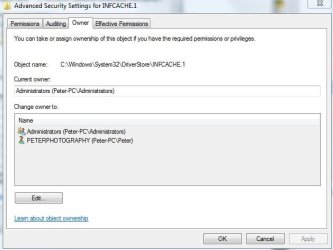
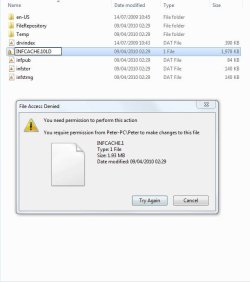
Ok, very nice I hear you say However my issue now is that I can not the name of the infcache file as per instructions. I have been playing with ownership of the file in accordance with windows inbuilt help but no luck. Please see (capture 1) for current owners.
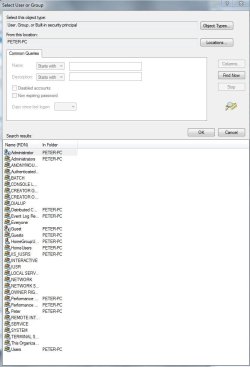
My problem is (and this probably sounds daft) but who should I give ownership to from this long list of possabilities, please see (capture 2) I am the owner and only user of my pc and yet I dont know who to give permission to
Hope you can help
Peter
I have been trying to solve a problem with my Verbatim USB drive for about a month now and have been trying to solve the issue myself
So I gave up today and called Verbatim support who quickly sent me the solution by mail (they said this is an issue present in windows 7)
Dear Customer,
Thank you for your phone call. Your reference number is HMA100412-026.
Please quote this reference on all future correspondence with us.
Windows 7 uses its own built-in drivers
and it manages the installation of external USB devices by it's own.
Please verify that you are logged as an administrator on your laptop/computer.
Please disconnect all external devices from your computer (except mouse, monitor and keyboard) and go to c:\windows\system32\drivestore.
Please rename “infcache1” to “infcache.1OLD”.
You might need to give the user account file write and read permissions for this file. You can change this settings via the file's Properties/Security/Advanced.
Now reboot your computer (with still no USB device connected) and connect the HDD as the only USB device to an USB port on the back of your computer if WINDOWS has started.
Best Regards,
Verbatim Euro Support
Dutec Limited
Company Registered in Ireland No: 307480
Ok, very nice I hear you say However my issue now is that I can not the name of the infcache file as per instructions. I have been playing with ownership of the file in accordance with windows inbuilt help but no luck. Please see (capture 1) for current owners.
My problem is (and this probably sounds daft) but who should I give ownership to from this long list of possabilities, please see (capture 2) I am the owner and only user of my pc and yet I dont know who to give permission to
Hope you can help
Peter
Attachments
My Computer
- Computer Manufacturer/Model Number
- home build
- OS
- windows 7
- CPU
- phenom x2 550be
- Case
- sonata 3

