You are using an out of date browser. It may not display this or other websites correctly.
You should upgrade or use an
alternative browser.
Solved Permission problems Hard Drive - standard options not visable
Hi All
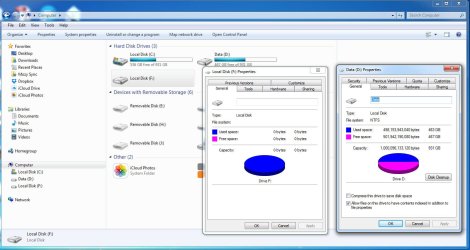
I have an external HD has been working for for a few years but now get "access is denied"
gone through the standard options on permissions.
enclosed screen grab
any ideas
thanks Mike
-
pc-access.jpg
127.6 KB
· Views: 4
- Computer type
- PC/Desktop
- Computer Manufacturer/Model Number
- Dell
- OS
- windows 7 Home Premium 64bit
- Memory
- 12GB
- Antivirus
- Norton
- Browser
- IE,Chrome,FireFox,Opera
Are you saying that you are unable to access Local Disk F?
What is the size and model of your ext. HDD?
- Computer type
- PC/Desktop
- OS
- Windows 10 LTSB 2016
- CPU
- Intel Pentium G4560 3.5GHz
- Motherboard
- Gigabyte GA-B250M-D3H
- Memory
- 8GB DDR4 2400MHz
- Graphics Card(s)
- Zotac GTX 1050 Ti 4GB GDDR5
- Sound Card
- Realtek HD Audio Codec ALC892
- Monitor(s) Displays
- Dell 22inch
- Screen Resolution
- 1920x1080
- Hard Drives
- 60GB UV100 KINGSTON SSD SATA 6Gbps(boot drive)
1 TB Seagate Barracuda 7200RPM SATA 6Gbps
- PSU
- Corsair CX450 450W 80+ Bronze
- Case
- Deepcool D-Shield V2
- Cooling
- Stock
- Keyboard
- Logitech K120
- Mouse
- Microsoft Optical Mouse
- Internet Speed
- 100Mbps
- Antivirus
- Microsoft Security Essentials
- Browser
- Mozilla Firefox
- Other Info
- APC Back USP 600VA(360W)
New member
Guru
Gold Member
VIP
- Computer type
- PC/Desktop
- Computer Manufacturer/Model Number
- Custom Build
- OS
- Windows 7 Ultimate x64 SP1
- CPU
- AMD Phenom 2 1090T
- Motherboard
- Gigabyte GA-890FXA-UD5
- Memory
- 2x8GB Kingston HyperX Fury Black 1600Mhz Unganged
- Graphics Card(s)
- MSI GTX 970 Gaming 4G
- Sound Card
- Realtek On-Board HD 7.1 Audio / Logitech G35
- Monitor(s) Displays
- 3xAcer GD245HQ
- Screen Resolution
- 1920x1080
- Hard Drives
- Samsung 850 Pro 512GB SSD - OS /
WD Caviar Black SATA 3 - 1 TBx2 - Dynamic RAID 0 /
WD Caviar Green SATA 2 - 640GBx2 - Dynamic RAID 0 /
WD Caviar Green SATA 2 - 640GB - Internal Backup /
Seagate Barracude SATA 3 - 3TB - External Backup/ Sync
- PSU
- HighPower 1000W
- Case
- Cooler Master HAF 932
- Cooling
- Noctua NH-D14
- Keyboard
- Logitech G19
- Mouse
- Logitech G500
- Internet Speed
- 100/4 Mbit Cable (100GB quota)
- Antivirus
- ZoneAlarm Extreme Security / MBAM Pro / MBAE Free / SAS Free
- Browser
- IE 11 - Firefox - Chrome
- Other Info
- Logitech F710/ G27/ G940/ Z5500 // TrackIR 5 // Nvidia 3D Surround Vision
New member
Thread Starter
Hi thanks for taking the time to respond
easwar2641993 Are you saying ...
yes I get the error message mentioned, size is about 80% on 1TB
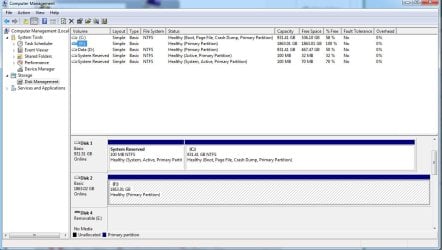
GokAy= enclosed screen grab
-
em-hd-info.jpg
112.1 KB
· Views: 0
- Computer type
- PC/Desktop
- Computer Manufacturer/Model Number
- Dell
- OS
- windows 7 Home Premium 64bit
- Memory
- 12GB
- Antivirus
- Norton
- Browser
- IE,Chrome,FireFox,Opera
New member
Guru
Gold Member
VIP
Try plugging it into other ports.
Do you need the data from this drive or have backups? Notice how the file format is empty for F.
Tried restarting while external is still connected? Connect it to a USB 2 port and restart PC.
- Computer type
- PC/Desktop
- Computer Manufacturer/Model Number
- Custom Build
- OS
- Windows 7 Ultimate x64 SP1
- CPU
- AMD Phenom 2 1090T
- Motherboard
- Gigabyte GA-890FXA-UD5
- Memory
- 2x8GB Kingston HyperX Fury Black 1600Mhz Unganged
- Graphics Card(s)
- MSI GTX 970 Gaming 4G
- Sound Card
- Realtek On-Board HD 7.1 Audio / Logitech G35
- Monitor(s) Displays
- 3xAcer GD245HQ
- Screen Resolution
- 1920x1080
- Hard Drives
- Samsung 850 Pro 512GB SSD - OS /
WD Caviar Black SATA 3 - 1 TBx2 - Dynamic RAID 0 /
WD Caviar Green SATA 2 - 640GBx2 - Dynamic RAID 0 /
WD Caviar Green SATA 2 - 640GB - Internal Backup /
Seagate Barracude SATA 3 - 3TB - External Backup/ Sync
- PSU
- HighPower 1000W
- Case
- Cooler Master HAF 932
- Cooling
- Noctua NH-D14
- Keyboard
- Logitech G19
- Mouse
- Logitech G500
- Internet Speed
- 100/4 Mbit Cable (100GB quota)
- Antivirus
- ZoneAlarm Extreme Security / MBAM Pro / MBAE Free / SAS Free
- Browser
- IE 11 - Firefox - Chrome
- Other Info
- Logitech F710/ G27/ G940/ Z5500 // TrackIR 5 // Nvidia 3D Surround Vision


