Solved Permissions: read files from another PC?

gb315

New member
Member
Local time
10:21 AM
Messages
5
My win10 PC won't boot (after a power interruption). I want to use its files while I work to fix that problem. So, I connected the win10 c: drive in a win7 PC, where I can 'see' said files. However, I can't do anything with them - any action (read, copy, ..) gets an "access is denied" error.

I am pretty inept at permissions. Mostly, I just flounder around until I get something to work, and then move on. I would appreciate any advice on (a) whether it's even possible to access these files, and (b) how one might do that. At this point, I would prefer not to do anything that would make the files un-readable on the original win10 box, assuming that can be saved.

Thank you
 

My Computer

Computer type
PC/Desktop
Computer Manufacturer/Model Number
Dell
OS
Windows 7 Home Premium 32bit
CPU
Pentium 4 CPU 570 3.80 Ghz
Hard Drives
2x WD Blue 500 MB SATA
Browser
Firefox
It is doable but is best if you could copy the files to another drive. That way you could leave the original drive unchanged and change the necessary permissions on the other drive. Can you at least copy folders with the files you want to another drive? If there aren't that many then you could use a flash drive.
 

My Computers

System One System Two

  • Computer type
    PC/Desktop
    Computer Manufacturer/Model Number
    Custom build
    OS
    Windows 7 Home Premium 64-bits
    CPU
    AMD FX-8350
    Motherboard
    Gigabyte GA-990FXA-UD3 (AM3+)
    Memory
    GSKILL Ripjaw-X PC3 12800 8GB (2x4GB)
    Graphics Card(s)
    ASUS ROG STRIX GTX 1060 6GB
    Sound Card
    Integrated
    Monitor(s) Displays
    Asus VE228H (21.5-in)
    Screen Resolution
    1920x1080 60Hz
    Hard Drives
    SAMSUNG 870 EVO 2.5 Inch SATA SSD (1TB)
    SAMSUNG 870 EVO 2.5 Inch SATA SSD (1TB)
    SAMSUNG 870 EVO 2.5 Inch SATA SSD (1TB)
    PSU
    Corsair RM750x (750 watts)
    Case
    Corsair Carbide Series 200R
    Cooling
    Corsair Hydro Series H60 (CWCH60)
    Keyboard
    Logitech Elite
    Mouse
    Logitech M510 Wireless Mouse
    Internet Speed
    Comcast Gigabit Extra (1200Mbps down / 35Mbps up)
    Antivirus
    Malwarebytes
    Browser
    Firefox, Edge, Chrome
    Other Info
    ASUS DRW-24B1ST DVD-RW (24X) optical drive
    Seagate Expansion Desk (5TB) external SATA/USB HDD
    Comcast XB8 Internet Gateway
  • Computer type
    PC/Desktop
    System Manufacturer/Model Number
    Custom
    OS
    Windows 7 Pro (64-bit)
    CPU
    AMD Phenom II 960T X4
    Motherboard
    ASUS M4N82 Deluxe
    Memory
    Corsair XMS2 DDR2-800 8GB (4x2GB)
    Graphics Card(s)
    ASUS ENGTX560 DCII OC/2DI/1GD5 1GB
    Monitor(s) Displays
    Samsung 930B 19-inch LCD
    Screen Resolution
    1280x1024
    Hard Drives
    Samsung SSD 870 EVO 1000 GB (Windows 10)
    Seagate ST1000DM003 1000 GB (Windows 7)
    PSU
    Antec TruePower (new) TP-650
    Case
    Antec Three Hundred
    Cooling
    AMD stock cooler from FX8350
    Mouse
    Logitech M100
    Internet Speed
    Xfinity Gigabit Extra 1200/35 Mbps
... Can you at least copy folders with the files you want to another drive? If there aren't that many then you could use a flash drive.

No: that's what I set out to do; it gets the same error.
 

My Computer

Computer type
PC/Desktop
Computer Manufacturer/Model Number
Dell
OS
Windows 7 Home Premium 32bit
CPU
Pentium 4 CPU 570 3.80 Ghz
Hard Drives
2x WD Blue 500 MB SATA
Browser
Firefox
The files will be owned by the SID of the user on the other pc you have to take care as if you change permissions wrong and get the other pc working you will be locked out of the files again you will need to add the 7 user to permissions and DONT take ownership
 

My Computer

Computer type
PC/Desktop
OS
win 8 32 bit
Can you at least copy folders with the files you want to another drive? If there aren't that many then you could use a flash drive.
No: that's what I set out to do; it gets the same error.


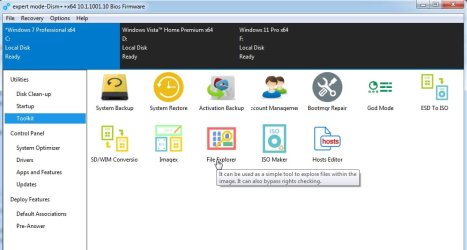
you can try the file explorer in dism++

Dism++fileexplorer.jpg

it is easier if you have CopyTo and MoveTo on your context menu.

Copy the code below. Paste it into a text file and Save it as copytomoveto.reg.

then dble click on the reg file you just made.

Windows Registry Editor Version 5.00

[HKEY_LOCAL_MACHINE\SOFTWARE\Classes\AllFilesystemObjects\shellex\ContextMenuHandlers\{C2FBB631-2971-11D1-A18C-00C04FD75D13}]

[HKEY_LOCAL_MACHINE\SOFTWARE\Classes\AllFilesystemObjects\shellex\ContextMenuHandlers\{C2FBB630-2971-11D1-A18C-00C04FD75D13}]


After that you can use the browse window from dism++ file explorer and rt click any files /folders then select Copy To from your context menu.
 

My Computers

System One System Two

  • Computer type
    PC/Desktop
    OS
    7 X64
    CPU
    i5 8400
    Motherboard
    gigabyte b365m ds3h
    Memory
    2x8gb 3200mhz
    Hard Drives
    various
    PSU
    pure power 11 400w cm
    Case
    Coolermaster
    Cooling
    cryorig m9i
  • Computer type
    PC/Desktop
    OS
    7x64
    CPU
    g5400
    Motherboard
    ga b365m ds3h
    Memory
    8gb ddr4 2400
    PSU
    xfx pro 450w
... At this point, I would prefer not to do anything that would make the files un-readable on the original win10 box, assuming that can be saved.
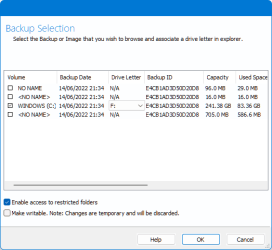
Do you have Macrium Reflect Free installed on another PC?

If so, then you can make a system image of the disk. You can then mount that system image as a virtual drive and use Explorer to retrieve files from the image, leaving the original drive unaltered.

There is an 'enable access to restricted folders' option that will bypass all permissions when mounting a Reflect image.

image.png
 

My Computers

System One System Two

  • Computer type
    Laptop
    Computer Manufacturer/Model Number
    Toshiba satellite C650D
    OS
    Windows 7 Home Premium x64
    CPU
    AMD V120
    Memory
    4GB
    Internet Speed
    150 Mbps
    Antivirus
    MSE
    Browser
    IE11, Edge, Firefox
    Other Info
    I also have W7 Pro on my System Two, and several W7 Hyper-V VMs. My other machines run Windows 10/11. Their specs are in my Ten Forums & Eleven Forum profiles.
  • Computer type
    Laptop
    System Manufacturer/Model Number
    Lenovo Thinkpad T430
    OS
    Windows 7 Pro x64
    CPU
    Intel i5-3320M
    Memory
    8 GB
    Hard Drives
    250GB Samsung SSD 860 EVO
    Other Info
    Antivirus: MSE
No need to make images. just use the file explorer in dism++
 

My Computers

System One System Two

  • Computer type
    PC/Desktop
    OS
    7 X64
    CPU
    i5 8400
    Motherboard
    gigabyte b365m ds3h
    Memory
    2x8gb 3200mhz
    Hard Drives
    various
    PSU
    pure power 11 400w cm
    Case
    Coolermaster
    Cooling
    cryorig m9i
  • Computer type
    PC/Desktop
    OS
    7x64
    CPU
    g5400
    Motherboard
    ga b365m ds3h
    Memory
    8gb ddr4 2400
    PSU
    xfx pro 450w
No need to make images. just use the file explorer in dism++
Thanks. I'm going to try this. It will probably take me a couple of days, and I'll post back when done.
 

My Computer

Computer type
PC/Desktop
Computer Manufacturer/Model Number
Dell
OS
Windows 7 Home Premium 32bit
CPU
Pentium 4 CPU 570 3.80 Ghz
Hard Drives
2x WD Blue 500 MB SATA
Browser
Firefox
Making an image does mean you can work on a copy, never risking changing anything on the original.
 

My Computers

System One System Two

  • Computer type
    Laptop
    Computer Manufacturer/Model Number
    Toshiba satellite C650D
    OS
    Windows 7 Home Premium x64
    CPU
    AMD V120
    Memory
    4GB
    Internet Speed
    150 Mbps
    Antivirus
    MSE
    Browser
    IE11, Edge, Firefox
    Other Info
    I also have W7 Pro on my System Two, and several W7 Hyper-V VMs. My other machines run Windows 10/11. Their specs are in my Ten Forums & Eleven Forum profiles.
  • Computer type
    Laptop
    System Manufacturer/Model Number
    Lenovo Thinkpad T430
    OS
    Windows 7 Pro x64
    CPU
    Intel i5-3320M
    Memory
    8 GB
    Hard Drives
    250GB Samsung SSD 860 EVO
    Other Info
    Antivirus: MSE
I got what I wanted - to retrieve the non-system files from the afflicted drive. I can't say everything makes sense, but I'm willing to just move on. For the record:
  1. As reported, I initially couldn't open folders or 'copy'/'xcopy' files from that drive. Later, I was able to perform these same operations. IDK what was different. All I can think is that, in the successful effort, I'd started the command-line window with 'run as administrator'. However, I AM the admin, so I'd think that unnecessary.
  2. Per Bree's suggestion, I used Macrium Reflect to make an image of the drive and, using Explorer, an accessible pseudo-drive. This is very nice. Thanks.
  3. I downloaded DISM++. The (presumed) help file (-½+˜ Dism++x86 +¦+++---.txt) came up blank, so I put it aside.

Thanks to all who replied.
 

My Computer

Computer type
PC/Desktop
Computer Manufacturer/Model Number
Dell
OS
Windows 7 Home Premium 32bit
CPU
Pentium 4 CPU 570 3.80 Ghz
Hard Drives
2x WD Blue 500 MB SATA
Browser
Firefox
no need for a help file, it is obvious from the gui as shown in my screenshot.
 

My Computers

System One System Two

  • Computer type
    PC/Desktop
    OS
    7 X64
    CPU
    i5 8400
    Motherboard
    gigabyte b365m ds3h
    Memory
    2x8gb 3200mhz
    Hard Drives
    various
    PSU
    pure power 11 400w cm
    Case
    Coolermaster
    Cooling
    cryorig m9i
  • Computer type
    PC/Desktop
    OS
    7x64
    CPU
    g5400
    Motherboard
    ga b365m ds3h
    Memory
    8gb ddr4 2400
    PSU
    xfx pro 450w
I got what I wanted - to retrieve the non-system files from the afflicted drive.....
....Thanks to all who replied.
:thumbsup:
 

My Computers

System One System Two

  • Computer type
    Laptop
    Computer Manufacturer/Model Number
    Toshiba satellite C650D
    OS
    Windows 7 Home Premium x64
    CPU
    AMD V120
    Memory
    4GB
    Internet Speed
    150 Mbps
    Antivirus
    MSE
    Browser
    IE11, Edge, Firefox
    Other Info
    I also have W7 Pro on my System Two, and several W7 Hyper-V VMs. My other machines run Windows 10/11. Their specs are in my Ten Forums & Eleven Forum profiles.
  • Computer type
    Laptop
    System Manufacturer/Model Number
    Lenovo Thinkpad T430
    OS
    Windows 7 Pro x64
    CPU
    Intel i5-3320M
    Memory
    8 GB
    Hard Drives
    250GB Samsung SSD 860 EVO
    Other Info
    Antivirus: MSE
Back
Top