
Phenom II x3 720BE problem

kurahk7

New member
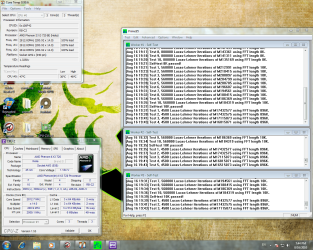
Hey guys, I was tweaking voltages for the AMD Phenom II x3 720BE today and managed to lower it from the stock of 1.325v to 1.2v. I left the computer to run Prime95 and now after I came back from dinner the different processor cores are significantly behind each other (see atached pic). Is this because I gave it too less volts and it's trying to cope with it? I am also running it on the stock hsf.
Edit: Is it also safe to leave it at this current state?
 

Attachments
  • temps.PNG
    temps.PNG
    1.3 MB · Views: 47

My Computer

Computer Manufacturer/Model Number
Custom Built/ Built by me, CR-48
OS
Windows 7 Ultimate x64
CPU
INTEL CORE I5 750 180x20 all powersaving 1.168v
Motherboard
MSI P55-GD55
Memory
OCZ 4GB DDR3 PC3-10666 (7-7-7-20-2t) @1.651v
Graphics Card(s)
ASUS 9800GT GLACIATOR FANSINK
Sound Card
ONBOARD REALTEK ALC889
Monitor(s) Displays
VIEWSONIC VX924, VIZIO VS420LF1A
Screen Resolution
VX924: 1280x1024 75hz, VS420LF1A: 1920x1080 60hz(1080p)
Hard Drives
HITACHI Deskstar HD31000 IDK/7K 1TB 7200RPM 32MB CACHE SATA II
PSU
OCZ MODXSTREAM PRO 700 WATT SEMI-MODULAR
Case
ANTEC 900
Cooling
CoolerMaster Hyper 212+
Keyboard
Logitech K520
Mouse
LOGITECH M310
Internet Speed
CHARTER PIPELINE 15MB DOWN/ 3MB UP
Other Info
ROUTER: DLINK DIR-655, Netgear WNR3500L (SamKnows)
MODEM: MOTOROLA SB6120
HTPC: AMD Athlon II x2 255 C3, Pegatron M2N78-LA (Violet 3.02) , Galaxy NVidia Geforce 210, HP OEM 300WATT PSU, Zalman Z7 Plus, SAMSUNG 3GB PC2-5300, SEAGATE 80GB SATA, Hauppauge WinTV-HVR-1800
so did you leave it at stock speed?
Yes, lowering voltage could cause it to fall behind a little, but i have noticed that when i ran it before, one core was a slight bit behind the other
 

My Computer

Computer Manufacturer/Model Number
Custom Build #2
OS
Windows 7 Ultimate 32-Bit
CPU
Intel Core 2 Duo E6300 O.C.'d to 2.80 GHz (For Now >:) )
Motherboard
Gigabyte P43-ES3G
Memory
4x1GB OCZ Dual Channel RAM
Graphics Card(s)
HIS ATI Radeon HD 5770 1GB
Sound Card
Onboard Sound
Monitor(s) Displays
Asus VH-236
Screen Resolution
1920x1080
Hard Drives
WD Caviar-Blue 250 GB SATA
WD Caviar-Green 1.5 TB SATA
PSU
Raidmax RX-630SS
Case
Apevia X-Dreamer
Cooling
Case: Arctic Cooling CPU:Rosewill RCX Z2
so did you leave it at stock speed?
Yes, lowering voltage could cause it to fall behind a little, but i have noticed that when i ran it before, one core was a slight bit behind the other

It's at stock clocks.
 

My Computer

Computer Manufacturer/Model Number
Custom Built/ Built by me, CR-48
OS
Windows 7 Ultimate x64
CPU
INTEL CORE I5 750 180x20 all powersaving 1.168v
Motherboard
MSI P55-GD55
Memory
OCZ 4GB DDR3 PC3-10666 (7-7-7-20-2t) @1.651v
Graphics Card(s)
ASUS 9800GT GLACIATOR FANSINK
Sound Card
ONBOARD REALTEK ALC889
Monitor(s) Displays
VIEWSONIC VX924, VIZIO VS420LF1A
Screen Resolution
VX924: 1280x1024 75hz, VS420LF1A: 1920x1080 60hz(1080p)
Hard Drives
HITACHI Deskstar HD31000 IDK/7K 1TB 7200RPM 32MB CACHE SATA II
PSU
OCZ MODXSTREAM PRO 700 WATT SEMI-MODULAR
Case
ANTEC 900
Cooling
CoolerMaster Hyper 212+
Keyboard
Logitech K520
Mouse
LOGITECH M310
Internet Speed
CHARTER PIPELINE 15MB DOWN/ 3MB UP
Other Info
ROUTER: DLINK DIR-655, Netgear WNR3500L (SamKnows)
MODEM: MOTOROLA SB6120
HTPC: AMD Athlon II x2 255 C3, Pegatron M2N78-LA (Violet 3.02) , Galaxy NVidia Geforce 210, HP OEM 300WATT PSU, Zalman Z7 Plus, SAMSUNG 3GB PC2-5300, SEAGATE 80GB SATA, Hauppauge WinTV-HVR-1800
yea, as long as you're not experiencing instability, you should be ok, although it might have better performance at stock voltages.
 

My Computer

Computer Manufacturer/Model Number
Custom Build #2
OS
Windows 7 Ultimate 32-Bit
CPU
Intel Core 2 Duo E6300 O.C.'d to 2.80 GHz (For Now >:) )
Motherboard
Gigabyte P43-ES3G
Memory
4x1GB OCZ Dual Channel RAM
Graphics Card(s)
HIS ATI Radeon HD 5770 1GB
Sound Card
Onboard Sound
Monitor(s) Displays
Asus VH-236
Screen Resolution
1920x1080
Hard Drives
WD Caviar-Blue 250 GB SATA
WD Caviar-Green 1.5 TB SATA
PSU
Raidmax RX-630SS
Case
Apevia X-Dreamer
Cooling
Case: Arctic Cooling CPU:Rosewill RCX Z2
yea, as long as you're not experiencing instability, you should be ok, although it might have better performance at stock voltages.

I guess I'll just leave it running PRIME95 overnight to see if it's stable then. Thanks. :D
 

My Computer

Computer Manufacturer/Model Number
Custom Built/ Built by me, CR-48
OS
Windows 7 Ultimate x64
CPU
INTEL CORE I5 750 180x20 all powersaving 1.168v
Motherboard
MSI P55-GD55
Memory
OCZ 4GB DDR3 PC3-10666 (7-7-7-20-2t) @1.651v
Graphics Card(s)
ASUS 9800GT GLACIATOR FANSINK
Sound Card
ONBOARD REALTEK ALC889
Monitor(s) Displays
VIEWSONIC VX924, VIZIO VS420LF1A
Screen Resolution
VX924: 1280x1024 75hz, VS420LF1A: 1920x1080 60hz(1080p)
Hard Drives
HITACHI Deskstar HD31000 IDK/7K 1TB 7200RPM 32MB CACHE SATA II
PSU
OCZ MODXSTREAM PRO 700 WATT SEMI-MODULAR
Case
ANTEC 900
Cooling
CoolerMaster Hyper 212+
Keyboard
Logitech K520
Mouse
LOGITECH M310
Internet Speed
CHARTER PIPELINE 15MB DOWN/ 3MB UP
Other Info
ROUTER: DLINK DIR-655, Netgear WNR3500L (SamKnows)
MODEM: MOTOROLA SB6120
HTPC: AMD Athlon II x2 255 C3, Pegatron M2N78-LA (Violet 3.02) , Galaxy NVidia Geforce 210, HP OEM 300WATT PSU, Zalman Z7 Plus, SAMSUNG 3GB PC2-5300, SEAGATE 80GB SATA, Hauppauge WinTV-HVR-1800
alright, good luck.
you could also try stock voltage afterwards and see if it runs better
 

My Computer

Computer Manufacturer/Model Number
Custom Build #2
OS
Windows 7 Ultimate 32-Bit
CPU
Intel Core 2 Duo E6300 O.C.'d to 2.80 GHz (For Now >:) )
Motherboard
Gigabyte P43-ES3G
Memory
4x1GB OCZ Dual Channel RAM
Graphics Card(s)
HIS ATI Radeon HD 5770 1GB
Sound Card
Onboard Sound
Monitor(s) Displays
Asus VH-236
Screen Resolution
1920x1080
Hard Drives
WD Caviar-Blue 250 GB SATA
WD Caviar-Green 1.5 TB SATA
PSU
Raidmax RX-630SS
Case
Apevia X-Dreamer
Cooling
Case: Arctic Cooling CPU:Rosewill RCX Z2
If you used the PC for anything .. Internet browsing whatever while prime was running this can happen.

Also background tasks, AV scans etc.

It has to get CPU time from somewhere.

If Stable for 12hrs, I would think you're OK. The fact a couple threads are a step or 2 behind just means something needed CPU time from that core during the test and it fell behind in its work because of it. Nothing to worry about.
 

My Computer

Computer Manufacturer/Model Number
Custom (Self Build)
OS
Windows 7 Home Premium 64bit
CPU
Intel Core i7 2700k
Motherboard
eVGA P67 SLI
Memory
8GB Mushkin Redline Ridgebacks @1866
Graphics Card(s)
EVGA GTX570 SC
Sound Card
XiFi Titanium HD
Monitor(s) Displays
LG W2453V
Screen Resolution
1920x1080
Hard Drives
Intel 320 80GB -- Intel X25-V 40GB --WD Black 1TB x2 -- WD Blue 640GB
PSU
Seasonic x750
Case
Corsair 600T SE White
Cooling
eVGA Superclocked CPU Cooler
Keyboard
Saitek Cyborg
Antivirus
Kaspersky
Browser
IE
Other Info
LG BD/DVD
That is an interesting little tidbit there, thanks for explaining that Wishmaster.

Actually, leaving it at stock and dropping voltage sounds like a really good idea, especially with Intel CPUs.

~Lordbob
 

My Computer

Computer Manufacturer/Model Number
Hera
OS
Windows 7 Ultimate x64, Mint 9
CPU
Intel i5-2500k
Motherboard
ASUS P8P67 Pro
Memory
2x 4Gb Corsair VENGEANCE DDR3-1600
Graphics Card(s)
NVidia GeForce N260GTX Twin Frozr
Sound Card
Realtek HD OnBoard Audio
Monitor(s) Displays
ASUS 24" Monitor
Screen Resolution
1920x1080
Hard Drives
G.SKILL Phoenix Series 60GB SATA II MLC Internal Solid State Drive (SSD)
SAMSUNG Spinpoint F3R 1TB 7200 RPM 32MB Cache SATA II
PSU
Cooler Master Real Power Pro 750W
Case
Cooler Master Haf 932
Cooling
Fans
Keyboard
Razer Tarantula
Mouse
Razer Lachesis
Internet Speed
not fast enough
Ok, I ran Prime95 for over 12 hours and it was completely stable but core number 2 was like 4 tests ahead of the other 2 cores, so I'll just assume that core number 2 is the stronger core unless MSE secretly ran a scan in the background while I was asleep. Temperatures also topped out at around 45C with the AMD stock cooler which is pretty good I think. Reps to all of you that replied :D.
 

My Computer

Computer Manufacturer/Model Number
Custom Built/ Built by me, CR-48
OS
Windows 7 Ultimate x64
CPU
INTEL CORE I5 750 180x20 all powersaving 1.168v
Motherboard
MSI P55-GD55
Memory
OCZ 4GB DDR3 PC3-10666 (7-7-7-20-2t) @1.651v
Graphics Card(s)
ASUS 9800GT GLACIATOR FANSINK
Sound Card
ONBOARD REALTEK ALC889
Monitor(s) Displays
VIEWSONIC VX924, VIZIO VS420LF1A
Screen Resolution
VX924: 1280x1024 75hz, VS420LF1A: 1920x1080 60hz(1080p)
Hard Drives
HITACHI Deskstar HD31000 IDK/7K 1TB 7200RPM 32MB CACHE SATA II
PSU
OCZ MODXSTREAM PRO 700 WATT SEMI-MODULAR
Case
ANTEC 900
Cooling
CoolerMaster Hyper 212+
Keyboard
Logitech K520
Mouse
LOGITECH M310
Internet Speed
CHARTER PIPELINE 15MB DOWN/ 3MB UP
Other Info
ROUTER: DLINK DIR-655, Netgear WNR3500L (SamKnows)
MODEM: MOTOROLA SB6120
HTPC: AMD Athlon II x2 255 C3, Pegatron M2N78-LA (Violet 3.02) , Galaxy NVidia Geforce 210, HP OEM 300WATT PSU, Zalman Z7 Plus, SAMSUNG 3GB PC2-5300, SEAGATE 80GB SATA, Hauppauge WinTV-HVR-1800
Yea, MSE could cause 1 core to fall behind due to background tasks, but i'm glad that it's stable, and that is a good temp for the stock cooler.
 

My Computer

Computer Manufacturer/Model Number
Custom Build #2
OS
Windows 7 Ultimate 32-Bit
CPU
Intel Core 2 Duo E6300 O.C.'d to 2.80 GHz (For Now >:) )
Motherboard
Gigabyte P43-ES3G
Memory
4x1GB OCZ Dual Channel RAM
Graphics Card(s)
HIS ATI Radeon HD 5770 1GB
Sound Card
Onboard Sound
Monitor(s) Displays
Asus VH-236
Screen Resolution
1920x1080
Hard Drives
WD Caviar-Blue 250 GB SATA
WD Caviar-Green 1.5 TB SATA
PSU
Raidmax RX-630SS
Case
Apevia X-Dreamer
Cooling
Case: Arctic Cooling CPU:Rosewill RCX Z2
@ kurahk7

I think undervolting and underclocking in general is pretty safe, just as long as you Prime95 the machine for stability. I run my Phenom II X2 555 BE @ 2.1Ghz (1.120v) when downloading overnight, I haven't tried going lower on the volts but I'm pretty sure I can. :p
 

My Computer

OS
Windows 7 Professional
CPU
Intel Core i7-2670QM
Memory
Samsung 8GB
Graphics Card(s)
NVIDIA GT 555M
Hard Drives
Intel 525 120GB | HGST Travelstar 1TB
Mouse
CM Storm Xornet | Microsoft Sculpt Comfort
Internet Speed
25 Mbps | 600 Kbps
Other Info
Centrino 6205 | Seagate Backup Plus 1TB
Back
Top