Solved Photo viewer GUI glitch when maximizing window

Lemon Tree

New member
Member
Local time
7:26 PM
Messages
52
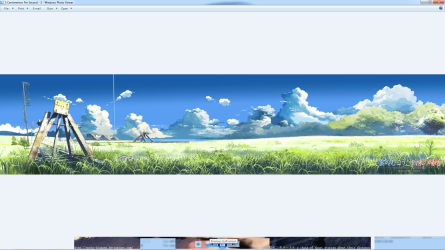
This happens most of the time when I maximize the window of the photo viewer, would anyone happen to know a way it, many thanks. :party:
 

Attachments

  • Untitled.png
    Untitled.png
    374.1 KB · Views: 6

My Computer My Computer

Computer type
PC/Desktop
OS
Windows 7 Home Premium 64bit
CPU
i7 3.40GHz Quad Core
Motherboard
Asus Maximus V Gene
Memory
8GB Cosair 1866MHz
Graphics Card(s)
EVGA 760 GTX 2GB RAM
Sound Card
Supreme FX III
Monitor(s) Displays
Samsung XL2370
Screen Resolution
1920x1080
Hard Drives
Seagate SSD 480GB
Seagate HDD 4TB
Seagate HDD 4TB
PSU
Antec 650W
Case
Thermaltake Lanbox Lite
Cooling
Intel Stock Fan
Antivirus
MSE
Browser
IE 11
More info please.
What exactly is the problem?
How often does it occur?
Does the screen freeze like that?
Can you recover or do you have to power off?

I would try a different video driver, either newer or older.
 

My Computer My Computer

Computer type
PC/Desktop
Computer Manufacturer/Model Number
Lenovo IdeaCenter 450
OS
Windows 10 Pro X64
CPU
Intel Quad Core i7-4770 @ 3.4Ghz
Memory
16.0GB PC3-12800 DDR3 SDRAM 1600 MHz
Graphics Card(s)
Intel Integrated HD Graphics
Sound Card
Realtek HD Audio
Monitor(s) Displays
HP 22" LCD
Screen Resolution
1680 x 1050
Hard Drives
250GB Samsung EVO SATA-3 SSD
2TB Seagate ST2000DM001 SATA-2
1.5TB Seagate ST3150041AS SATA
Keyboard
Dell USB
Mouse
Lenovo USB
Internet Speed
Cable via Road Runner 3MB Upload, 30MB Download
Antivirus
Windows Defender, MBAM Pro, MBAE
Browser
Seamonkey
Other Info
UEFI/GPT
PLDS DVD-RW DH16AERSH
More info please.
What exactly is the problem?

All the buttons still functions perfectly, it's just the appearance of the UI seems kinda messed up. : /


How often does it occur?

It happen most of the time when I maximize the window


Does the screen freeze like that?

Naw


Can you recover or do you have to power off?

When I move the cursor over the area where the button should be located they show back up. But the rest of the skin remain glitched. : /
 

My Computer My Computer

Computer type
PC/Desktop
OS
Windows 7 Home Premium 64bit
CPU
i7 3.40GHz Quad Core
Motherboard
Asus Maximus V Gene
Memory
8GB Cosair 1866MHz
Graphics Card(s)
EVGA 760 GTX 2GB RAM
Sound Card
Supreme FX III
Monitor(s) Displays
Samsung XL2370
Screen Resolution
1920x1080
Hard Drives
Seagate SSD 480GB
Seagate HDD 4TB
Seagate HDD 4TB
PSU
Antec 650W
Case
Thermaltake Lanbox Lite
Cooling
Intel Stock Fan
Antivirus
MSE
Browser
IE 11
Update the video driver then, see if that helps.
 

My Computer My Computer

Computer type
PC/Desktop
Computer Manufacturer/Model Number
Lenovo IdeaCenter 450
OS
Windows 10 Pro X64
CPU
Intel Quad Core i7-4770 @ 3.4Ghz
Memory
16.0GB PC3-12800 DDR3 SDRAM 1600 MHz
Graphics Card(s)
Intel Integrated HD Graphics
Sound Card
Realtek HD Audio
Monitor(s) Displays
HP 22" LCD
Screen Resolution
1680 x 1050
Hard Drives
250GB Samsung EVO SATA-3 SSD
2TB Seagate ST2000DM001 SATA-2
1.5TB Seagate ST3150041AS SATA
Keyboard
Dell USB
Mouse
Lenovo USB
Internet Speed
Cable via Road Runner 3MB Upload, 30MB Download
Antivirus
Windows Defender, MBAM Pro, MBAE
Browser
Seamonkey
Other Info
UEFI/GPT
PLDS DVD-RW DH16AERSH
Are you using a modified theme?
 

My Computer My Computer

Computer type
PC/Desktop
Computer Manufacturer/Model Number
Lenovo IdeaCenter 450
OS
Windows 10 Pro X64
CPU
Intel Quad Core i7-4770 @ 3.4Ghz
Memory
16.0GB PC3-12800 DDR3 SDRAM 1600 MHz
Graphics Card(s)
Intel Integrated HD Graphics
Sound Card
Realtek HD Audio
Monitor(s) Displays
HP 22" LCD
Screen Resolution
1680 x 1050
Hard Drives
250GB Samsung EVO SATA-3 SSD
2TB Seagate ST2000DM001 SATA-2
1.5TB Seagate ST3150041AS SATA
Keyboard
Dell USB
Mouse
Lenovo USB
Internet Speed
Cable via Road Runner 3MB Upload, 30MB Download
Antivirus
Windows Defender, MBAM Pro, MBAE
Browser
Seamonkey
Other Info
UEFI/GPT
PLDS DVD-RW DH16AERSH
Mines should be the latest one from NVidia. I'm using windows aero for my theme.
 

My Computer My Computer

Computer type
PC/Desktop
OS
Windows 7 Home Premium 64bit
CPU
i7 3.40GHz Quad Core
Motherboard
Asus Maximus V Gene
Memory
8GB Cosair 1866MHz
Graphics Card(s)
EVGA 760 GTX 2GB RAM
Sound Card
Supreme FX III
Monitor(s) Displays
Samsung XL2370
Screen Resolution
1920x1080
Hard Drives
Seagate SSD 480GB
Seagate HDD 4TB
Seagate HDD 4TB
PSU
Antec 650W
Case
Thermaltake Lanbox Lite
Cooling
Intel Stock Fan
Antivirus
MSE
Browser
IE 11

My Computer My Computer

Computer type
PC/Desktop
Computer Manufacturer/Model Number
Lenovo IdeaCenter 450
OS
Windows 10 Pro X64
CPU
Intel Quad Core i7-4770 @ 3.4Ghz
Memory
16.0GB PC3-12800 DDR3 SDRAM 1600 MHz
Graphics Card(s)
Intel Integrated HD Graphics
Sound Card
Realtek HD Audio
Monitor(s) Displays
HP 22" LCD
Screen Resolution
1680 x 1050
Hard Drives
250GB Samsung EVO SATA-3 SSD
2TB Seagate ST2000DM001 SATA-2
1.5TB Seagate ST3150041AS SATA
Keyboard
Dell USB
Mouse
Lenovo USB
Internet Speed
Cable via Road Runner 3MB Upload, 30MB Download
Antivirus
Windows Defender, MBAM Pro, MBAE
Browser
Seamonkey
Other Info
UEFI/GPT
PLDS DVD-RW DH16AERSH
ack sorry I forgot to update my system specs. I forgot to mention I moved to setting up a new pc.
 

My Computer My Computer

Computer type
PC/Desktop
OS
Windows 7 Home Premium 64bit
CPU
i7 3.40GHz Quad Core
Motherboard
Asus Maximus V Gene
Memory
8GB Cosair 1866MHz
Graphics Card(s)
EVGA 760 GTX 2GB RAM
Sound Card
Supreme FX III
Monitor(s) Displays
Samsung XL2370
Screen Resolution
1920x1080
Hard Drives
Seagate SSD 480GB
Seagate HDD 4TB
Seagate HDD 4TB
PSU
Antec 650W
Case
Thermaltake Lanbox Lite
Cooling
Intel Stock Fan
Antivirus
MSE
Browser
IE 11
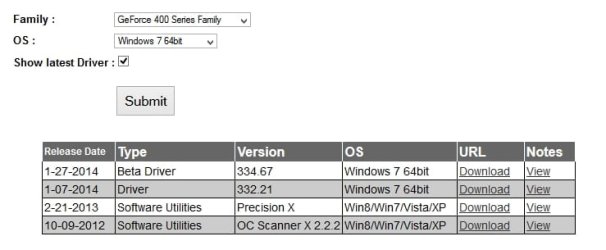
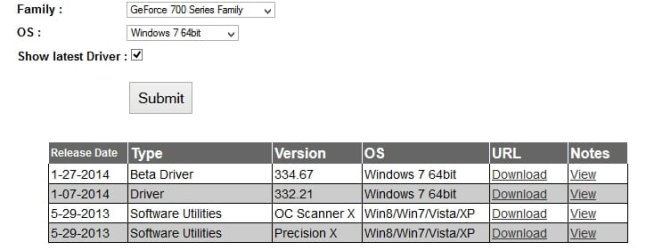
What version video driver do you have? I see this:

Geforce760.jpg
 

My Computer My Computer

Computer type
PC/Desktop
Computer Manufacturer/Model Number
Lenovo IdeaCenter 450
OS
Windows 10 Pro X64
CPU
Intel Quad Core i7-4770 @ 3.4Ghz
Memory
16.0GB PC3-12800 DDR3 SDRAM 1600 MHz
Graphics Card(s)
Intel Integrated HD Graphics
Sound Card
Realtek HD Audio
Monitor(s) Displays
HP 22" LCD
Screen Resolution
1680 x 1050
Hard Drives
250GB Samsung EVO SATA-3 SSD
2TB Seagate ST2000DM001 SATA-2
1.5TB Seagate ST3150041AS SATA
Keyboard
Dell USB
Mouse
Lenovo USB
Internet Speed
Cable via Road Runner 3MB Upload, 30MB Download
Antivirus
Windows Defender, MBAM Pro, MBAE
Browser
Seamonkey
Other Info
UEFI/GPT
PLDS DVD-RW DH16AERSH
I choosed the 332.21 version.
 

My Computer My Computer

Computer type
PC/Desktop
OS
Windows 7 Home Premium 64bit
CPU
i7 3.40GHz Quad Core
Motherboard
Asus Maximus V Gene
Memory
8GB Cosair 1866MHz
Graphics Card(s)
EVGA 760 GTX 2GB RAM
Sound Card
Supreme FX III
Monitor(s) Displays
Samsung XL2370
Screen Resolution
1920x1080
Hard Drives
Seagate SSD 480GB
Seagate HDD 4TB
Seagate HDD 4TB
PSU
Antec 650W
Case
Thermaltake Lanbox Lite
Cooling
Intel Stock Fan
Antivirus
MSE
Browser
IE 11
Is this only with Windows Photo Viewer?
 

My Computer My Computer

Computer type
PC/Desktop
Computer Manufacturer/Model Number
Lenovo IdeaCenter 450
OS
Windows 10 Pro X64
CPU
Intel Quad Core i7-4770 @ 3.4Ghz
Memory
16.0GB PC3-12800 DDR3 SDRAM 1600 MHz
Graphics Card(s)
Intel Integrated HD Graphics
Sound Card
Realtek HD Audio
Monitor(s) Displays
HP 22" LCD
Screen Resolution
1680 x 1050
Hard Drives
250GB Samsung EVO SATA-3 SSD
2TB Seagate ST2000DM001 SATA-2
1.5TB Seagate ST3150041AS SATA
Keyboard
Dell USB
Mouse
Lenovo USB
Internet Speed
Cable via Road Runner 3MB Upload, 30MB Download
Antivirus
Windows Defender, MBAM Pro, MBAE
Browser
Seamonkey
Other Info
UEFI/GPT
PLDS DVD-RW DH16AERSH
It's the only one I've noticed, I went on google earlier and notice a lot of ppl are saying they're going through the same problem with the photo viewer and says when they switched to another driver the problem sometimes goes away.
 

My Computer My Computer

Computer type
PC/Desktop
OS
Windows 7 Home Premium 64bit
CPU
i7 3.40GHz Quad Core
Motherboard
Asus Maximus V Gene
Memory
8GB Cosair 1866MHz
Graphics Card(s)
EVGA 760 GTX 2GB RAM
Sound Card
Supreme FX III
Monitor(s) Displays
Samsung XL2370
Screen Resolution
1920x1080
Hard Drives
Seagate SSD 480GB
Seagate HDD 4TB
Seagate HDD 4TB
PSU
Antec 650W
Case
Thermaltake Lanbox Lite
Cooling
Intel Stock Fan
Antivirus
MSE
Browser
IE 11
You might try an older video driver. Sometimes that fixes weird problems like this.
 

My Computer My Computer

Computer type
PC/Desktop
Computer Manufacturer/Model Number
Lenovo IdeaCenter 450
OS
Windows 10 Pro X64
CPU
Intel Quad Core i7-4770 @ 3.4Ghz
Memory
16.0GB PC3-12800 DDR3 SDRAM 1600 MHz
Graphics Card(s)
Intel Integrated HD Graphics
Sound Card
Realtek HD Audio
Monitor(s) Displays
HP 22" LCD
Screen Resolution
1680 x 1050
Hard Drives
250GB Samsung EVO SATA-3 SSD
2TB Seagate ST2000DM001 SATA-2
1.5TB Seagate ST3150041AS SATA
Keyboard
Dell USB
Mouse
Lenovo USB
Internet Speed
Cable via Road Runner 3MB Upload, 30MB Download
Antivirus
Windows Defender, MBAM Pro, MBAE
Browser
Seamonkey
Other Info
UEFI/GPT
PLDS DVD-RW DH16AERSH
Woot it worked! Last night NVidia released a new driver and the update fixed the UI glitch. :)
 

My Computer My Computer

Computer type
PC/Desktop
OS
Windows 7 Home Premium 64bit
CPU
i7 3.40GHz Quad Core
Motherboard
Asus Maximus V Gene
Memory
8GB Cosair 1866MHz
Graphics Card(s)
EVGA 760 GTX 2GB RAM
Sound Card
Supreme FX III
Monitor(s) Displays
Samsung XL2370
Screen Resolution
1920x1080
Hard Drives
Seagate SSD 480GB
Seagate HDD 4TB
Seagate HDD 4TB
PSU
Antec 650W
Case
Thermaltake Lanbox Lite
Cooling
Intel Stock Fan
Antivirus
MSE
Browser
IE 11
That's great.
 

My Computer My Computer

Computer type
PC/Desktop
Computer Manufacturer/Model Number
Lenovo IdeaCenter 450
OS
Windows 10 Pro X64
CPU
Intel Quad Core i7-4770 @ 3.4Ghz
Memory
16.0GB PC3-12800 DDR3 SDRAM 1600 MHz
Graphics Card(s)
Intel Integrated HD Graphics
Sound Card
Realtek HD Audio
Monitor(s) Displays
HP 22" LCD
Screen Resolution
1680 x 1050
Hard Drives
250GB Samsung EVO SATA-3 SSD
2TB Seagate ST2000DM001 SATA-2
1.5TB Seagate ST3150041AS SATA
Keyboard
Dell USB
Mouse
Lenovo USB
Internet Speed
Cable via Road Runner 3MB Upload, 30MB Download
Antivirus
Windows Defender, MBAM Pro, MBAE
Browser
Seamonkey
Other Info
UEFI/GPT
PLDS DVD-RW DH16AERSH
Back
Top