Physical Memory High - Causing Computer To Be Slow

jsmith10168

New member
Local time
9:24 PM
Messages
12
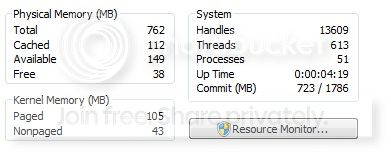
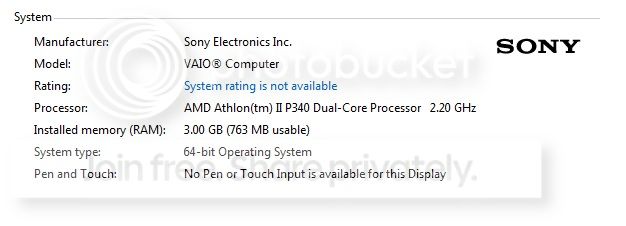
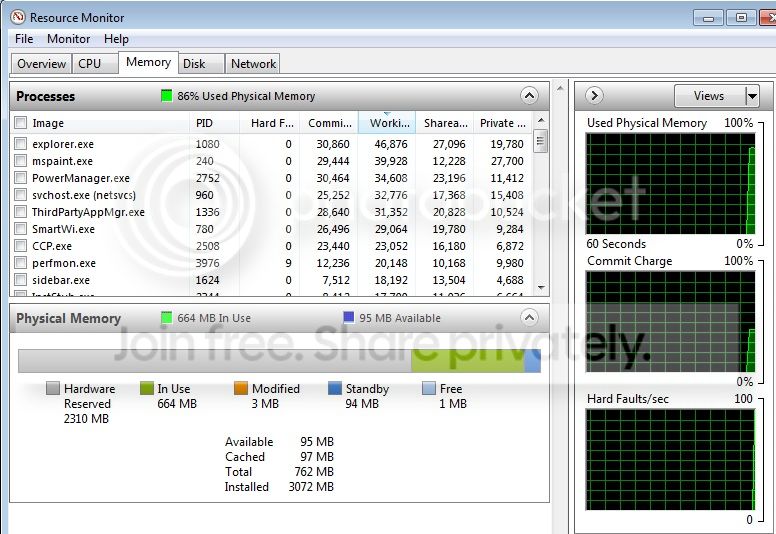
(Sony Vaio) has been extremely slow lately, which I am assuming because the physical memory is constantly high (up to 95% at times) even when I am not doing anything. Below are some screenshots for information. I have tried killing some processes but cannot find one process that is a major problem. 52 Processes are currently running which doesnt seem so excessive. Is it normal to have so much memory reserved for hardware? If there is anymore information I need to post please let me know, I appreciate any help I can get.
system_zpse9f1cb1a.jpg


physmem_zps8bcdc65e.jpg


physmem2_zps7543cd61.jpg
 

My Computer

OS
Win 7
Have you tried doing a anti-virus scan of your system with MSE?

What hardware have you installed on your system?
 

My Computer

Computer type
Laptop
Have you tried doing a anti-virus scan of your system with MSE?

What hardware have you installed on your system?

Thats what I thought at first. But I scanned with my antivirus program and malwarebytes and didnt find a single thing. Last night I reinstalled windows with the recovery partion so it has nothing installed on it as of now, except what comes with factory install.
 

My Computer

OS
Win 7
No it's not correct to have hardware that high. The two times that I have seen it that way on peoples computers it was cause by using the wrong ram, or it wasn't installed properly and lastly motherboard problems. I know nothing about a Sony but here are some questions.
Have you dropped, banged, run over with a car that might of dislodge anything in the computer?
Have you changed any hardware inside the computer?
Have you make any changes in the Bios?
Does you ram look this way with everything unplugged from the computer?
Is you laptop still under warranty?
 

My Computer

Computer type
PC/Desktop
Computer Manufacturer/Model Number
Home made Desktop
OS
Windows 10 Pro. 64/ version 1709 Windows 7 Pro/64
CPU
Intel i7-6800K @ 4.3
Motherboard
ASUS X-99 Deluxe II
Memory
Corsair Platinum 16 gig @2400
Graphics Card(s)
EVGA GTX 1070 OC
Monitor(s) Displays
Asus 27" LED LCD/VE278Q
Screen Resolution
1920-1080 or 1280-720 HDMI
Hard Drives
INTEL SSD 730-240 Gb Sata 3.0/
PSU
EVGA Platium 1200W
Case
Phanteks Luxe Tempered Glass 8 fans/ one radiator
Cooling
XSPC/ Water Cooled CPU
Keyboard
Das 4 Professional
Mouse
Logitech M705/MX Anywhere 2-S
Internet Speed
100 mbits
Antivirus
Microsoft Security Essentials/ Malwarebytes Premium 3.0/ SAS
Browser
I.E. 11 default/Firefox/ ISP Time Warner Cable/Spectrum
Other Info
LG BluRay Burner/
Sound system-KLipsch-THX/
Icy Dock ssd Hot Swap bays.
No it's not correct to have hardware that high. The two times that I have seen it that way on peoples computers it was cause by using the wrong ram, or it wasn't installed properly and lastly motherboard problems. I know nothing about a Sony but here are some questions.
Have you dropped, banged, run over with a car that might of dislodge anything in the computer?
Have you changed any hardware inside the computer?
Have you make any changes in the Bios?
Does you ram look this way with everything unplugged from the computer?
Is you laptop still under warranty?

This is my girlfriend's computer and I'm pretty sure she told me one time she dropped it while it was plugged in and it landed on the charging port/connection but it still worked. I haven't touched any hardware, nothing is connected to this computer besides the AC charger. I also haven't done anything in the BIOS and like I said I just reinstalled windows last night. I will have to check about the warranty.

In msconfig, I disabled a lot of processes and when I restarted it went down to 45%. But this also disabled some drivers, etc.. so I enabled most of it again and can't nail down exactly what the problem is.
 

My Computer

OS
Win 7
Check on that warranty. Their/there is a chance that the ram came dislodged (not seated properly) or other internal damage.
 

My Computer

Computer type
PC/Desktop
Computer Manufacturer/Model Number
Home made Desktop
OS
Windows 10 Pro. 64/ version 1709 Windows 7 Pro/64
CPU
Intel i7-6800K @ 4.3
Motherboard
ASUS X-99 Deluxe II
Memory
Corsair Platinum 16 gig @2400
Graphics Card(s)
EVGA GTX 1070 OC
Monitor(s) Displays
Asus 27" LED LCD/VE278Q
Screen Resolution
1920-1080 or 1280-720 HDMI
Hard Drives
INTEL SSD 730-240 Gb Sata 3.0/
PSU
EVGA Platium 1200W
Case
Phanteks Luxe Tempered Glass 8 fans/ one radiator
Cooling
XSPC/ Water Cooled CPU
Keyboard
Das 4 Professional
Mouse
Logitech M705/MX Anywhere 2-S
Internet Speed
100 mbits
Antivirus
Microsoft Security Essentials/ Malwarebytes Premium 3.0/ SAS
Browser
I.E. 11 default/Firefox/ ISP Time Warner Cable/Spectrum
Other Info
LG BluRay Burner/
Sound system-KLipsch-THX/
Icy Dock ssd Hot Swap bays.
Check on that warranty. Their/there is a chance that the ram came dislodged (not seated properly) or other internal damage.

I believe the warranty is expired. I've never dealt with hardware, is it simple enough to check for anything that may be loose (without causing more damage)?
 

My Computer

OS
Win 7

My Computer

Computer type
PC/Desktop
Computer Manufacturer/Model Number
Home made Desktop
OS
Windows 10 Pro. 64/ version 1709 Windows 7 Pro/64
CPU
Intel i7-6800K @ 4.3
Motherboard
ASUS X-99 Deluxe II
Memory
Corsair Platinum 16 gig @2400
Graphics Card(s)
EVGA GTX 1070 OC
Monitor(s) Displays
Asus 27" LED LCD/VE278Q
Screen Resolution
1920-1080 or 1280-720 HDMI
Hard Drives
INTEL SSD 730-240 Gb Sata 3.0/
PSU
EVGA Platium 1200W
Case
Phanteks Luxe Tempered Glass 8 fans/ one radiator
Cooling
XSPC/ Water Cooled CPU
Keyboard
Das 4 Professional
Mouse
Logitech M705/MX Anywhere 2-S
Internet Speed
100 mbits
Antivirus
Microsoft Security Essentials/ Malwarebytes Premium 3.0/ SAS
Browser
I.E. 11 default/Firefox/ ISP Time Warner Cable/Spectrum
Other Info
LG BluRay Burner/
Sound system-KLipsch-THX/
Icy Dock ssd Hot Swap bays.
Back
Top