Physical Memory Usage never above 33%

nickunbc

New member
Local time
8:42 AM
Messages
5
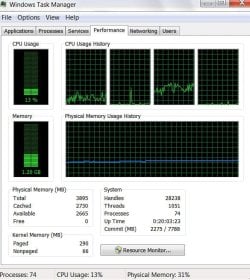
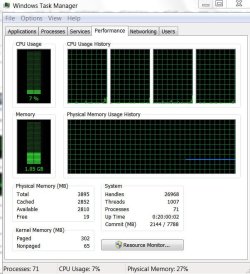
I have a new Dell inspiron 580 with core i3 processor, 4gb ram and windows 7 home premium x64. Through a dock gadget, I noticed that the physical memory usage never ever exceeds 33%, regardless of the amount of tasks and load placed on it. It seems it would rather slow down that exceed this number. On the flip side, while running fairly idle, never dips below 20%. Testing using task manager confirms this. System info shows 4GB installed and 2.76GB available. When testing under various different scenarios, task manager will max out at 1.15GB used, while showing 0MB free but 2800~MB available. Can anybody give me any input on the situation? Capture shows light load, Capture 2 shows multiple tasks including an HD movie playing.
 

Attachments
  • Capture.JPG
    Capture.JPG
    73.6 KB · Views: 38
  • Capture2.JPG
    Capture2.JPG
    73.1 KB · Views: 27

My Computer

Computer Manufacturer/Model Number
Dell Inspiron 580
OS
Windows 7 Home Premium-X64 based
CPU
Intel(R) Core(TM) i3 CPU 540 @ 3.07GHz
Memory
4gb
Hi, nickunbc! Welcome to the Seven Forums! :)

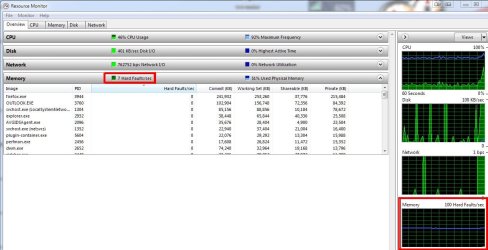
Open Resource Monitor. You can do so either by clicking the Resource Monitor button in the Performance tab of the task manager or typing resmon in the Start search box.

What does it display in regard to "Hard Faults?"

ScreenShot00020.jpg

If your HD is not getting thrashed you probably have nothing to worry about.

(note: my hard faults are a bit high right now - they are usually at zero - because AVG and Windows are reindexing files since I just installed Office 2010)
 

My Computer

Computer Manufacturer/Model Number
Toshiba L355D
OS
Windows 7 Ultimate x64 SP1
CPU
Core2 Duo
Motherboard
Intel
Memory
4 GB
Graphics Card(s)
GM965 on-board
Sound Card
RealTek on-board
Monitor(s) Displays
19"+17"(laptop)
Screen Resolution
1440x900 (x 2)
Hard Drives
500GB Ext. 200GB Internal
PSU
N/A
Case
N/A
Cooling
N/A
Nada!

Shows "0 hard faults/sec" "33% used physical memory". My main concern is that no matter how much activity I try, whether it's playing a song or having hd movies playing with multiple different programs running, it still will not exceed 33% usage, 1.15GB used, even if there is quite a bit available. It would rather slow down than actually use any additional RAM. Seeing as I paid for the extra memory, I want to know why it's refusing to use it.
 

My Computer

Computer Manufacturer/Model Number
Dell Inspiron 580
OS
Windows 7 Home Premium-X64 based
CPU
Intel(R) Core(TM) i3 CPU 540 @ 3.07GHz
Memory
4gb
I dunno. If you're not seeing any hard faults in the Resource Monitor, I would think you haven't stressed you system RAM yet.

Do you notice an evident delay in running programs? If your system is not hitting the HD page file, your RAM is being used as intended.
 

My Computer

Computer Manufacturer/Model Number
Toshiba L355D
OS
Windows 7 Ultimate x64 SP1
CPU
Core2 Duo
Motherboard
Intel
Memory
4 GB
Graphics Card(s)
GM965 on-board
Sound Card
RealTek on-board
Monitor(s) Displays
19"+17"(laptop)
Screen Resolution
1440x900 (x 2)
Hard Drives
500GB Ext. 200GB Internal
PSU
N/A
Case
N/A
Cooling
N/A
Mostly just that it seems to labor more and more as I increase the load on the system. Precisely what you would see on a system with less RAM as you multitask. I guess the real headscratcher is that I can be at that 33% threshold(1.15GB used, 2.7~GB AVAILABLE), and as I gradually add more tasks (including video processing), it still doesn't increase the amount of RAM used even with a ton still available. For example, processing a video using my old computer with a slower processor and 2GB of RAM is only about 20% slower than this new one using the exact same programs. Any other ideas to figure out what might be going on? BTW, how can I check if the HD page file is being used.
 

My Computer

Computer Manufacturer/Model Number
Dell Inspiron 580
OS
Windows 7 Home Premium-X64 based
CPU
Intel(R) Core(TM) i3 CPU 540 @ 3.07GHz
Memory
4gb
Not sure if this is normal or helps explain it, but when watching the resource monitor, I noticed the "in use" is clipping along at it's usual 1.1~GB, but that 2.69GB of the 2.72GB "available" is listed as "standby" (contains cached data or code not actively in use) while only 33mb is listed as free. Again, not sure if this is normal, but that 2.69GB in standby seems to be exactly the portion that is never able to be used.
 

My Computer

Computer Manufacturer/Model Number
Dell Inspiron 580
OS
Windows 7 Home Premium-X64 based
CPU
Intel(R) Core(TM) i3 CPU 540 @ 3.07GHz
Memory
4gb
see attached
 

Attachments

  • resmon.JPG
    resmon.JPG
    97.5 KB · Views: 120

My Computer

Computer Manufacturer/Model Number
Dell Inspiron 580
OS
Windows 7 Home Premium-X64 based
CPU
Intel(R) Core(TM) i3 CPU 540 @ 3.07GHz
Memory
4gb
Back
Top