Solved physical memory

chin00k47

New member
Local time
3:20 AM
Messages
3
Windows Task manager, performance, bottom left of screen "physical memory"

It reads

Total 4094
Cached 1263
Available 1582
Free 382

Where has the rest gone? surely it should add up to 4094? I am running Anno online and filmon free TV and it freezes like all memory is used and slowing PC? any ideas please?

Edit: I have 1154 ish in "standby" I have emptied cache, is this normal and can I lower it??
 
Last edited:

My Computer

Computer type
PC/Desktop
Computer Manufacturer/Model Number
custom
OS
Win 7 64bit home premium
CPU
quad 6600
Motherboard
sli 680i
Memory
4GB
Graphics Card(s)
680i
Hard Drives
500m
Antivirus
avg

My Computer

Computer type
PC/Desktop
Computer Manufacturer/Model Number
Lenovo IdeaCenter 450
OS
Windows 10 Pro X64
CPU
Intel Quad Core i7-4770 @ 3.4Ghz
Memory
16.0GB PC3-12800 DDR3 SDRAM 1600 MHz
Graphics Card(s)
Intel Integrated HD Graphics
Sound Card
Realtek HD Audio
Monitor(s) Displays
HP 22" LCD
Screen Resolution
1680 x 1050
Hard Drives
250GB Samsung EVO SATA-3 SSD
2TB Seagate ST2000DM001 SATA-2
1.5TB Seagate ST3150041AS SATA
Keyboard
Dell USB
Mouse
Lenovo USB
Internet Speed
Cable via Road Runner 3MB Upload, 30MB Download
Antivirus
Windows Defender, MBAM Pro, MBAE
Browser
Seamonkey
Other Info
UEFI/GPT
PLDS DVD-RW DH16AERSH
Windows Task manager, performance, bottom left of screen "physical memory"

It reads

Total 4094
Cached 1263
Available 1582
Free 382

Where has the rest gone? surely it should add up to 4094? I am running Anno online and filmon free TV and it freezes like all memory is used and slowing PC? any ideas please?

Edit: I have 1154 ish in "standby" I have emptied cache, is this normal and can I lower it??

There is also in-use. Basically from what you posted, you have a reservoir of 3.3 GB that can be used The rest is basically in-use by by the kernel or otherwise locked down.
 

My Computer

Computer type
PC/Desktop
Computer Manufacturer/Model Number
Home built (GeneO industries)/Model 4
OS
Windows 10 Pro. EFI boot partition, full EFI boot
CPU
i7 4770k 4.4GHz (44-44-43-43 turbo) @ 1.248V
Motherboard
ASUS Maximus VI Hero
Memory
16GB (8GBx2) @2200 MHz G.skill Sniper 10-11-10-30-1, 1.6V
Graphics Card(s)
MSI GTX 970 Gaming 4G
Sound Card
Onboard SupremeFX Audio
Monitor(s) Displays
NEC Spectraview 2490WUXi-SV
Screen Resolution
1920 x 1200
Hard Drives
Samsung 850 Pro 256GB (OS), Samsung 2x 128GB 840 Pro SSD in RAID0, 3x WD Blue 6Gb/s 1TB RAID0, WD 2TB Black external USB 3.0, 2TB WD20EARS Green external USB 3.0, 2x 500GB Seagate and 1 750 GB external USB, 1x 350GB external USB3
PSU
Seasonic X-850 (2012 KM3 model)
Case
Fractal Design Define R4
Cooling
NH-D14, NF-F12, NF-A15; NF-P14, NF-P12,NF-A14, S12A PWM
Keyboard
Cooler Master Storm Quickfire Rapid - Brown
Mouse
Logitech G602
Internet Speed
126.4 Mb/s down, 24.3 Mb/s up
Other Info
USB 3.0 x8 , SATA III x8, eSATA, USB 2.0 x6. Samsung DVD R/W drive.

WEI: CPU 7.8, Memory 7.9, Graphics 7.9, Disk 7.9
There is no relationship between Cached, Available, and Free memory such that they would add up to Total. If they did it would be pure coincidence.

There is considerable overlap between Cached, Available, and Free. All of Free is available. Most of Cached will also be Available. All of Standby (not shown) is available. All of Modified (not shown) is part of Cached.

A large value for Standby is a good thing. Standby memory is far better than Free which should be as low as possible, the ideal being zero. Reducing Standby memory is a bad thing and will impair performance.

There is nothing about these numbers that would indicate a problem. Whatever the problem might be I doubt it is memory related. The value of 1582 MB for Available is strong evidence for this.
 

My Computer

Computer type
PC/Desktop
Computer Manufacturer/Model Number
HP
OS
Windows 7 Pro 64 bit
CPU
Xeon W3520
Memory
8 GB
Graphics Card(s)
Nvidia Geforce 210
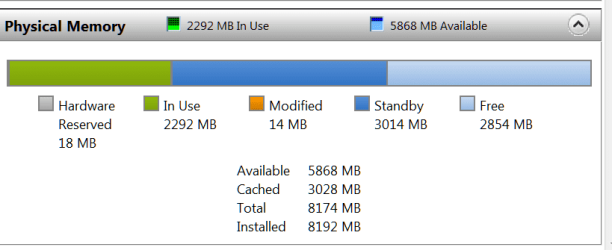
Look into Resource Monitor > Memory tab. That gives you a much better picture - like this:

Note: Standby is the same as cached
 

Attachments

  • 2014-01-30_0004.png
    2014-01-30_0004.png
    8.8 KB · Views: 2

My Computer

Computer Manufacturer/Model Number
HP, Dell, Gateway, Toshiba - 4 laptops and 2 desktops
OS
Vista, Windows7, Mint Mate, Zorin, Windows 8
CPU
from 1.6GHz Duo to i7
Monitor(s) Displays
2x HP w2207
Hard Drives
5x HDD, 7x SSD, 12x Externals
Keyboard
with trackball - no mices
Mouse
Trackball mice
Internet Speed
DSL 6000
thanks people at least I understand now, guess the PC just cant keep up these days.
 

My Computer

Computer type
PC/Desktop
Computer Manufacturer/Model Number
custom
OS
Win 7 64bit home premium
CPU
quad 6600
Motherboard
sli 680i
Memory
4GB
Graphics Card(s)
680i
Hard Drives
500m
Antivirus
avg
guess the PC just cant keep up these days.
I am afraid I don't know what you mean by that. Could you elaborate ?
 

My Computer

Computer Manufacturer/Model Number
HP, Dell, Gateway, Toshiba - 4 laptops and 2 desktops
OS
Vista, Windows7, Mint Mate, Zorin, Windows 8
CPU
from 1.6GHz Duo to i7
Monitor(s) Displays
2x HP w2207
Hard Drives
5x HDD, 7x SSD, 12x Externals
Keyboard
with trackball - no mices
Mouse
Trackball mice
Internet Speed
DSL 6000
Sorted the problem, opening both anno online on one screen and film-on tv on the other screen was causing the pc to run really slow. The problem was not the PC it is Google Chrome. I switched to IE and suddenly everything is fine and running normally.
 

My Computer

Computer type
PC/Desktop
Computer Manufacturer/Model Number
custom
OS
Win 7 64bit home premium
CPU
quad 6600
Motherboard
sli 680i
Memory
4GB
Graphics Card(s)
680i
Hard Drives
500m
Antivirus
avg
Good. I guess if you overload the PC, it walks slower.
 

My Computer

Computer Manufacturer/Model Number
HP, Dell, Gateway, Toshiba - 4 laptops and 2 desktops
OS
Vista, Windows7, Mint Mate, Zorin, Windows 8
CPU
from 1.6GHz Duo to i7
Monitor(s) Displays
2x HP w2207
Hard Drives
5x HDD, 7x SSD, 12x Externals
Keyboard
with trackball - no mices
Mouse
Trackball mice
Internet Speed
DSL 6000
Back
Top