Pictures look bad on one computer and not the other

lisaone

New member
Member
Local time
10:31 AM
Messages
63
Location
Sydney AU
My desktop computer (windows 7) shows some pictures (generally photos with a lot of white or bright parts in them) really badly, its like theyre 256 colors or something like that. I thought all my photos had been saved wrong or something then i looked at them on my laptop (vista) and they were all ok. Ive tried viewing them in several diff programs and they all look the same.

I updated my monitor driver and my video card driver, im not sure what else to do! I dont know if its the OS, the video card or the monitor (or something else??) I installed windows 7 recently (2 months ago i guess) and i hadnt looked over the pics til now so i dont know if its been like this the whole time or if its a new problem. Same problem with viewing these same pics on the internet (had some saved to my myspace page - they look fine on my laptop and wrong with this desktop) so im sure its not the way they were transferred to this computer, its definitely a viewing problem.

video card: radeon 4870
monitor: viewsonic vx2235wm
 

My Computer My Computer

At a glance

Win7Intel® Core™ i7 Processor 3630QM8gbNVIDIA® GeForce® GT 650M Graphics with 2GB gD...
Computer type
Laptop
Computer Manufacturer/Model Number
Samsung NP550P5C-S08AU
OS
Win7
CPU
Intel® Core™ i7 Processor 3630QM
Memory
8gb
Graphics Card(s)
NVIDIA® GeForce® GT 650M Graphics with 2GB gDDR3 Graphic Mem
Sound Card
on board
Screen Resolution
1680x1050
Hard Drives
1TB
Keyboard
logitech g19
Mouse
Roccat Kone
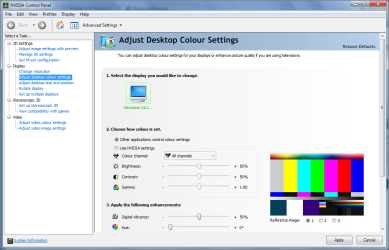
Do other images, such as desktop backgrounds, look in a similar way? Check your colour depth and screen resolution settings - these should be set to 32-bit and the monitor's native resolution respectively.
 

My Computer My Computer

At a glance

Windows 8.1 Pro RTM x64Intel Core-i5-3570K 4-core @ 3.4GHz (Ivy Brid...4 x 4GB DDR3-1600 Corsair Vengeance CMZ8GX3M2...MSI GeForce GTX770 Gaming OC 2GB
Computer type
PC/Desktop
Computer Manufacturer/Model Number
Dwarf Dwf/11/2012 r09/2013
OS
Windows 8.1 Pro RTM x64
CPU
Intel Core-i5-3570K 4-core @ 3.4GHz (Ivy Bridge) (OC 4.4GHz)
Motherboard
ASRock Z77 Extreme4-M
Memory
4 x 4GB DDR3-1600 Corsair Vengeance CMZ8GX3M2A1600C9B (16GB)
Graphics Card(s)
MSI GeForce GTX770 Gaming OC 2GB
Sound Card
Realtek High Definition on board solution (ALC 898)
Monitor(s) Displays
ViewSonic VA1912w Widescreen (VGA)
Screen Resolution
1440x900
Hard Drives
OCZ Agility 3 SSD 120GB SATA III x2 (RAID 0)
Samsung HD501LJ 500GB SATA II x2
Hitachi HDS721010CLA332 1TB SATA II
Iomega 1.5TB Ext USB 2.0
WD 2.0TB Ext USB 3.0
PSU
XFX Pro Series 850W Semi-Modular
Case
Gigabyte IF233
Cooling
1 x 120mm Front Inlet 1 x 120mm Rear Exhaust
Keyboard
Microsoft Comfort Curve Keyboard 3000 (USB)
Mouse
Microsoft Comfort Mouse 3000 for Business (USB)
Internet Speed
NetGear DG834Gv3 ADSL Modem/Router (Ethernet) ~4.0 Mb/s (O2)
Antivirus
Avast! 8.0.1497
Browser
IE 11
Other Info
Optical Drive: HL-DT-ST BD-RE BH10LS30 SATA Bluray
Lexmark S305 Printer/Scanner/Copier (USB)
WEI Score: 8.1/8.1/8.5/8.5/8.25
Asus Eee PC 1011PX Netbook (Windows 7 x86 Starter)
its set to 32 bit, and most images look fine, it only shows up with bright/white photos.
 

My Computer My Computer

At a glance

Win7Intel® Core™ i7 Processor 3630QM8gbNVIDIA® GeForce® GT 650M Graphics with 2GB gD...
Computer type
Laptop
Computer Manufacturer/Model Number
Samsung NP550P5C-S08AU
OS
Win7
CPU
Intel® Core™ i7 Processor 3630QM
Memory
8gb
Graphics Card(s)
NVIDIA® GeForce® GT 650M Graphics with 2GB gDDR3 Graphic Mem
Sound Card
on board
Screen Resolution
1680x1050
Hard Drives
1TB
Keyboard
logitech g19
Mouse
Roccat Kone

My Computer My Computer

At a glance

Windows 8.1 Pro RTM x64Intel Core-i5-3570K 4-core @ 3.4GHz (Ivy Brid...4 x 4GB DDR3-1600 Corsair Vengeance CMZ8GX3M2...MSI GeForce GTX770 Gaming OC 2GB
Computer type
PC/Desktop
Computer Manufacturer/Model Number
Dwarf Dwf/11/2012 r09/2013
OS
Windows 8.1 Pro RTM x64
CPU
Intel Core-i5-3570K 4-core @ 3.4GHz (Ivy Bridge) (OC 4.4GHz)
Motherboard
ASRock Z77 Extreme4-M
Memory
4 x 4GB DDR3-1600 Corsair Vengeance CMZ8GX3M2A1600C9B (16GB)
Graphics Card(s)
MSI GeForce GTX770 Gaming OC 2GB
Sound Card
Realtek High Definition on board solution (ALC 898)
Monitor(s) Displays
ViewSonic VA1912w Widescreen (VGA)
Screen Resolution
1440x900
Hard Drives
OCZ Agility 3 SSD 120GB SATA III x2 (RAID 0)
Samsung HD501LJ 500GB SATA II x2
Hitachi HDS721010CLA332 1TB SATA II
Iomega 1.5TB Ext USB 2.0
WD 2.0TB Ext USB 3.0
PSU
XFX Pro Series 850W Semi-Modular
Case
Gigabyte IF233
Cooling
1 x 120mm Front Inlet 1 x 120mm Rear Exhaust
Keyboard
Microsoft Comfort Curve Keyboard 3000 (USB)
Mouse
Microsoft Comfort Mouse 3000 for Business (USB)
Internet Speed
NetGear DG834Gv3 ADSL Modem/Router (Ethernet) ~4.0 Mb/s (O2)
Antivirus
Avast! 8.0.1497
Browser
IE 11
Other Info
Optical Drive: HL-DT-ST BD-RE BH10LS30 SATA Bluray
Lexmark S305 Printer/Scanner/Copier (USB)
WEI Score: 8.1/8.1/8.5/8.5/8.25
Asus Eee PC 1011PX Netbook (Windows 7 x86 Starter)
all the settings were already the same as yours ):
 

My Computer My Computer

At a glance

Win7Intel® Core™ i7 Processor 3630QM8gbNVIDIA® GeForce® GT 650M Graphics with 2GB gD...
Computer type
Laptop
Computer Manufacturer/Model Number
Samsung NP550P5C-S08AU
OS
Win7
CPU
Intel® Core™ i7 Processor 3630QM
Memory
8gb
Graphics Card(s)
NVIDIA® GeForce® GT 650M Graphics with 2GB gDDR3 Graphic Mem
Sound Card
on board
Screen Resolution
1680x1050
Hard Drives
1TB
Keyboard
logitech g19
Mouse
Roccat Kone
Excuse me if i had missed this, but, is it just with specific pictures or the whole screen, like anything bright on the monitor?

Awaiting response :)
 

My Computer My Computer

At a glance

Windows 7 Home Premium4GB RAMnVidia Geforce 9500 GT - 2541mb
Computer Manufacturer/Model Number
Custom Build
OS
Windows 7 Home Premium
Memory
4GB RAM
Graphics Card(s)
nVidia Geforce 9500 GT - 2541mb
Sound Card
Realtek High Defenition Audio
Monitor(s) Displays
SAMSUNG 20"
Screen Resolution
1600x900
Hard Drives
C:\ 468 GB
D:\ 462 GB
Keyboard
Genius
Mouse
Samsung
Internet Speed
8 Mbits
yes it does happen with anything bright, but its not quite as noticeable as it is in the photos, i dont know why


to clarify, i notice it in other pictures on the internet, not just ones that belong to me, but this here text box is white, and seems to display no problems, its only noticeable along the gradient if you know what i mean, its like the colors dont blend well, im going to arrange some pics to show what i mean!
 

My Computer My Computer

At a glance

Win7Intel® Core™ i7 Processor 3630QM8gbNVIDIA® GeForce® GT 650M Graphics with 2GB gD...
Computer type
Laptop
Computer Manufacturer/Model Number
Samsung NP550P5C-S08AU
OS
Win7
CPU
Intel® Core™ i7 Processor 3630QM
Memory
8gb
Graphics Card(s)
NVIDIA® GeForce® GT 650M Graphics with 2GB gDDR3 Graphic Mem
Sound Card
on board
Screen Resolution
1680x1050
Hard Drives
1TB
Keyboard
logitech g19
Mouse
Roccat Kone
I use a fairly old Graphic Card, nVidia Geforce Fx 5500, when i got Windows 7 and downloaded the driver update I had the same problem, what i did was reduce the Screen Refresh Rate from 75 to 60 and the screen looked regular again, maybe you can try that?

Here are the steps:
-Right Click on the Desktop and Choose Screen Resolution.
-Click on Advanced Settings.
-Click on the Monitor Tab
-Under Screen Refresh Rate change the number to 60

Please remember these steps though so in case it does not help you would be able to go to your older settings.

Hope it all works out for you!
-Ray95
 

My Computer My Computer

At a glance

Windows 7 Home Premium4GB RAMnVidia Geforce 9500 GT - 2541mb
Computer Manufacturer/Model Number
Custom Build
OS
Windows 7 Home Premium
Memory
4GB RAM
Graphics Card(s)
nVidia Geforce 9500 GT - 2541mb
Sound Card
Realtek High Defenition Audio
Monitor(s) Displays
SAMSUNG 20"
Screen Resolution
1600x900
Hard Drives
C:\ 468 GB
D:\ 462 GB
Keyboard
Genius
Mouse
Samsung
Internet Speed
8 Mbits
i tried to change it, the only options were 59hz and 60 hz. it was on 59, i changed it to 60, it made no diff, i went back to check i did it correctly and it was on 59 again! i made sure to choose apply before choOsing 'ok' this time. But it still went back to 59! craziness!

im also having a hard time getting a pic to show, i can get a pic that looks bad to me but i know it will look fine to you, so i was going to take a screenshot to show what it looked like to me, but when i saved the screenshot and viewed it on my laptop it looked fine too! I dont know what else i can do lol, but but in case it helps to understand, all the photo looks normal, but the bright spots on the face from the flash are WAAAAY too bright, they stand out as being very abnormal, whiter than paper on otherwise tan skin.

But like i said, its not just pictures of people that are like this.
 

My Computer My Computer

At a glance

Win7Intel® Core™ i7 Processor 3630QM8gbNVIDIA® GeForce® GT 650M Graphics with 2GB gD...
Computer type
Laptop
Computer Manufacturer/Model Number
Samsung NP550P5C-S08AU
OS
Win7
CPU
Intel® Core™ i7 Processor 3630QM
Memory
8gb
Graphics Card(s)
NVIDIA® GeForce® GT 650M Graphics with 2GB gDDR3 Graphic Mem
Sound Card
on board
Screen Resolution
1680x1050
Hard Drives
1TB
Keyboard
logitech g19
Mouse
Roccat Kone
It could be with the settings of your Monitor, are you using a laptop or a desktop computer? as a desktop you might have to change the brightness option through the buttons on the screen itself, and i understand what you mean about the pictures, and it also points towards having a problem with the screen, cause taking a screenshot is operated throughout the computer of what it thinks its displaying, but if its not showing correctly that means the screen has something wrong.

So see if adjusting any of the monitor settings would help.

Edit: There could also be an "Auto" button on your screen, try clicking that, its supposed to adjust the screen automatically to make it fit.


-Ray95
 

My Computer My Computer

At a glance

Windows 7 Home Premium4GB RAMnVidia Geforce 9500 GT - 2541mb
Computer Manufacturer/Model Number
Custom Build
OS
Windows 7 Home Premium
Memory
4GB RAM
Graphics Card(s)
nVidia Geforce 9500 GT - 2541mb
Sound Card
Realtek High Defenition Audio
Monitor(s) Displays
SAMSUNG 20"
Screen Resolution
1600x900
Hard Drives
C:\ 468 GB
D:\ 462 GB
Keyboard
Genius
Mouse
Samsung
Internet Speed
8 Mbits
well i spoze my monitor is just on the way out then, i noticed a few days ago that i couldnt change the brightness/contrast on it when i was playing a game that was a bit too dark for my liking. Ive never had any trouble changing it before but it just wont respond anymore.

I guess this would make sense as to my other problem too.

well... ive been wanting a bigger monitor >:)

thankyou all for your time.
 

My Computer My Computer

At a glance

Win7Intel® Core™ i7 Processor 3630QM8gbNVIDIA® GeForce® GT 650M Graphics with 2GB gD...
Computer type
Laptop
Computer Manufacturer/Model Number
Samsung NP550P5C-S08AU
OS
Win7
CPU
Intel® Core™ i7 Processor 3630QM
Memory
8gb
Graphics Card(s)
NVIDIA® GeForce® GT 650M Graphics with 2GB gDDR3 Graphic Mem
Sound Card
on board
Screen Resolution
1680x1050
Hard Drives
1TB
Keyboard
logitech g19
Mouse
Roccat Kone
sorry for the quick, wanted to let you know quickly before you left, i saw your edit and checked for the auto option, for some reason it was greyed out but there was an auto skin tone optio, i changed it from nature to red and it fixed all the whiteness issues!!!

THANKS!! I would never have found that!
 

My Computer My Computer

At a glance

Win7Intel® Core™ i7 Processor 3630QM8gbNVIDIA® GeForce® GT 650M Graphics with 2GB gD...
Computer type
Laptop
Computer Manufacturer/Model Number
Samsung NP550P5C-S08AU
OS
Win7
CPU
Intel® Core™ i7 Processor 3630QM
Memory
8gb
Graphics Card(s)
NVIDIA® GeForce® GT 650M Graphics with 2GB gDDR3 Graphic Mem
Sound Card
on board
Screen Resolution
1680x1050
Hard Drives
1TB
Keyboard
logitech g19
Mouse
Roccat Kone
Yay I'm very happy for you! Glad this helped you!! And truly sorry for not seeing this posts earlier, I'm actually here refreshing the page, but it was giving me the older version so i couldn't see your post till now!!

Woohoo! now we just need someone to change the thread to "Solved" :)

-Ray95
 

My Computer My Computer

At a glance

Windows 7 Home Premium4GB RAMnVidia Geforce 9500 GT - 2541mb
Computer Manufacturer/Model Number
Custom Build
OS
Windows 7 Home Premium
Memory
4GB RAM
Graphics Card(s)
nVidia Geforce 9500 GT - 2541mb
Sound Card
Realtek High Defenition Audio
Monitor(s) Displays
SAMSUNG 20"
Screen Resolution
1600x900
Hard Drives
C:\ 468 GB
D:\ 462 GB
Keyboard
Genius
Mouse
Samsung
Internet Speed
8 Mbits
Back
Top