Solved Ping constantly timing out / interference

inaniloquent

goodbye windows 7
Member
VIP
Local time
1:37 PM
Messages
190
Location
UK
We recently installed a new router in our house. Initially everyone's internet was terrible because the phone was interfering with the wireless signal, so my dad put an ADSL filter on it. This fixed the problem; everyone's internet is now fine.
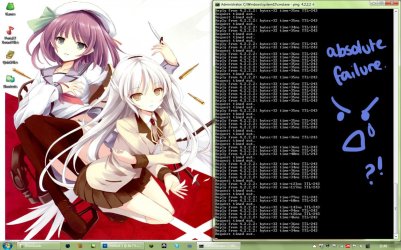
My computer followed suit with everyone else's until yesterday afternoon when it started having the exact same problem as before. The ping is relatively low all the time but constantly times out, like something is interfering with it. (now as I am typing this it seems to be becoming less and less constantly low). It seems to drop out less if I am not actively using the internet such as attempting to load pages or trying to do a virus update.
I have tried moving USB ports & reinstalling the drivers, turning the router on and off and rebooting my PC but nothing has worked. I am only just managing to load this web page.
This is frustrating as shit. I've had endless problems with my stupid ****ing internet. Please help me.
 

Attachments

  • 1.jpg
    1.jpg
    247.4 KB · Views: 16
  • 2.jpg
    2.jpg
    216.5 KB · Views: 12

My Computer My Computer

At a glance

Windows 7 Home Premium 64-Biti5-4590Corsair DDR3 8GBGeForce GTX 970
Computer type
PC/Desktop
Computer Manufacturer/Model Number
Custom build
OS
Windows 7 Home Premium 64-Bit
CPU
i5-4590
Motherboard
GIGABYTE H97M-HD3
Memory
Corsair DDR3 8GB
Graphics Card(s)
GeForce GTX 970
Monitor(s) Displays
LG Electronics W1942 - 19 inches
Screen Resolution
1440x900
Hard Drives
Corsair Neutron SSD 119GB, Toshiba External 931GB
PSU
Corsair CX600
Keyboard
Logitech K360 Wireless
Mouse
Logitech Wireless Mouse M325
Browser
Firefox
Hello,

List and Name all Anti-Virus, Security or Firewall Software installed from the problematic computer.

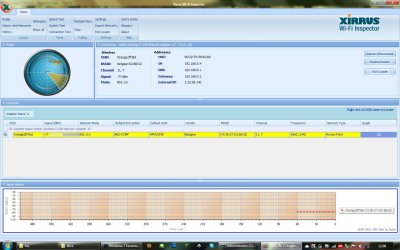
Install and run Xirrus Wi-Fi Inspector.
Click on the 'Show Networks' to display all wireless networks on the xirrus icon on your desktop if you have one running in a corner. Tap the Printscreen key on your keyboard, open up Paint then choose Edit from the Menu and select Paste, then save it. Upload and attached it here.
 

My Computer My Computer

At a glance

Win7 & Win8 64bitIntel i5
Computer Manufacturer/Model Number
Lenovo Desktop/Samsung Laptop
OS
Win7 & Win8 64bit
CPU
Intel i5
Internet Speed
Charter-20 Mbps
Antivirus
Avast
Browser
FF, IE9 and Chrome
Hello,

List and Name all Anti-Virus, Security or Firewall Software installed from the problematic computer.

Install and run Xirrus Wi-Fi Inspector.
Click on the 'Show Networks' to display all wireless networks on the xirrus icon on your desktop if you have one running in a corner. Tap the Printscreen key on your keyboard, open up Paint then choose Edit from the Menu and select Paste, then save it. Upload and attached it here.
Kaspersky Internet Security 2011 is the only virus software I have installed and it works brilliantly. I've been using it since the beginning of this year, and used 2010 last year, etc.
 

Attachments

  • xirrus.jpg
    xirrus.jpg
    153.4 KB · Views: 30

My Computer My Computer

At a glance

Windows 7 Home Premium 64-Biti5-4590Corsair DDR3 8GBGeForce GTX 970
Computer type
PC/Desktop
Computer Manufacturer/Model Number
Custom build
OS
Windows 7 Home Premium 64-Bit
CPU
i5-4590
Motherboard
GIGABYTE H97M-HD3
Memory
Corsair DDR3 8GB
Graphics Card(s)
GeForce GTX 970
Monitor(s) Displays
LG Electronics W1942 - 19 inches
Screen Resolution
1440x900
Hard Drives
Corsair Neutron SSD 119GB, Toshiba External 931GB
PSU
Corsair CX600
Keyboard
Logitech K360 Wireless
Mouse
Logitech Wireless Mouse M325
Browser
Firefox
Yeah, it is most likely your AV program that interferes. Shut it off during the ping. I had that happen with Norton too.
 

My Computer My Computer

At a glance

Vista, Windows7, Mint Mate, Zorin, Windows 8from 1.6GHz Duo to i7
Computer Manufacturer/Model Number
HP, Dell, Gateway, Toshiba - 4 laptops and 2 desktops
OS
Vista, Windows7, Mint Mate, Zorin, Windows 8
CPU
from 1.6GHz Duo to i7
Monitor(s) Displays
2x HP w2207
Hard Drives
5x HDD, 7x SSD, 12x Externals
Keyboard
with trackball - no mices
Mouse
Trackball mice
Internet Speed
DSL 6000
Yeah, it is most likely your AV program that interferes. Shut it off during the ping. I had that happen with Norton too.
Made no difference. Screenshot attached of my ping with Kaspersky disabled. It's obvious it's not going to though, as I've had Kaspersky for over 2 years and the source of the problems I've had have not been because of my AV.
 

Attachments

  • KASPERSKU.jpg
    KASPERSKU.jpg
    190.6 KB · Views: 16

My Computer My Computer

At a glance

Windows 7 Home Premium 64-Biti5-4590Corsair DDR3 8GBGeForce GTX 970
Computer type
PC/Desktop
Computer Manufacturer/Model Number
Custom build
OS
Windows 7 Home Premium 64-Bit
CPU
i5-4590
Motherboard
GIGABYTE H97M-HD3
Memory
Corsair DDR3 8GB
Graphics Card(s)
GeForce GTX 970
Monitor(s) Displays
LG Electronics W1942 - 19 inches
Screen Resolution
1440x900
Hard Drives
Corsair Neutron SSD 119GB, Toshiba External 931GB
PSU
Corsair CX600
Keyboard
Logitech K360 Wireless
Mouse
Logitech Wireless Mouse M325
Browser
Firefox
I'm looking at your adapter that is wireless G and your router that is a N Router and you are running it seems on 2 different channels you need to find out what channel your router is running on and then set your computer to the same channel..Your problem should go away.
 

My Computer My Computer

At a glance

Windows 7 Ultimate x64I76 x 1.5V DDR3 DIMM sockets supporting up to 2...GeForce GTX 580
Computer Manufacturer/Model Number
Alienware
OS
Windows 7 Ultimate x64
CPU
I7
Motherboard
GA-X58-USB3
Memory
6 x 1.5V DDR3 DIMM sockets supporting up to 24 GB of system
Graphics Card(s)
GeForce GTX 580
Sound Card
Realtek ALC892 codec 2/4/5.1/7.1-channel
Monitor(s) Displays
NEC Display Solutions E321 Black 32"
Screen Resolution
1366 x 768
Hard Drives
OCZ Colossus LT Series OCZSSD2-1CLSLT1T 3.5" 1TB SATA II MLC Internal Solid State Drive
PSU
XFX Black Edition XPS-850W-BES 850W ATX12V
Case
Antec
Cooling
Zalman
Keyboard
Microsoft
Mouse
Microsoft
Thanks for the info provided. The signal doesn't look good at all.

2 Things that you may try:

Update your router's firmware to the latest. You may download the firmware from the manufacturer's site.

Change the wireless channel to 1 or 6, see which one you can get a great signal.

An update will be nice.
 

My Computer My Computer

At a glance

Win7 & Win8 64bitIntel i5
Computer Manufacturer/Model Number
Lenovo Desktop/Samsung Laptop
OS
Win7 & Win8 64bit
CPU
Intel i5
Internet Speed
Charter-20 Mbps
Antivirus
Avast
Browser
FF, IE9 and Chrome
I'm looking at your adapter that is wireless G and your router that is a N Router and you are running it seems on 2 different channels you need to find out what channel your router is running on and then set your computer to the same channel..Your problem should go away.
How do I change the channel of my PC?
 

My Computer My Computer

At a glance

Windows 7 Home Premium 64-Biti5-4590Corsair DDR3 8GBGeForce GTX 970
Computer type
PC/Desktop
Computer Manufacturer/Model Number
Custom build
OS
Windows 7 Home Premium 64-Bit
CPU
i5-4590
Motherboard
GIGABYTE H97M-HD3
Memory
Corsair DDR3 8GB
Graphics Card(s)
GeForce GTX 970
Monitor(s) Displays
LG Electronics W1942 - 19 inches
Screen Resolution
1440x900
Hard Drives
Corsair Neutron SSD 119GB, Toshiba External 931GB
PSU
Corsair CX600
Keyboard
Logitech K360 Wireless
Mouse
Logitech Wireless Mouse M325
Browser
Firefox
You will need to logon to your router's configuration page thru a browser. You'll also need the logon to your router.
 

My Computer My Computer

At a glance

Win7 & Win8 64bitIntel i5
Computer Manufacturer/Model Number
Lenovo Desktop/Samsung Laptop
OS
Win7 & Win8 64bit
CPU
Intel i5
Internet Speed
Charter-20 Mbps
Antivirus
Avast
Browser
FF, IE9 and Chrome
i am so confused. for the last 2-3 hours or so my internet has been working fine and i haven't done anything at all to it. NOTHING MAKES SENSE ANY MORE. ;_______;
 

My Computer My Computer

At a glance

Windows 7 Home Premium 64-Biti5-4590Corsair DDR3 8GBGeForce GTX 970
Computer type
PC/Desktop
Computer Manufacturer/Model Number
Custom build
OS
Windows 7 Home Premium 64-Bit
CPU
i5-4590
Motherboard
GIGABYTE H97M-HD3
Memory
Corsair DDR3 8GB
Graphics Card(s)
GeForce GTX 970
Monitor(s) Displays
LG Electronics W1942 - 19 inches
Screen Resolution
1440x900
Hard Drives
Corsair Neutron SSD 119GB, Toshiba External 931GB
PSU
Corsair CX600
Keyboard
Logitech K360 Wireless
Mouse
Logitech Wireless Mouse M325
Browser
Firefox
Alright, please let us know if issue persist.
i am so confused. for the last 2-3 hours or so my internet has been working fine and i haven't done anything at all to it. NOTHING MAKES SENSE ANY MORE. ;_______;
 

My Computer My Computer

At a glance

Win7 & Win8 64bitIntel i5
Computer Manufacturer/Model Number
Lenovo Desktop/Samsung Laptop
OS
Win7 & Win8 64bit
CPU
Intel i5
Internet Speed
Charter-20 Mbps
Antivirus
Avast
Browser
FF, IE9 and Chrome
Since I'm having the same issue.. (still unresolved for myself, but I've actually narrowed it down to my provider) guess I'll chip in to the thread. (right now at the moment, my internet is dead too lmao) But the only guess I'll be taking a shot at is the provider itself, unless everyone else in the house actually accesses the internet fine, then it can't be the wireless channels. Since I've dealt with this for a good amount of my time, I sat for a good week relying solely on my phone data plan. You also didn't mention the reset of your router either. It'd also be great if you could tell us the model of your router, there are some routers that have a power setting in the browser like 2xg has said.
 

My Computer My Computer

At a glance

Windows 7 Ultimate x64i7 2600k @ 4.8 GHzKingston HyperX 2x4GB 1600ENGTX460
OS
Windows 7 Ultimate x64
CPU
i7 2600k @ 4.8 GHz
Motherboard
Asus P8P67
Memory
Kingston HyperX 2x4GB 1600
Graphics Card(s)
ENGTX460
Monitor(s) Displays
22" Acer, 17" SyncMaster, 17" Optiquest
Hard Drives
500GB Seagate
2TB Seagate
2TB Seagate
1.5TB Western Digital
1TB Western Digital
1dyingTB Hitachi
PSU
Antec 750w TruePower
Case
Antec DF-85
Cooling
Corsair H50
Since I'm having the same issue.. (still unresolved for myself, but I've actually narrowed it down to my provider) guess I'll chip in to the thread. (right now at the moment, my internet is dead too lmao) But the only guess I'll be taking a shot at is the provider itself, unless everyone else in the house actually accesses the internet fine, then it can't be the wireless channels. Since I've dealt with this for a good amount of my time, I sat for a good week relying solely on my phone data plan. You also didn't mention the reset of your router either. It'd also be great if you could tell us the model of your router, there are some routers that have a power setting in the browser like 2xg has said.
Our router is a Netgear N150 Wireless ADSL2+ Modem Router DGN1000 and has a power button on the back that you can manually turn on and off, not reset like our old router.
 

My Computer My Computer

At a glance

Windows 7 Home Premium 64-Biti5-4590Corsair DDR3 8GBGeForce GTX 970
Computer type
PC/Desktop
Computer Manufacturer/Model Number
Custom build
OS
Windows 7 Home Premium 64-Bit
CPU
i5-4590
Motherboard
GIGABYTE H97M-HD3
Memory
Corsair DDR3 8GB
Graphics Card(s)
GeForce GTX 970
Monitor(s) Displays
LG Electronics W1942 - 19 inches
Screen Resolution
1440x900
Hard Drives
Corsair Neutron SSD 119GB, Toshiba External 931GB
PSU
Corsair CX600
Keyboard
Logitech K360 Wireless
Mouse
Logitech Wireless Mouse M325
Browser
Firefox
Alright, please let us know if issue persist.
i am so confused. for the last 2-3 hours or so my internet has been working fine and i haven't done anything at all to it. NOTHING MAKES SENSE ANY MORE. ;_______;
The problem is persisting but seems to be a bit different now. We discovered the cable between extensions in the living was damaged, and have since moved the router to the master socket, but we are still all experiencing problems. My mum's laptop gets decent internet which gradually dies over a few hours and then stops altogether. She solves this by turning the router on and off again. My problem is just that randomly the internet works (slowly, but still works) and sometimes doesn't at all. It's all so random and irritating and nonsensical.
 

My Computer My Computer

At a glance

Windows 7 Home Premium 64-Biti5-4590Corsair DDR3 8GBGeForce GTX 970
Computer type
PC/Desktop
Computer Manufacturer/Model Number
Custom build
OS
Windows 7 Home Premium 64-Bit
CPU
i5-4590
Motherboard
GIGABYTE H97M-HD3
Memory
Corsair DDR3 8GB
Graphics Card(s)
GeForce GTX 970
Monitor(s) Displays
LG Electronics W1942 - 19 inches
Screen Resolution
1440x900
Hard Drives
Corsair Neutron SSD 119GB, Toshiba External 931GB
PSU
Corsair CX600
Keyboard
Logitech K360 Wireless
Mouse
Logitech Wireless Mouse M325
Browser
Firefox
It looks like it runs off the phone jack. (I've also seemed to have fixed my internet, all it took was a more in-depth call with the technical support and some laughs)

Does it run off a splitter? Or directly into the wall? I've heard that you can have issues plugging it directly into the wall (due to high noise, db) but that usually never happens because I used to run on a phone line. (my provider uses coxial)

Try other phone cables that can be used, or simply in another location to see if it works, sometimes nodes in the house can wear off over time.
 

My Computer My Computer

At a glance

Windows 7 Ultimate x64i7 2600k @ 4.8 GHzKingston HyperX 2x4GB 1600ENGTX460
OS
Windows 7 Ultimate x64
CPU
i7 2600k @ 4.8 GHz
Motherboard
Asus P8P67
Memory
Kingston HyperX 2x4GB 1600
Graphics Card(s)
ENGTX460
Monitor(s) Displays
22" Acer, 17" SyncMaster, 17" Optiquest
Hard Drives
500GB Seagate
2TB Seagate
2TB Seagate
1.5TB Western Digital
1TB Western Digital
1dyingTB Hitachi
PSU
Antec 750w TruePower
Case
Antec DF-85
Cooling
Corsair H50
It looks like it runs off the phone jack. (I've also seemed to have fixed my internet, all it took was a more in-depth call with the technical support and some laughs)

Does it run off a splitter? Or directly into the wall? I've heard that you can have issues plugging it directly into the wall (due to high noise, db) but that usually never happens because I used to run on a phone line. (my provider uses coxial)

Try other phone cables that can be used, or simply in another location to see if it works, sometimes nodes in the house can wear off over time.
We discovered the problem to be with the router. Netgear routers are not very compatible with Orange's stream of data, which was why it was so slow. Thank you for all of your help. :)
 

My Computer My Computer

At a glance

Windows 7 Home Premium 64-Biti5-4590Corsair DDR3 8GBGeForce GTX 970
Computer type
PC/Desktop
Computer Manufacturer/Model Number
Custom build
OS
Windows 7 Home Premium 64-Bit
CPU
i5-4590
Motherboard
GIGABYTE H97M-HD3
Memory
Corsair DDR3 8GB
Graphics Card(s)
GeForce GTX 970
Monitor(s) Displays
LG Electronics W1942 - 19 inches
Screen Resolution
1440x900
Hard Drives
Corsair Neutron SSD 119GB, Toshiba External 931GB
PSU
Corsair CX600
Keyboard
Logitech K360 Wireless
Mouse
Logitech Wireless Mouse M325
Browser
Firefox
Glad to hear that all is sorted.
 

My Computer My Computer

At a glance

Win7 & Win8 64bitIntel i5
Computer Manufacturer/Model Number
Lenovo Desktop/Samsung Laptop
OS
Win7 & Win8 64bit
CPU
Intel i5
Internet Speed
Charter-20 Mbps
Antivirus
Avast
Browser
FF, IE9 and Chrome
Back
Top