Ping DG, ftp block/httpd block

DreadStarX

New member
Member
VIP
Local time
10:04 PM
Messages
302
Location
Washington State
Hello Guys,


I find this to be quite embarrassing, having an issue like this that I can't figure out.

Here's what I can't do.

1. Ping DG (Default Gateway)
2. Ping my IP (96.46.29.108)
3. Can't access my router via remote, even though its setup to allow it.

What I can do.

1. Access any web page.
2. Ping any website but my own IP/DG.
3. Play games & use the internet like usual.

I've forwarded the ports I use, and allowed all the programs to roll through the Firewall without issues. I'm not sure if my ICMP was disabled on my router, my family currently shut down my computer, so I can't remote in, and work on it.

I installed TeamViewer because LogMeIn isn't going to accept any "Free" connections anymore, and will require a paid subscription. I've got an older version of RealVNC installed, but I couldn't remember my serial key.


Sincerely,
Thomas
 

My Computer

Computer type
PC/Desktop
Computer Manufacturer/Model Number
Custom Built
OS
Windows 8 64bit Professional
CPU
Intel Q9400 Quad Core 2.66Ghz
Motherboard
Gigabyte
Memory
G.Skill 4GB DDR3-1600
Graphics Card(s)
NVidia GeForce 560GTX
Sound Card
On-board
Monitor(s) Displays
24" LCD
Screen Resolution
1920x1080
Hard Drives
160GB WD
WD Caviar Black 640GB
WD 500GB
WD 1TB
WD 1TB
PSU
Cooler Master 1300W Silent Pro
Case
Sunbeam Transformer Black
Cooling
Fans
Keyboard
Logitech G15 (Original Screen + 18G Keys)
Mouse
Logitech MX518
Internet Speed
10mbit up/down Fiber Optic
Browser
FireFox / Chrome
Other Info
SF is amazing!
Is this from a remote location or from within the local LAN of the router? If remote, when you mean Default Gateway, is that the remote router you are trying to access or the default gateway used to access the internet?

Have you checked that the public IP address is current? Unless you have paid for a static IP address it is very possible for a different one to be assigned via DHCP by the ISP.

Josh :)
 

My Computer

Computer type
PC/Desktop
Computer Manufacturer/Model Number
Custom Built
OS
Windows 7 Professional x64 SP1 ; Windows Server 2012 R2 Standard
CPU
Intel Core i5 2400 @ 3.10GHz
Motherboard
Foxconn H67MP-S/-V/H67MP
Memory
8.0GB DDR3 @ 665MHz (2GBx4)
Graphics Card(s)
AMD Radeon HD 6870
Sound Card
Realtek High Definition Audio
Monitor(s) Displays
AOC 2243W & SMB1930NW
Screen Resolution
1440x900 & 1920x1080
Hard Drives
977GB Seagate ST31000524AS ATA Drive (SATA)
250GB WD iSCSI attached Drive
PSU
750W Gaming PSU
Case
Novatech Night
Cooling
Fan
Keyboard
Dell Standard PS/2 Keyboard
Mouse
R.A.T 07 Gaming Mouse
Internet Speed
Download: 10 Mbps Ping: 30ms Upload: 0.81 Mbps
Browser
Google Chrome
Other Info
Optiarc DVD RW AD-5260S ATA Device
Is this from a remote location or from within the local LAN of the router? If remote, when you mean Default Gateway, is that the remote router you are trying to access or the default gateway used to access the internet?

Have you checked that the public IP address is current? Unless you have paid for a static IP address it is very possible for a different one to be assigned via DHCP by the ISP.

Josh :)

Thanks for the reply, Josh.

I've done remote, and from within the network. I can ping my local IP, but not my public address. I'm trying to remote access my router via https, and it fails it. Doesn't matter which IP Address I use.


My IP Address shouldn't have changed at all. It's been the same for a few years now. I'll check into that theory though. The IP Address that goes to the router is a static IP, and then gives the IPs out via DHCP.
 

My Computer

Computer type
PC/Desktop
Computer Manufacturer/Model Number
Custom Built
OS
Windows 8 64bit Professional
CPU
Intel Q9400 Quad Core 2.66Ghz
Motherboard
Gigabyte
Memory
G.Skill 4GB DDR3-1600
Graphics Card(s)
NVidia GeForce 560GTX
Sound Card
On-board
Monitor(s) Displays
24" LCD
Screen Resolution
1920x1080
Hard Drives
160GB WD
WD Caviar Black 640GB
WD 500GB
WD 1TB
WD 1TB
PSU
Cooler Master 1300W Silent Pro
Case
Sunbeam Transformer Black
Cooling
Fans
Keyboard
Logitech G15 (Original Screen + 18G Keys)
Mouse
Logitech MX518
Internet Speed
10mbit up/down Fiber Optic
Browser
FireFox / Chrome
Other Info
SF is amazing!
Thanks for the reply, Josh.

I've done remote, and from within the network. I can ping my local IP, but not my public address. I'm trying to remote access my router via https, and it fails it. Doesn't matter which IP Address I use.


My IP Address shouldn't have changed at all. It's been the same for a few years now. I'll check into that theory though. The IP Address that goes to the router is a static IP, and then gives the IPs out via DHCP.

Can you do a WHOIS on yourself? What I'm asking is, is there any internet protocol function working that you can direct back at yourself.

Have you asked anyone else to try and ping your (public) IP addy from their own computer and network?

I think the question that was asked was in reference to your public addy. Your internet provider gave your router the address and that can change from one boot to the next. Internally, I'm at 192.168.1.10, and my router is 192.168.1.1. Externally, my router is 92.xxx.254.17.
 

My Computer

Computer type
PC/Desktop
Computer Manufacturer/Model Number
iBuyPower NZXT
OS
Microsoft Windows 10 Home Build 15036
CPU
Intel(R) Core(TM) i7-860 @ 2.80GHz
Motherboard
Gigabyte Technology Co., Ltd. P55-UD3L
Memory
4.00 GB
Graphics Card(s)
NVIDIA GeForce GTX 750
Sound Card
(1) Line 6 UX2 (2) Realtek High Definition Audio
Monitor(s) Displays
23" acer
Screen Resolution
1920 x 1080 x 32 bits (4294967296 colors) @ 60 Hz
Hard Drives
(1) WDC WD5000AAKS-00D2B0 ATA Device (2) Seagate FreeAgent Go 250G USB Device
Cooling
Corsair H75 liquid cooler (Very easy to install, actually)
Internet Speed
60M cable modem-->Linksys E1200-->1Gbps net card
Browser
Chrome
Other Info
This is probably the longest I've ever had a Windows machine run without having to restore it to scratch. I'm used to restoring to "factory" about every 2 yrs. I've run with Win7 since new in 2009 and only recently (Nov, '14) restored to clean up the machine from all my 'xperimenting. LOL!! I may never need another machine.

Upgraded to 10 when it was still free, then installed 2017 update.
Is this from a remote location or from within the local LAN of the router? If remote, when you mean Default Gateway, is that the remote router you are trying to access or the default gateway used to access the internet?

Have you checked that the public IP address is current? Unless you have paid for a static IP address it is very possible for a different one to be assigned via DHCP by the ISP.

Josh :)

Thanks for the reply, Josh.

I've done remote, and from within the network. I can ping my local IP, but not my public address. I'm trying to remote access my router via https, and it fails it. Doesn't matter which IP Address I use.


My IP Address shouldn't have changed at all. It's been the same for a few years now. I'll check into that theory though. The IP Address that goes to the router is a static IP, and then gives the IPs out via DHCP.

My apologies if I wasn't clear, Yes your router acts as a DHCP server for the 192.168.1.0/24 network or of a similar private IP address setup. When remote connecting you will be remotely connecting using a publicly assigned IP address that was given to you by your ISP (96.46.29.108). This is set by DHCP with your ISP acting as the server and your router's internet connection being the client side. Overtime this can change since the ISP will re-use their public IP addresses to ensure scalability. Why set a static IP address to a customer who's router is turned off?

As PeaB4YouGo suggests, trying to ping 192.168.1.X will fail if you attempt to do that remotely since that is a private IP address and is not routed on the internet. I did attempt to send a ping to your public IP address to see if a connection from me worked, however I received a request timed out. This could be a block placed by your ISP or the address not currently being used.

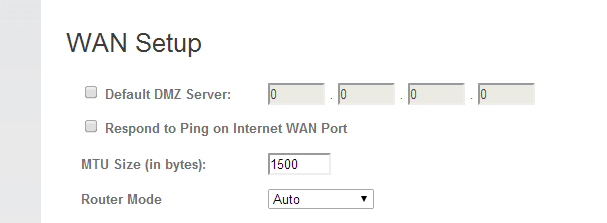
I do know that some routers are set-up to NOT respond to ping or allow remote access from the internet to the config page for security reasons. One of the most secure set-up is one where a malicious actor is not able to enter in a username or password at all.

Capture.PNG

Double check the router settings and see if the IP address is the same. Unless you have explicitly paid for it the address may have changed.

Josh :)
 

My Computer

Computer type
PC/Desktop
Computer Manufacturer/Model Number
Custom Built
OS
Windows 7 Professional x64 SP1 ; Windows Server 2012 R2 Standard
CPU
Intel Core i5 2400 @ 3.10GHz
Motherboard
Foxconn H67MP-S/-V/H67MP
Memory
8.0GB DDR3 @ 665MHz (2GBx4)
Graphics Card(s)
AMD Radeon HD 6870
Sound Card
Realtek High Definition Audio
Monitor(s) Displays
AOC 2243W & SMB1930NW
Screen Resolution
1440x900 & 1920x1080
Hard Drives
977GB Seagate ST31000524AS ATA Drive (SATA)
250GB WD iSCSI attached Drive
PSU
750W Gaming PSU
Case
Novatech Night
Cooling
Fan
Keyboard
Dell Standard PS/2 Keyboard
Mouse
R.A.T 07 Gaming Mouse
Internet Speed
Download: 10 Mbps Ping: 30ms Upload: 0.81 Mbps
Browser
Google Chrome
Other Info
Optiarc DVD RW AD-5260S ATA Device
Hey Guys,


I can ping my LAN Address (192.168.1.106), and I'm fine. I've pinged my computer from my work PC (This one I'm on), and I get a Timed Out Message.


I've gone ahead and released my ip address, and I'll renew it when my family gets home from work. I think I've had this IP too long and things are messing up.


My brothers computer has the same IP Address as mine, 96.46.29.108, this is from whatismyip.com & ipchicken.com.

I have no idea what in the heck is going on, and I'm starting to get frustrated. :(
 

My Computer

Computer type
PC/Desktop
Computer Manufacturer/Model Number
Custom Built
OS
Windows 8 64bit Professional
CPU
Intel Q9400 Quad Core 2.66Ghz
Motherboard
Gigabyte
Memory
G.Skill 4GB DDR3-1600
Graphics Card(s)
NVidia GeForce 560GTX
Sound Card
On-board
Monitor(s) Displays
24" LCD
Screen Resolution
1920x1080
Hard Drives
160GB WD
WD Caviar Black 640GB
WD 500GB
WD 1TB
WD 1TB
PSU
Cooler Master 1300W Silent Pro
Case
Sunbeam Transformer Black
Cooling
Fans
Keyboard
Logitech G15 (Original Screen + 18G Keys)
Mouse
Logitech MX518
Internet Speed
10mbit up/down Fiber Optic
Browser
FireFox / Chrome
Other Info
SF is amazing!
NAT is the problem. 192.168.0.0/16; 172.16.0.0/12; 10.0.0.0/8 are all private IP addresses and cannot be routed on the internet. To resolve this, when your internal LAN devices access the internet their source IP address is translated to the one public IP address configured on your WAN interface connecting to the internet. This translation is done on a layer 4 (TCP/UDP ... etc) port basis so two devices can be seen as having the same public IP address to the internet.

I take it your work PC is remote from your LAN? You cannot ping a private IP address remotely. It just doesn't work since they are not routed on the internet. Chances are your works network has it set to drop any traffic destined to a private IP address that does not exist rather than sending the traffic to the ISP (via the Default Route) and having the ISP drop it since it is a private IP address.

The issue with NAT is that it is a one way system (More of a benefit in the context of security). You cannot send data to a device without it first initiating the session. From your internal LAN you can ping google but google can't ping you unless you started the connection.

Hope This Helps,
Josh :)
 

My Computer

Computer type
PC/Desktop
Computer Manufacturer/Model Number
Custom Built
OS
Windows 7 Professional x64 SP1 ; Windows Server 2012 R2 Standard
CPU
Intel Core i5 2400 @ 3.10GHz
Motherboard
Foxconn H67MP-S/-V/H67MP
Memory
8.0GB DDR3 @ 665MHz (2GBx4)
Graphics Card(s)
AMD Radeon HD 6870
Sound Card
Realtek High Definition Audio
Monitor(s) Displays
AOC 2243W & SMB1930NW
Screen Resolution
1440x900 & 1920x1080
Hard Drives
977GB Seagate ST31000524AS ATA Drive (SATA)
250GB WD iSCSI attached Drive
PSU
750W Gaming PSU
Case
Novatech Night
Cooling
Fan
Keyboard
Dell Standard PS/2 Keyboard
Mouse
R.A.T 07 Gaming Mouse
Internet Speed
Download: 10 Mbps Ping: 30ms Upload: 0.81 Mbps
Browser
Google Chrome
Other Info
Optiarc DVD RW AD-5260S ATA Device
NAT is the problem. 192.168.0.0/16; 172.16.0.0/12; 10.0.0.0/8 are all private IP addresses and cannot be routed on the internet. To resolve this, when your internal LAN devices access the internet their source IP address is translated to the one public IP address configured on your WAN interface connecting to the internet. This translation is done on a layer 4 (TCP/UDP ... etc) port basis so two devices can be seen as having the same public IP address to the internet.

I take it your work PC is remote from your LAN? You cannot ping a private IP address remotely. It just doesn't work since they are not routed on the internet. Chances are your works network has it set to drop any traffic destined to a private IP address that does not exist rather than sending the traffic to the ISP (via the Default Route) and having the ISP drop it since it is a private IP address.

The issue with NAT is that it is a one way system (More of a benefit in the context of security). You cannot send data to a device without it first initiating the session. From your internal LAN you can ping google but google can't ping you unless you started the connection.

Hope This Helps,
Josh :)

It didn't use to be this way. I used to be able to host an ftp/mysql/webserver on my desktop at home. It wasn't until we switched companies (Company A was bought by Company B), and we were forced to switch. =/ I guess I'll give them a call.
 

My Computer

Computer type
PC/Desktop
Computer Manufacturer/Model Number
Custom Built
OS
Windows 8 64bit Professional
CPU
Intel Q9400 Quad Core 2.66Ghz
Motherboard
Gigabyte
Memory
G.Skill 4GB DDR3-1600
Graphics Card(s)
NVidia GeForce 560GTX
Sound Card
On-board
Monitor(s) Displays
24" LCD
Screen Resolution
1920x1080
Hard Drives
160GB WD
WD Caviar Black 640GB
WD 500GB
WD 1TB
WD 1TB
PSU
Cooler Master 1300W Silent Pro
Case
Sunbeam Transformer Black
Cooling
Fans
Keyboard
Logitech G15 (Original Screen + 18G Keys)
Mouse
Logitech MX518
Internet Speed
10mbit up/down Fiber Optic
Browser
FireFox / Chrome
Other Info
SF is amazing!
NAT is the problem. 192.168.0.0/16; 172.16.0.0/12; 10.0.0.0/8 are all private IP addresses and cannot be routed on the internet. To resolve this, when your internal LAN devices access the internet their source IP address is translated to the one public IP address configured on your WAN interface connecting to the internet. This translation is done on a layer 4 (TCP/UDP ... etc) port basis so two devices can be seen as having the same public IP address to the internet.

I take it your work PC is remote from your LAN? You cannot ping a private IP address remotely. It just doesn't work since they are not routed on the internet. Chances are your works network has it set to drop any traffic destined to a private IP address that does not exist rather than sending the traffic to the ISP (via the Default Route) and having the ISP drop it since it is a private IP address.

The issue with NAT is that it is a one way system (More of a benefit in the context of security). You cannot send data to a device without it first initiating the session. From your internal LAN you can ping google but google can't ping you unless you started the connection.

Hope This Helps,
Josh :)

It didn't use to be this way. I used to be able to host an ftp/mysql/webserver on my desktop at home. It wasn't until we switched companies (Company A was bought by Company B), and we were forced to switch. =/ I guess I'll give them a call.

So is this an issue with connecting to the router or the the computer hosting the data? Your original post didn't make it clear that you were actually hosting something but rather couldn't access your router...

This might be why there's confusion with addressing.

It might be worth seeing if the ports you use are blocked by your ISP since hosting websites and services normally require a business package or subscription of some sort. As a testing measure, try to place your hosted server into the DMZ zone on your router. This will open up all ports and help to verify if this is a port based issue. If that works then you can remove the server from the DMZ and troubleshoot your port forwarding. If it doesn't then I would check that your public IP address on the router is the same as what you were trying to access and that your ISP isn't blocking the ports themselves.

   Warning
Remember to remove the server from the DMZ zone after testing since it may be vulnerable to attack.


Josh :)
 

My Computer

Computer type
PC/Desktop
Computer Manufacturer/Model Number
Custom Built
OS
Windows 7 Professional x64 SP1 ; Windows Server 2012 R2 Standard
CPU
Intel Core i5 2400 @ 3.10GHz
Motherboard
Foxconn H67MP-S/-V/H67MP
Memory
8.0GB DDR3 @ 665MHz (2GBx4)
Graphics Card(s)
AMD Radeon HD 6870
Sound Card
Realtek High Definition Audio
Monitor(s) Displays
AOC 2243W & SMB1930NW
Screen Resolution
1440x900 & 1920x1080
Hard Drives
977GB Seagate ST31000524AS ATA Drive (SATA)
250GB WD iSCSI attached Drive
PSU
750W Gaming PSU
Case
Novatech Night
Cooling
Fan
Keyboard
Dell Standard PS/2 Keyboard
Mouse
R.A.T 07 Gaming Mouse
Internet Speed
Download: 10 Mbps Ping: 30ms Upload: 0.81 Mbps
Browser
Google Chrome
Other Info
Optiarc DVD RW AD-5260S ATA Device
I fixed the pinging problem. Now I've got to figure out where I went wrong with the FTP/Webserver.

Thanks guys!

It was "Block Anonymous Incoming Requests".
 

My Computer

Computer type
PC/Desktop
Computer Manufacturer/Model Number
Custom Built
OS
Windows 8 64bit Professional
CPU
Intel Q9400 Quad Core 2.66Ghz
Motherboard
Gigabyte
Memory
G.Skill 4GB DDR3-1600
Graphics Card(s)
NVidia GeForce 560GTX
Sound Card
On-board
Monitor(s) Displays
24" LCD
Screen Resolution
1920x1080
Hard Drives
160GB WD
WD Caviar Black 640GB
WD 500GB
WD 1TB
WD 1TB
PSU
Cooler Master 1300W Silent Pro
Case
Sunbeam Transformer Black
Cooling
Fans
Keyboard
Logitech G15 (Original Screen + 18G Keys)
Mouse
Logitech MX518
Internet Speed
10mbit up/down Fiber Optic
Browser
FireFox / Chrome
Other Info
SF is amazing!
Back
Top