
Hi all,
I have a small Stardom RAID Gigabit NAS with just under 1TB of data that I want to back up to another drive. It has a very slow USB port (5Mb/s) so I cant use that, but it has Ethernet (obviously).
My router is not Gigabit rated so transfers from the NAS back to the PC (Win 7 x64 Ultimate) are only running at about 11Mb/s. Backing up like this is going to take days.....
So.... thought I'd try and connect the NAS to the PC directly via Ethernet as my Mobo has a second Ethernet port. I'm not sure what I'm doing wrong, it's probably something really obvious so would be grateful for any help. I just want to be able to see the folders on the NAS just like I can when it's connected to my Home Network via the router (but hopefully it will transfer data much faster!).
Here's what I did:
1) Connected the NAS to my spare Ethernet Port (used a conventional cable and assuming LAN card is detecting the need to Auto-Crossover, this gives the following additional location in Network Settings showing a new "Public Network":
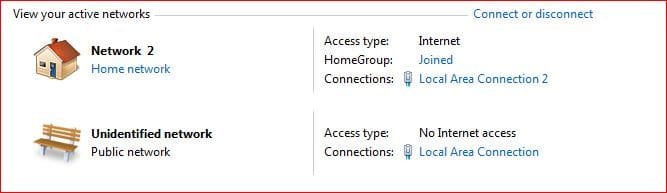
This appears to be "set" like this. Double clicking the park bench icon should allow a name change but I cant type in the box (or change the icon) or change the "type" of network (not sure if I need to or not).
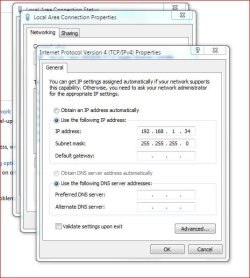
2) Opened the new Network Adapter Properties and assigned an IPv4 address:
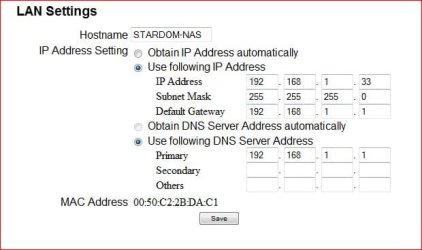
3) I had preset the NAS with a static IP before I started this:
The NAS now appears in the Network screen as an "Other Device". If I double click it I go straight to the admin screen in a browser. I can carry out all admin functions and access the NAS. It does not appear up top in the "computers" section as it does when it's connected via LAN2 (the home network).
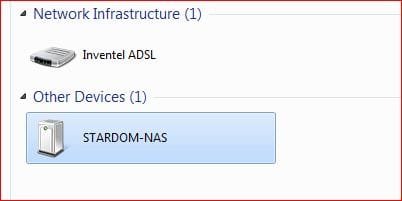
So I can access it via the admin screens, I can ping it successfully too on 192.168.1.33 but I can't see it's folders.
Here's my IPConfig screen showing both LAN ports:
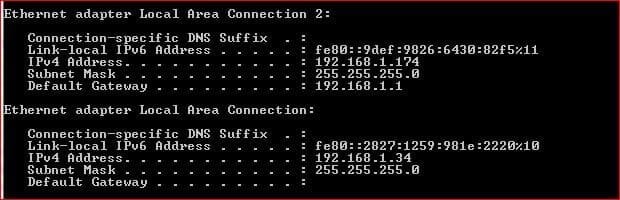
I'm obviously doing something wrong . Network Sharing is ON and I've lowered the encryption from 128 to 40-50 in the Advanced Network Changes screen. Can't think what else to do.
Hope that helps...!
TIA
Jaybee
I have a small Stardom RAID Gigabit NAS with just under 1TB of data that I want to back up to another drive. It has a very slow USB port (5Mb/s) so I cant use that, but it has Ethernet (obviously).
My router is not Gigabit rated so transfers from the NAS back to the PC (Win 7 x64 Ultimate) are only running at about 11Mb/s. Backing up like this is going to take days.....
So.... thought I'd try and connect the NAS to the PC directly via Ethernet as my Mobo has a second Ethernet port. I'm not sure what I'm doing wrong, it's probably something really obvious so would be grateful for any help. I just want to be able to see the folders on the NAS just like I can when it's connected to my Home Network via the router (but hopefully it will transfer data much faster!).
Here's what I did:
1) Connected the NAS to my spare Ethernet Port (used a conventional cable and assuming LAN card is detecting the need to Auto-Crossover, this gives the following additional location in Network Settings showing a new "Public Network":
This appears to be "set" like this. Double clicking the park bench icon should allow a name change but I cant type in the box (or change the icon) or change the "type" of network (not sure if I need to or not).
2) Opened the new Network Adapter Properties and assigned an IPv4 address:
3) I had preset the NAS with a static IP before I started this:
The NAS now appears in the Network screen as an "Other Device". If I double click it I go straight to the admin screen in a browser. I can carry out all admin functions and access the NAS. It does not appear up top in the "computers" section as it does when it's connected via LAN2 (the home network).
So I can access it via the admin screens, I can ping it successfully too on 192.168.1.33 but I can't see it's folders.
Here's my IPConfig screen showing both LAN ports:
I'm obviously doing something wrong
. Network Sharing is ON and I've lowered the encryption from 128 to 40-50 in the Advanced Network Changes screen. Can't think what else to do. Hope that helps...!
TIA
Jaybee
My Computer
At a glance
Windows 7 64bit Ultimatei7 920 o/c to 3.04Ghz12Gb Corsair XMS DDR3 PC3-12800 (1600) CAS 9768Mb Nvidia Quadro FX 1800
- Computer Manufacturer/Model Number
- Scan 3XS
- OS
- Windows 7 64bit Ultimate
- CPU
- i7 920 o/c to 3.04Ghz
- Motherboard
- Asus P6T Deluxe
- Memory
- 12Gb Corsair XMS DDR3 PC3-12800 (1600) CAS 9
- Graphics Card(s)
- 768Mb Nvidia Quadro FX 1800
- Sound Card
- onboard
- Monitor(s) Displays
- Apple Cinema (aluminium) 20"
- Screen Resolution
- 1680 x 1050
- Hard Drives
- 160 Gb Intel SSD Gen 2
- PSU
- 550W Corsair
- Case
- Lian Li
- Cooling
- Noctua NH-U12P SE2 Dual Fan
- Other Info
- 3 x 1TB WD Caviar Black storage drives.


