Ping spikes

keyboardface

New member
Member
Local time
9:45 PM
Messages
75
Recently I've started getting these big ping spikes whilst online gaming making them kinda pointless to play cos I'd get temporary 'Connection Interrupted' errors and such. My setup hasn't changed and I've never had this problem before so I'm hoping it's a software issue or some pretty well hidden malware.

Code:
Pinging google.com [173.194.34.169] with 32 bytes of data:
Reply from 173.194.34.169: bytes=32 time=29ms TTL=58
Reply from 173.194.34.169: bytes=32 time=30ms TTL=58
Reply from 173.194.34.169: bytes=32 time=31ms TTL=58
Reply from 173.194.34.169: bytes=32 time=29ms TTL=58
Reply from 173.194.34.169: bytes=32 time=30ms TTL=58
Reply from 173.194.34.169: bytes=32 time=36ms TTL=58
Reply from 173.194.34.169: bytes=32 time=29ms TTL=58
Reply from 173.194.34.169: bytes=32 time=30ms TTL=58
Reply from 173.194.34.169: bytes=32 time=29ms TTL=58
Reply from 173.194.34.169: bytes=32 time=39ms TTL=58
Reply from 173.194.34.169: bytes=32 time=31ms TTL=58
Reply from 173.194.34.169: bytes=32 time=36ms TTL=58
Reply from 173.194.34.169: bytes=32 time=29ms TTL=58
Reply from 173.194.34.169: bytes=32 time=30ms TTL=58
Reply from 173.194.34.169: bytes=32 time=34ms TTL=58
Reply from 173.194.34.169: bytes=32 time=29ms TTL=58
Reply from 173.194.34.169: bytes=32 time=30ms TTL=58
Reply from 173.194.34.169: bytes=32 time=31ms TTL=58
Reply from 173.194.34.169: bytes=32 time=29ms TTL=58
Reply from 173.194.34.169: bytes=32 time=32ms TTL=58
Reply from 173.194.34.169: bytes=32 time=31ms TTL=58
Reply from 173.194.34.169: bytes=32 time=29ms TTL=58
Reply from 173.194.34.169: bytes=32 time=31ms TTL=58
Reply from 173.194.34.169: bytes=32 time=30ms TTL=58
Reply from 173.194.34.169: bytes=32 time=29ms TTL=58
Reply from 173.194.34.169: bytes=32 time=30ms TTL=58
Reply from 173.194.34.169: bytes=32 time=32ms TTL=58
Reply from 173.194.34.169: bytes=32 time=30ms TTL=58
Reply from 173.194.34.169: bytes=32 time=29ms TTL=58
Reply from 173.194.34.169: bytes=32 time=31ms TTL=58
Reply from 173.194.34.169: bytes=32 time=30ms TTL=58
Reply from 173.194.34.169: bytes=32 time=39ms TTL=58
Reply from 173.194.34.169: bytes=32 time=29ms TTL=58
Reply from 173.194.34.169: bytes=32 time=30ms TTL=58
Reply from 173.194.34.169: bytes=32 time=34ms TTL=58
Reply from 173.194.34.169: bytes=32 time=29ms TTL=58
Reply from 173.194.34.169: bytes=32 time=32ms TTL=58
Reply from 173.194.34.169: bytes=32 time=29ms TTL=58
Reply from 173.194.34.169: bytes=32 time=30ms TTL=58
Reply from 173.194.34.169: bytes=32 time=29ms TTL=58
Reply from 173.194.34.169: bytes=32 time=30ms TTL=58
Reply from 173.194.34.169: bytes=32 time=29ms TTL=58
Reply from 173.194.34.169: bytes=32 time=30ms TTL=58
Reply from 173.194.34.169: bytes=32 time=29ms TTL=58
[B]Reply from 173.194.34.169: bytes=32 time=97ms TTL=58[/B]
[B]Reply from 173.194.34.169: bytes=32 time=206ms TTL=58[/B]
[B]Reply from 173.194.34.169: bytes=32 time=251ms TTL=58[/B]
Reply from 173.194.34.169: bytes=32 time=56ms TTL=58
Reply from 173.194.34.169: bytes=32 time=30ms TTL=58
Reply from 173.194.34.169: bytes=32 time=31ms TTL=58
Reply from 173.194.34.169: bytes=32 time=30ms TTL=58
Reply from 173.194.34.169: bytes=32 time=29ms TTL=58
Reply from 173.194.34.169: bytes=32 time=30ms TTL=58
Reply from 173.194.34.169: bytes=32 time=29ms TTL=58
Reply from 173.194.34.169: bytes=32 time=30ms TTL=58
Reply from 173.194.34.169: bytes=32 time=31ms TTL=58
Reply from 173.194.34.169: bytes=32 time=30ms TTL=58
[B]Reply from 173.194.34.169: bytes=32 time=1192ms TTL=58[/B]
[B]Reply from 173.194.34.169: bytes=32 time=112ms TTL=58[/B]
[B]Reply from 173.194.34.169: bytes=32 time=1362ms TTL=58[/B]
[B]Reply from 173.194.34.169: bytes=32 time=185ms TTL=58[/B]
Reply from 173.194.34.169: bytes=32 time=29ms TTL=58
Reply from 173.194.34.169: bytes=32 time=31ms TTL=58
Reply from 173.194.34.169: bytes=32 time=78ms TTL=58

Ping statistics for 173.194.34.169:
    Packets: Sent = 93, Received = 93, Lost = 0 (0% loss),
Approximate round trip times in milli-seconds:
    Minimum = 29ms, Maximum = 1362ms, Average = 65ms
I've restarted in Safe Mode with Networking and tried the same thing and the ping spikes still occur.
I've tested the ping to Google on another machine on the network and there were no spikes at all, ~30ms straight across the board.

Any ideas to help me work out what's causing them? Any help would be much appreciated.
 

My Computer

Computer type
PC/Desktop
OS
Windows 7 Ultimate x64
CPU
AMD FX 8120 Eight-Core 3.10 GHz
Memory
8GB DDR3
Graphics Card(s)
GeForce GTX 550 Ti
Sound Card
SoundBlaster Live! 24-Bit
If you're not pinging Google, perhaps Google is pinging because you have some com blocked. Do you run Chrome or the Tool Bar? They both "phone home" and report everything you do on your PC, basically.
 

My Computer

Computer type
PC/Desktop
Computer Manufacturer/Model Number
Built 2/11/2011
OS
Windows 7 Pro-x64
CPU
i7-2600 3.4GHz - 3.8GHz Turbo
Motherboard
Intel DH67BL-B3
Memory
8Gb - 2x4GB, Muskin 991770 PC3-1333
Graphics Card(s)
Integrated Intel HD 2000
Sound Card
Integrated Intel 10.1 HD, RealTek ALC892
Monitor(s) Displays
Asus LCD VH222H, Haier HL24XSL2a
Screen Resolution
1920x1080, 1920x1080
Hard Drives
Crucial SSD C300-128Gb,
Western Digital WD5002AALX - 500Gb,
Western Digital WD7501AALS - 750Gb
PSU
Seasonic 650W 80+ Gold Modular
Case
Rosewill Defender
Cooling
Stock CPU, Four 120mm case fans, PCH fan added
Keyboard
Logitech EX100 Y-RBH94 Wireless
Mouse
Logitech EX100 M-RCE95 Wireless
Internet Speed
3.0/1.5 Mbs
Antivirus
Microsoft Security Essentials
Browser
Microsoft Internet Explorer 11
Other Info
Antec Veris Premier-Multimedia IR Station,
Cyber Accoustics-3602 Speakers,
AFT XM-5U Card Reader,
Hauppauge TV-HVR-2250,
Sony LX300 USB Turntable
If you're not pinging Google, perhaps Google is pinging because you have some com blocked. Do you run Chrome or the Tool Bar? They both "phone home" and report everything you do on your PC, basically.

I'm not sure what you mean sorry? I just used Google as an example to demonstrate the ping spikes. If you scroll down you'll see the spikes in bold.

I use Firefox.
 

My Computer

Computer type
PC/Desktop
OS
Windows 7 Ultimate x64
CPU
AMD FX 8120 Eight-Core 3.10 GHz
Memory
8GB DDR3
Graphics Card(s)
GeForce GTX 550 Ti
Sound Card
SoundBlaster Live! 24-Bit
So you did the pinging. So what's the problem?

It's not unusual for pings to be all over the place unless you have exclusive use of the routers from your location to the site. What did you use for the ping test?

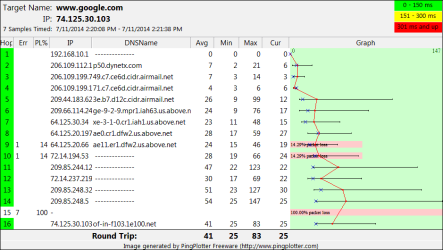
I just ran one and it's showing packet losses. Could be a router problem somewhere.
 

Attachments

  • Ping-google.com.png
    Ping-google.com.png
    18.3 KB · Views: 1

My Computer

Computer type
PC/Desktop
Computer Manufacturer/Model Number
Built 2/11/2011
OS
Windows 7 Pro-x64
CPU
i7-2600 3.4GHz - 3.8GHz Turbo
Motherboard
Intel DH67BL-B3
Memory
8Gb - 2x4GB, Muskin 991770 PC3-1333
Graphics Card(s)
Integrated Intel HD 2000
Sound Card
Integrated Intel 10.1 HD, RealTek ALC892
Monitor(s) Displays
Asus LCD VH222H, Haier HL24XSL2a
Screen Resolution
1920x1080, 1920x1080
Hard Drives
Crucial SSD C300-128Gb,
Western Digital WD5002AALX - 500Gb,
Western Digital WD7501AALS - 750Gb
PSU
Seasonic 650W 80+ Gold Modular
Case
Rosewill Defender
Cooling
Stock CPU, Four 120mm case fans, PCH fan added
Keyboard
Logitech EX100 Y-RBH94 Wireless
Mouse
Logitech EX100 M-RCE95 Wireless
Internet Speed
3.0/1.5 Mbs
Antivirus
Microsoft Security Essentials
Browser
Microsoft Internet Explorer 11
Other Info
Antec Veris Premier-Multimedia IR Station,
Cyber Accoustics-3602 Speakers,
AFT XM-5U Card Reader,
Hauppauge TV-HVR-2250,
Sony LX300 USB Turntable
So you did the pinging. So what's the problem?

It's not unusual for pings to be all over the place unless you have exclusive use of the routers from your location to the site. What did you use for the ping test?

I just ran one and it's showing packet losses. Could be a router problem somewhere.

I just used Command Prompt. I'm not convinced that random ping spikes of +1000ms are normal, and the problems I've been having with online gaming would prove that. There's only one other machine on this network and I still get the spikes when nobody is using it.
 

My Computer

Computer type
PC/Desktop
OS
Windows 7 Ultimate x64
CPU
AMD FX 8120 Eight-Core 3.10 GHz
Memory
8GB DDR3
Graphics Card(s)
GeForce GTX 550 Ti
Sound Card
SoundBlaster Live! 24-Bit
Let me get this straight--Your network is connected directly to Google servers? Are you inside the Google building?

Run a ping plot and you'll get a better idea of where your traffic is going. It returns a ping from each server in the message route. You'll should note that network traffic can get bounced all over the world just to get next door. It just depends on network load. There's a lot of load on the network now. MS just released a ton of updates.
 

My Computer

Computer type
PC/Desktop
Computer Manufacturer/Model Number
Built 2/11/2011
OS
Windows 7 Pro-x64
CPU
i7-2600 3.4GHz - 3.8GHz Turbo
Motherboard
Intel DH67BL-B3
Memory
8Gb - 2x4GB, Muskin 991770 PC3-1333
Graphics Card(s)
Integrated Intel HD 2000
Sound Card
Integrated Intel 10.1 HD, RealTek ALC892
Monitor(s) Displays
Asus LCD VH222H, Haier HL24XSL2a
Screen Resolution
1920x1080, 1920x1080
Hard Drives
Crucial SSD C300-128Gb,
Western Digital WD5002AALX - 500Gb,
Western Digital WD7501AALS - 750Gb
PSU
Seasonic 650W 80+ Gold Modular
Case
Rosewill Defender
Cooling
Stock CPU, Four 120mm case fans, PCH fan added
Keyboard
Logitech EX100 Y-RBH94 Wireless
Mouse
Logitech EX100 M-RCE95 Wireless
Internet Speed
3.0/1.5 Mbs
Antivirus
Microsoft Security Essentials
Browser
Microsoft Internet Explorer 11
Other Info
Antec Veris Premier-Multimedia IR Station,
Cyber Accoustics-3602 Speakers,
AFT XM-5U Card Reader,
Hauppauge TV-HVR-2250,
Sony LX300 USB Turntable
I didn't know that 1 or 2 ms difference was considered a spike.
 

My Computer

Computer type
PC/Desktop
Computer Manufacturer/Model Number
Home made Desktop
OS
Windows 10 Pro. 64/ version 1709 Windows 7 Pro/64
CPU
Intel i7-6800K @ 4.3
Motherboard
ASUS X-99 Deluxe II
Memory
Corsair Platinum 16 gig @2400
Graphics Card(s)
EVGA GTX 1070 OC
Monitor(s) Displays
Asus 27" LED LCD/VE278Q
Screen Resolution
1920-1080 or 1280-720 HDMI
Hard Drives
INTEL SSD 730-240 Gb Sata 3.0/
PSU
EVGA Platium 1200W
Case
Phanteks Luxe Tempered Glass 8 fans/ one radiator
Cooling
XSPC/ Water Cooled CPU
Keyboard
Das 4 Professional
Mouse
Logitech M705/MX Anywhere 2-S
Internet Speed
100 mbits
Antivirus
Microsoft Security Essentials/ Malwarebytes Premium 3.0/ SAS
Browser
I.E. 11 default/Firefox/ ISP Time Warner Cable/Spectrum
Other Info
LG BluRay Burner/
Sound system-KLipsch-THX/
Icy Dock ssd Hot Swap bays.
Also consider that this kind of pinging with a significant amount of packets is not normal for an extended period. No idea if that's your case, but the server may be applying to your connection as a defensive measure against DDOS.
 

My Computer

Computer type
Laptop
Computer Manufacturer/Model Number
Toshiba Sattelite A665-S6092
OS
Windows 7 Ultimate x64
CPU
Intel Core i7-740QM
Memory
8 GB DDR3
Graphics Card(s)
NVIDIA GeForce 330GT
Screen Resolution
1366x768
Hard Drives
Samsung 840 SSD 500GB
1TB USB3 external HD
Cooling
Coolermaster Notepal U3 notebook cooling pad
Internet Speed
3mbps ASDL
Antivirus
ClamWin 0.98.7
Browser
Opera 12.17 x86 (main), Firefox 38 (sec), IE11 (last resort)
Recently I've started getting these big ping spikes whilst online gaming making them kinda pointless to play cos I'd get temporary 'Connection Interrupted' errors and such. My setup hasn't changed and I've never had this problem before so I'm hoping it's a software issue or some pretty well hidden malware.

Code:
Pinging google.com [173.194.34.169] with 32 bytes of data:
Reply from 173.194.34.169: bytes=32 time=29ms TTL=58
Reply from 173.194.34.169: bytes=32 time=30ms TTL=58
Reply from 173.194.34.169: bytes=32 time=31ms TTL=58
Reply from 173.194.34.169: bytes=32 time=29ms TTL=58
Reply from 173.194.34.169: bytes=32 time=30ms TTL=58
Reply from 173.194.34.169: bytes=32 time=36ms TTL=58
Reply from 173.194.34.169: bytes=32 time=29ms TTL=58
Reply from 173.194.34.169: bytes=32 time=30ms TTL=58
Reply from 173.194.34.169: bytes=32 time=29ms TTL=58
Reply from 173.194.34.169: bytes=32 time=39ms TTL=58
Reply from 173.194.34.169: bytes=32 time=31ms TTL=58
Reply from 173.194.34.169: bytes=32 time=36ms TTL=58
Reply from 173.194.34.169: bytes=32 time=29ms TTL=58
Reply from 173.194.34.169: bytes=32 time=30ms TTL=58
Reply from 173.194.34.169: bytes=32 time=34ms TTL=58
Reply from 173.194.34.169: bytes=32 time=29ms TTL=58
Reply from 173.194.34.169: bytes=32 time=30ms TTL=58
Reply from 173.194.34.169: bytes=32 time=31ms TTL=58
Reply from 173.194.34.169: bytes=32 time=29ms TTL=58
Reply from 173.194.34.169: bytes=32 time=32ms TTL=58
Reply from 173.194.34.169: bytes=32 time=31ms TTL=58
Reply from 173.194.34.169: bytes=32 time=29ms TTL=58
Reply from 173.194.34.169: bytes=32 time=31ms TTL=58
Reply from 173.194.34.169: bytes=32 time=30ms TTL=58
Reply from 173.194.34.169: bytes=32 time=29ms TTL=58
Reply from 173.194.34.169: bytes=32 time=30ms TTL=58
Reply from 173.194.34.169: bytes=32 time=32ms TTL=58
Reply from 173.194.34.169: bytes=32 time=30ms TTL=58
Reply from 173.194.34.169: bytes=32 time=29ms TTL=58
Reply from 173.194.34.169: bytes=32 time=31ms TTL=58
Reply from 173.194.34.169: bytes=32 time=30ms TTL=58
Reply from 173.194.34.169: bytes=32 time=39ms TTL=58
Reply from 173.194.34.169: bytes=32 time=29ms TTL=58
Reply from 173.194.34.169: bytes=32 time=30ms TTL=58
Reply from 173.194.34.169: bytes=32 time=34ms TTL=58
Reply from 173.194.34.169: bytes=32 time=29ms TTL=58
Reply from 173.194.34.169: bytes=32 time=32ms TTL=58
Reply from 173.194.34.169: bytes=32 time=29ms TTL=58
Reply from 173.194.34.169: bytes=32 time=30ms TTL=58
Reply from 173.194.34.169: bytes=32 time=29ms TTL=58
Reply from 173.194.34.169: bytes=32 time=30ms TTL=58
Reply from 173.194.34.169: bytes=32 time=29ms TTL=58
Reply from 173.194.34.169: bytes=32 time=30ms TTL=58
Reply from 173.194.34.169: bytes=32 time=29ms TTL=58
[B]Reply from 173.194.34.169: bytes=32 time=97ms TTL=58[/B]
[B]Reply from 173.194.34.169: bytes=32 time=206ms TTL=58[/B]
[B]Reply from 173.194.34.169: bytes=32 time=251ms TTL=58[/B]
Reply from 173.194.34.169: bytes=32 time=56ms TTL=58
Reply from 173.194.34.169: bytes=32 time=30ms TTL=58
Reply from 173.194.34.169: bytes=32 time=31ms TTL=58
Reply from 173.194.34.169: bytes=32 time=30ms TTL=58
Reply from 173.194.34.169: bytes=32 time=29ms TTL=58
Reply from 173.194.34.169: bytes=32 time=30ms TTL=58
Reply from 173.194.34.169: bytes=32 time=29ms TTL=58
Reply from 173.194.34.169: bytes=32 time=30ms TTL=58
Reply from 173.194.34.169: bytes=32 time=31ms TTL=58
Reply from 173.194.34.169: bytes=32 time=30ms TTL=58
[B]Reply from 173.194.34.169: bytes=32 time=1192ms TTL=58[/B]
[B]Reply from 173.194.34.169: bytes=32 time=112ms TTL=58[/B]
[B]Reply from 173.194.34.169: bytes=32 time=1362ms TTL=58[/B]
[B]Reply from 173.194.34.169: bytes=32 time=185ms TTL=58[/B]
Reply from 173.194.34.169: bytes=32 time=29ms TTL=58
Reply from 173.194.34.169: bytes=32 time=31ms TTL=58
Reply from 173.194.34.169: bytes=32 time=78ms TTL=58

Ping statistics for 173.194.34.169:
    Packets: Sent = 93, Received = 93, Lost = 0 (0% loss),
Approximate round trip times in milli-seconds:
    Minimum = 29ms, Maximum = 1362ms, Average = 65ms
I've restarted in Safe Mode with Networking and tried the same thing and the ping spikes still occur.
I've tested the ping to Google on another machine on the network and there were no spikes at all, ~30ms straight across the board.

Any ideas to help me work out what's causing them? Any help would be much appreciated.

With times like that I am suspecting that this is a wireless based connection? Wireless can suffer from various interferences that could affect latency. Test your latency when using a wired connection to see if the Wireless connectivity is the cause of this.

If the latency is still irregular on a wired connection and other devices do not experience any issues then it could be software based.

I would begin to look into drivers for your NIC. What is the make/model of your NIC?

There was a case awhile back that had a similar symptom and the issue was the result of a bad driver.

Ping (ICMP) is a connection-less protocol therefore the ping spikes wouldn't be a result of his server-client connection as there is none. Equally, if it was traffic engineering then it would affect anyone who pings Google and for me I do not receive lag spikes.

Code:
C:\Users\Josh>ping www.google.com -t

Pinging www.google.com [2.127.252.221] with 32 bytes of dat
Reply from 2.127.252.221: bytes=32 time=17ms TTL=60
Reply from 2.127.252.221: bytes=32 time=18ms TTL=60
Reply from 2.127.252.221: bytes=32 time=19ms TTL=60
Reply from 2.127.252.221: bytes=32 time=18ms TTL=60
Reply from 2.127.252.221: bytes=32 time=19ms TTL=60
Reply from 2.127.252.221: bytes=32 time=18ms TTL=60
Reply from 2.127.252.221: bytes=32 time=17ms TTL=60
Reply from 2.127.252.221: bytes=32 time=22ms TTL=60
Reply from 2.127.252.221: bytes=32 time=16ms TTL=60
Reply from 2.127.252.221: bytes=32 time=17ms TTL=60
Reply from 2.127.252.221: bytes=32 time=21ms TTL=60
Reply from 2.127.252.221: bytes=32 time=18ms TTL=60
Reply from 2.127.252.221: bytes=32 time=22ms TTL=60
Reply from 2.127.252.221: bytes=32 time=17ms TTL=60
Reply from 2.127.252.221: bytes=32 time=16ms TTL=60
Reply from 2.127.252.221: bytes=32 time=20ms TTL=60
Reply from 2.127.252.221: bytes=32 time=21ms TTL=60
Reply from 2.127.252.221: bytes=32 time=35ms TTL=60
Reply from 2.127.252.221: bytes=32 time=17ms TTL=60
Reply from 2.127.252.221: bytes=32 time=20ms TTL=60
Reply from 2.127.252.221: bytes=32 time=17ms TTL=60
Reply from 2.127.252.221: bytes=32 time=16ms TTL=60
Reply from 2.127.252.221: bytes=32 time=17ms TTL=60
Reply from 2.127.252.221: bytes=32 time=16ms TTL=60
Reply from 2.127.252.221: bytes=32 time=19ms TTL=60
Reply from 2.127.252.221: bytes=32 time=16ms TTL=60
Reply from 2.127.252.221: bytes=32 time=17ms TTL=60
Reply from 2.127.252.221: bytes=32 time=18ms TTL=60
Reply from 2.127.252.221: bytes=32 time=17ms TTL=60
Reply from 2.127.252.221: bytes=32 time=18ms TTL=60
Reply from 2.127.252.221: bytes=32 time=21ms TTL=60
Reply from 2.127.252.221: bytes=32 time=18ms TTL=60
Reply from 2.127.252.221: bytes=32 time=16ms TTL=60
Reply from 2.127.252.221: bytes=32 time=18ms TTL=60

Ping statistics for 2.127.252.221:
    Packets: Sent = 42, Received = 42, Lost = 0 (0% loss),
Approximate round trip times in milli-seconds:
    Minimum = 16ms, Maximum = 70ms, Average = 19ms
Control-C
^C
C:\Users\Josh>

With a wireless connection like mine a Jitter (Variance in latency) of 1 to 5 ms is average.

Josh :)
 

My Computer

Computer type
PC/Desktop
Computer Manufacturer/Model Number
Custom Built
OS
Windows 7 Professional x64 SP1 ; Windows Server 2012 R2 Standard
CPU
Intel Core i5 2400 @ 3.10GHz
Motherboard
Foxconn H67MP-S/-V/H67MP
Memory
8.0GB DDR3 @ 665MHz (2GBx4)
Graphics Card(s)
AMD Radeon HD 6870
Sound Card
Realtek High Definition Audio
Monitor(s) Displays
AOC 2243W & SMB1930NW
Screen Resolution
1440x900 & 1920x1080
Hard Drives
977GB Seagate ST31000524AS ATA Drive (SATA)
250GB WD iSCSI attached Drive
PSU
750W Gaming PSU
Case
Novatech Night
Cooling
Fan
Keyboard
Dell Standard PS/2 Keyboard
Mouse
R.A.T 07 Gaming Mouse
Internet Speed
Download: 10 Mbps Ping: 30ms Upload: 0.81 Mbps
Browser
Google Chrome
Other Info
Optiarc DVD RW AD-5260S ATA Device
Oh there is indeed a connection; Otherwise, the server(s) wouldn't respond. While the ICMP special message is handled differently, it's still a message. The option to respond is server based. The Ping doesn't really mean much if you're looking for why a delay is occurring. You certainly can't say it's local software simply because there is a delay. All a ping tells you is end-to-end time. A routing trace (Tracert) is more meaningful in determining where the delay is occurring since you get a "ping" return from each server that handles the message to the end-point. If you see an elevated response from a server in the route, the problem is there, not local.

The route servers I see may not be the same as the servers you see. More often than not, they won't be the same until the message reaches the end point. So comparing two pings from different clients to the same end point doesn't tell you anything. The OP experienced delays and that's for sure but given the data above, blaming a driver is a shot in the dark.
 

My Computer

Computer type
PC/Desktop
Computer Manufacturer/Model Number
Built 2/11/2011
OS
Windows 7 Pro-x64
CPU
i7-2600 3.4GHz - 3.8GHz Turbo
Motherboard
Intel DH67BL-B3
Memory
8Gb - 2x4GB, Muskin 991770 PC3-1333
Graphics Card(s)
Integrated Intel HD 2000
Sound Card
Integrated Intel 10.1 HD, RealTek ALC892
Monitor(s) Displays
Asus LCD VH222H, Haier HL24XSL2a
Screen Resolution
1920x1080, 1920x1080
Hard Drives
Crucial SSD C300-128Gb,
Western Digital WD5002AALX - 500Gb,
Western Digital WD7501AALS - 750Gb
PSU
Seasonic 650W 80+ Gold Modular
Case
Rosewill Defender
Cooling
Stock CPU, Four 120mm case fans, PCH fan added
Keyboard
Logitech EX100 Y-RBH94 Wireless
Mouse
Logitech EX100 M-RCE95 Wireless
Internet Speed
3.0/1.5 Mbs
Antivirus
Microsoft Security Essentials
Browser
Microsoft Internet Explorer 11
Other Info
Antec Veris Premier-Multimedia IR Station,
Cyber Accoustics-3602 Speakers,
AFT XM-5U Card Reader,
Hauppauge TV-HVR-2250,
Sony LX300 USB Turntable
Oh there is indeed a connection; Otherwise, the server(s) wouldn't respond. While the ICMP special message is handled differently, it's still a message. The option to respond is server based.

By connection-less I am referring to whether an identifiable connection can be established. Another post suggested that Google may be performing traffic shaping techniques by queing the traffic before processing. In a connection-less application like ICMP there is no way to uniquely identify each echo request and reply. If traffic shaping techniques had been enforced then other people who ping Google would experience the same spikes. I didn't which makes the validity of this questionable but not completely invalid. This is the reason why I sent the ping messages myself. My intentions had nothing to do with the path taken to the server.

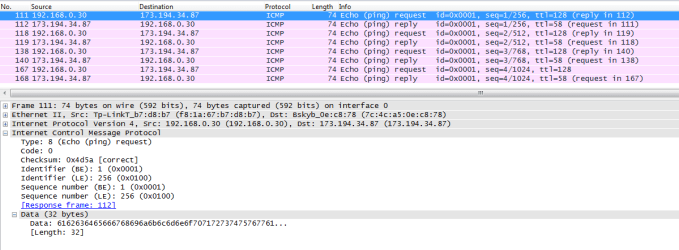
If you look at a wire capture of a ping you can see that no uniquely identifiable information is exchanged and no keep-alive messages are sent either since there is no formal connection being made.

Capture.PNG

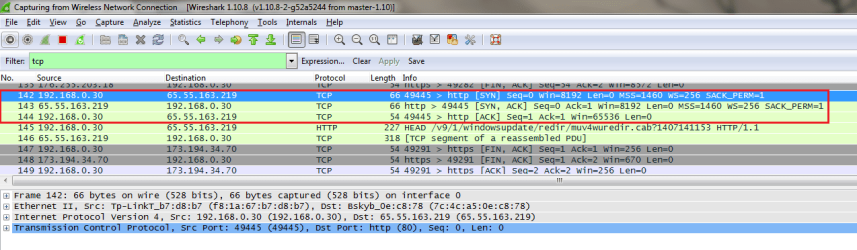
This is as opposed to TCP based applications which does establish a unique session (Also known as a Socket). This would then make QoS enforcement on a particular connection more feasible. An example of a TCP connection being established can be seen below:

TCP-Connection.png

A traceroute is good option however when using it on the internet it can be rather decieving and will not show the full picture. For example, a traceroute for me says that Google is 7 hops away. So that would mean that my ISP has less than 7 routers in the path to Google? No possible. Traceroute relies on the TTL being decremented in order to offer an accurate reading. As for the latency times... it could offer a suitable reading to see if a router in the path is causing extortionate high spikes in latency however again not all routers are recorded in a trace. Additionally, traceroute works by sending ICMP messages with low TTLs and receives feedback based on the ICMP TTL Expiration messages. The latency involved would not be accurate to a routing lookup as the router involved would need to create a new packet to send back where as in normal transit traffic it will just need to perform a route lookup and send the original packet on its way.

trace.png

As for my suggestion on testing drivers first it would seem the next logical step as we test each variable that could affect latency. Why start blaming a router on the internet when you haven't tested if there is an issue within the local network to begin with?

We've first established this is application independent from the OP's response that it happens when playing online games as well as the noticeable spikes when pinging Google.

First check would be to see if a third party application or anti-virus software may be causing the issue? The OP stated that they attempted in safe mode however the issue still existed?

What is still enabled during safe mode that could affect latency? Could be malware which is a potential culprit however drivers are still involved so could also be a potential culprit?

Moving up away from the local machine we could say that it is the internal router at the home that is the cause? Well yes it could be however the OP stated that no other devices on the network experience the same issue so would be unlikely. What about the uplink to the ISP? Again, the issue is apparently local to this device...

Then we enter the internet where ability to test things with precise accuracy becomes near impossible. As the OP stated, this is application independent therefore the chances of there being a constant latency spike for different destination servers would be unlikely. It could be the ISP itself however again, no other devices apparently experience this. A good way to test would be to possible test latency on a different network ... maybe a friend or family's or a public hotspot?

Another reason for attempting to rule out drivers is that I have seen it been a culprit before. Take the following thread as an example:

http://www.sevenforums.com/network-sharing/300935-random-ping-spikes.html

Very similar symptoms.

While a ping can't tell you everything it doesn't mean you can't break down the path that is being taken and identifying potential variables that could cause the issue. Starting from within the local network helps to prevent unnecessary calls to an ISP on fixing an issue that may be local to a particular machine.

Just my thought process, if you have a better idea then please share. I may have missed something :)

Josh :)
 
Last edited:

My Computer

Computer type
PC/Desktop
Computer Manufacturer/Model Number
Custom Built
OS
Windows 7 Professional x64 SP1 ; Windows Server 2012 R2 Standard
CPU
Intel Core i5 2400 @ 3.10GHz
Motherboard
Foxconn H67MP-S/-V/H67MP
Memory
8.0GB DDR3 @ 665MHz (2GBx4)
Graphics Card(s)
AMD Radeon HD 6870
Sound Card
Realtek High Definition Audio
Monitor(s) Displays
AOC 2243W & SMB1930NW
Screen Resolution
1440x900 & 1920x1080
Hard Drives
977GB Seagate ST31000524AS ATA Drive (SATA)
250GB WD iSCSI attached Drive
PSU
750W Gaming PSU
Case
Novatech Night
Cooling
Fan
Keyboard
Dell Standard PS/2 Keyboard
Mouse
R.A.T 07 Gaming Mouse
Internet Speed
Download: 10 Mbps Ping: 30ms Upload: 0.81 Mbps
Browser
Google Chrome
Other Info
Optiarc DVD RW AD-5260S ATA Device
You'll have to explain what you mean by a "formal connection". You don't need a session for a server to respond to a frame but there is a connection established. The server will respond to a frame. That frame has a source address and a destination address. The response is really an error response (time to live = 0) but the server does respond. It's in your example called a "reply". It can't respond without knowing where to send it. Formal or not, that's a connection. The ping software just doesn't pull a number out of a hat. :rolleyes:
 

My Computer

Computer type
PC/Desktop
Computer Manufacturer/Model Number
Built 2/11/2011
OS
Windows 7 Pro-x64
CPU
i7-2600 3.4GHz - 3.8GHz Turbo
Motherboard
Intel DH67BL-B3
Memory
8Gb - 2x4GB, Muskin 991770 PC3-1333
Graphics Card(s)
Integrated Intel HD 2000
Sound Card
Integrated Intel 10.1 HD, RealTek ALC892
Monitor(s) Displays
Asus LCD VH222H, Haier HL24XSL2a
Screen Resolution
1920x1080, 1920x1080
Hard Drives
Crucial SSD C300-128Gb,
Western Digital WD5002AALX - 500Gb,
Western Digital WD7501AALS - 750Gb
PSU
Seasonic 650W 80+ Gold Modular
Case
Rosewill Defender
Cooling
Stock CPU, Four 120mm case fans, PCH fan added
Keyboard
Logitech EX100 Y-RBH94 Wireless
Mouse
Logitech EX100 M-RCE95 Wireless
Internet Speed
3.0/1.5 Mbs
Antivirus
Microsoft Security Essentials
Browser
Microsoft Internet Explorer 11
Other Info
Antec Veris Premier-Multimedia IR Station,
Cyber Accoustics-3602 Speakers,
AFT XM-5U Card Reader,
Hauppauge TV-HVR-2250,
Sony LX300 USB Turntable
You'll have to explain what you mean by a "formal connection". You don't need a session for a server to respond to a frame but there is a connection established. The server will respond to a frame. That frame has a source address and a destination address. The response is really an error response (time to live = 0) but the server does respond. It's in your example called a "reply". It can't respond without knowing where to send it. Formal or not, that's a connection. The ping software just doesn't pull a number out of a hat. :rolleyes:

By a "formal connection" I mean a full session being made between client and server with record of that happening. The second image in my previous post shows a TCP three way handshake taking place and causing a connection to be established. If you run the following command in a command prompt it will show the various connections that are established.

Code:
netstat -a

ICMP doesn't appear because it doesn't establish a session before sending the echo requests and is therefore known as a connection-less protocol. If you've ever had any experience with UDP you will notice that it is also known as a connection-less protocol since a connection isn't technically established. For example, consider DNS which uses UDP port 53.

DNS.PNG

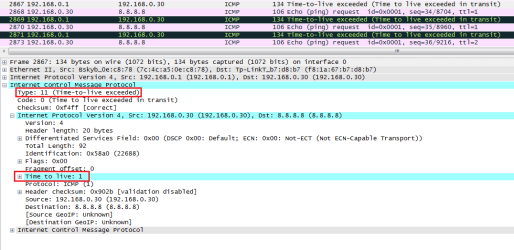
The response is a designated type of ICMP message dedicated for echo-reply functions (ICMP type 0). TTL Expiration messages are of type 11. The reason the server replies was because the destination IP address and layer 2 address on the other side matched the one of the server therefore it read the whole packet. The only time a TTL expiration error message is legitimately used is in traceroute ;)

ping.png

TTL expiration is used for traceroute messages as that is how it determines what hops are in the path.

trace.png

The server knows what IP address to send the reply message to but an IP address isn't 100% unique. Consider the implantation of NAT (Network Address Translation). Many devices could be using one public IP address when accessing a server. With ICMP the unique information is handled via NAT but from a server perspective it will not know the NAT table mapping and therefore only has an IP address to go by.

With something like TCP, which establishes a connection, there is a unique source port generated by the client in the process and therefore offers something that can uniquely identify each individual connection. For example, a session from the following socket:

200.12.35.6:34562

Can be seen as a different connection than:

200.12.35.6:40023

With ICMP there is no source port made therefore two pings coming from the same IP address cannot be distinguished from each other.

Josh :)
 

My Computer

Computer type
PC/Desktop
Computer Manufacturer/Model Number
Custom Built
OS
Windows 7 Professional x64 SP1 ; Windows Server 2012 R2 Standard
CPU
Intel Core i5 2400 @ 3.10GHz
Motherboard
Foxconn H67MP-S/-V/H67MP
Memory
8.0GB DDR3 @ 665MHz (2GBx4)
Graphics Card(s)
AMD Radeon HD 6870
Sound Card
Realtek High Definition Audio
Monitor(s) Displays
AOC 2243W & SMB1930NW
Screen Resolution
1440x900 & 1920x1080
Hard Drives
977GB Seagate ST31000524AS ATA Drive (SATA)
250GB WD iSCSI attached Drive
PSU
750W Gaming PSU
Case
Novatech Night
Cooling
Fan
Keyboard
Dell Standard PS/2 Keyboard
Mouse
R.A.T 07 Gaming Mouse
Internet Speed
Download: 10 Mbps Ping: 30ms Upload: 0.81 Mbps
Browser
Google Chrome
Other Info
Optiarc DVD RW AD-5260S ATA Device
Shadowjk sure is a lot of neat information but I have some question I think you could help with.
From computer A a signal leaves and goes through all the hardware, cables, fiber, switches and possibly a satellite to reach computer B and back to computer A.

1. Can a 2 or 3 na variation be noticed by a user of computer A?
2. Can the exact external device be pinpointed where the 2 or 3 ns are lost with all the things that a signal has to go through?
3. If one could pinpoint the location of the dropped 2 or 3 ns somewhere in the world what could they do about it?

Keep in mind I only have 3 brain cells so it's easy to get me lost.
I'm thinking one could loose a ns just entering a Google Server Complex and then doing all the things that need to be done with the signal before it leaves again.
 

My Computer

Computer type
PC/Desktop
Computer Manufacturer/Model Number
Home made Desktop
OS
Windows 10 Pro. 64/ version 1709 Windows 7 Pro/64
CPU
Intel i7-6800K @ 4.3
Motherboard
ASUS X-99 Deluxe II
Memory
Corsair Platinum 16 gig @2400
Graphics Card(s)
EVGA GTX 1070 OC
Monitor(s) Displays
Asus 27" LED LCD/VE278Q
Screen Resolution
1920-1080 or 1280-720 HDMI
Hard Drives
INTEL SSD 730-240 Gb Sata 3.0/
PSU
EVGA Platium 1200W
Case
Phanteks Luxe Tempered Glass 8 fans/ one radiator
Cooling
XSPC/ Water Cooled CPU
Keyboard
Das 4 Professional
Mouse
Logitech M705/MX Anywhere 2-S
Internet Speed
100 mbits
Antivirus
Microsoft Security Essentials/ Malwarebytes Premium 3.0/ SAS
Browser
I.E. 11 default/Firefox/ ISP Time Warner Cable/Spectrum
Other Info
LG BluRay Burner/
Sound system-KLipsch-THX/
Icy Dock ssd Hot Swap bays.
1. Can a 2 or 3 na variation be noticed by a user of computer A?

Depends on the application in question. If you were using something like HTTP or web browsing then absolutely not. If you were playing an online game or streaming live video then yes the effect could be seen. As to whether or not it could be noticeable? Most likely not :) At least I couldn't.

2. Can the exact external device be pinpointed where the 2 or 3 ns are lost with all the things that a signal has to go through?

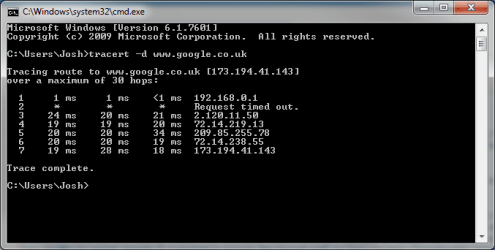
Packets go through potentially hundreds of different paths and routers and switches in order to get to their destination. Determining where the potential latency is being caused is difficult when there is only 2 or 3 ms of variation that we are talking about. For example, when making a tracert to Google UK I see that the time it takes for my traffic to reach Google is cumulative across the board with no hop causing considerable increase in latency

trace.png

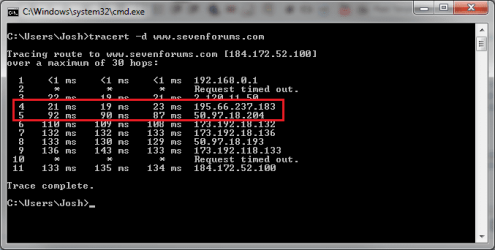
However when performing a trace to a device that is far away from me, For example, Sevenforums which resides in the US, you can see a clear difference in the path that shows when my traffic left my geographical region and went across the pacific to get to the US.

As you can see the latency between hop 4 and hop 5 increases by about 50 ms.

trace2.png

In terms of exact pin-point of where the increase began at a link level... not possible. At least not on the internet. For an enterprise network there are management and reporting tools that tell us about the link statuses for us. On the internet no one single entity owns a particular link therefore no-one is authorised to monitor its status.

Additionally, traceroute doesn't show every hop in the path to reach sevenforums. There were probably close to 100 different routers used to get to sevenforums it is just that a lot of them in the path didn't decrement the TTL value therefore it wasn't recorded as being a hop.

3. If one could pinpoint the location of the dropped 2 or 3 ns somewhere in the world what could they do about it?

Absolutely nothing. There is a rule on the internet that all ISPs follow.... You cannot tell someone how they should route their traffic. Equally, no-one else can tell YOU how to route your traffic.

Essentially, as traffic flows between different ISPs on the internet the path it takes inside and ISP is up to them. If an ISP wanted to they could force all traffic going to Google through a 64Kbps connection and end up with drop-outs. The funny thing is, no-one could do anything about it if that happened.

Hopefully this helps,
Josh :)
 

My Computer

Computer type
PC/Desktop
Computer Manufacturer/Model Number
Custom Built
OS
Windows 7 Professional x64 SP1 ; Windows Server 2012 R2 Standard
CPU
Intel Core i5 2400 @ 3.10GHz
Motherboard
Foxconn H67MP-S/-V/H67MP
Memory
8.0GB DDR3 @ 665MHz (2GBx4)
Graphics Card(s)
AMD Radeon HD 6870
Sound Card
Realtek High Definition Audio
Monitor(s) Displays
AOC 2243W & SMB1930NW
Screen Resolution
1440x900 & 1920x1080
Hard Drives
977GB Seagate ST31000524AS ATA Drive (SATA)
250GB WD iSCSI attached Drive
PSU
750W Gaming PSU
Case
Novatech Night
Cooling
Fan
Keyboard
Dell Standard PS/2 Keyboard
Mouse
R.A.T 07 Gaming Mouse
Internet Speed
Download: 10 Mbps Ping: 30ms Upload: 0.81 Mbps
Browser
Google Chrome
Other Info
Optiarc DVD RW AD-5260S ATA Device
Thank you very much for the great information. Yes it does help my 3 brain cells understand a lot better.

Then I'm missing the whole point of the thread that keyboardface started.
If one could find the problem except in their own equipment (maybe) their is nothing one can do about it. It is what it is.
Is that correct.
 

My Computer

Computer type
PC/Desktop
Computer Manufacturer/Model Number
Home made Desktop
OS
Windows 10 Pro. 64/ version 1709 Windows 7 Pro/64
CPU
Intel i7-6800K @ 4.3
Motherboard
ASUS X-99 Deluxe II
Memory
Corsair Platinum 16 gig @2400
Graphics Card(s)
EVGA GTX 1070 OC
Monitor(s) Displays
Asus 27" LED LCD/VE278Q
Screen Resolution
1920-1080 or 1280-720 HDMI
Hard Drives
INTEL SSD 730-240 Gb Sata 3.0/
PSU
EVGA Platium 1200W
Case
Phanteks Luxe Tempered Glass 8 fans/ one radiator
Cooling
XSPC/ Water Cooled CPU
Keyboard
Das 4 Professional
Mouse
Logitech M705/MX Anywhere 2-S
Internet Speed
100 mbits
Antivirus
Microsoft Security Essentials/ Malwarebytes Premium 3.0/ SAS
Browser
I.E. 11 default/Firefox/ ISP Time Warner Cable/Spectrum
Other Info
LG BluRay Burner/
Sound system-KLipsch-THX/
Icy Dock ssd Hot Swap bays.
Thank you very much for the great information. Yes it does help my 3 brain cells understand a lot better.

Then I'm missing the whole point of the thread that keyboardface started.
If one could find the problem except in their own equipment (maybe) their is nothing one can do about it. It is what it is.
Is that correct.

Aye, could be. I just wanted the OP to test variables that are under their own control to see if that was the issue. Test drivers... Third party apps etc...

If after testing the internal network and devices that he has authoritative control over doesn't resolve the issue then it may well be something out of his control.

Josh :)
 

My Computer

Computer type
PC/Desktop
Computer Manufacturer/Model Number
Custom Built
OS
Windows 7 Professional x64 SP1 ; Windows Server 2012 R2 Standard
CPU
Intel Core i5 2400 @ 3.10GHz
Motherboard
Foxconn H67MP-S/-V/H67MP
Memory
8.0GB DDR3 @ 665MHz (2GBx4)
Graphics Card(s)
AMD Radeon HD 6870
Sound Card
Realtek High Definition Audio
Monitor(s) Displays
AOC 2243W & SMB1930NW
Screen Resolution
1440x900 & 1920x1080
Hard Drives
977GB Seagate ST31000524AS ATA Drive (SATA)
250GB WD iSCSI attached Drive
PSU
750W Gaming PSU
Case
Novatech Night
Cooling
Fan
Keyboard
Dell Standard PS/2 Keyboard
Mouse
R.A.T 07 Gaming Mouse
Internet Speed
Download: 10 Mbps Ping: 30ms Upload: 0.81 Mbps
Browser
Google Chrome
Other Info
Optiarc DVD RW AD-5260S ATA Device
Back
Top