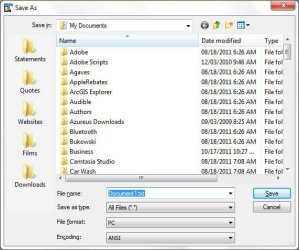
Solved Places bar in Windows 7 common dialog

edwardBe

New member
Local time
2:07 AM
Messages
5
Hi,

I see a tutorial here about customizing the places bar in the common file dialog, but I don't see how to get the places bar to show up instead of the navigation pane. There is nothing in the Organize -> Layout drop-down.

Thanks,

Ed
 

My Computer My Computer

OS
64 bit win 7 Ultimate SP1
Places Bar

Actually, the places bar or rather the lack of it is an OS issue, not necessarily hardwired into the program.

When a program can be run in XP compatibility mode, like Textpad, as below, the places bar shows up, but not otherwise.

Also, when I run Office 2010 on my XP box, I get the places bar, but not on my Win 7 laptop. So there must be a way to get it to happen. We just haven't found it yet.

 

Attachments

  • common.jpg
    common.jpg
    47.4 KB · Views: 21

My Computer My Computer

OS
64 bit win 7 Ultimate SP1
Places Bar

Actually, I think the problem is after all, in Office 2010, because I am using Office 2010 64 bit and it can't run in XP compatibility mode.
 

My Computer My Computer

OS
64 bit win 7 Ultimate SP1
Back
Top