
Hi....
I've recently started to experience very odd behaviour with my 7MC set-up..
I start playing a standard definition WTV and after about five minutes the network congestion message pops up and then playback stops suddenly.. I have no idea why.. I've tried many different programs and its the same behaviour.
The set up is:
Xbox 360 in living room, hard wired 100mbp CAT5 to Netgear 3330 G/N router, router to LAN2 connection on PC.
I've done the network optimisation test and I get full bar signal - it is hard wired, so that's not unexpected.
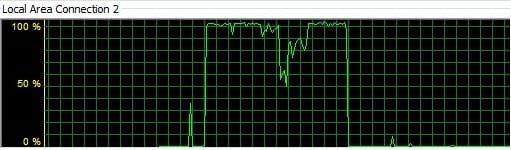
I've opened up task manager to observe the network performance and the moment I start playing the WTV the utilisation shoots up to 95-98 percent - constantly. It stays here up to the point that playback aborts and 7MC goes back to the program detail screen... just as if I have pressed the stop on my remote..
It is as if playing the video maxes out the lan connection utilisation to the point that playback fails.. Why would a simple standard definition playback max out the 100mb link?
Any help is greatly appreciated.
Kind Regards
Dom
(pic of network utilisation attached).
I've recently started to experience very odd behaviour with my 7MC set-up..
I start playing a standard definition WTV and after about five minutes the network congestion message pops up and then playback stops suddenly.. I have no idea why.. I've tried many different programs and its the same behaviour.
The set up is:
Xbox 360 in living room, hard wired 100mbp CAT5 to Netgear 3330 G/N router, router to LAN2 connection on PC.
I've done the network optimisation test and I get full bar signal - it is hard wired, so that's not unexpected.
I've opened up task manager to observe the network performance and the moment I start playing the WTV the utilisation shoots up to 95-98 percent - constantly. It stays here up to the point that playback aborts and 7MC goes back to the program detail screen... just as if I have pressed the stop on my remote..
It is as if playing the video maxes out the lan connection utilisation to the point that playback fails.. Why would a simple standard definition playback max out the 100mb link?
Any help is greatly appreciated.
Kind Regards
Dom
(pic of network utilisation attached).
Attachments
My Computer
At a glance
Windows 7 Home Premium 64bit
- OS
- Windows 7 Home Premium 64bit
