PLEASE check Outlook 2007 for me.

Judesman

New member
Member
VIP
Local time
2:53 PM
Messages
217
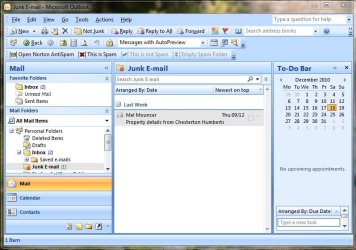
In the Junk E-mail box in Outlook 2007 "This is not Spam" and "Empty Spam Folder" are greyed out whilst "This is Spam" is in black. This is the wrong way round. To remove items from the Junk E-Mail box I now have to drag and drop. I thought this was something to do with the problem Outlook updates KB2412171 and KB2466076 so I deleted them but it didn't make any difference.

PLEASE could someone check their Junk E-Mail box in Outlook 2007 and see if they have the same problem. It would be appreciated.
 

My Computer My Computer

Computer type
PC/Desktop
Computer Manufacturer/Model Number
Dell OptiPlex 960
OS
Windows 7 64 bit
Memory
8 GB
Graphics Card(s)
Redeon HD 4670
Monitor(s) Displays
Dell
Antivirus
Norton
Browser
IE 10
Ok. Outlook is not retarded enough to not know what folder an email is in. If it's in your Junk folder, it will ALWAYS only give you an option for "This is not junk" and vice versa for folders outside Junk Mail.

If you could attach a screenshot of what you're talking about, that'd be appreciated because as it stands, right now, I'm not biting.
 

My Computer My Computer

OS
Windows 7 Ultimate 64-bit
CPU
AMD Phenom II X6 1090T 3.2GHZ
Motherboard
MSI 890FXA-GD70
Memory
G.SKILL RipJaw 3x2GB DDR3-1066
Graphics Card(s)
2x HIS Radeon HD 6850 1 GB
Sound Card
VIA 8-channel
Monitor(s) Displays
2x 20 inch Acer LCDs, 1x 32" Sony LCD TV
Screen Resolution
4480x900
Hard Drives
1x Crucial 64GB SSD
3x 1TB HDDs (WD, Seagate, Hitatchi)
1x 500GB Seagate External
PSU
Kingwin 1000W Modular
Case
Coolermaster HAF 932
Cooling
1x 120mm, 3x 200mm, CoolerMaster Hyper 212+
Keyboard
Microsoft Wireless Keyboard 1000
Mouse
Microsoft Wiresless Mouse 5000
Internet Speed
20mbps
Other Info
Samsung BD-ROM/DVD-RW
Thank you Jelyman, what a relief someone has replied. Here is a screenshot:

As you will see "This is not Spam" and "Empty Spam Folder" are greyed out but "This is Spam" is in black. This is the wrong way round for the Junk E-Mail Folder and I thought it had something to do with the recent bad update that I deleted but it has not resolved the problem. Any thoughts please.
 

Attachments

  • Outlook Junk E-Mail.JPG
    Outlook Junk E-Mail.JPG
    75.9 KB · Views: 30

My Computer My Computer

Computer type
PC/Desktop
Computer Manufacturer/Model Number
Dell OptiPlex 960
OS
Windows 7 64 bit
Memory
8 GB
Graphics Card(s)
Redeon HD 4670
Monitor(s) Displays
Dell
Antivirus
Norton
Browser
IE 10
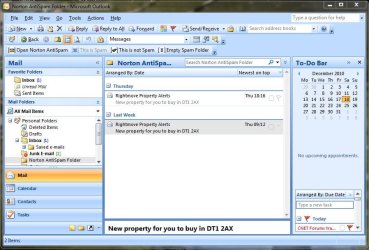
The "This is not spam" and "Empty Spam Folder" are associated with your Norton created spam folder. They are not valid for your Outlook 2007 junk folder. If you right-click on the e-mail in your Junk Folder you will see the Outlook 2007 valid commands. If you open the Norton created "spam folder" those items will not be grayed out.
 

My Computer My Computer

Computer Manufacturer/Model Number
Homemade
OS
Win 7 64 bit professional
CPU
CPU: 3930K @ 4.8 MHz Stable as a rock
Motherboard
ASUS Rampage IV Extreme LGA 2011
Memory
CORSAIR DOMINATOR GT 16GB (4 x 4GB) 240-Pin DDR3
Graphics Card(s)
EVGA SuperClocked+ GeForce GTX 680
Monitor(s) Displays
Dell 3007WFP
Screen Resolution
2560 x 1600
Hard Drives
Vector(256gb) x 2
RevoDrive 3 X2 space (240 GB)
Crucial C300 256 GB SSD
PSU
CORSAIR AX1200i 1200W Digital ATX12V v2.31 and EPS 2.92 SLI
Cooling
Water cooling EK Supremacy ELITE
Mouse
ratZ-7
Other Info
WEI-7.8
Thank you Snakeyeskm. I am now attaching a screenshot of the Norton AntiSpam Folder. This is working exactly as it should with This is not Spam and Empty Spam Folder active. Sometimes Junk Mail goes into Norton Anti Spam and sometimes into the Junk E-mail Folder. In the past whenever there has been mail in the Outlook Junk E-mail box This is not Spam has been active and not greyed out, now it is "This is Spam" that is active, it should be greyed out. This seems to have happened recently and I thought it was something to do with the duff updates.
 

Attachments

  • Norton Anti-Spam Folder.JPG
    Norton Anti-Spam Folder.JPG
    90.7 KB · Views: 13

My Computer My Computer

Computer type
PC/Desktop
Computer Manufacturer/Model Number
Dell OptiPlex 960
OS
Windows 7 64 bit
Memory
8 GB
Graphics Card(s)
Redeon HD 4670
Monitor(s) Displays
Dell
Antivirus
Norton
Browser
IE 10
Jelyman and Snakeyeskm, I am not much of a techie and I didn't realise that the Norton AntiSpam Toolbar is activated by AntiSpam Outlook Plugin. However previously the option to restore mail to the Inbox through "This is not Spam" was available in Outlook Junk Mail. It so happens that at the time of the duff updates I also updated NIS to NIS 2011. I think that might be the problem so I will go back to Norton on this one. Thanks for your input.
 

My Computer My Computer

Computer type
PC/Desktop
Computer Manufacturer/Model Number
Dell OptiPlex 960
OS
Windows 7 64 bit
Memory
8 GB
Graphics Card(s)
Redeon HD 4670
Monitor(s) Displays
Dell
Antivirus
Norton
Browser
IE 10
Glad you were able to identify your issue. Just a suggestion, disable the Norton spam and stick to the Outlook junk filter. Over time it is just as effective as Norton and saves you the hassle of having two spam folders. Alternatively shutdown the Outlook junk e-mail feature and stick to Norton.
 

My Computer My Computer

Computer Manufacturer/Model Number
Homemade
OS
Win 7 64 bit professional
CPU
CPU: 3930K @ 4.8 MHz Stable as a rock
Motherboard
ASUS Rampage IV Extreme LGA 2011
Memory
CORSAIR DOMINATOR GT 16GB (4 x 4GB) 240-Pin DDR3
Graphics Card(s)
EVGA SuperClocked+ GeForce GTX 680
Monitor(s) Displays
Dell 3007WFP
Screen Resolution
2560 x 1600
Hard Drives
Vector(256gb) x 2
RevoDrive 3 X2 space (240 GB)
Crucial C300 256 GB SSD
PSU
CORSAIR AX1200i 1200W Digital ATX12V v2.31 and EPS 2.92 SLI
Cooling
Water cooling EK Supremacy ELITE
Mouse
ratZ-7
Other Info
WEI-7.8
Thanks for that, I will see what Norton come up with. I am not sure how you shutdown the Outlook Junk E-Mail folder.
 

My Computer My Computer

Computer type
PC/Desktop
Computer Manufacturer/Model Number
Dell OptiPlex 960
OS
Windows 7 64 bit
Memory
8 GB
Graphics Card(s)
Redeon HD 4670
Monitor(s) Displays
Dell
Antivirus
Norton
Browser
IE 10
Back
Top