
Solved Please explain user and group permissions please!!!!

JigsawPMB

New member
Local time
6:41 AM
Messages
31
PLEASE someone help me and explain users and groups and how to view what user is part of what group, and how to create a group, add a user to a group, delete a user from a group, give certain permissions to a user or deny certain permissions to a user etc... AND PLEASE EXPLAIN IT AS IT PERTAINS TO WINDOWS 7 HOME PREMIUM 64 BIT. Thank you for any and all help!!!!
 

My Computer My Computer

Computer type
Laptop
Computer Manufacturer/Model Number
HP G72
OS
Windows 7 Home Premium x64, Windows Vista Home Premium x??
CPU
Pentium dual core t4500 @2.3 gigs
Motherboard
?
Memory
3.0 gb
Monitor(s) Displays
17" hdwidescreen
Hard Drives
320gb
Internet Speed
high speed frontier communications, close to 6mbps down.

My Computer My Computer

Computer type
PC/Desktop
Computer Manufacturer/Model Number
Self built custom
OS
64-bit Windows 11 Pro for Workstations
CPU
Intel i7-8700K OC'd to 5 GHz
Motherboard
ASUS ROG Maximus XI Formula Z390
Memory
64 GB (4x16GB) G.SKILL TridentZ RGB DDR4 3600 MHz
Graphics Card(s)
ASUS ROG-STRIX-GTX1080TI-O11G-GAMING
Sound Card
Integrated
Monitor(s) Displays
2 x Samsung Odyssey G7 27"
Screen Resolution
2560x1440
Hard Drives
1TB Samsung 990 PRO M.2,
4TB Samsung 990 PRO PRO M.2,
TerraMaster F8 SSD Plus NAS
PSU
Seasonic Prime Titanium 850W
Case
Thermaltake Core P3
Cooling
Corsair Hydro H115i
Keyboard
Logitech wireless K800
Mouse
Logitech MX Master 4
Internet Speed
2 Gb/s Download and 100 Mb/s Upload
Antivirus
Malwarebyte Anti-Malware Premium
Browser
Google Chrome
Other Info
Logitech Z625 speaker system,
Logitech BRIO 4K Pro webcam,
HP Color LaserJet Pro MFP M477fdn,
APC SMART-UPS RT 1000 XL - SURT1000XLI,
Galaxy S23 Plus phone
Sort of helps. I have a computer degree from years back but I believe my education with OS stopped after XP. I recently decided to learn windows 7 in's and out's due to creating another standard user account on a home premium edition of 7. What a nightmare it has been since! I guess in order to further put what you pointed out to me to use I need to know how do I go about viewing a current listing of users and groups on the system now so I know where and what Permissions I need to assign or deny. I'm ultimantly after a way to make the standard user account in 7 home premium not be able to view anything except thier account folders, shared music and picture folders, not be able to click folder and search options to disable the "show all files and folders" option. I'm so confused and frustrated by this whole deal!
 

My Computer My Computer

Computer type
Laptop
Computer Manufacturer/Model Number
HP G72
OS
Windows 7 Home Premium x64, Windows Vista Home Premium x??
CPU
Pentium dual core t4500 @2.3 gigs
Motherboard
?
Memory
3.0 gb
Monitor(s) Displays
17" hdwidescreen
Hard Drives
320gb
Internet Speed
high speed frontier communications, close to 6mbps down.

My Computer My Computer

Computer type
PC/Desktop
Computer Manufacturer/Model Number
Self built custom
OS
64-bit Windows 11 Pro for Workstations
CPU
Intel i7-8700K OC'd to 5 GHz
Motherboard
ASUS ROG Maximus XI Formula Z390
Memory
64 GB (4x16GB) G.SKILL TridentZ RGB DDR4 3600 MHz
Graphics Card(s)
ASUS ROG-STRIX-GTX1080TI-O11G-GAMING
Sound Card
Integrated
Monitor(s) Displays
2 x Samsung Odyssey G7 27"
Screen Resolution
2560x1440
Hard Drives
1TB Samsung 990 PRO M.2,
4TB Samsung 990 PRO PRO M.2,
TerraMaster F8 SSD Plus NAS
PSU
Seasonic Prime Titanium 850W
Case
Thermaltake Core P3
Cooling
Corsair Hydro H115i
Keyboard
Logitech wireless K800
Mouse
Logitech MX Master 4
Internet Speed
2 Gb/s Download and 100 Mb/s Upload
Antivirus
Malwarebyte Anti-Malware Premium
Browser
Google Chrome
Other Info
Logitech Z625 speaker system,
Logitech BRIO 4K Pro webcam,
HP Color LaserJet Pro MFP M477fdn,
APC SMART-UPS RT 1000 XL - SURT1000XLI,
Galaxy S23 Plus phone
Folder Options - Hide

Hi Again!

Well after even more research I stumbled across Brink's tutorial here:

Disable "Show all files and folders"

Folder Options - Enable or Disable

Method 3 works for me.

So that will hopefully resolve one of your problems!

Still it's hard to see how that's secure unless you disable registry editing for users.
 

My Computer My Computer

Computer type
Laptop
Computer Manufacturer/Model Number
ASUS
OS
Microsoft Windows 7 Home Premium 64-bit 7601 Multiprocessor Free Service Pack 1
CPU
AMD C-60 APU with Radeon(tm) HD Graphics
Motherboard
ASUSTeK COMPUTER INC. X501U
Memory
4.00 GB
Graphics Card(s)
AMD Radeon HD 6290 Graphics
Sound Card
(1) AMD High Definition Audio Device (2) Realtek High Defi
Screen Resolution
1366 x 768 x 32 bits (4294967296 colors) @ 60 Hz
Hard Drives
Hitachi HTS545050A7E380 SATA Disk Device
Antivirus
Comodo CIS & FW, SecureAplus App Whitelisting, Threatfire
Browser
Cyberfox 64bit, Opera 64bit, Airfox
Other Info
Spy-The-Spy, HitmanPro.Alert, Norton Connect Safe, MJRegWatcher, BitDefender TrafficLight, Voodoo Shield, Zemana AntiMalware
I know how to go through the control panel and see what user accounts are, be it admin or standard. More specifically I need to be able to see paths of those accounts might be the way to put it. for example, I know my user made admin account is named "jigsaw", I know the built in admin account is named "store27" and I know the standard user created account is named "sara". Now my question is...Where would I look to see exactly what groups those "users" are a part of. Not what kind of account they are that I know. But when I get into the policies page and permission it sort of breaks it down more to those specified names so I would need to know how to find out what groups they are a part of. So long story short, how do I view all active groups and the users that are part of said groups?
 

My Computer My Computer

Computer type
Laptop
Computer Manufacturer/Model Number
HP G72
OS
Windows 7 Home Premium x64, Windows Vista Home Premium x??
CPU
Pentium dual core t4500 @2.3 gigs
Motherboard
?
Memory
3.0 gb
Monitor(s) Displays
17" hdwidescreen
Hard Drives
320gb
Internet Speed
high speed frontier communications, close to 6mbps down.
I would need to know how to find out what groups they are a part of. So long story short, how do I view all active groups and the users that are part of said groups?


Try Start> Run then type netplwiz

Press Enter

Hopefully you'll see users and groups.

The problem with Windows 7 Home Premium is that the "Advanced User Management" options are not available!
 

My Computer My Computer

Computer type
Laptop
Computer Manufacturer/Model Number
ASUS
OS
Microsoft Windows 7 Home Premium 64-bit 7601 Multiprocessor Free Service Pack 1
CPU
AMD C-60 APU with Radeon(tm) HD Graphics
Motherboard
ASUSTeK COMPUTER INC. X501U
Memory
4.00 GB
Graphics Card(s)
AMD Radeon HD 6290 Graphics
Sound Card
(1) AMD High Definition Audio Device (2) Realtek High Defi
Screen Resolution
1366 x 768 x 32 bits (4294967296 colors) @ 60 Hz
Hard Drives
Hitachi HTS545050A7E380 SATA Disk Device
Antivirus
Comodo CIS & FW, SecureAplus App Whitelisting, Threatfire
Browser
Cyberfox 64bit, Opera 64bit, Airfox
Other Info
Spy-The-Spy, HitmanPro.Alert, Norton Connect Safe, MJRegWatcher, BitDefender TrafficLight, Voodoo Shield, Zemana AntiMalware
Dear Callender....

THANK YOU SO VERY MUCH! That is exactly what I needed. I have already tweaked my version of home premium to include local policy editor and other things normally not included. So easy that it was overlooked by me or I wasn't familiar with it in windows 7. Now that I have a current and correct list of users and where and what groups that exist and who exists within them I can edit permissions for those groups. thank you.
 

My Computer My Computer

Computer type
Laptop
Computer Manufacturer/Model Number
HP G72
OS
Windows 7 Home Premium x64, Windows Vista Home Premium x??
CPU
Pentium dual core t4500 @2.3 gigs
Motherboard
?
Memory
3.0 gb
Monitor(s) Displays
17" hdwidescreen
Hard Drives
320gb
Internet Speed
high speed frontier communications, close to 6mbps down.
Local Policy Editor

Glad it helped!
 

My Computer My Computer

Computer type
Laptop
Computer Manufacturer/Model Number
ASUS
OS
Microsoft Windows 7 Home Premium 64-bit 7601 Multiprocessor Free Service Pack 1
CPU
AMD C-60 APU with Radeon(tm) HD Graphics
Motherboard
ASUSTeK COMPUTER INC. X501U
Memory
4.00 GB
Graphics Card(s)
AMD Radeon HD 6290 Graphics
Sound Card
(1) AMD High Definition Audio Device (2) Realtek High Defi
Screen Resolution
1366 x 768 x 32 bits (4294967296 colors) @ 60 Hz
Hard Drives
Hitachi HTS545050A7E380 SATA Disk Device
Antivirus
Comodo CIS & FW, SecureAplus App Whitelisting, Threatfire
Browser
Cyberfox 64bit, Opera 64bit, Airfox
Other Info
Spy-The-Spy, HitmanPro.Alert, Norton Connect Safe, MJRegWatcher, BitDefender TrafficLight, Voodoo Shield, Zemana AntiMalware
More info - might be useful

Hi, I know that you were looking into restricting the folders that users could see and other restrictions. Here's something that you could consider experimenting with. A new tool has been released today (18th March 2014).

Mini Regedit Free Download

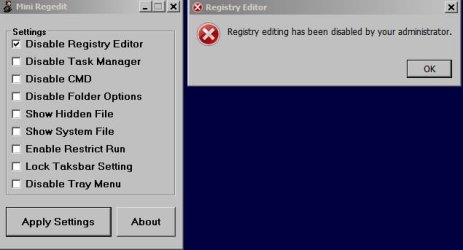
Mini Regedit can be run from a USB Stick and quickly and easily allows/ blocks access to certain features as shown in the screenshot.

Tested on my machine and other than excluding the app from being sandboxed by my security software - it worked like a charm. It need to be "run as administrator".

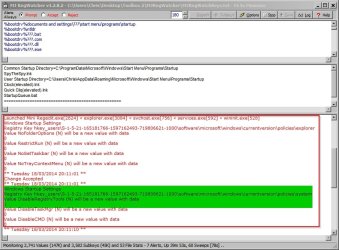
Screenshots and monitored registry change when blocking access to regedit:

Mini Regedit.jpg
Mini Regedit2.jpg
 
Last edited:

My Computer My Computer

Computer type
Laptop
Computer Manufacturer/Model Number
ASUS
OS
Microsoft Windows 7 Home Premium 64-bit 7601 Multiprocessor Free Service Pack 1
CPU
AMD C-60 APU with Radeon(tm) HD Graphics
Motherboard
ASUSTeK COMPUTER INC. X501U
Memory
4.00 GB
Graphics Card(s)
AMD Radeon HD 6290 Graphics
Sound Card
(1) AMD High Definition Audio Device (2) Realtek High Defi
Screen Resolution
1366 x 768 x 32 bits (4294967296 colors) @ 60 Hz
Hard Drives
Hitachi HTS545050A7E380 SATA Disk Device
Antivirus
Comodo CIS & FW, SecureAplus App Whitelisting, Threatfire
Browser
Cyberfox 64bit, Opera 64bit, Airfox
Other Info
Spy-The-Spy, HitmanPro.Alert, Norton Connect Safe, MJRegWatcher, BitDefender TrafficLight, Voodoo Shield, Zemana AntiMalware
is this a gui application then? Is it a user friendly program that I could just point and click with or will I need to brush up on some values and registry keys? I appriciate the help and I'm going to look into it either way, thanks!
 

My Computer My Computer

Computer type
Laptop
Computer Manufacturer/Model Number
HP G72
OS
Windows 7 Home Premium x64, Windows Vista Home Premium x??
CPU
Pentium dual core t4500 @2.3 gigs
Motherboard
?
Memory
3.0 gb
Monitor(s) Displays
17" hdwidescreen
Hard Drives
320gb
Internet Speed
high speed frontier communications, close to 6mbps down.
Screenshot shows GUI

The screenshot shows the GUI. It's the only window that you'll see. I think the idea is to run it from USB rather than keep it on the machine (it's portable) but if you keep it on the hard drive you'd need to hide it from other users. As far as I can work out - and I haven't tested this part, you log in as a user then run the program from USB to lock settings for that user. At least that's how I hope it works! On my machine I tested it and it worked fine but I'm the only user (plus the admin account) so haven't tested to see if it works on a per user basis.

As it's portable and doesn't need installing you could try it as it might suit your needs. If you need to undo changes you can just run the program leaving all boxes unchecked then click "Apply".

If you located it on your hard drive and don't need it - you can just delete the folder and it will be gone.

Edit: Yes, it's simple point, click and apply.

The second screenshot is nothing to do with the program - it's a screenshot from another program that I have installed that shows live registry changes as they happen. Just for monitoring purposes. So it shows the changes made when I used Mini Regedit to disable Registry Editor then asked if I would accept those changes. I thought that the info on the actual registry changes made might be useful but I can see that actually it appears confusing as I didn't explain what that second screenshot depicted!
 
Last edited:

My Computer My Computer

Computer type
Laptop
Computer Manufacturer/Model Number
ASUS
OS
Microsoft Windows 7 Home Premium 64-bit 7601 Multiprocessor Free Service Pack 1
CPU
AMD C-60 APU with Radeon(tm) HD Graphics
Motherboard
ASUSTeK COMPUTER INC. X501U
Memory
4.00 GB
Graphics Card(s)
AMD Radeon HD 6290 Graphics
Sound Card
(1) AMD High Definition Audio Device (2) Realtek High Defi
Screen Resolution
1366 x 768 x 32 bits (4294967296 colors) @ 60 Hz
Hard Drives
Hitachi HTS545050A7E380 SATA Disk Device
Antivirus
Comodo CIS & FW, SecureAplus App Whitelisting, Threatfire
Browser
Cyberfox 64bit, Opera 64bit, Airfox
Other Info
Spy-The-Spy, HitmanPro.Alert, Norton Connect Safe, MJRegWatcher, BitDefender TrafficLight, Voodoo Shield, Zemana AntiMalware
Back
Top