Hello,
Thanks for reading and a million thanks for any help.
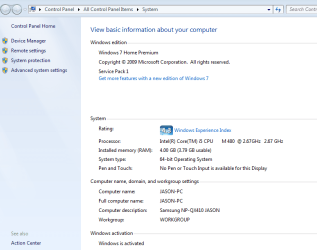
I recently resurrected my college son's "dead" Samsung NP-QX410 laptop. It suffered a dying HDD. I managed to salvage the recovery partition files and was able to re install Windows 7 Home Premium SP1 onto an older Seagate 120G Sata HDD.
After sorting and fixing several driver issues, the laptop is working well, with a few exceptions:
- It's a slow 5200rpm 7 yr. old HDD (we are replacing with a Samsung 850 EVO SSD 250G)
- Windows Update has been done many times with mostly success (have 3 updates that repeatedly fail, am currently receiving help from NoelDP regarding these WinUpdate issues, he's been excellent!)
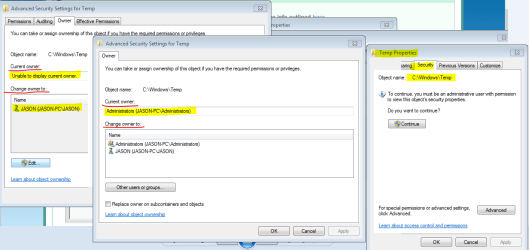
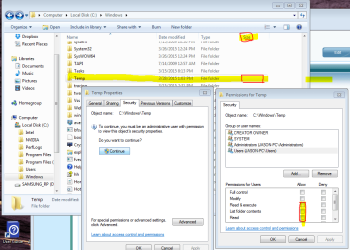
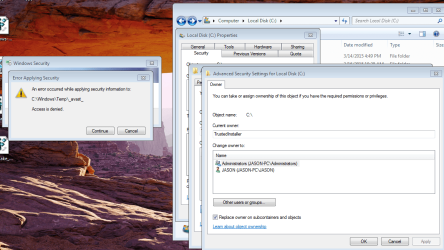
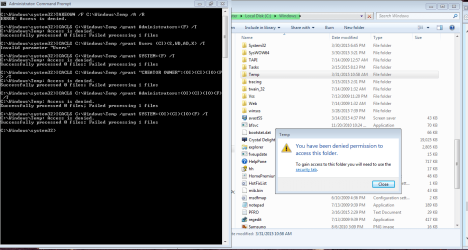
- I seem to have permission and ownership issues. It became apparent when I tried to look for files in my C:\Windows\Temp and was denied permission. tried as Administrator (denied). Installed *Brinks* take ownership download (still denied)
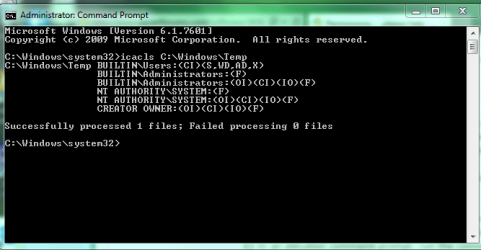
NoelDP provided me with a script to try top resolve this, but the issue seems to be deeper within. he's looking into it but is very busy and I thought this section of the 7Forum might be a good place to get additional advice.
I confess to being a bit of a novice, certainly compared to many of the experts on the Forum who's help we are truly grateful for, but I can follow instruction well enough. I admit I'm not even sure of the UAC and how it should be set up? What simple settings or configuration I should have regarding UAC's. This laptop, once I have it fully functional, updated, and error free is going to be a gift for our 10 yr. old son at the end of this school year. So any additional advice on how to set up the UAC's would be appreciated.
Attached are a few screen shots to illustrate what's happening:
Thanks for reading and a million thanks for any help.
I recently resurrected my college son's "dead" Samsung NP-QX410 laptop. It suffered a dying HDD. I managed to salvage the recovery partition files and was able to re install Windows 7 Home Premium SP1 onto an older Seagate 120G Sata HDD.
After sorting and fixing several driver issues, the laptop is working well, with a few exceptions:
- It's a slow 5200rpm 7 yr. old HDD (we are replacing with a Samsung 850 EVO SSD 250G)
- Windows Update has been done many times with mostly success (have 3 updates that repeatedly fail, am currently receiving help from NoelDP regarding these WinUpdate issues, he's been excellent!)
- I seem to have permission and ownership issues. It became apparent when I tried to look for files in my C:\Windows\Temp and was denied permission. tried as Administrator (denied). Installed *Brinks* take ownership download (still denied)
NoelDP provided me with a script to try top resolve this, but the issue seems to be deeper within. he's looking into it but is very busy and I thought this section of the 7Forum might be a good place to get additional advice.
I confess to being a bit of a novice, certainly compared to many of the experts on the Forum who's help we are truly grateful for, but I can follow instruction well enough. I admit I'm not even sure of the UAC and how it should be set up? What simple settings or configuration I should have regarding UAC's. This laptop, once I have it fully functional, updated, and error free is going to be a gift for our 10 yr. old son at the end of this school year. So any additional advice on how to set up the UAC's would be appreciated.
Attached are a few screen shots to illustrate what's happening:
Attachments

My Computer
- Computer type
- Laptop
- Computer Manufacturer/Model Number
- Toshiba Satellite c855-s5214
- OS
- windows 7 professional 64 bit Version 6.1.7601 Service Pack 1 Build 7601
- CPU
- Intel(R) Pentium(R) CPU B970 @ 2.30GHz, 2300 Mhz, 2 cores
- Motherboard
- Toshiba Portable BIOS Insyde Corp Version 1.60 Date 4/20/12
- Memory
- 8Gb
- Graphics Card(s)
- Intel HD Graphics Driver Vers 9.17.10.3347 Date 10/31/20
- Hard Drives
- SanDisk Extreme Pro SSD 480 Gb (approx. 381gb free)
Firmware Version X21200RL
Migrated and Installed 4/3/2015
- Antivirus
- BitDefender AntiVirus Free Edition Version 1.0.21.1099
- Browser
- Internet Explorer 11 update version 11.0.16
- Other Info
- Additional Systems:
Samsung NP-QX410 Laptop Windows 7 Home Premium SP1
Samsung 850 EVO 250G 4G ram
Avast! Free 2015
Toshiba A205-S7468 Laptop Windows 7 Ultimate
WD 320G HDD 4G ram
AVG free 2015