
Please help, I can't get Adobe Flashplayer update in FF 25

applepie

New member
Member
VIP
Local time
6:42 AM
Messages
102
Location
Coney Island my Hometown
Whenever I try to update to the LATEST Version of Adobe Flashplayer for Firefox 25 I get this error message: Note: Your antivirus software must allow you to install software! Help what do I do now? I uninstalled the Old Version of Adobe Flashplayer, because I didn't want my Windows 7 Home Premium laptop to get infected.
 

My Computer My Computer

Computer type
Laptop
Computer Manufacturer/Model Number
HP Pavilion g7 series
OS
Windows 7 Home Premium 64 bit.
Memory
4 GB
Hard Drives
DVD/CD Roms
Case
Charcoal Gray
Cooling
Internal Fan
Keyboard
Duel Keyboard with Side Number Pad included and not USB #Pad
Mouse
G.E. Gray & Black Laser Mouse with Cord.
Internet Speed
Earthlink High Speed Wifi
Antivirus
M. S. E.
Browser
Firefox and Google Chrome.
Other Info
I use the computer to practice my typing skills,
but I really like to play online dressup games.
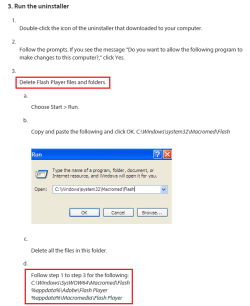
It's possible your computer still has leftover bits and pieces of the old Flash Player and that's preventing a clean install of the latest version. Try running the official Adobe Flash Player Uninstaller. Make sure you follow the instructions exactly as provided.

Uninstall Flash Player | Windows

Once you've run the uninstaller, reboot your computer and then try installing the latest Flash Player from the official Player Download Center.

Adobe - Flash Player

You didn't mention what antivirus you're using. If, after following the above suggested steps you're still having issues, (1) Use the uninstaller again. (2) Visit the Player Download Center again. (3) Temporarily turn off your AV real time monitoring/scanning. (4) Install latest Flash Player. (5) Once Adobe confirms Flash Player is working turn your AV real time monitoring/scanning back on.
 

My Computer My Computer

Computer type
Laptop
Computer Manufacturer/Model Number
Sony Vaio VPCEB47GM Laptop
OS
Win 7 Pro 64-bit
CPU
Intel i5 2.4 Ghz
Memory
8GB DDR3
Graphics Card(s)
Intel HD 3000
Sound Card
IDT High Definition
Monitor(s) Displays
15.6 WGXA Anti-Glare LED
Screen Resolution
1280x800
Hard Drives
640Gb 7200rpm
Antivirus
MSE
Browser
Opera (primary) with IE9 backup
It's possible your computer still has leftover bits and pieces of the old Flash Player and that's preventing a clean install of the latest version. Try running the official Adobe Flash Player Uninstaller. Make sure you follow the instructions exactly as provided.

Uninstall Flash Player | Windows

Once you've run the uninstaller, reboot your computer and then try installing the latest Flash Player from the official Player Download Center.

Adobe - Flash Player

You didn't mention what antivirus you're using. If, after following the above suggested steps you're still having issues, (1) Use the uninstaller again. (2) Visit the Player Download Center again. (3) Temporarily turn off your AV real time monitoring/scanning. (4) Install latest Flash Player. (5) Once Adobe confirms Flash Player is working turn your AV real time monitoring/scanning back on.

Hi Mars,
I'm using Microsoft Security Essentials Anti-Virus for my Windows 7 Home Premium.
So SORRY that I didn't mention it before.
:o
 

My Computer My Computer

Computer type
Laptop
Computer Manufacturer/Model Number
HP Pavilion g7 series
OS
Windows 7 Home Premium 64 bit.
Memory
4 GB
Hard Drives
DVD/CD Roms
Case
Charcoal Gray
Cooling
Internal Fan
Keyboard
Duel Keyboard with Side Number Pad included and not USB #Pad
Mouse
G.E. Gray & Black Laser Mouse with Cord.
Internet Speed
Earthlink High Speed Wifi
Antivirus
M. S. E.
Browser
Firefox and Google Chrome.
Other Info
I use the computer to practice my typing skills,
but I really like to play online dressup games.
OK, I'm using Microsoft Security Essentials too. I'm also running the latest Firefox 25.0.1 and didn't have any issues when I got the latest version. Give the Adobe Uninstaller a try and see if that helps.
 

My Computer My Computer

Computer type
Laptop
Computer Manufacturer/Model Number
Sony Vaio VPCEB47GM Laptop
OS
Win 7 Pro 64-bit
CPU
Intel i5 2.4 Ghz
Memory
8GB DDR3
Graphics Card(s)
Intel HD 3000
Sound Card
IDT High Definition
Monitor(s) Displays
15.6 WGXA Anti-Glare LED
Screen Resolution
1280x800
Hard Drives
640Gb 7200rpm
Antivirus
MSE
Browser
Opera (primary) with IE9 backup
OK, I'm using Microsoft Security Essentials too. I'm also running the latest Firefox 25.0.1 and didn't have any issues when I got the latest version. Give the Adobe Uninstaller a try and see if that helps.

:ditto:

I think it may be old files conflicting with the installation.
 

My Computer My Computer

Computer type
Laptop
OK, I'm using Microsoft Security Essentials too. I'm also running the latest Firefox 25.0.1 and didn't have any issues when I got the latest version. Give the Adobe Uninstaller a try and see if that helps.

:ditto:

I think it may be old files conflicting with the installation.

Hi Mars, and BlueRobot,
I'm still having a hard time installing the (new) version of Flash Player even though I used the Adobe Uninstaller Tool. HELP how do I get the old files that are still stuck on my Windows 7 system off? :confused:
 

My Computer My Computer

Computer type
Laptop
Computer Manufacturer/Model Number
HP Pavilion g7 series
OS
Windows 7 Home Premium 64 bit.
Memory
4 GB
Hard Drives
DVD/CD Roms
Case
Charcoal Gray
Cooling
Internal Fan
Keyboard
Duel Keyboard with Side Number Pad included and not USB #Pad
Mouse
G.E. Gray & Black Laser Mouse with Cord.
Internet Speed
Earthlink High Speed Wifi
Antivirus
M. S. E.
Browser
Firefox and Google Chrome.
Other Info
I use the computer to practice my typing skills,
but I really like to play online dressup games.
Did the uninstaller run successfully?
 

My Computer My Computer

Computer type
Laptop

My Computer My Computer

Computer type
Laptop
Computer Manufacturer/Model Number
HP Pavilion g7 series
OS
Windows 7 Home Premium 64 bit.
Memory
4 GB
Hard Drives
DVD/CD Roms
Case
Charcoal Gray
Cooling
Internal Fan
Keyboard
Duel Keyboard with Side Number Pad included and not USB #Pad
Mouse
G.E. Gray & Black Laser Mouse with Cord.
Internet Speed
Earthlink High Speed Wifi
Antivirus
M. S. E.
Browser
Firefox and Google Chrome.
Other Info
I use the computer to practice my typing skills,
but I really like to play online dressup games.
Does this happen with all browsers?
 

My Computer My Computer

Computer type
Laptop

My Computer My Computer

Computer type
Laptop
Computer Manufacturer/Model Number
Employer provided Dell Latitude
OS
W7 Pro SP1 64bit
CPU
i7
Memory
8GB
Graphics Card(s)
Intel HD Graphics
Hard Drives
crappy SSD
Antivirus
Employer mandated Symantec Endpoint Protection
Browser
Pale Moon 64bit, IE11 64bit & Chrome 64bit
Try this, using Internet Explorer visit this site

Adobe - Install a different version of Adobe Flash Player

Select your operating system in Step 1 drop down

Select Flash player 11 for other browsers in the Step 2 drop down

Untick the Optional offers box for Google Chrome in the center

Click on Download now on the right

When the download dialog opens at the bottom of the screen, click on the arrow to the right of Save, and choose Save as.

2wn5p55.jpg


Choose to save to your desktop> Click on Save button

2ladedy.jpg


Once downloaded, run the installer, see if you have success. If not, post a screenshot of any error received.

http://www.sevenforums.com/tutorials/9733-screenshots-files-upload-post-seven-forums.html

A Guy
 

My Computer My Computer

Computer type
PC/Desktop
OS
Windows 10 Home x64
CPU
INTEL Core i5-750 Quad-Core 3.37GHz
Motherboard
ASUS P7P55D
Memory
HyperX Fury Black Series 8GB (2 x 4GB) 1866Mhz
Graphics Card(s)
EVGA GeForce GTX 750 Superclocked 1GB 128-Bit GDDR5
Monitor(s) Displays
LG 32MA68HY 32" IPS
Screen Resolution
1920 x 1080
Hard Drives
Samsung 840 Evo 120GB, SEAGATE 500GB Barracuda® 7200.12, SATA 3 Gb/s, 7200 RPM, 16MB cache
PSU
ANTEC TruePower New TP-550, 80 PLUS, 550W
Case
ANTEC Three Hundred Illusion
Cooling
COOLER MASTER Hyper 212 Plus, 4 x 120mm 1 x 140mm Noctua's
Internet Speed
85 + Mbps
Antivirus
Avast
Browser
Vivaldi
Last edited:

My Computer My Computer

Computer type
Laptop
Computer Manufacturer/Model Number
HP Pavilion g7 series
OS
Windows 7 Home Premium 64 bit.
Memory
4 GB
Hard Drives
DVD/CD Roms
Case
Charcoal Gray
Cooling
Internal Fan
Keyboard
Duel Keyboard with Side Number Pad included and not USB #Pad
Mouse
G.E. Gray & Black Laser Mouse with Cord.
Internet Speed
Earthlink High Speed Wifi
Antivirus
M. S. E.
Browser
Firefox and Google Chrome.
Other Info
I use the computer to practice my typing skills,
but I really like to play online dressup games.

My Computer My Computer

Computer type
Laptop
Computer Manufacturer/Model Number
Employer provided Dell Latitude
OS
W7 Pro SP1 64bit
CPU
i7
Memory
8GB
Graphics Card(s)
Intel HD Graphics
Hard Drives
crappy SSD
Antivirus
Employer mandated Symantec Endpoint Protection
Browser
Pale Moon 64bit, IE11 64bit & Chrome 64bit

Hi Username,
I was finally able to install the latest version of Adobe Flash Player on Firefox. I just clicked on a link at the bottom that told me in install it manually after the plugin for Firefox of Flash player failed to install the first time. Thank you for your help.
 

My Computer My Computer

Computer type
Laptop
Computer Manufacturer/Model Number
HP Pavilion g7 series
OS
Windows 7 Home Premium 64 bit.
Memory
4 GB
Hard Drives
DVD/CD Roms
Case
Charcoal Gray
Cooling
Internal Fan
Keyboard
Duel Keyboard with Side Number Pad included and not USB #Pad
Mouse
G.E. Gray & Black Laser Mouse with Cord.
Internet Speed
Earthlink High Speed Wifi
Antivirus
M. S. E.
Browser
Firefox and Google Chrome.
Other Info
I use the computer to practice my typing skills,
but I really like to play online dressup games.
Back
Top