Please Help in Identifying Recurring Locked Temp Files

Maxxwire

New member
Guru
Local time
10:55 PM
Messages
1,251
3TempFiles.jpg


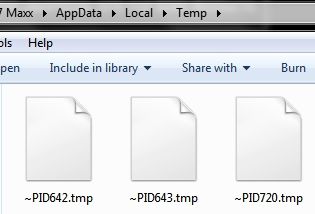
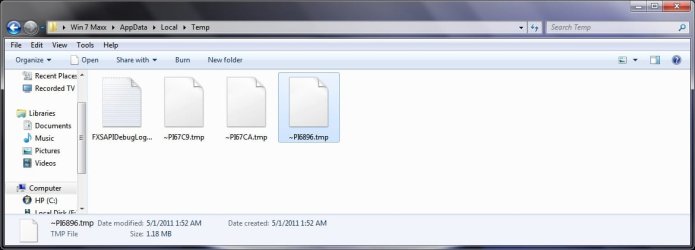
Lately these 3 locked Temp files have been appearing every day even though I unlock and delete them. They are 640KB, 1.8MB and 1.8 MB in size.
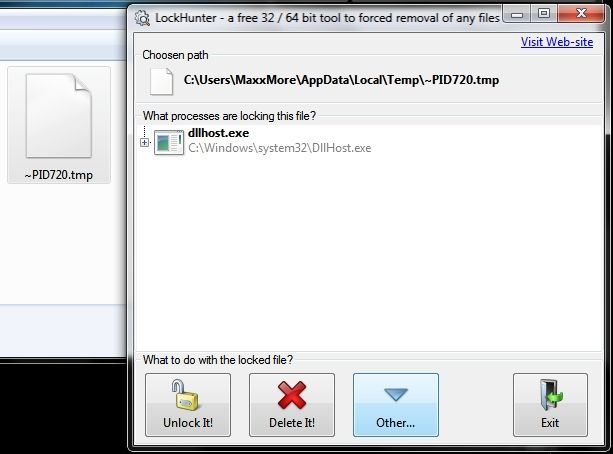
LockHunter.jpg


The LockHunter program which I have been using to unlock and delete these temp files says that they are being locked by C:Windows\system32\DllHost.exe. I just scanned the computer using both Emmisoft and MBAM while these files were in place and there were 0 detections from either scan.
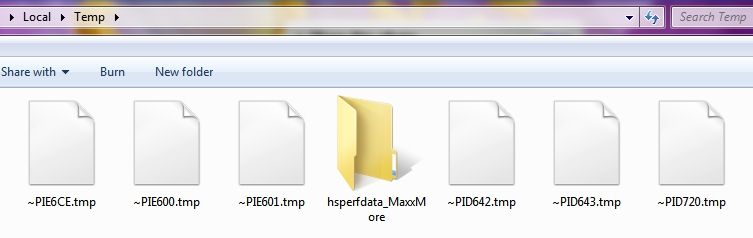
3MoreFiles.jpg


I just discovered that 3 more files along with Java's hsperfdata temp file have appeared within the last 10 minutes. These have contents of 3.68 MB, 640 KB and 2.25 MB in size.

I'm hoping that someone will be able to identify the source and purpose of these persistent locked temp files that keep showing up in my computer's AppData> Temp file.

Thanks for your help; Maxx

.
Win7_50.png
 

My Computer My Computer

Computer Manufacturer/Model Number
HP HPE 270f
OS
Windows 7 x64 Home Premium
CPU
Intel Core i7 930 @ 2.8 Ghz Socket 1366 LGA
Motherboard
Pegatron Truckee v1.04E41
Memory
8 GB 1366 Mhz DDR3 (PC3-10700) RAM
Graphics Card(s)
ATI Radeon 5770 1 GB DDR5 RAM
Sound Card
Realtech High Definition
Monitor(s) Displays
32" Sony Bravia
Screen Resolution
1366 X 768
Hard Drives
Intel 25nm 120 GB Series 320 SSD HD Tune- 265 MBps Read/ 130 MBps Write

LaCie 1TB + 1TB RAID 0 eSATA Drive HD Tune- 160 MBps Read/ 90 MBps Write
Keyboard
Logitech Illuminated
Mouse
Logitech MX Revolution
Internet Speed
36.4 Mbps Maximum on a 37 Mbps Motorola SB501 Modem
Many programs create temp files. If the scans you have not found any malware, then you have no need to be concerned. It is a good idea, from a maintenance perspective, to clean out temp files from time to time. There accumulation can have a negative effect on system performance.

CCleaner is a very good temp file cleaner
 

My Computer My Computer

Computer Manufacturer/Model Number
Dell Studio 15
OS
Windows 7 Ultimate 64 bit
Most likely, the reason that they are locked, is that they are in use by the app that created them. If you can identify the app, then you may be able to prevent these files by the apps settings.

EDIT: If you can use the right click menu to access their properties, it may identify the app that made them.
 

My Computer My Computer

Computer Manufacturer/Model Number
DIY
OS
W7x64 Pro, SuSe 12.1/** W7 x64 Pro, XP MCE
CPU
Phenom II 1090T w/Noctua NH-D14 /**4400+ X2 w/CM Hyper TX 3
Motherboard
ASRock 890FX Deluxe 4/**A8N-SLI
Memory
2 x 2GB Patriot PGS34g1600LLKA/**4x1GB Corsair VS
Graphics Card(s)
EVGA GTX460 SC/**EVGA 8800GTS
Sound Card
Asus Xonar D2X/**Xonar D1
Monitor(s) Displays
Acer X233H, Dell E152FPc /**LG M237-WD
Screen Resolution
1920x1080 & 1024x768/**1980x1080
Hard Drives
WDC 2TB, 1.5TB, 1TB, 500GB,Seagate 500GB , Maxtor 80GB /**500GB Seagate & WDC 1TB Black
PSU
CM RS600 w/ APC BX1000G/**Antec 500 TP w/ APC BX1000
Case
HAF922/**Antec 1040IIB
Cooling
3x200mm, 1x140 and 1x120mm/**5x80mm fans
Keyboard
Logitech Media USB/**Saitek Eclipse
Mouse
Cordless Trackman Wheel/**Ditto
Internet Speed
3.3Mbps
Other Info
SB 560 5.1 w/ Sennheiser RS140/**Creative T20 speakers, Dvico FusionHDTV7 Gold RT, Cisco E3000, HP 5510V AIO, Linksys E3000, Belkin F5U237 hub and **F5D8055 adapter
(** = 2nd rig)
Hi, Maxxwire.

Since hsperfdata is a Java file, I suggest that you make sure you have the latest version of Java installed on your computer and that all older/vulnerable versions have been removed. The current version is Java SE Runtime Environment (JRE) 6 Update 25.

I also suggest clearing the Java cache: How do I clear the Java cache?.
 

My Computer My Computer

OS
Windows 7 & Windows Vista Ultimate
Corrine- Thanks! Upon your advise I used Revo to uninstall Java v6.0.240.7 (from 4-13-11) and then installed the latest iteration v6.0.650.6.

~Maxx~

.
Win7_50.png
 

My Computer My Computer

Computer Manufacturer/Model Number
HP HPE 270f
OS
Windows 7 x64 Home Premium
CPU
Intel Core i7 930 @ 2.8 Ghz Socket 1366 LGA
Motherboard
Pegatron Truckee v1.04E41
Memory
8 GB 1366 Mhz DDR3 (PC3-10700) RAM
Graphics Card(s)
ATI Radeon 5770 1 GB DDR5 RAM
Sound Card
Realtech High Definition
Monitor(s) Displays
32" Sony Bravia
Screen Resolution
1366 X 768
Hard Drives
Intel 25nm 120 GB Series 320 SSD HD Tune- 265 MBps Read/ 130 MBps Write

LaCie 1TB + 1TB RAID 0 eSATA Drive HD Tune- 160 MBps Read/ 90 MBps Write
Keyboard
Logitech Illuminated
Mouse
Logitech MX Revolution
Internet Speed
36.4 Mbps Maximum on a 37 Mbps Motorola SB501 Modem
Most likely, the reason that they are locked, is that they are in use by the app that created them. If you can identify the app, then you may be able to prevent these files by the apps settings.

EDIT: If you can use the right click menu to access their properties, it may identify the app that made them.

The details pane available through the context menu gave no clue as to what program created these Temp files, but as you indicated going into the Java Control Panel revealed a way to stop the Java program from storing information on the computer and since I rescinded permission to store files on the computer there have been no such files appear in AppData\Temp which indicates their original source.

I confirmed that these Temp files were placed by the Java program this morning by briefly allowing and then immediately turning off the permission again which created the first 3 of these Temp files since I originally turned off the permission for them to be created on the computer yesterday afternoon.

I have now returned the program which uses Java back to full use and so far only Java's empty hsperfdata folder has appeared. I will post back if any of the Java Temp files show up again...

~Maxx~

.
Win7_50.png
 

Attachments

  • Java Control Panel.jpg
    Java Control Panel.jpg
    31.7 KB · Views: 6

My Computer My Computer

Computer Manufacturer/Model Number
HP HPE 270f
OS
Windows 7 x64 Home Premium
CPU
Intel Core i7 930 @ 2.8 Ghz Socket 1366 LGA
Motherboard
Pegatron Truckee v1.04E41
Memory
8 GB 1366 Mhz DDR3 (PC3-10700) RAM
Graphics Card(s)
ATI Radeon 5770 1 GB DDR5 RAM
Sound Card
Realtech High Definition
Monitor(s) Displays
32" Sony Bravia
Screen Resolution
1366 X 768
Hard Drives
Intel 25nm 120 GB Series 320 SSD HD Tune- 265 MBps Read/ 130 MBps Write

LaCie 1TB + 1TB RAID 0 eSATA Drive HD Tune- 160 MBps Read/ 90 MBps Write
Keyboard
Logitech Illuminated
Mouse
Logitech MX Revolution
Internet Speed
36.4 Mbps Maximum on a 37 Mbps Motorola SB501 Modem
Is having temporary files that much of an issue?
Do you have an obsessive compulsive disorder?
 

My Computer My Computer

Computer type
PC/Desktop
Computer Manufacturer/Model Number
Alienware Aurora ALX R4
OS
Windows 10 Pro (x64)
CPU
Intel Core i7-3930K (3.2GHz - 4.5GHz)
Motherboard
Alienware Aurora-R4 x79
Memory
4x Samsung 4GB PC3-12800 DDR3 (16GB 1600MHz)
Graphics Card(s)
Nvidia Geforce GTX 690
Sound Card
SteelSeries Siberia Elite
Monitor(s) Displays
Dell UltraSharp U3011
Screen Resolution
2560x1600
Hard Drives
Samsung 850 Pro 256 GB, Seagate 1TB Desktop Hybrid HDD, 2x Western Digital 4TB Green HDD
PSU
875W Some Dell PSU <.<
Case
Alienware Aurora ALX
Cooling
Custom Liquid Cooling (EK CPU & GPU blocks) dual EK 480RAD
Keyboard
Logitech G710+ Mechanical
Mouse
Logitech G700s
Internet Speed
Verizon Fios (50 mbps average)
Other Info
Server: Intel NUC D54250WYK: i5-4250U, 16GB, 256 GB mSATA, Windows Server 2012 R2
Is having temporary files that much of an issue?
Do you have an obsessive compulsive disorder?

I'm not concerned that there are files in the AppData Temp file because that is what it is used for. What I am most concerned about is the identification of these files. In my experience most temp files are fairly easily identifiable as to the program which placed them there, but since there is absolutely no indication of where these files came from or what they are being used for it raises a level of concern on my part especially after my computer started malfunctioning as it never has before.

Last night Explorer quit working properly so I tried a system restore which has worked every time that I have used it in the past and I was shocked when system restore failed for the very first time ever in Win 7 x64. I was finally able to do a Macruim Reflect image restore at about 4:30 am, but today I just noticed a completely new set of 4 temp files (screenshot attached) appear in addition the perfdata file none of which I've ever seen before and there is absolutely no indication where they came from either so yes, I am concerned about that considering the unprecedented problems I had with the computer last night especially since I have prevented Java from placing any files whatsoever anywhere on the computer which makes me all the more uncertain about what these 11 constantly incarnating files in the AppData Temp folder which so far have appeared as locked files, unlocked files and even an XML file are doing there and if this is related to the most serious malfunction I've had with Win 7 to date which occurred in the midst of the same 24 hour period that all of these before unseen AppData files appeared especially even though the computer continues to scan clean.

~Maxx~

.
Win7_50.png
 

Attachments

  • 4-30 New Temp Files.jpg
    4-30 New Temp Files.jpg
    17.4 KB · Views: 10
Last edited:

My Computer My Computer

Computer Manufacturer/Model Number
HP HPE 270f
OS
Windows 7 x64 Home Premium
CPU
Intel Core i7 930 @ 2.8 Ghz Socket 1366 LGA
Motherboard
Pegatron Truckee v1.04E41
Memory
8 GB 1366 Mhz DDR3 (PC3-10700) RAM
Graphics Card(s)
ATI Radeon 5770 1 GB DDR5 RAM
Sound Card
Realtech High Definition
Monitor(s) Displays
32" Sony Bravia
Screen Resolution
1366 X 768
Hard Drives
Intel 25nm 120 GB Series 320 SSD HD Tune- 265 MBps Read/ 130 MBps Write

LaCie 1TB + 1TB RAID 0 eSATA Drive HD Tune- 160 MBps Read/ 90 MBps Write
Keyboard
Logitech Illuminated
Mouse
Logitech MX Revolution
Internet Speed
36.4 Mbps Maximum on a 37 Mbps Motorola SB501 Modem
I want to thank everyone for their help, but I have decided not to continue to use this Java based program any longer in that in the beginning it seemed like a convenient way to download operational files from the internet, but it has turned into such a hassle that I have decided that I will continue to do the download once a day manually (which as it turns out is all the program was doing anyway) which process only takes a couple of minutes anyway. As a result I have uninstalled both the Java based program as well as Java Runtime which I only needed to run that one program with anyway in that my Opera browser already has Java onboard.

Again, thanks for your help, but having the 'convenience' that this program offers is just not worth all the hassle it has become. Hopefully the unique problems that my Win 7 x64 computer has been having during this period will cease and I can get back to enjoying the new Intel 320 SSD I had installed in it just 2 weeks ago.

~Maxx~

.
Win7_50.png
 
Last edited:

My Computer My Computer

Computer Manufacturer/Model Number
HP HPE 270f
OS
Windows 7 x64 Home Premium
CPU
Intel Core i7 930 @ 2.8 Ghz Socket 1366 LGA
Motherboard
Pegatron Truckee v1.04E41
Memory
8 GB 1366 Mhz DDR3 (PC3-10700) RAM
Graphics Card(s)
ATI Radeon 5770 1 GB DDR5 RAM
Sound Card
Realtech High Definition
Monitor(s) Displays
32" Sony Bravia
Screen Resolution
1366 X 768
Hard Drives
Intel 25nm 120 GB Series 320 SSD HD Tune- 265 MBps Read/ 130 MBps Write

LaCie 1TB + 1TB RAID 0 eSATA Drive HD Tune- 160 MBps Read/ 90 MBps Write
Keyboard
Logitech Illuminated
Mouse
Logitech MX Revolution
Internet Speed
36.4 Mbps Maximum on a 37 Mbps Motorola SB501 Modem
I thought that this was all over after Java was uninstalled, but a few minutes ago another mystery temp file showed up in the AppData Temp file. Both HitmanPro and MBAM say that it is not malware, but interestingly enough during the MBAM scan another temp file shows up next to it and then disappears when the scan is complete. There are as many as 4 more phantom files that will appear briefly and then disappear. I'm really curious now as to where these temp files are coming from and why they have been placed there.

~Maxx~

.
Win7_50.png
 

Attachments

  • 2011-04-30_204337.jpg
    2011-04-30_204337.jpg
    41.3 KB · Views: 6

My Computer My Computer

Computer Manufacturer/Model Number
HP HPE 270f
OS
Windows 7 x64 Home Premium
CPU
Intel Core i7 930 @ 2.8 Ghz Socket 1366 LGA
Motherboard
Pegatron Truckee v1.04E41
Memory
8 GB 1366 Mhz DDR3 (PC3-10700) RAM
Graphics Card(s)
ATI Radeon 5770 1 GB DDR5 RAM
Sound Card
Realtech High Definition
Monitor(s) Displays
32" Sony Bravia
Screen Resolution
1366 X 768
Hard Drives
Intel 25nm 120 GB Series 320 SSD HD Tune- 265 MBps Read/ 130 MBps Write

LaCie 1TB + 1TB RAID 0 eSATA Drive HD Tune- 160 MBps Read/ 90 MBps Write
Keyboard
Logitech Illuminated
Mouse
Logitech MX Revolution
Internet Speed
36.4 Mbps Maximum on a 37 Mbps Motorola SB501 Modem
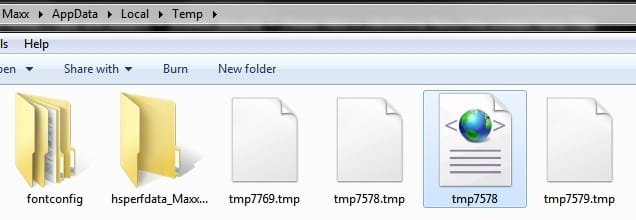
I was browsing the Comodo Defense+ log and found these entries from last night from the Windows Installer-

MSI94CD.tmp

MSIDF69.tmp

MSIB2CD.tmp

They can not be searched on Google so I was wondering if anyone any of you were familiar with what they are. I have attached a screen capture.

Thanks for your help. I just may go and re-image the computer to an even earlier date and see if I can get beyond all this...

~Maxx~
 

Attachments

  • Defense+ Log.jpg
    Defense+ Log.jpg
    102.1 KB · Views: 5

My Computer My Computer

Computer Manufacturer/Model Number
HP HPE 270f
OS
Windows 7 x64 Home Premium
CPU
Intel Core i7 930 @ 2.8 Ghz Socket 1366 LGA
Motherboard
Pegatron Truckee v1.04E41
Memory
8 GB 1366 Mhz DDR3 (PC3-10700) RAM
Graphics Card(s)
ATI Radeon 5770 1 GB DDR5 RAM
Sound Card
Realtech High Definition
Monitor(s) Displays
32" Sony Bravia
Screen Resolution
1366 X 768
Hard Drives
Intel 25nm 120 GB Series 320 SSD HD Tune- 265 MBps Read/ 130 MBps Write

LaCie 1TB + 1TB RAID 0 eSATA Drive HD Tune- 160 MBps Read/ 90 MBps Write
Keyboard
Logitech Illuminated
Mouse
Logitech MX Revolution
Internet Speed
36.4 Mbps Maximum on a 37 Mbps Motorola SB501 Modem
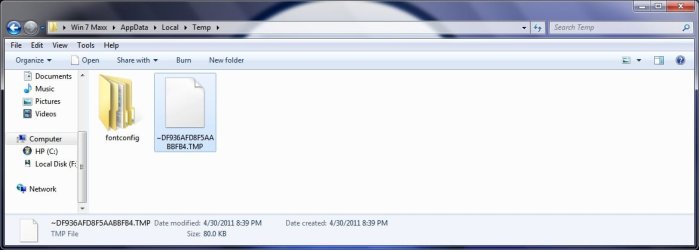
I re-imaged my computer back as far as I could to the day after I got it back from the shop which was 2 weeks ago nevertheless the fun and games continue as these mysterious temp files which names each begin in ~ which I originally thought were Java temp files appeared once again 8 hours after uninstalling Java and restarting the computer. These are the same type and size as the ones pictured in my first post and I'm asking once again if anyone recognizes them because even though the computer scans clean and is using an image from 2 weeks ago these same locked temp files keep appearing.

One thing that they all have in common is each of their file names begins with ~PI. Can any of you interpret what that might mean?

Thank you so much for bearing with me as I'm hoping that the continued re-occurrence of these kind of locked temp files might somehow be related to some function of the Win 7 OS and one of the Members might be able to identify their true function.

~Maxx~

PS- This just in... I just finished checking out my Vista laptop where I originally started using the program that was using Java Runtime and the AppData file had no folders like the 3 ~PI files I've been seeing in Win 7 lately so it appears that the 3 ~PI files are not Java related at all...

.
Win7_50.png
 

Attachments

  • 3 Java Temp Files 8 Hours After Uninstall 2011-04-30_231939.jpg
    3 Java Temp Files 8 Hours After Uninstall 2011-04-30_231939.jpg
    45.1 KB · Views: 5
  • 3 Temp Files.jpg
    3 Temp Files.jpg
    8.3 KB · Views: 91
  • 3 More Files.jpg
    3 More Files.jpg
    16.8 KB · Views: 3
Last edited:

My Computer My Computer

Computer Manufacturer/Model Number
HP HPE 270f
OS
Windows 7 x64 Home Premium
CPU
Intel Core i7 930 @ 2.8 Ghz Socket 1366 LGA
Motherboard
Pegatron Truckee v1.04E41
Memory
8 GB 1366 Mhz DDR3 (PC3-10700) RAM
Graphics Card(s)
ATI Radeon 5770 1 GB DDR5 RAM
Sound Card
Realtech High Definition
Monitor(s) Displays
32" Sony Bravia
Screen Resolution
1366 X 768
Hard Drives
Intel 25nm 120 GB Series 320 SSD HD Tune- 265 MBps Read/ 130 MBps Write

LaCie 1TB + 1TB RAID 0 eSATA Drive HD Tune- 160 MBps Read/ 90 MBps Write
Keyboard
Logitech Illuminated
Mouse
Logitech MX Revolution
Internet Speed
36.4 Mbps Maximum on a 37 Mbps Motorola SB501 Modem
Seriously...if you are so OCD about this just use Process Monitor and Process Explorer...
 

My Computer My Computer

Computer type
PC/Desktop
Computer Manufacturer/Model Number
Alienware Aurora ALX R4
OS
Windows 10 Pro (x64)
CPU
Intel Core i7-3930K (3.2GHz - 4.5GHz)
Motherboard
Alienware Aurora-R4 x79
Memory
4x Samsung 4GB PC3-12800 DDR3 (16GB 1600MHz)
Graphics Card(s)
Nvidia Geforce GTX 690
Sound Card
SteelSeries Siberia Elite
Monitor(s) Displays
Dell UltraSharp U3011
Screen Resolution
2560x1600
Hard Drives
Samsung 850 Pro 256 GB, Seagate 1TB Desktop Hybrid HDD, 2x Western Digital 4TB Green HDD
PSU
875W Some Dell PSU <.<
Case
Alienware Aurora ALX
Cooling
Custom Liquid Cooling (EK CPU & GPU blocks) dual EK 480RAD
Keyboard
Logitech G710+ Mechanical
Mouse
Logitech G700s
Internet Speed
Verizon Fios (50 mbps average)
Other Info
Server: Intel NUC D54250WYK: i5-4250U, 16GB, 256 GB mSATA, Windows Server 2012 R2
logicearth- I frequently see people here on the Forum report new and unfamiliar files that they have not seen before which have appeared on their computer in order to get opinions from the Membership as to what the nature of these new files might indeed be.

This is the first time I have posted this kind of an inquiry here on the Windows 7 Forums or anywhere else in hopes of getting feedback from the Membership as to what the nature of these strange new files might be and so far no one seems to know what these locked temp files are for or by what agency they have appeared so I feel justified in my concern over them as I think any conscientious and computer security minded person would be.

The latest event was early this morning when these locked temp files appeared with such a fury that they deleted the legitimate 1.25 MB GIMP fontconfiguration file from the AppData Temp folder where it had been since the old HDD had been cloned onto the new SSD nearly 3 weeks ago and GIMP's temp file had to be reconfigured.

~Maxx~

.
Win7_50.png
 

Attachments

  • KOd GIMP 2011-05-01_020903.jpg
    KOd GIMP 2011-05-01_020903.jpg
    41 KB · Views: 3

My Computer My Computer

Computer Manufacturer/Model Number
HP HPE 270f
OS
Windows 7 x64 Home Premium
CPU
Intel Core i7 930 @ 2.8 Ghz Socket 1366 LGA
Motherboard
Pegatron Truckee v1.04E41
Memory
8 GB 1366 Mhz DDR3 (PC3-10700) RAM
Graphics Card(s)
ATI Radeon 5770 1 GB DDR5 RAM
Sound Card
Realtech High Definition
Monitor(s) Displays
32" Sony Bravia
Screen Resolution
1366 X 768
Hard Drives
Intel 25nm 120 GB Series 320 SSD HD Tune- 265 MBps Read/ 130 MBps Write

LaCie 1TB + 1TB RAID 0 eSATA Drive HD Tune- 160 MBps Read/ 90 MBps Write
Keyboard
Logitech Illuminated
Mouse
Logitech MX Revolution
Internet Speed
36.4 Mbps Maximum on a 37 Mbps Motorola SB501 Modem
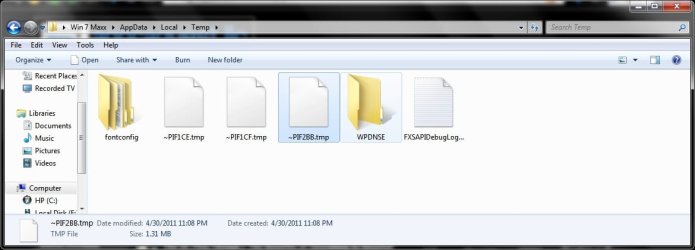
I'll tell you what these files are then. They are files that start with "~PI" followed by random hex number with an extension of "tmp". You are taking "conscientious and computer security minded person" way overboard. Either past or are bordering on OCD.

Again use Process Monitor.
 

My Computer My Computer

Computer type
PC/Desktop
Computer Manufacturer/Model Number
Alienware Aurora ALX R4
OS
Windows 10 Pro (x64)
CPU
Intel Core i7-3930K (3.2GHz - 4.5GHz)
Motherboard
Alienware Aurora-R4 x79
Memory
4x Samsung 4GB PC3-12800 DDR3 (16GB 1600MHz)
Graphics Card(s)
Nvidia Geforce GTX 690
Sound Card
SteelSeries Siberia Elite
Monitor(s) Displays
Dell UltraSharp U3011
Screen Resolution
2560x1600
Hard Drives
Samsung 850 Pro 256 GB, Seagate 1TB Desktop Hybrid HDD, 2x Western Digital 4TB Green HDD
PSU
875W Some Dell PSU <.<
Case
Alienware Aurora ALX
Cooling
Custom Liquid Cooling (EK CPU & GPU blocks) dual EK 480RAD
Keyboard
Logitech G710+ Mechanical
Mouse
Logitech G700s
Internet Speed
Verizon Fios (50 mbps average)
Other Info
Server: Intel NUC D54250WYK: i5-4250U, 16GB, 256 GB mSATA, Windows Server 2012 R2
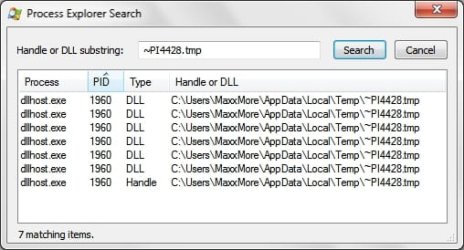
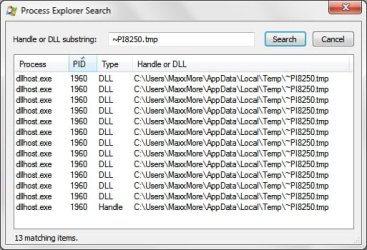
Corrine- Now I see what you guys mean. I've had Process Explorer for several years and up until now I've only used it on running processes, but I searched for each of the ~PI .tmps and found their dllhost.exe PID number of 1960! Your bit of knowledge shared has gone a long way toward helping me to finally understand what is actually going on in my computer and has been of infinite more use than condemnation over my level of concern for the security of my computer and its recently installed SSD which has changed so many things.

It was not easy making all of this public, but as I hoped I got the answer I needed at the Windows 7 Forums and most valuable of all I learned some new Process Explorer skills as a bonus that I will certainly be able to use in the future!

Thanks again!

~Maxx~

.
Win7_50.png
 

Attachments

  • PE Search.jpg
    PE Search.jpg
    30.5 KB · Views: 4
  • PE Search 2.jpg
    PE Search 2.jpg
    20.1 KB · Views: 4
  • PE Search 3.jpg
    PE Search 3.jpg
    30.6 KB · Views: 5

My Computer My Computer

Computer Manufacturer/Model Number
HP HPE 270f
OS
Windows 7 x64 Home Premium
CPU
Intel Core i7 930 @ 2.8 Ghz Socket 1366 LGA
Motherboard
Pegatron Truckee v1.04E41
Memory
8 GB 1366 Mhz DDR3 (PC3-10700) RAM
Graphics Card(s)
ATI Radeon 5770 1 GB DDR5 RAM
Sound Card
Realtech High Definition
Monitor(s) Displays
32" Sony Bravia
Screen Resolution
1366 X 768
Hard Drives
Intel 25nm 120 GB Series 320 SSD HD Tune- 265 MBps Read/ 130 MBps Write

LaCie 1TB + 1TB RAID 0 eSATA Drive HD Tune- 160 MBps Read/ 90 MBps Write
Keyboard
Logitech Illuminated
Mouse
Logitech MX Revolution
Internet Speed
36.4 Mbps Maximum on a 37 Mbps Motorola SB501 Modem
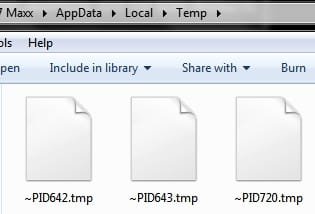
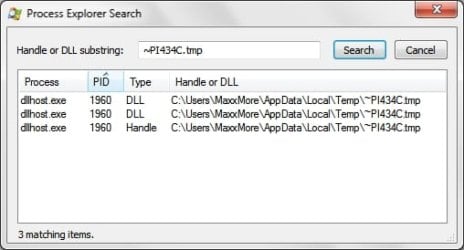
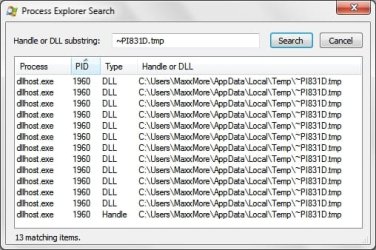
Corrine- 3 new .tmp files just arrived and thanks to your tip on using Process Explorer I was able to check out each one of them! Thanks for the gift of knowledge as to what these .tmp files are although I am still curious as to what their purpose might be on my Win 7 computer and I don't remember seeing them at all before the Intel 320 SSD was installed.

~Maxx~

.
Win7_50.png
 

Attachments

  • PE Search 4.jpg
    PE Search 4.jpg
    45.9 KB · Views: 3
  • PE Search 5.jpg
    PE Search 5.jpg
    20.6 KB · Views: 3
  • PE Search 6.jpg
    PE Search 6.jpg
    45.6 KB · Views: 3

My Computer My Computer

Computer Manufacturer/Model Number
HP HPE 270f
OS
Windows 7 x64 Home Premium
CPU
Intel Core i7 930 @ 2.8 Ghz Socket 1366 LGA
Motherboard
Pegatron Truckee v1.04E41
Memory
8 GB 1366 Mhz DDR3 (PC3-10700) RAM
Graphics Card(s)
ATI Radeon 5770 1 GB DDR5 RAM
Sound Card
Realtech High Definition
Monitor(s) Displays
32" Sony Bravia
Screen Resolution
1366 X 768
Hard Drives
Intel 25nm 120 GB Series 320 SSD HD Tune- 265 MBps Read/ 130 MBps Write

LaCie 1TB + 1TB RAID 0 eSATA Drive HD Tune- 160 MBps Read/ 90 MBps Write
Keyboard
Logitech Illuminated
Mouse
Logitech MX Revolution
Internet Speed
36.4 Mbps Maximum on a 37 Mbps Motorola SB501 Modem
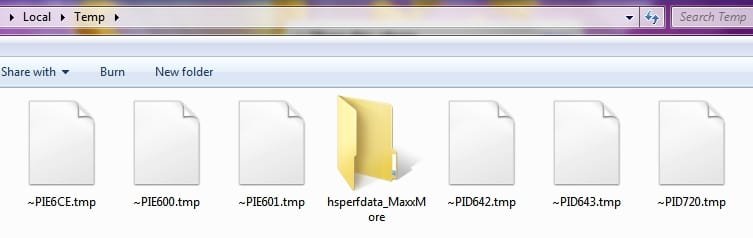
Corrine- That was another great link about the dllhost! You know what they say-

If you help someone with their computer security problem it will be solved, but if help them learn to use the right diagnostic tool they can solve their own computer security problems both now and in the future! Every time I use Process Explorer to research a file I will be indebted to you for getting me started.

~Maxx~

.
Win7_50.png
 

My Computer My Computer

Computer Manufacturer/Model Number
HP HPE 270f
OS
Windows 7 x64 Home Premium
CPU
Intel Core i7 930 @ 2.8 Ghz Socket 1366 LGA
Motherboard
Pegatron Truckee v1.04E41
Memory
8 GB 1366 Mhz DDR3 (PC3-10700) RAM
Graphics Card(s)
ATI Radeon 5770 1 GB DDR5 RAM
Sound Card
Realtech High Definition
Monitor(s) Displays
32" Sony Bravia
Screen Resolution
1366 X 768
Hard Drives
Intel 25nm 120 GB Series 320 SSD HD Tune- 265 MBps Read/ 130 MBps Write

LaCie 1TB + 1TB RAID 0 eSATA Drive HD Tune- 160 MBps Read/ 90 MBps Write
Keyboard
Logitech Illuminated
Mouse
Logitech MX Revolution
Internet Speed
36.4 Mbps Maximum on a 37 Mbps Motorola SB501 Modem
Back
Top