Please help keyboard and mouse not working in normal mode!

realflow100

New member
Member
VIP
Local time
6:28 PM
Messages
252
Works in safemode. Doesn't even turn on or have a light in normal mode. Also unplugging and plugging the mouse/keyboard into any other usb port makes an usb device failed error sound instead of successfully plugged in sound.
Works flawlessly no problem in safemode? What gives??
 

My Computer My Computer

Computer type
PC/Desktop
Computer Manufacturer/Model Number
HP Elite 8300 compaq SFF
OS
Windows 7 Pro x64
CPU
i7 3770k 3.5ghz up to 3.9ghz turbo boost 4 core 8 thread CPU
Motherboard
HP Elite 8300 compaq SFF OEM board
Memory
32GB 4x8GB DDR3 1600mhz CL9 patriot viper gaming ram
Graphics Card(s)
ZOTAC GTX 1650 low profile overclocked GPU
Sound Card
realtek integrated HD audio
Monitor(s) Displays
23" acer gaming 144hz 1ms monitor
Screen Resolution
1920x1080 @120hz/144hz
Hard Drives
ADATA 128GB SSD
ADAtA 256GB SSD
x1 Seagate 250GB 7200 RPM drive
x1 Seagate 500GB 7200 RPM drive
PSU
430w thermaltake smart
Case
HP Elite 8300 compaq SFF
Cooling
Stock + new thermal paste
Keyboard
REDRAGON mechanical blue switch
Mouse
ZELOTES wired T-90 mouse
Internet Speed
10MB/s (80mbps) download good internet
Antivirus
in-use/other
Browser
IE11 + firefox + Google Chrome randomly switches between
Other Info
Info updated

power supply doesnt fit but still works with adapter its just sitting on the desk behind the computer wires going into the case where the old power supply was.

Go to device Mgr and see if there are any yellow exclamation marks.

If so, right click and update drivers.
 

My Computer My Computer

Computer type
PC/Desktop
Computer Manufacturer/Model Number
Self-Built
OS
Windows 7 Professional X64
CPU
Core i7 (2nd gen) i7-2600K / 3.40GHz
Motherboard
ASUS P8Z77-V Intel 7 Series Motherboard
Memory
DDR3 2400MHz (OC) 16gb
Graphics Card(s)
Intel(R) HD Graphics 3000, -1988 Mb
Sound Card
8 ChannelsAudio Chipset Realtek ALC892
Monitor(s) Displays
LG 29UM65 Black 29"
Screen Resolution
2560 x 1080
Hard Drives
840 EVO 250 GB SSD ;2tb (2);Seagate;1tb Seagate; 750 gb Seagate; wd ext (2) 750 gb,WD 2tb X 2;WD 3TB Black
PSU
750 watt
Case
Thermaltake RX -1
Cooling
2120mm Fans Included 1Other Fan Ports 5x 200mm Fan Ports
Keyboard
Microsoft Digital Media Pro
Mouse
Microsoft Wireless 6000
Internet Speed
U-verse 18 mbps
Antivirus
MSE
Browser
Firefox, Chrome and my favorite: Pale Moon
Other Info
HdHomerun Dual Tuner.
SRS Audio Lab,
Pioneer BDR 208-DBK
PS3-What a difference in my Surround Sound Receiver!
HP 4540s - My new Toy.
Epson R280 Printer- To personalize my Dvds.
Canon MP 560 - For scanning.
Nothings shown wrong in safe mode but i cant do that in normal startup mode to check!!!!

Edit: Weird... i disabled USB 3.0 in my bios and everything just works perfectly all of a sudden. is there a better solution than just disabling USB 3.0? i would like to keep it enabled if im using a usb 3.0 device in the future.
 

My Computer My Computer

Computer type
PC/Desktop
Computer Manufacturer/Model Number
HP Elite 8300 compaq SFF
OS
Windows 7 Pro x64
CPU
i7 3770k 3.5ghz up to 3.9ghz turbo boost 4 core 8 thread CPU
Motherboard
HP Elite 8300 compaq SFF OEM board
Memory
32GB 4x8GB DDR3 1600mhz CL9 patriot viper gaming ram
Graphics Card(s)
ZOTAC GTX 1650 low profile overclocked GPU
Sound Card
realtek integrated HD audio
Monitor(s) Displays
23" acer gaming 144hz 1ms monitor
Screen Resolution
1920x1080 @120hz/144hz
Hard Drives
ADATA 128GB SSD
ADAtA 256GB SSD
x1 Seagate 250GB 7200 RPM drive
x1 Seagate 500GB 7200 RPM drive
PSU
430w thermaltake smart
Case
HP Elite 8300 compaq SFF
Cooling
Stock + new thermal paste
Keyboard
REDRAGON mechanical blue switch
Mouse
ZELOTES wired T-90 mouse
Internet Speed
10MB/s (80mbps) download good internet
Antivirus
in-use/other
Browser
IE11 + firefox + Google Chrome randomly switches between
Other Info
Info updated

power supply doesnt fit but still works with adapter its just sitting on the desk behind the computer wires going into the case where the old power supply was.
From what I found Googling your system came with Windows 8.1.
Is that correct?

Your system specs show Window 7 ultimate/64.

Your specs also show you have no anti virus program installed.
Is that also correct?
 

My Computer My Computer

Computer type
PC/Desktop
Computer Manufacturer/Model Number
Home made Desktop
OS
Windows 10 Pro. 64/ version 1709 Windows 7 Pro/64
CPU
Intel i7-6800K @ 4.3
Motherboard
ASUS X-99 Deluxe II
Memory
Corsair Platinum 16 gig @2400
Graphics Card(s)
EVGA GTX 1070 OC
Monitor(s) Displays
Asus 27" LED LCD/VE278Q
Screen Resolution
1920-1080 or 1280-720 HDMI
Hard Drives
INTEL SSD 730-240 Gb Sata 3.0/
PSU
EVGA Platium 1200W
Case
Phanteks Luxe Tempered Glass 8 fans/ one radiator
Cooling
XSPC/ Water Cooled CPU
Keyboard
Das 4 Professional
Mouse
Logitech M705/MX Anywhere 2-S
Internet Speed
100 mbits
Antivirus
Microsoft Security Essentials/ Malwarebytes Premium 3.0/ SAS
Browser
I.E. 11 default/Firefox/ ISP Time Warner Cable/Spectrum
Other Info
LG BluRay Burner/
Sound system-KLipsch-THX/
Icy Dock ssd Hot Swap bays.
I have anti-virus software and is working properly (mistake in editing machine specs) and yes i have windows 7 64 ultimate but i downgraded from win8 due to compatibility problems with many older games and softwares..
 

My Computer My Computer

Computer type
PC/Desktop
Computer Manufacturer/Model Number
HP Elite 8300 compaq SFF
OS
Windows 7 Pro x64
CPU
i7 3770k 3.5ghz up to 3.9ghz turbo boost 4 core 8 thread CPU
Motherboard
HP Elite 8300 compaq SFF OEM board
Memory
32GB 4x8GB DDR3 1600mhz CL9 patriot viper gaming ram
Graphics Card(s)
ZOTAC GTX 1650 low profile overclocked GPU
Sound Card
realtek integrated HD audio
Monitor(s) Displays
23" acer gaming 144hz 1ms monitor
Screen Resolution
1920x1080 @120hz/144hz
Hard Drives
ADATA 128GB SSD
ADAtA 256GB SSD
x1 Seagate 250GB 7200 RPM drive
x1 Seagate 500GB 7200 RPM drive
PSU
430w thermaltake smart
Case
HP Elite 8300 compaq SFF
Cooling
Stock + new thermal paste
Keyboard
REDRAGON mechanical blue switch
Mouse
ZELOTES wired T-90 mouse
Internet Speed
10MB/s (80mbps) download good internet
Antivirus
in-use/other
Browser
IE11 + firefox + Google Chrome randomly switches between
Other Info
Info updated

power supply doesnt fit but still works with adapter its just sitting on the desk behind the computer wires going into the case where the old power supply was.
Acer | Download Drivers and Manuals | Acer Official Site
2014-11-16_130831.jpg
So the USB drivers should be Intel Chipset elements.

Go to Intel Download Center. Take the Intel® Driver Update Utility and see if it offers any update to any drivers. It may make the keyboard/mouse workable there.

As per the edit to your post #3, if the USB3 drivers are not installed then the ports (blue USB3) will not work properly.
 

My Computer My Computer

Computer type
PC/Desktop
Computer Manufacturer/Model Number
Self Assembled
OS
Microsoft Windows 10 Pro Insider Preview 64-bit
CPU
Intel(R) Core(TM) i3-4130 CPU @ 3.40GHz
Motherboard
Gigabyte Technology Co., Ltd. B85M-D3H
Memory
Corsair Vengence 4GB x2 (8.00GB Dual-Channel DDR3 @ 798MHz)
Graphics Card(s)
2047MB GeForce GTS 450 (ZOTAC International)
Sound Card
Onboard (Realtek High Definition Audio)
Monitor(s) Displays
LG Flatron E2040T
Screen Resolution
1600x900
Hard Drives
Western Digital 1 TB
Seagate 500 GB
PSU
Corsair VS550
Case
Cooler Master K380
Cooling
Cooler Master Seidon 120V Plus
Keyboard
Logitech MK260r
Mouse
Logitech MK260r
Internet Speed
PMPL Broadband
Antivirus
Windows Defender + MBAM
Browser
Firefox
Other Info
Dell Studio 15" Laptop
i have installed it but enabling USB 3.0 in bios causes same problem yet again keyboard and mouse dont work in ANY usb port 2.0 or 3.0......... no solutions?
 

My Computer My Computer

Computer type
PC/Desktop
Computer Manufacturer/Model Number
HP Elite 8300 compaq SFF
OS
Windows 7 Pro x64
CPU
i7 3770k 3.5ghz up to 3.9ghz turbo boost 4 core 8 thread CPU
Motherboard
HP Elite 8300 compaq SFF OEM board
Memory
32GB 4x8GB DDR3 1600mhz CL9 patriot viper gaming ram
Graphics Card(s)
ZOTAC GTX 1650 low profile overclocked GPU
Sound Card
realtek integrated HD audio
Monitor(s) Displays
23" acer gaming 144hz 1ms monitor
Screen Resolution
1920x1080 @120hz/144hz
Hard Drives
ADATA 128GB SSD
ADAtA 256GB SSD
x1 Seagate 250GB 7200 RPM drive
x1 Seagate 500GB 7200 RPM drive
PSU
430w thermaltake smart
Case
HP Elite 8300 compaq SFF
Cooling
Stock + new thermal paste
Keyboard
REDRAGON mechanical blue switch
Mouse
ZELOTES wired T-90 mouse
Internet Speed
10MB/s (80mbps) download good internet
Antivirus
in-use/other
Browser
IE11 + firefox + Google Chrome randomly switches between
Other Info
Info updated

power supply doesnt fit but still works with adapter its just sitting on the desk behind the computer wires going into the case where the old power supply was.
IMHO you should ask Acer if they have any USB3 driver for windows7 that will work for your model.
 

My Computer My Computer

Computer type
PC/Desktop
Computer Manufacturer/Model Number
Self Assembled
OS
Microsoft Windows 10 Pro Insider Preview 64-bit
CPU
Intel(R) Core(TM) i3-4130 CPU @ 3.40GHz
Motherboard
Gigabyte Technology Co., Ltd. B85M-D3H
Memory
Corsair Vengence 4GB x2 (8.00GB Dual-Channel DDR3 @ 798MHz)
Graphics Card(s)
2047MB GeForce GTS 450 (ZOTAC International)
Sound Card
Onboard (Realtek High Definition Audio)
Monitor(s) Displays
LG Flatron E2040T
Screen Resolution
1600x900
Hard Drives
Western Digital 1 TB
Seagate 500 GB
PSU
Corsair VS550
Case
Cooler Master K380
Cooling
Cooler Master Seidon 120V Plus
Keyboard
Logitech MK260r
Mouse
Logitech MK260r
Internet Speed
PMPL Broadband
Antivirus
Windows Defender + MBAM
Browser
Firefox
Other Info
Dell Studio 15" Laptop
well i guess till intel or acer adds support for windows 7 i guess i'm stuck with no USB 3.0 till they get it fixed.. (usb 2.0 works in the usb 3.0 port but no usb 3.0 speed boost.) intel doesnt offer anything with the detection tool other than graphics driver that is bugged and i was forced to downgrade from back to my old video driver that worked perfectly compared to the updated one.
 

My Computer My Computer

Computer type
PC/Desktop
Computer Manufacturer/Model Number
HP Elite 8300 compaq SFF
OS
Windows 7 Pro x64
CPU
i7 3770k 3.5ghz up to 3.9ghz turbo boost 4 core 8 thread CPU
Motherboard
HP Elite 8300 compaq SFF OEM board
Memory
32GB 4x8GB DDR3 1600mhz CL9 patriot viper gaming ram
Graphics Card(s)
ZOTAC GTX 1650 low profile overclocked GPU
Sound Card
realtek integrated HD audio
Monitor(s) Displays
23" acer gaming 144hz 1ms monitor
Screen Resolution
1920x1080 @120hz/144hz
Hard Drives
ADATA 128GB SSD
ADAtA 256GB SSD
x1 Seagate 250GB 7200 RPM drive
x1 Seagate 500GB 7200 RPM drive
PSU
430w thermaltake smart
Case
HP Elite 8300 compaq SFF
Cooling
Stock + new thermal paste
Keyboard
REDRAGON mechanical blue switch
Mouse
ZELOTES wired T-90 mouse
Internet Speed
10MB/s (80mbps) download good internet
Antivirus
in-use/other
Browser
IE11 + firefox + Google Chrome randomly switches between
Other Info
Info updated

power supply doesnt fit but still works with adapter its just sitting on the desk behind the computer wires going into the case where the old power supply was.
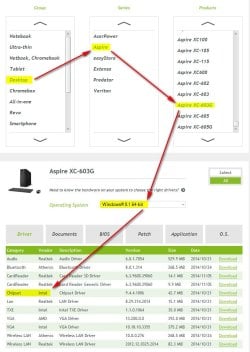
Apparently you have no other option than being deprived from USB3.
 

My Computer My Computer

Computer type
PC/Desktop
Computer Manufacturer/Model Number
Self Assembled
OS
Microsoft Windows 10 Pro Insider Preview 64-bit
CPU
Intel(R) Core(TM) i3-4130 CPU @ 3.40GHz
Motherboard
Gigabyte Technology Co., Ltd. B85M-D3H
Memory
Corsair Vengence 4GB x2 (8.00GB Dual-Channel DDR3 @ 798MHz)
Graphics Card(s)
2047MB GeForce GTS 450 (ZOTAC International)
Sound Card
Onboard (Realtek High Definition Audio)
Monitor(s) Displays
LG Flatron E2040T
Screen Resolution
1600x900
Hard Drives
Western Digital 1 TB
Seagate 500 GB
PSU
Corsair VS550
Case
Cooler Master K380
Cooling
Cooler Master Seidon 120V Plus
Keyboard
Logitech MK260r
Mouse
Logitech MK260r
Internet Speed
PMPL Broadband
Antivirus
Windows Defender + MBAM
Browser
Firefox
Other Info
Dell Studio 15" Laptop
Back
Top