Solved Please help me change the active partition

alexosm

Banned
Local time
8:09 AM
Messages
6
Resolved.

My ultimate goal is to eliminate drive C altogether. Win Xp is installed on C ,Win 7 is installed on E, and I would like to set e as the active partition, remove all the files from C and uninstall xp. Please help me out!
I have attached a screenshot of my Disk Management.
 
Last edited:

My Computer

OS
windows 7
Welcome to Windows Seven Forums.

Please read this tutorial on how to use Partition Wizard: http://www.sevenforums.com/tutorials/93322-partition-wizard-use-bootable-cd.html

However, before you go down this road I would clean up your current disk layout.

Personally, I would wipe the hard drive completely and clean install Windows 7. The reason I suggest this is because it is recognised as best practice to install your operating system to a primary drive rather than a logical volume.

During the install, Windows will want to create a system reserved partition of 100 MB, which will hold the master boot record and will become the active partition.

Windows will then be installed and will automatically give the partition it is installed on drive letter C.
 

My Computer

Computer Manufacturer/Model Number
HP Pavilion Elite 495UK
OS
Windows 7 Ultimate SP1 64-Bit
CPU
Intel Core i7 870 @ 2.93GHz
Motherboard
MSI 2A9C (CPU1)
Memory
8Gb Dual-Channel DDR3 @ 664MHz
Graphics Card(s)
nVidia GeForce GTX 460 1024MB dedicated RAM
Sound Card
Realtek HD Audio
Monitor(s) Displays
HP2310i
Screen Resolution
1920 x 1080
Hard Drives
1x1954GB Hitachi HDS22020ALA 330 (RAID), 1x1954GB Hitachi External for backup and storage
PSU
460W
Case
HP Elite
Cooling
Air cooled
Keyboard
Logitech K750 solar-powered keyboard
Mouse
Logitech Wireless M180 mouse
Internet Speed
2Mb
Other Info
Pure Avanti Flow Internet Radio with iPod Dock, 64Gb iPod, HP USB Speakers, Sony MDR-V500 Headphones, Sony Vaio F-Series Laptop
Does Win7 itself show as C drive when you boot into it? It should do this unless it was incorrectly installed from the XP desktop.

If not then I would definitely clean reinstall it from boot after deleting all partitions on the HD: Clean Install Windows 7

If so then you can use free Partition Wizard bootable CD to convert Win7 partition to Primary, rightclick to Modify>mark it Active, Apply steps. Then boot into Win7 DVD Repair console or Repair CD to Startup Repair - Run 3 Separate Times.

Once it starts on its own and lists the System Active flags, then you can boot back into PW CD to delete XP partition, rightclick Win7 to resize and slide its left grey border all the way to the left to move Win7 into the preferred lower HD space, then slide right border where you want it.
 
No Win 7 comes up as Drive E, Win XP was first installed on drive C. It became unbootable in the sense that I would get a blue screen eventually. I have all my files on Drive E, and would prefer to keep them rather than reinstalling altogether. Is there a way around this ?
 
Last edited:

My Computer

OS
windows 7
The only way WIn7 when booted will see itself as anything but C is if the Win7 installer was run from an OS and not booted.

Yes, you can continue to use WIn7 on E and delete XP if that is what you want.
 
Last edited:
If you want to get rid of XP and just keep Win7, you have a couple of problems:

1. You XP partition contains the bootmgr which also boots Win7. if you delete the XP partition, Win7 will not boot any more. You would have to move/fix the bootmgr on the Win7 partition.

2. Your Win7 partition is not a primary partition. If you want to make it active, you have to first make it a primary partition.

If you want to do that and need help, post back.
 

My Computer

Computer Manufacturer/Model Number
HP, Dell, Gateway, Toshiba - 4 laptops and 2 desktops
OS
Vista, Windows7, Mint Mate, Zorin, Windows 8
CPU
from 1.6GHz Duo to i7
Monitor(s) Displays
2x HP w2207
Hard Drives
5x HDD, 7x SSD, 12x Externals
Keyboard
with trackball - no mices
Mouse
Trackball mice
Internet Speed
DSL 6000
Yes, I would like to make it an active partition. How do I move the Bootfiles ?
 
Last edited:

My Computer

OS
windows 7
Boot free Partition Wizard bootable CD, rightclick on Win7 partition to Modify>Convert to Primary, click OK.

next rightclick on Win7 partition again to Modify>Set to Active, click OK.

then click on Win7 HD to highlight it, from Disk tab select Rebuild MBR, OK, Apply all steps.

If Win7 doesn't start at reboot, boot into Win7 DVD Repair console or System Repair Disk to Startup Repair - Run 3 Separate Times.

Once Win7 starts on its own, confirm in Disk Mgmt it holds the System Active flags.

If you want to recover the XP HD space into Win7, boot PW CD again to rightclick XP to Delete, OK. Then rightclick Win7 partition to Resize, slide left grey border to the left to take up XP space, OK, Apply all steps. You may need to Rebuild MBR again or run Startup Repairs if WIn7 doesn't start.

Back up your files and a WIn7 backup image beforehand.
 
Last edited:
1. Download and burn this program to CD - it is the last entry on the webpage.

2. Load this CD (you may have to change the bootsequence in the BIOS)

3. Highlight your XP partition, click on the Partition tab and go to Modify, then on deactivate

4. Highlight your Win7 partition, Partition tab > Modify > activate -- then click Apply under "Operations pending" on the bottom left.

5. Now you can fix your bootmgr on the Win7 partition: http://www.sevenforums.com/tutorials/104341-bootmgr-missing-fix.html

Hmm, just saw that Greg had explained that already - better read that
 

My Computer

Computer Manufacturer/Model Number
HP, Dell, Gateway, Toshiba - 4 laptops and 2 desktops
OS
Vista, Windows7, Mint Mate, Zorin, Windows 8
CPU
from 1.6GHz Duo to i7
Monitor(s) Displays
2x HP w2207
Hard Drives
5x HDD, 7x SSD, 12x Externals
Keyboard
with trackball - no mices
Mouse
Trackball mice
Internet Speed
DSL 6000
Thanks for all the input! I have set the Windows 7 HD as Primary and active. I highlighted the win 7 HD, but I cannot select anything from the Disk Menu.
 
Last edited:

My Computer

OS
windows 7
Did you click on the WIn7 HD so it lights up on the drive map, then see if Rebuild MBR shows up on the Disk dropdown tab?

Are you using PW bootable CD latest version?

If Rebuild MBR will not show up then Apply Marking Active step, reboot into Win7 DVD Repair console or REpair CD to run Startup Repair up to 3 separate times until Win7 starts.

http://www.sevenforums.com/tutorials/668-system-recovery-options.html
 
It works!!! Thank you all for the help!!
 
Last edited:

My Computer

OS
windows 7
I wasn't able to select MBR, so I found the Windows 7 Cd, and on the second restart, Voila, it worked! Thanks for all your help !
 
Last edited:

My Computer

OS
windows 7
You can post back a screenshot of your Disk Mgmt drive map and listings, using Snipping Tool in Start Menu, if you want us to look it over.
 
Help with Active Drive Partition Deletion

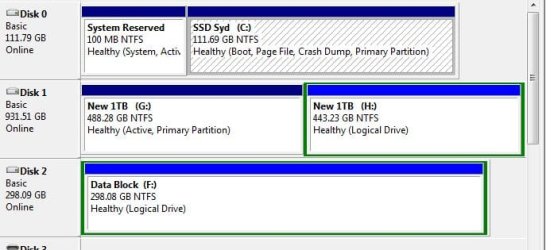
Hi Folks, I have contrived to get two active partitions on my PC! After a 2 week old hard drive (D: & F -) died I replaced (now F & G) it with an old drive that had previously been configured with XP and as a boot drive. I don’t think it is acting as boot as drive C: has an active partition and boot and largely the computer runs fine with the exception of G not being search / index able? And there being a phantom path in the backup which I can’t reset. So the question!
How do I remove the active setting on G: (it holds all the variable windows data) and will it lose all the data?
Im at that point where a little knowledge is dangerous and have seen some genius replies so thought I would ask and see if you could help me out.

See attached screen shot

Thanks for all input
 

Attachments

  • active part.JPG
    active part.JPG
    41.8 KB · Views: 33

My Computer

Computer Manufacturer/Model Number
Ebay Component Build - Under £500 Total Build
OS
Windows 7 Home Premium 64bit
CPU
i7
Motherboard
Asus P8P67 Pro
Memory
Ripsaw 8192Mb DDR3 700Mhz
Graphics Card(s)
AMD Radon 6800
Hard Drives
C:OCZ-Agility3 120Gb + 2TB x2 Segate & Samsung
PSU
Corsair 650
Internet Speed
37Mps Down 8Mps
Back
Top