
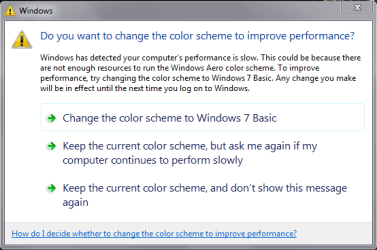
Please help me get rid of this msg.

QuiGon

New member
Member
Local time
1:58 PM
Messages
18
Hello,

I know this has been answered before but i have tried everything and i must have clicked "don't show this msg again" like thousand times, and i turned off "Windows troubleshoting", turned of UAC as well...

but still i see it. is there any way to get rid of it for good, without having to change windows theme.

it only happens when i play games and i alt + tab a lot! also i have disabled transparency and RAM should not be a problem. i have 8 GB DDR3.
 

Attachments
  • ScreenShot001.png
    ScreenShot001.png
    12.8 KB · Views: 95

My Computer My Computer

At a glance

Windows 7 Ultimate x64Intel i5 3350PKingston HyperX DDR3 1600MHz 4GB (x2)Asus, GeForce GTX 560Ti, DCUII 1024MB
Computer type
PC/Desktop
OS
Windows 7 Ultimate x64
CPU
Intel i5 3350P
Motherboard
Asus P8H77-V
Memory
Kingston HyperX DDR3 1600MHz 4GB (x2)
Graphics Card(s)
Asus, GeForce GTX 560Ti, DCUII 1024MB
Hello.
Basically this message it telling you that you computer is performing slow and that graphics card is out of memory (you should not disable it) but;
Anyway, check it again (just to make sure):

Control Panel>System and Securty>Action Center>Change Action center settings (left bar)>Maintenance messages>Check did you turned off Windows troubleshooting

Also try to Disable Desktop Composition in .exe of game you're running (Compatibility tab).

If you did turned it off and it still pops up something is not alright.
Run SFC /SCANNOW in Command prompt.System may be corrupted.
 
Last edited:

My Computer My Computer

At a glance

Windows 7 x64 Pro
OS
Windows 7 x64 Pro
i did SFC scan, "Windows Resource Protection did not find any integrity violation".

also as wrote before, i did disable "Windows troubleshooting". that's the first thing i did, and it's still disabled.

problem is, system is not behaving slow, it has enough memory and vram. but that memory is taken by the game, not all of it though. but still...problem is when i ALT+TAB a lot. to do something else while playing, example open browser and check something up on internet. i don't turn off game to do so. just alt tab. if i disable desktop composition, that it makes my desktop look ugly. i don't want to turn of theme on dekstop. though i disabled a lot of features that takes unecesarry VRAM. even transparecy is off..but i don't want classic star menu, or white/gray taskbar..

is there solution (like registry fix) or where to change to disable just this msg to popup, even if computer thinks that it's performing slow (which is not). everthing works well ok, except for that anoying popup msg. i just think that windows want's to be smart in every way, but failing to do so.

all i wanna do is, say : "shut up windows, don't bug me...let me worry about those things, and i'll see if you performing slow...". which he's not, again. just likes to say so..for no aparent reason!
 

My Computer My Computer

At a glance

Windows 7 Ultimate x64Intel i5 3350PKingston HyperX DDR3 1600MHz 4GB (x2)Asus, GeForce GTX 560Ti, DCUII 1024MB
Computer type
PC/Desktop
OS
Windows 7 Ultimate x64
CPU
Intel i5 3350P
Motherboard
Asus P8H77-V
Memory
Kingston HyperX DDR3 1600MHz 4GB (x2)
Graphics Card(s)
Asus, GeForce GTX 560Ti, DCUII 1024MB
Try this :
Start>Regedit.exe>HKEY_CURRENT_USER\Software\Microsoft\Windows\DWM>Create new DWORD UseMachineCheck with value=0.
 

My Computer My Computer

At a glance

Windows 7 x64 Pro
OS
Windows 7 x64 Pro
thank you for helping. i already had that dword key, with value 0. probably tried that before, but it didn't help i still see that msg!
 

My Computer My Computer

At a glance

Windows 7 Ultimate x64Intel i5 3350PKingston HyperX DDR3 1600MHz 4GB (x2)Asus, GeForce GTX 560Ti, DCUII 1024MB
Computer type
PC/Desktop
OS
Windows 7 Ultimate x64
CPU
Intel i5 3350P
Motherboard
Asus P8H77-V
Memory
Kingston HyperX DDR3 1600MHz 4GB (x2)
Graphics Card(s)
Asus, GeForce GTX 560Ti, DCUII 1024MB
To me the answer is in your computer specs.
With Windows 7 64 and 2 GB of DDR2 with a video card with 512MB of ram.
You are just running out of ram with what you are trying to do.

That is why you are getting that message from Windows 7.

OS Windows 7 Ultimate x64
CPU AMD Athlon64, 4000+
Motherboard Biostar A770 A2G+
Memory Geil 2GiB DDR2-800
Graphics Card nVidia GeForce 8800 GT, G92 512 MB
 

My Computer My Computer

At a glance

Windows 10 Pro. 64/ version 1709 Windows 7 Pr...Intel i7-6800K @ 4.3Corsair Platinum 16 gig @2400EVGA GTX 1070 OC
Computer type
PC/Desktop
Computer Manufacturer/Model Number
Home made Desktop
OS
Windows 10 Pro. 64/ version 1709 Windows 7 Pro/64
CPU
Intel i7-6800K @ 4.3
Motherboard
ASUS X-99 Deluxe II
Memory
Corsair Platinum 16 gig @2400
Graphics Card(s)
EVGA GTX 1070 OC
Monitor(s) Displays
Asus 27" LED LCD/VE278Q
Screen Resolution
1920-1080 or 1280-720 HDMI
Hard Drives
INTEL SSD 730-240 Gb Sata 3.0/
PSU
EVGA Platium 1200W
Case
Phanteks Luxe Tempered Glass 8 fans/ one radiator
Cooling
XSPC/ Water Cooled CPU
Keyboard
Das 4 Professional
Mouse
Logitech M705/MX Anywhere 2-S
Internet Speed
100 mbits
Antivirus
Microsoft Security Essentials/ Malwarebytes Premium 3.0/ SAS
Browser
I.E. 11 default/Firefox/ ISP Time Warner Cable/Spectrum
Other Info
LG BluRay Burner/
Sound system-KLipsch-THX/
Icy Dock ssd Hot Swap bays.
I get this message also and have more than enough DDR3 (16GB) memory and VRAM (6GB).
 

My Computer My Computer

At a glance

windows 7 x64i7-4930KGSkill Ripjaws, 1866mhz, 16GBEVGA GTX 980 ti SC ACX 2.0
Computer type
PC/Desktop
Computer Manufacturer/Model Number
Custom built
OS
windows 7 x64
CPU
i7-4930K
Motherboard
Asus X79 Deluxe
Memory
GSkill Ripjaws, 1866mhz, 16GB
Graphics Card(s)
EVGA GTX 980 ti SC ACX 2.0
Sound Card
on board
Monitor(s) Displays
Asus PB278Q
Screen Resolution
2560 x 1440
Hard Drives
(1) OCZ Vertex 4 128GB (OS)
(2) WD RE4 500GB RAID0 (Data)
(1) WD Caviar Black 2TB (Backup)
PSU
Corsair 1000watt
Case
Coolermaster HAF932 Blue
Cooling
CoolerMaster TPC812
Keyboard
Logitech G19
Mouse
Logitech G5
Antivirus
Norton
To me the answer is in your computer specs.
With Windows 7 64 and 2 GB of DDR2 with a video card with 512MB of ram.
You are just running out of ram with what you are trying to do.

That is why you are getting that message from Windows 7.

OS Windows 7 Ultimate x64
CPU AMD Athlon64, 4000+
Motherboard Biostar A770 A2G+
Memory Geil 2GiB DDR2-800
Graphics Card nVidia GeForce 8800 GT, G92 512 MB

In his original post he said: i have 8 GB DDR3.

so it looks like his System Specs are out of date.
 

My Computer My Computer

At a glance

Windows 10 Pro X64Intel Quad Core i7-4770 @ 3.4Ghz16.0GB PC3-12800 DDR3 SDRAM 1600 MHzIntel Integrated HD Graphics
Computer type
PC/Desktop
Computer Manufacturer/Model Number
Lenovo IdeaCenter 450
OS
Windows 10 Pro X64
CPU
Intel Quad Core i7-4770 @ 3.4Ghz
Memory
16.0GB PC3-12800 DDR3 SDRAM 1600 MHz
Graphics Card(s)
Intel Integrated HD Graphics
Sound Card
Realtek HD Audio
Monitor(s) Displays
HP 22" LCD
Screen Resolution
1680 x 1050
Hard Drives
250GB Samsung EVO SATA-3 SSD
2TB Seagate ST2000DM001 SATA-2
1.5TB Seagate ST3150041AS SATA
Keyboard
Dell USB
Mouse
Lenovo USB
Internet Speed
Cable via Road Runner 3MB Upload, 30MB Download
Antivirus
Windows Defender, MBAM Pro, MBAE
Browser
Seamonkey
Other Info
UEFI/GPT
PLDS DVD-RW DH16AERSH
I read post #1 and QuiGon system specs. Which tell me nothing except we don't know what the specs are we are working with.

Knowing the system specs would be a nice place to start.

By Brink:
http://www.sevenforums.com/tutorials/180324-system-info-see-your-system-specs.html

To the best of my memory Windows 7 only gives that warning when the system is being over tasked for the hardware that is being used and or the settings of the system.
 

My Computer My Computer

At a glance

Windows 10 Pro. 64/ version 1709 Windows 7 Pr...Intel i7-6800K @ 4.3Corsair Platinum 16 gig @2400EVGA GTX 1070 OC
Computer type
PC/Desktop
Computer Manufacturer/Model Number
Home made Desktop
OS
Windows 10 Pro. 64/ version 1709 Windows 7 Pro/64
CPU
Intel i7-6800K @ 4.3
Motherboard
ASUS X-99 Deluxe II
Memory
Corsair Platinum 16 gig @2400
Graphics Card(s)
EVGA GTX 1070 OC
Monitor(s) Displays
Asus 27" LED LCD/VE278Q
Screen Resolution
1920-1080 or 1280-720 HDMI
Hard Drives
INTEL SSD 730-240 Gb Sata 3.0/
PSU
EVGA Platium 1200W
Case
Phanteks Luxe Tempered Glass 8 fans/ one radiator
Cooling
XSPC/ Water Cooled CPU
Keyboard
Das 4 Professional
Mouse
Logitech M705/MX Anywhere 2-S
Internet Speed
100 mbits
Antivirus
Microsoft Security Essentials/ Malwarebytes Premium 3.0/ SAS
Browser
I.E. 11 default/Firefox/ ISP Time Warner Cable/Spectrum
Other Info
LG BluRay Burner/
Sound system-KLipsch-THX/
Icy Dock ssd Hot Swap bays.
I'm only getting it after closing certain games. I have a GTX 980ti, so I have plenty of VRAM. I do overclock the video card as much as possible and sometimes see 100% usage, so that could be the problem.
 

My Computer My Computer

At a glance

windows 7 x64i7-4930KGSkill Ripjaws, 1866mhz, 16GBEVGA GTX 980 ti SC ACX 2.0
Computer type
PC/Desktop
Computer Manufacturer/Model Number
Custom built
OS
windows 7 x64
CPU
i7-4930K
Motherboard
Asus X79 Deluxe
Memory
GSkill Ripjaws, 1866mhz, 16GB
Graphics Card(s)
EVGA GTX 980 ti SC ACX 2.0
Sound Card
on board
Monitor(s) Displays
Asus PB278Q
Screen Resolution
2560 x 1440
Hard Drives
(1) OCZ Vertex 4 128GB (OS)
(2) WD RE4 500GB RAID0 (Data)
(1) WD Caviar Black 2TB (Backup)
PSU
Corsair 1000watt
Case
Coolermaster HAF932 Blue
Cooling
CoolerMaster TPC812
Keyboard
Logitech G19
Mouse
Logitech G5
Antivirus
Norton
You only have 2 GB of memory :eek:

You need to.............. I`ll let someone else say it :D

Whenever I game, I always switch to Windows basic theme.
 

My Computer My Computer

At a glance

Windows 10 Pro x64Intel Core i7 6700KGSkill TridentZ RGB 16GB 3600 16-16-16-36EVGA GTX 980 Ti SC x2
Computer type
PC/Desktop
Computer Manufacturer/Model Number
Skylake Special #666
OS
Windows 10 Pro x64
CPU
Intel Core i7 6700K
Motherboard
Asus Sabertooth Z170 Mark 1
Memory
GSkill TridentZ RGB 16GB 3600 16-16-16-36
Graphics Card(s)
EVGA GTX 980 Ti SC x2
Sound Card
Realtek High Definition
Monitor(s) Displays
AOC G2460PG
Screen Resolution
1920 x 1080 144Hz
Hard Drives
Samsung 860 Pro 256GB, Seagate Barracuda 4TB x2
PSU
EVGA 1000 P2, EVGA White Custom Braided Cables
Case
Corsair Vengeance C70 Gunmetal Black
Cooling
Corsair H100i v2, Corsair ML120 x2, Thermal Grizzly Kryonaut
Keyboard
Logitech G910 Orion Spectrum
Mouse
Logitech G700s
Internet Speed
Verizon Fios Quantum Gateway 75/75
Antivirus
Windows Defender, Malwarebytes Free 3.8.3
Browser
Chrome
Other Info
Corsair SP120 x4, LG Blu-ray Drive, Durabrand HT-395 100 Watt Dolby Digital Amp, Corsair H2100 Wireless 7.1 Headset
my system spces are way out of date..i don't even remember i filled those, long time ago..i' will update them now! Sorry about that.

anyway i understand that it happends when windows is overtasked with stuff (understandable, cause i'm playing games that suck up no matter how much hardware power i have), and doing so would probably make windows beilive thati have insuficient resources..

my question however is not to understand how to make this msg dissapear on it's own. i would like to know if there is possibility to turn this feature off completely..so windows doesn't care about it at all..and it doesn't bug me again about it. even if that means tweaking windows some mumbo jumbo secret way that usually i shouldn't supposed to do :)
 

My Computer My Computer

At a glance

Windows 7 Ultimate x64Intel i5 3350PKingston HyperX DDR3 1600MHz 4GB (x2)Asus, GeForce GTX 560Ti, DCUII 1024MB
Computer type
PC/Desktop
OS
Windows 7 Ultimate x64
CPU
Intel i5 3350P
Motherboard
Asus P8H77-V
Memory
Kingston HyperX DDR3 1600MHz 4GB (x2)
Graphics Card(s)
Asus, GeForce GTX 560Ti, DCUII 1024MB
Back
Top