Please help me resolve crackling/popping sounds

Ziggletooth

New member
Local time
4:45 AM
Messages
3
Hello. I have had this problem for a while now and I have been unable to resolve it. I could really use some help.

I am experiencing audio problems in the form of crackling or popping sounds. These sounds are present whenever I play a youtube video or watch something on netflix however they are not present when I watch a downloaded video, for example a local mkv file.

I have tried the following.

Different web browser - no difference
Updated realtek drivers - no difference
Changed audio format to CD quality - no difference
Disabled sound enhancements - no difference
Change driver from 'realtek high definition audio' to 'high definition audio. - no difference

I was instructed from a search result to download and run a program called LatencyMon. I have attached the result of running it for 3 minutes with a youtube video (I left it running afterwards).

Unfortunately I am not familiar with any of this and don't know what numbers I should be expecting or how to remedy it. The advice on the software is too general to be of any help to me but perhaps someone can use these results to help me.

Thank you for your time.

I would really like to fix this.
 

Attachments

  • Audio.png
    Audio.png
    39.3 KB · Views: 3

My Computer My Computer

At a glance

Windows 7 Home Premium 64 bit
Computer type
PC/Desktop
OS
Windows 7 Home Premium 64 bit
Update

I've tried a few more things with no success.

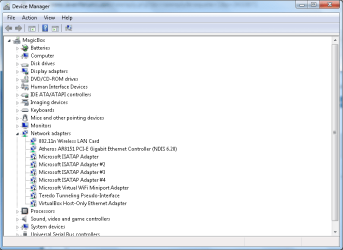
I went into device manager and looked at network adapters. I found a few entries with yellow exclamation marks next to them. I disabled all of them except for the first two (see image) - no difference.

I tried updating AVG (anti-virus) - no difference
I tried disabling AVG - no difference
I changed my power plan to high performance - no change

Any help appreciated.
 

Attachments

  • device manager.png
    device manager.png
    18.5 KB · Views: 0

My Computer My Computer

At a glance

Windows 7 Home Premium 64 bit
Computer type
PC/Desktop
OS
Windows 7 Home Premium 64 bit
Update

Ok so it's definitely my network adapter, if I turn off wifi the crackling stops. So I can let netflix buffer and watch in segments except there is a "you are not connected to the internet" message over the video so thanks for that netflix.

I have updated the adapter - no difference

I don't know where to go from here. I've searched and can't find any solutions. Any ideas guys.
 

My Computer My Computer

At a glance

Windows 7 Home Premium 64 bit
Computer type
PC/Desktop
OS
Windows 7 Home Premium 64 bit
it may also be possible to fix this without disabling networking, so here are some thoughts on that

your DPC report show that either, or both, iastor.sys and ndis.sys are the issues. the fix for ndis is to disable the network adapter like you did. But read through these two links to familiarize yourself with both. You may not need iastor if you aren't using raid.

link#1
Access to this page has been denied.

link #2
Uninstalling the Intel(R) Rapid Storage Technology driver - Microsoft Community

and here is another thread with some ideas
Something else to disable on Win7 - ReadyBoot - Solid State Drives (SSD) - StorageReview Forums

but if none of the above fixes it then you should continue down the networking path. My question is: are you using ethernet, wifi, both? Which adapter was it that you disabled in order to make the issue go away, and what is its Hardware ID?
How to Find Hardware ID: 9 Steps (with Pictures) - wikiHow
 

My Computer My Computer

At a glance

Win7 pro x64stock i7 7700kCorsair Vengeance LPX 16GB (2x8GB) DDR4 @ 320...integrated Intel HD 630
Computer type
PC/Desktop
Computer Manufacturer/Model Number
diy
OS
Win7 pro x64
CPU
stock i7 7700k
Motherboard
Gigabyte Z270N-WIFI mini-ITX
Memory
Corsair Vengeance LPX 16GB (2x8GB) DDR4 @ 3200MHz
Graphics Card(s)
integrated Intel HD 630
Sound Card
onboard Realtek ALC1220
Monitor(s) Displays
two vertically mounted samsung 55" 4k un55mu8000
Screen Resolution
1920x1280
Hard Drives
256GB Samsung EVO 960 M.2 pci-e NVMe SSD
PSU
SilverStone Nightjar ST45NF 450Watt Fanless
Case
No case. Motherboard is mounted directly onto power supply
Cooling
Evercool low profile 815EP with Panaflow 12L fan at 7v
Keyboard
Ortek MCK-86 mini
Mouse
Belkin 5-button USB
Internet Speed
spectrum 400mbps
How about the connection on the mobo where the adapter plugs in?
 

My Computer My Computer

At a glance

Win 7 Ult 64-bitG620 2.6GHZ Pentium R6 GB
Computer type
PC/Desktop
Computer Manufacturer/Model Number
HP p6-2020t
OS
Win 7 Ult 64-bit
CPU
G620 2.6GHZ Pentium R
Memory
6 GB
Monitor(s) Displays
25" HPLV2311
Screen Resolution
1920 x 1200
Hard Drives
1 SATA, 1 exterior SATA
Case
HP
Cooling
PSU
Antivirus
Glasswire
Browser
Waterfox; Firefox; Chrome for work
Other Info
Firewall--Glasswire
Similar specs in Gateway DX4200
Verizon FIOS Wired network

1 other Win7 computer-- has SSD
Everything you posted was exactly what you should be doing, so it looks like you've been doing your research. It is more than likely network related and I was going to post that very thing until you mentioned it.

Question: You said you had devices in Device Manager with yellow exclamation marks? I don't see that in the image you provided. We need hardware IDs for those. Refer to the post above about that.

If you can use ethernet over WIFI that may be the better choice. Unless you're using ethernet already. You updated the sound drivers, see if there's an update to your network drivers. Absent of that, it could even be a program communicating on the Internet behind your back all the time. Like a cloud backup program. Or an anti-virus/firewall messed with the TCP/IP stack. To remedy that, fully uninstall that product for testing. Do so in safe mode. You can also try CurrPorts and see what's connecting to the Internet. CurrPorts: Monitoring TCP/IP network connections on Windows
 

My Computer My Computer

At a glance

Windows 7 Ultimate x64
Computer type
PC/Desktop
OS
Windows 7 Ultimate x64
Back
Top