Please help me with my 3 annoying problems...

chaoscreater

New member
Local time
10:54 AM
Messages
11
Hi guys, first off i'm running Windows 7 32bit build 7600 (full and legit version).

I'm having 3 annoying problems, the first is the "Getting Started" window that pops up everytime at the desktop straight after the welcome screen, this happens everytime when i start windows. In Windows Vista, there is an option on the bottom left to disable it so that it never shows up again. However, i can't find that option anywhere.

I did some Googling and the solutions i found don't work either, such as running the command "msconfig" and finding the service that starts the Getting Started screen, there isn't one on my list, and i went to user accounts and there's no option to disable the screen on Windows 7, but it's there on Windows XP & Vista.

So ya, that's one problem, the 2nd problem is the Pin to Start menu option, it's not there. I already looked at this topic here:

http://www.sevenforums.com/tutorials/5736-start-menu-enable-folder-library-pin-start-menu.html


and applied the registry patch, but it didn't work. I did some Googling and used other registry patches and they don't work either.


and the 3rd most annoying problem is the item selection highlight. When you select any icon on Windows 7, it should be highlighted, i.e the icon background should be highlighted and the default normal colour is light blue or dark blue. But on Windows 7, it's different, it's transparent and it's hard to see what items you selected, especially if you have multiple icons selected. If you don't understand what i mean by this, try select Windows Classic theme and then just select an item on your desktop or something, and the background should be dark blue. If you use an aero theme or whatever theme, it is most likely glassy and transparent.

This annoys me a bit since it's hard to see what you have selected, and it doesn't happen on XP or Vista. I tried turning transparency off and adjusted the options and it didn't change the icon background to the default colour.


So ya i'm out of ideas, if anyone could please help me with these problems i would be greatly appreciated.
 

My Computer My Computer

OS
Windows 7
CPU
i7
Motherboard
Asus Rampage II
Memory
4GB
Graphics Card(s)
Radeon HD 5870
Monitor(s) Displays
Samsung 50' Plasma (using my TV)
Hard Drives
Seagate Barracuda 2TB
PSU
Acbel 800W
Reinstall windows. If after reinstallation the situation is just the same, get your windows dvd changed. If you are using a machine with windows 7 preloaded, contact your vendor.
 

My Computer My Computer

Computer type
PC/Desktop
Computer Manufacturer/Model Number
Self Assembled
OS
Microsoft Windows 10 Pro Insider Preview 64-bit
CPU
Intel(R) Core(TM) i3-4130 CPU @ 3.40GHz
Motherboard
Gigabyte Technology Co., Ltd. B85M-D3H
Memory
Corsair Vengence 4GB x2 (8.00GB Dual-Channel DDR3 @ 798MHz)
Graphics Card(s)
2047MB GeForce GTS 450 (ZOTAC International)
Sound Card
Onboard (Realtek High Definition Audio)
Monitor(s) Displays
LG Flatron E2040T
Screen Resolution
1600x900
Hard Drives
Western Digital 1 TB
Seagate 500 GB
PSU
Corsair VS550
Case
Cooler Master K380
Cooling
Cooler Master Seidon 120V Plus
Keyboard
Logitech MK260r
Mouse
Logitech MK260r
Internet Speed
PMPL Broadband
Antivirus
Windows Defender + MBAM
Browser
Firefox
Other Info
Dell Studio 15" Laptop
Hi chaoscreater,

I'll start with your second problem and have a think about the others. :)

=Taskbar=
When a program is running and you left click on the program icon in the taskbar, is the 'pin to taskbar' option available? This will tell me if the dll is registered.
 

Attachments

  • pintotaskbar.png
    pintotaskbar.png
    17.8 KB · Views: 9

My Computer My Computer

Computer Manufacturer/Model Number
Custom Hack job
OS
Windows 7 Ultimate 64 bit
CPU
Intel(R) Core(TM)2 Quad CPU Q8200 @ 2.33GHz
Motherboard
GigaByte EP45-UD3
Memory
8 GB Kingston
Graphics Card(s)
Nvidia GeForce 9600GT
Sound Card
Soundblaster Audigy
Monitor(s) Displays
AOC x2 22"
Hard Drives
2 x Samsung 500GB (RAID)
2 x Samsung 2TB
1 x WD Green 2TB
1 x Seagate 1TB
1 x Samsung 500GB
PSU
Thermaltake QFan 750W
Case
CM Scout Gaming
Cooling
Coolermaster V10
Keyboard
Microsoft Wireless Keyboard 1000
Mouse
Microsoft Wireless Optical 2000
Internet Speed
320
Other Info
Winfast PVR2000CP
LG DVD-RAM DVD/RW/DL Super Multi
Linksys WMP300Nx2 Wireless Adapter
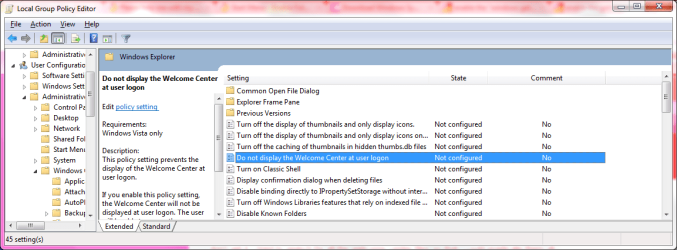
For your first problem, I think the best way is to just disable this in the group policy.

= WELCOME CENTRE=

1. Click on the start globe
2. Open RUN
3. type 'gpedit.msc'
4. Then open the following windows
- user configuration
- administrive templates
- Windows COmponents
- windows explorer
- Do not display the welcome center at user logon
- enable

Reboot and test
 

Attachments

  • welcome screen.png
    welcome screen.png
    34.1 KB · Views: 85

My Computer My Computer

Computer Manufacturer/Model Number
Custom Hack job
OS
Windows 7 Ultimate 64 bit
CPU
Intel(R) Core(TM)2 Quad CPU Q8200 @ 2.33GHz
Motherboard
GigaByte EP45-UD3
Memory
8 GB Kingston
Graphics Card(s)
Nvidia GeForce 9600GT
Sound Card
Soundblaster Audigy
Monitor(s) Displays
AOC x2 22"
Hard Drives
2 x Samsung 500GB (RAID)
2 x Samsung 2TB
1 x WD Green 2TB
1 x Seagate 1TB
1 x Samsung 500GB
PSU
Thermaltake QFan 750W
Case
CM Scout Gaming
Cooling
Coolermaster V10
Keyboard
Microsoft Wireless Keyboard 1000
Mouse
Microsoft Wireless Optical 2000
Internet Speed
320
Other Info
Winfast PVR2000CP
LG DVD-RAM DVD/RW/DL Super Multi
Linksys WMP300Nx2 Wireless Adapter
Reinstall windows. If after reinstallation the situation is just the same, get your windows dvd changed. If you are using a machine with windows 7 preloaded, contact your vendor.

uhh....reinstall Windows? I don't really think that's the best way to solve things, otherwise i would've done it already. Besides, i actually formatted my PC today and installed from fresh start......and i installed Windows 7 on my other PCs and laptops and got them working fine too.

Hi chaoscreater,

I'll start with your second problem and have a think about the others. :)

=Taskbar=
When a program is running and you left click on the program icon in the taskbar, is the 'pin to taskbar' option available? This will tell me if the dll is registered.

thanks for your reply. Yes it's available, i've already pinned a few programs to the taskbar. And i just found out something, if i try to right click on an icon, the pin to start menu is available. But if i try to right click on any folders, it's not there.

On my other PCs, this option is available even if it's a folder or a library shortcut.


Oh and for my last problem about the item select highlight, i forgot to mention that you can solve this by using a different theme. For example, you can download the theme "Infiniti" from Microsoft's website, just go to your Personalization and choose download more themes or something like that, and you will be taken to the website.

The thing is, for some reason on this PC, no matter what themes i use, the item selection is still the glassy & transparent type background, whereas on my other PCs it works fine and shows the default blue background when i select an item/icon etc....
 

My Computer My Computer

OS
Windows 7
CPU
i7
Motherboard
Asus Rampage II
Memory
4GB
Graphics Card(s)
Radeon HD 5870
Monitor(s) Displays
Samsung 50' Plasma (using my TV)
Hard Drives
Seagate Barracuda 2TB
PSU
Acbel 800W
The theme problem is interesting.

I can see the highlight fine on my PC (but I do have a black background).

I tested and changed the theme's around, I can change everything 'except' the highlight colour (or perhaps it changes only subtlety) after a reboot it still looks aero-blue to me.

On your other PC's is the highlight easier to see?

Like all good tech's, if I can't fix it (and rebooting doesn't work :) ), I have a few standard remedies in the medicine cabinet that we could try. This is for all problems where windows is not doing what it is supposed to..... so you know I'm clutching at straws now. :p

1. I am half tempted to give you a script to run that re-registers all of the drivers in your system32 folder. I have not tested this on Win7; but used it many times on XP; so use this last and back up first in case it fails. I've decided to attached it anyway, use at your own risk. Run it as admin from the system32 folder.

2. Perhaps an SFC /Scannow from an elevated command prompt would help?
 

Attachments

My Computer My Computer

Computer Manufacturer/Model Number
Custom Hack job
OS
Windows 7 Ultimate 64 bit
CPU
Intel(R) Core(TM)2 Quad CPU Q8200 @ 2.33GHz
Motherboard
GigaByte EP45-UD3
Memory
8 GB Kingston
Graphics Card(s)
Nvidia GeForce 9600GT
Sound Card
Soundblaster Audigy
Monitor(s) Displays
AOC x2 22"
Hard Drives
2 x Samsung 500GB (RAID)
2 x Samsung 2TB
1 x WD Green 2TB
1 x Seagate 1TB
1 x Samsung 500GB
PSU
Thermaltake QFan 750W
Case
CM Scout Gaming
Cooling
Coolermaster V10
Keyboard
Microsoft Wireless Keyboard 1000
Mouse
Microsoft Wireless Optical 2000
Internet Speed
320
Other Info
Winfast PVR2000CP
LG DVD-RAM DVD/RW/DL Super Multi
Linksys WMP300Nx2 Wireless Adapter
A last thought about your 'pin' problem.....

If you hold down shift when you left click on the *.EXE (this gives you the hidden options), can you see the pin option?
 

My Computer My Computer

Computer Manufacturer/Model Number
Custom Hack job
OS
Windows 7 Ultimate 64 bit
CPU
Intel(R) Core(TM)2 Quad CPU Q8200 @ 2.33GHz
Motherboard
GigaByte EP45-UD3
Memory
8 GB Kingston
Graphics Card(s)
Nvidia GeForce 9600GT
Sound Card
Soundblaster Audigy
Monitor(s) Displays
AOC x2 22"
Hard Drives
2 x Samsung 500GB (RAID)
2 x Samsung 2TB
1 x WD Green 2TB
1 x Seagate 1TB
1 x Samsung 500GB
PSU
Thermaltake QFan 750W
Case
CM Scout Gaming
Cooling
Coolermaster V10
Keyboard
Microsoft Wireless Keyboard 1000
Mouse
Microsoft Wireless Optical 2000
Internet Speed
320
Other Info
Winfast PVR2000CP
LG DVD-RAM DVD/RW/DL Super Multi
Linksys WMP300Nx2 Wireless Adapter
  • Like
Reactions: Dom
For your first problem, I think the best way is to just disable this in the group policy.

= WELCOME CENTRE=

1. Click on the start globe
2. Open RUN
3. type 'gpedit.msc'
4. Then open the following windows
- user configuration
- administrive templates
- Windows COmponents
- windows explorer
- Do not display the welcome center at user logon
- enable

Reboot and test

thanks for the reply. I just tried that and restarted my PC, and it still popped up. I went back and look at it and i can see it's enabled.


A last thought about your 'pin' problem.....

If you hold down shift when you left click on the *.EXE (this gives you the hidden options), can you see the pin option?

AHH yes that worked, i can pin the folders to the start menu now! Great thanks a lot :)


as for my theme problem, i actually saved the theme (yes you can do that) and share them online etc. But anyway i saved it because i actually fiddled around on my other PCs when i installed Windows 7 for the very first time, and somehow i got the background highlight problem fixed and so i saved that theme as a backup and used it on 2 of my other home computers as well as my laptop, and they all work fine and show the same highlight colour and brightness/contrast or whatever......i.e they all look the same.

Just that on this particular PC, it doesn't change anything....
 

My Computer My Computer

OS
Windows 7
CPU
i7
Motherboard
Asus Rampage II
Memory
4GB
Graphics Card(s)
Radeon HD 5870
Monitor(s) Displays
Samsung 50' Plasma (using my TV)
Hard Drives
Seagate Barracuda 2TB
PSU
Acbel 800W
Whoo, so group policy is denying it and it's still appearing. Nice.

I think I'm going to get nasty on this welcome centre. ;)

START UP FOLDER
Check the '%userprofile%\AppData\Roaming\Microsoft\Windows\Start Menu\Programs\Startup' folder and remove any shortcuts to it.

OPEN REGEDIT
Look at these entries for any references to the Welcome centre.
HKLM\Software\Microsoft\Windows\CurrentVersion\Run
HKLM\Software\Microsoft\Windows\CurrentVersion\RunOnce
HKLM\Software\Microsoft\Windows\CurrentVersion\RunOnceEx

HKCU\Software\Microsoft\Windows\CurrentVersion\Run
HKCU\Software\Microsoft\Windows\CurrentVersion\RunOnce
HKCU\Software\Microsoft\Windows\CurrentVersion\RunOnceEx
HKLM\Software\Microsoft\Windows NT\CurrentVersion\Winlogon

GROUP POLICY
As an extra to what we did before, check for any templates loading at startup
Group Policy
Gpedit.msc
user configuration
administrative templates
system
login
Run These Programs At User Logon
(should be blank and Not configured)

MSCONFIG
From the RUN box, type MSCONFIG
Choose selective startup and look on the startup tab
Look for 'welcome center' as a start up item
The program path should be something like
%windir%\system32\rundll32.exe %SystemRoot%\system32\OobeFldr.dll,ShowWelcomeCenter

LAST RESORT ONLY - UNREGISTER THE DLL
I know which dll is used for the welcome centre; but I don't know what else it does. So this is high risk! Try everything else first, back up before trying.
From an elevated command prompt
regsvr32 -u OobeFldr.dll

In regards to the highlight issue, I'm really out of ideas. You could try disabling Aero (or disable/re-enable), ensure that you have the latest drivers for your graphics card from the manufactures website (not MS update), or run the batch I gave you. Did you try an sfc /scannow?
 

My Computer My Computer

Computer Manufacturer/Model Number
Custom Hack job
OS
Windows 7 Ultimate 64 bit
CPU
Intel(R) Core(TM)2 Quad CPU Q8200 @ 2.33GHz
Motherboard
GigaByte EP45-UD3
Memory
8 GB Kingston
Graphics Card(s)
Nvidia GeForce 9600GT
Sound Card
Soundblaster Audigy
Monitor(s) Displays
AOC x2 22"
Hard Drives
2 x Samsung 500GB (RAID)
2 x Samsung 2TB
1 x WD Green 2TB
1 x Seagate 1TB
1 x Samsung 500GB
PSU
Thermaltake QFan 750W
Case
CM Scout Gaming
Cooling
Coolermaster V10
Keyboard
Microsoft Wireless Keyboard 1000
Mouse
Microsoft Wireless Optical 2000
Internet Speed
320
Other Info
Winfast PVR2000CP
LG DVD-RAM DVD/RW/DL Super Multi
Linksys WMP300Nx2 Wireless Adapter
Whoo, so group policy is denying it and it's still appearing. Nice.

I think I'm going to get nasty on this welcome centre. ;)

START UP FOLDER
Check the '%userprofile%\AppData\Roaming\Microsoft\Windows\Start Menu\Programs\Startup' folder and remove any shortcuts to it.

Hmm i checked, nothing in the folder.

OPEN REGEDIT
Look at these entries for any references to the Welcome centre.
HKLM\Software\Microsoft\Windows\CurrentVersion\Run
HKLM\Software\Microsoft\Windows\CurrentVersion\RunOnce
HKLM\Software\Microsoft\Windows\CurrentVersion\RunOnceEx

HKCU\Software\Microsoft\Windows\CurrentVersion\Run
HKCU\Software\Microsoft\Windows\CurrentVersion\RunOnce
HKCU\Software\Microsoft\Windows\CurrentVersion\RunOnceEx
HKLM\Software\Microsoft\Windows NT\CurrentVersion\Winlogon

I found nothing that referenced to the Welcome Centre.

GROUP POLICY
As an extra to what we did before, check for any templates loading at startup
Group Policy
Gpedit.msc
user configuration
administrative templates
system
login
Run These Programs At User Logon
(should be blank and Not configured)

Yup, it's blank and not configured.

MSCONFIG
From the RUN box, type MSCONFIG
Choose selective startup and look on the startup tab
Look for 'welcome center' as a start up item
The program path should be something like
%windir%\system32\rundll32.exe %SystemRoot%\system32\OobeFldr.dll,ShowWelcomeCenter

I found nothing related to it.....all the list shows is C:/ProgramFiles.......and nothing starting with system32 or %windir$ etc...

LAST RESORT ONLY - UNREGISTER THE DLL
I know which dll is used for the welcome centre; but I don't know what else it does. So this is high risk! Try everything else first, back up before trying.
From an elevated command prompt
regsvr32 -u OobeFldr.dll

In regards to the highlight issue, I'm really out of ideas. You could try disabling Aero (or disable/re-enable), ensure that you have the latest drivers for your graphics card from the manufactures website (not MS update), or run the batch I gave you. Did you try an sfc /scannow?


Hmm i think i might try the unregister dll command, and see what happens. Ya i did the sfc scannow and found no errors (i wouldn't think there is any since i did a fresh format installation of Windows 7 only yesterday), and also i'm up to date with my graphics card driver, i always keep up to date with my Realtek sound drivers and ATI drivers etc and i check their websites every 2 weeks or so.


Anyway i'll try the command later and see how it goes, but what's the command to register it? In case something happens and i need to register it back again just to fix it....
 

My Computer My Computer

OS
Windows 7
CPU
i7
Motherboard
Asus Rampage II
Memory
4GB
Graphics Card(s)
Radeon HD 5870
Monitor(s) Displays
Samsung 50' Plasma (using my TV)
Hard Drives
Seagate Barracuda 2TB
PSU
Acbel 800W
Chaoscreater, This is really strange, there has to be a reference to it somewhere for it to appear. hmmmm. Maybe windows calls it by a different name.

In answer to your other question. I'll explain the regsvr32.exe a little more.

Our Unregister example = regsvr32 -u OobeFldr.dll

If you open a command prompt and type 'regsvr32 /?' you get a list of what the command can do.
In our example we use the -u switch to unregister the driver, it can a.so be written '/u' instead of '-u' although this is not the case for all switches. (e.g. regsvr32 /u OobeFldr.dll)

To INSTALL we just leaved out the '-u' switch.
regsvr32 OobeFldr.dll

Hope this helps.

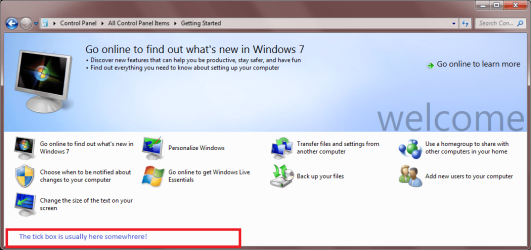
By the way, I have attached a picture of the getting started welcome centre, just to verify that we are talking about the same thing. It never hurts to double check :)

When you first install it there is a check box in the bottom Left that you can click to stop it appearing (just in case you missed this too).
 

Attachments

  • getting started.png
    getting started.png
    85.6 KB · Views: 20

My Computer My Computer

Computer Manufacturer/Model Number
Custom Hack job
OS
Windows 7 Ultimate 64 bit
CPU
Intel(R) Core(TM)2 Quad CPU Q8200 @ 2.33GHz
Motherboard
GigaByte EP45-UD3
Memory
8 GB Kingston
Graphics Card(s)
Nvidia GeForce 9600GT
Sound Card
Soundblaster Audigy
Monitor(s) Displays
AOC x2 22"
Hard Drives
2 x Samsung 500GB (RAID)
2 x Samsung 2TB
1 x WD Green 2TB
1 x Seagate 1TB
1 x Samsung 500GB
PSU
Thermaltake QFan 750W
Case
CM Scout Gaming
Cooling
Coolermaster V10
Keyboard
Microsoft Wireless Keyboard 1000
Mouse
Microsoft Wireless Optical 2000
Internet Speed
320
Other Info
Winfast PVR2000CP
LG DVD-RAM DVD/RW/DL Super Multi
Linksys WMP300Nx2 Wireless Adapter
Chaoscreater, This is really strange, there has to be a reference to it somewhere for it to appear. hmmmm. Maybe windows calls it by a different name.

In answer to your other question. I'll explain the regsvr32.exe a little more.

Our Unregister example = regsvr32 -u OobeFldr.dll

If you open a command prompt and type 'regsvr32 /?' you get a list of what the command can do.
In our example we use the -u switch to unregister the driver, it can a.so be written '/u' instead of '-u' although this is not the case for all switches. (e.g. regsvr32 /u OobeFldr.dll)

To INSTALL we just leaved out the '-u' switch.
regsvr32 OobeFldr.dll

Hope this helps.

By the way, I have attached a picture of the getting started welcome centre, just to verify that we are talking about the same thing. It never hurts to double check :)

When you first install it there is a check box in the bottom Left that you can click to stop it appearing (just in case you missed this too).


ahh ok thanks for the tips. Yup that's the welcome screen i'm talking about, and ya the checkbox should appear at the bottom left coz it showed that on Vista, but i never see the checkbox on Windows 7. During the first startup after i freshly formatted my PC, it popped up and the checkbox wasn't there at all, but the window just keeps showing up everytime.....

maybe i could get tools like TuneUp utilities as it can show a better list of all the startup items, and i'll see if i can find it in the list before i try to unregister the dll.......
 

My Computer My Computer

OS
Windows 7
CPU
i7
Motherboard
Asus Rampage II
Memory
4GB
Graphics Card(s)
Radeon HD 5870
Monitor(s) Displays
Samsung 50' Plasma (using my TV)
Hard Drives
Seagate Barracuda 2TB
PSU
Acbel 800W
I can't believe we can't get rid of your welcome/getting started screen. I think it annoys me just as much as it does you now :)

=Getting started screen=
In MSCONFIG you might need to look for the entry and path, after searching online, I believe that this is the correct one "ShowWelcomeCenter LaunchedBy_StartMenuShortcut"

There are free programs to disable start-up programs. But the trick will be finding one that works on Win7 (and in my case 64bit). Many windows tweaking programs also do this.

But I am about out of ideas mate. :(
 

My Computer My Computer

Computer Manufacturer/Model Number
Custom Hack job
OS
Windows 7 Ultimate 64 bit
CPU
Intel(R) Core(TM)2 Quad CPU Q8200 @ 2.33GHz
Motherboard
GigaByte EP45-UD3
Memory
8 GB Kingston
Graphics Card(s)
Nvidia GeForce 9600GT
Sound Card
Soundblaster Audigy
Monitor(s) Displays
AOC x2 22"
Hard Drives
2 x Samsung 500GB (RAID)
2 x Samsung 2TB
1 x WD Green 2TB
1 x Seagate 1TB
1 x Samsung 500GB
PSU
Thermaltake QFan 750W
Case
CM Scout Gaming
Cooling
Coolermaster V10
Keyboard
Microsoft Wireless Keyboard 1000
Mouse
Microsoft Wireless Optical 2000
Internet Speed
320
Other Info
Winfast PVR2000CP
LG DVD-RAM DVD/RW/DL Super Multi
Linksys WMP300Nx2 Wireless Adapter
Hi guys, i've solved the welcome screen problem, it seems my msconfig had a problem or something i dunno, but yesterday i was installing a patch that lets me install 3rd party Windows 7 themes as well as custom Windows Media Centre skins/themes, and when i restarted my PC, my taskbar changed to the windows classic look, and no matter what themes i switch to, it doesn't change it at all.

There was also a program that came installed with the patch and it auto starts up everytime as well, so i thought maybe i should disable that and see what happens, so i ran "msconfig" and while i was searching the list for the program, i then found the welcome screen which isn't in the "Service" tab but in the "Startup" tab instead, and the name is "Microsoft Windows Operating System", so i disabled that and restarted, and it's gone!

So ya for some reason, it showed up this time, but not previously. I also solved the custom windows 7 theme as well in case ur wondering.


Anyway i think most of my problems are solved now, a big thank you to everyone who helped me!!
 

My Computer My Computer

OS
Windows 7
CPU
i7
Motherboard
Asus Rampage II
Memory
4GB
Graphics Card(s)
Radeon HD 5870
Monitor(s) Displays
Samsung 50' Plasma (using my TV)
Hard Drives
Seagate Barracuda 2TB
PSU
Acbel 800W
Brilliant! Merry Xmas.:D
 

My Computer My Computer

Computer Manufacturer/Model Number
Custom Hack job
OS
Windows 7 Ultimate 64 bit
CPU
Intel(R) Core(TM)2 Quad CPU Q8200 @ 2.33GHz
Motherboard
GigaByte EP45-UD3
Memory
8 GB Kingston
Graphics Card(s)
Nvidia GeForce 9600GT
Sound Card
Soundblaster Audigy
Monitor(s) Displays
AOC x2 22"
Hard Drives
2 x Samsung 500GB (RAID)
2 x Samsung 2TB
1 x WD Green 2TB
1 x Seagate 1TB
1 x Samsung 500GB
PSU
Thermaltake QFan 750W
Case
CM Scout Gaming
Cooling
Coolermaster V10
Keyboard
Microsoft Wireless Keyboard 1000
Mouse
Microsoft Wireless Optical 2000
Internet Speed
320
Other Info
Winfast PVR2000CP
LG DVD-RAM DVD/RW/DL Super Multi
Linksys WMP300Nx2 Wireless Adapter
Back
Top