
PLEASE help this will truly show me a GENUIS in computers if soloved

Core7

New member
Member
VIP
Local time
10:25 AM
Messages
525
Location
South Africa
HI there i have a USB Transcend JF V30/4GB.....i know its not worth the trouble but would really like to find out why its not working. The flash drive is normal when i plug it in makes a sound but whengo to my computer there is nothing there. When i say show hidden devices i can see that there is something plugged in with the device name (k:) but cant open it it says insert drive in (K:) and when i plug it out it disappears. SO it must be the flash drive that the computer detects but not usable, have tried it in 5 computers not showing


What can i do please help:)
 

My Computer My Computer

At a glance

Window 7 Ultimate 32bitIntel core 2 duo @ 2.40 GhzHynix 2X1GBThe Club 3D GTS250 256bit
Computer Manufacturer/Model Number
Gigabyte
OS
Window 7 Ultimate 32bit
CPU
Intel core 2 duo @ 2.40 Ghz
Motherboard
Gigabyte
Memory
Hynix 2X1GB
Graphics Card(s)
The Club 3D GTS250 256bit
Sound Card
laptech
Monitor(s) Displays
Acer
Screen Resolution
1440X900
Hard Drives
Seagate 350gig
Seagate 250gig
PSU
Coolermaster GX 650
Case
Acer
Cooling
2 80mm fans
Keyboard
Acer
Mouse
Logitech
Internet Speed
54kb/s
If its not being properly detected, chances are at one time it was physically unplugged from the PC without using the "safely remove hardware" function. When instances such as this happen the device will not be properly detected the next time (or subsequent times) its plugged in as its status is corrupted in Windows.

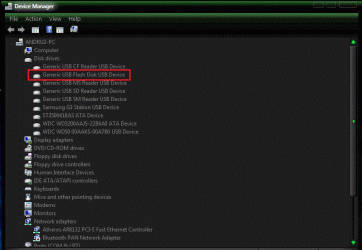
If this is the case, plug in the USB drive and then go to the Device Manager, either the device will be listed under Disc Drives probably with an error or in the USB section. If there is an unknown device shown in the USB section chances are its the USB drive. Either location that its shown, RIGHT click on the unknown device entry to highlight it and then LEFT click "Uninstall". DO NOT check the box to uninstall the drivers as the drivers are just the default built in Windows drivers. Then physically disconnect the USB drive and then restart the PC. After Windows starts, connect the drive and Windows should detect the new hardware and install it. If this works, before you physically disconnect the unit make sure you use the Safely Remove Hardware option (icon in the Notification area - lower right of task bar).
 

My Computer My Computer

At a glance

Windows 10 64 bitIntel i7 6700K16GB Corsair DominatorIntel CPU Graphics
Computer type
PC/Desktop
Computer Manufacturer/Model Number
My Own Build
OS
Windows 10 64 bit
CPU
Intel i7 6700K
Motherboard
ASUS ROG Maximus VIII Hero
Memory
16GB Corsair Dominator
Graphics Card(s)
Intel CPU Graphics
Sound Card
RealTek
Monitor(s) Displays
27" Dell S2719dgf
Screen Resolution
2560X1440
Hard Drives
1 TB Samsung 850 EVO SSD for Win 10 Pro
500GB Samsung 850 EVO SSD for Win 10 Insider
2 TB drive for backup
PSU
EVGA Supernova 750G2
Case
BeQuiet Silent Base 600
Cooling
Deepcool Captain 120EX
Keyboard
Microsoft Wireless 2000
Mouse
Microsoft wireless
Internet Speed
100 MB/sec (Cable)
Antivirus
Microsoft Defender and Malwarebytes
Browser
Edge/Firefox
Other Info
Cakewalk (Sonar) by BandLab and Studio One 4.1 Pro recording studio software. MOTU 896Mk3 Hybrid recording interface, Frontier Tranzport wireless control unit, Behringer X-Touch Control Surface.
Five USB connected optical drives for CD Audio production using Nero BurningROM
By any chance would there be a(n) on/off switch on the flashdrive. If so, sometimes they can get accidentally flip to make the device inoperable.
 

My Computer My Computer

At a glance

Windows 7 Ultimate 64 bitAMD Phenom II X4 965 Black EditionGSkill 4 X 2 GB PC 8500XFX Radeon HD 6790 D
Computer Manufacturer/Model Number
Custom built
OS
Windows 7 Ultimate 64 bit
CPU
AMD Phenom II X4 965 Black Edition
Motherboard
Gigabyte GA-MA790X-DS4
Memory
GSkill 4 X 2 GB PC 8500
Graphics Card(s)
XFX Radeon HD 6790 D
Sound Card
On board RealTek HD
Monitor(s) Displays
Dual monitors:Samsung SyncMaster S20B300
Screen Resolution
1600 X 900
Hard Drives
Seagate Barracuda 1TB (primary)
Seagate Barracuda 2 X 320 GB
PSU
Ultra X4 750 watt fully modular
Case
Thermaltake Overseer RX 1 full tower
Cooling
Core-Contact 92 mm CPU Cooler
Keyboard
Logitech G510
Mouse
Razor DeathAdder
Internet Speed
50/5 Mbps UL/DL
Other Info
Optical: Super Muliti DVD burner w/lightscribe, Hauppauge WinTV HVR-1800
If its not being properly detected, chances are at one time it was physically unplugged from the PC without using the "safely remove hardware" function. When instances such as this happen the device will not be properly detected the next time (or subsequent times) its plugged in as its status is corrupted in Windows.

If this is the case, plug in the USB drive and then go to the Device Manager, either the device will be listed under Disc Drives probably with an error or in the USB section. If there is an unknown device shown in the USB section chances are its the USB drive. Either location that its shown, RIGHT click on the unknown device entry to highlight it and then LEFT click "Uninstall". DO NOT check the box to uninstall the drivers as the drivers are just the default built in Windows drivers. Then physically disconnect the USB drive and then restart the PC. After Windows starts, connect the drive and Windows should detect the new hardware and install it. If this works, before you physically disconnect the unit make sure you use the Safely Remove Hardware option (icon in the Notification area - lower right of task bar).

Thanks, but have tried this and have tried to use the same usb on other pc's but has the same problem
 

My Computer My Computer

At a glance

Window 7 Ultimate 32bitIntel core 2 duo @ 2.40 GhzHynix 2X1GBThe Club 3D GTS250 256bit
Computer Manufacturer/Model Number
Gigabyte
OS
Window 7 Ultimate 32bit
CPU
Intel core 2 duo @ 2.40 Ghz
Motherboard
Gigabyte
Memory
Hynix 2X1GB
Graphics Card(s)
The Club 3D GTS250 256bit
Sound Card
laptech
Monitor(s) Displays
Acer
Screen Resolution
1440X900
Hard Drives
Seagate 350gig
Seagate 250gig
PSU
Coolermaster GX 650
Case
Acer
Cooling
2 80mm fans
Keyboard
Acer
Mouse
Logitech
Internet Speed
54kb/s
The front usb ports on your machine don't happen to have a door over them that's held in place with a small magnet by any chance?

This was a design flaw in a case I once owned and it claimed two flash drives when they accidentally tapped the top of the housing.
 

My Computer My Computer

At a glance

Windows 7 x64Intel i7 2600kG.skill Ripjaw 16gigs @ 1866Nvidia gtx580 (evga)
Computer Manufacturer/Model Number
Insane hobo technologies. ;-)
OS
Windows 7 x64
CPU
Intel i7 2600k
Motherboard
Asrock z68 extreme 4 gen 3
Memory
G.skill Ripjaw 16gigs @ 1866
Graphics Card(s)
Nvidia gtx580 (evga)
Sound Card
Integrated HD audio + hdmi
Monitor(s) Displays
24" ASUS widescreen + 42" insignia
Screen Resolution
1080p (1920x1080)
Hard Drives
128 Samsung 830
256 Samsung 840
3 x 1tb storage drive (various)
1 western digital 1tb (eSATA)
1 Seagate 1tb (eSATA)
PSU
1 kilowatt SLI/Crossfire rated Silverstone modular
Case
NZXT Phantom + additional 220 fan
Cooling
Zalmann
Keyboard
Microsoft wireless 3000 (v2)
Mouse
MS - wireless 5000 (bluetrack)
Internet Speed
depends on if you ask me or my provider.
Other Info
The above information is provided as is, and the author assumes no responsibility for issues it may cause with your sanity or fanboyism.

Attachments

  • Untitled.gif
    Untitled.gif
    133.5 KB · Views: 15

My Computer My Computer

At a glance

Window 7 Ultimate 32bitIntel core 2 duo @ 2.40 GhzHynix 2X1GBThe Club 3D GTS250 256bit
Computer Manufacturer/Model Number
Gigabyte
OS
Window 7 Ultimate 32bit
CPU
Intel core 2 duo @ 2.40 Ghz
Motherboard
Gigabyte
Memory
Hynix 2X1GB
Graphics Card(s)
The Club 3D GTS250 256bit
Sound Card
laptech
Monitor(s) Displays
Acer
Screen Resolution
1440X900
Hard Drives
Seagate 350gig
Seagate 250gig
PSU
Coolermaster GX 650
Case
Acer
Cooling
2 80mm fans
Keyboard
Acer
Mouse
Logitech
Internet Speed
54kb/s
I must say I have removed this device plenty of times with out safely removing it.....
 

My Computer My Computer

At a glance

Window 7 Ultimate 32bitIntel core 2 duo @ 2.40 GhzHynix 2X1GBThe Club 3D GTS250 256bit
Computer Manufacturer/Model Number
Gigabyte
OS
Window 7 Ultimate 32bit
CPU
Intel core 2 duo @ 2.40 Ghz
Motherboard
Gigabyte
Memory
Hynix 2X1GB
Graphics Card(s)
The Club 3D GTS250 256bit
Sound Card
laptech
Monitor(s) Displays
Acer
Screen Resolution
1440X900
Hard Drives
Seagate 350gig
Seagate 250gig
PSU
Coolermaster GX 650
Case
Acer
Cooling
2 80mm fans
Keyboard
Acer
Mouse
Logitech
Internet Speed
54kb/s
I have removed several of my USB sticks w/o "safely removing" them without any issues.....don't do it while it is reading/writing from/to it as that could cause problems. If there isn't anything on the drive vitally important, you could see about formatting it....that has been known to help in some cases. Other than that, I might guess it is just a bad flash drive. They make so many of them these days as cheap as possible, some bad ones make it through.

Kelly
 

My Computer My Computer

At a glance

Windows 7 Professional 64bit SP1Intel Core i5-3570K @ 4.5GHzCorsair Vengeance 16GB (4x4) @1866MHz CL 9-9-...EVGA GTX 750 Ti FTW
Computer type
PC/Desktop
Computer Manufacturer/Model Number
Custom Built
OS
Windows 7 Professional 64bit SP1
CPU
Intel Core i5-3570K @ 4.5GHz
Motherboard
Asus Sabertooth Z77
Memory
Corsair Vengeance 16GB (4x4) @1866MHz CL 9-9-9-24 1T
Graphics Card(s)
EVGA GTX 750 Ti FTW
Sound Card
Onboard Audio
Monitor(s) Displays
Dell S2309W
Screen Resolution
1920x1080
Hard Drives
Samsung 830 128GB SSD - OS
(4) Seagate 5TB HDD
(1) Seagate 2TB HDD
PSU
Seasonic X750 80+ Gold Full Modular
Case
Antec Eleven Hundred Super Mid Tower
Cooling
Intel Liquid Cooler
Keyboard
Max Nighthawk X8 Mechanical keyboard
Mouse
Mionix Naos 7000
Internet Speed
50 Mbps Down / 10 Mbps Up
Antivirus
Microsoft Security Essentials/Malwarebytes Anti-Malware
Browser
Chrome/Firefox
Other Info
Klipsch ProMedia 2.1's
Asus RT-N66R Wireless Router
Please post a screenshot of your Disk Management - maximize the window so I can see more detail.

Thanks
 

My Computer My Computer

At a glance

x64 (6.3.9600) Win8.1 Pro & soon dual boot x6...AMD A6-3420M APU with Radeon(tm) HD Graphics6.00 GBAMD Radeon(TM) HD 6520G
Computer type
Laptop
Computer Manufacturer/Model Number
HP Pavilion dv6-6c10us
OS
x64 (6.3.9600) Win8.1 Pro & soon dual boot x64 (6.1.7601) Win7_SP1 HomePrem
CPU
AMD A6-3420M APU with Radeon(tm) HD Graphics
Motherboard
Hewlett-Packard 1805
Memory
6.00 GB
Graphics Card(s)
AMD Radeon(TM) HD 6520G
Sound Card
(1) AMD High Definition Audio Device (2) IDT High Definiti
Monitor(s) Displays
HP W2072a 20" LCD (1600 x 900) @ 60 Hz
Screen Resolution
1366 x 768 x 32 bits (4294967296 colors) @ 60 Hz
Hard Drives
ST640LM0 00 HM641JI SATA Disk Device
Keyboard
Logitech k520 wireless KB
Mouse
Logitech m320 wireless mouse (bundled with KB)
Internet Speed
15/5 | 54 MB Wireless 'n'
Antivirus
Realtime: Defender or Avast | On-demand: Malwarebytes, ESET
Browser
IE 11 on Win8, IE 10 on win 7
Other Info
Media: [Gimp, Audacity, VLC] || Comm: [WEmail 2012, Skype] || Productivity: [OpenOffice,| Textpad] || Utils: [Sysinternals, cCleaner, Speccy, Defraggler]
Back
Top