Please help with UPS surge protector.

crimson

New member
Power User
VIP
Local time
5:35 PM
Messages
178
Hello. I was looking at a surge protector for my PC with 850W PSU. I was checking out the surge protectors, and noticed that they have wattage.

The one I was looking at is 330W:
Newegg.com - CyberPower Standby Series CP550SLG 550 VA 330 Watts 8 Outlets UPS Replaces existing model# CP550SL

Does this matter? Should this surge protector be able to keep my computer on for a few minutes in case the power goes out?

The power in this place probably went out twice because they forget to pay their bills. But often, there have been times when the power would blink off for a second or 2, then come back on. Enough to shut off my computer.
 

My Computer

OS
Windows 7 Retail
Have a looky over here pal UPS Power Calculator (change the settings to the country you reside in) ;)
 

My Computer

Computer type
PC/Desktop
Computer Manufacturer/Model Number
Self Built
OS
Windows 7 Ultimate 64bit
CPU
AMD Phenom Quad core 9950 black edition
Motherboard
Gigabyte
Memory
16Gb
Graphics Card(s)
2x XFX Radeon 5850
Sound Card
PCI Express X-Fi Titanium / Logitech G35
Monitor(s) Displays
2x HP 2410i
Screen Resolution
1920x1080
Hard Drives
2x 500Gb Seagate
1x 300Gb Seagate
1x 1Tb Seagate
2x 1Tb Hitatchi
PSU
Jean Tech Storm 700W
Case
Cooler Master COSMOS S
Cooling
Akasa Evo Blue Pro
Keyboard
Logitech G15
Mouse
Mad Catz M.M.O. 7
Internet Speed
12mb
It doesn't have an option for power supply. 850W. How does it work? I can't tell what I should get.
 

My Computer

OS
Windows 7 Retail
I don't understand. I just need something that will keep my computer on in case my power blinks on and off. Or goes off so I can shut it down in a few minutes. I don't need a UPS that will keep my computer on for an hour or so. I have 850W PSU so does the watts on a UPS matter?
 

My Computer

OS
Windows 7 Retail
The 850 watt rating of your power supply is telling you the maximum amount of power it can supply continuously. If your system is not being pushed hard by gaming or video encoding or the like, then the power requirement will be much less.

For example, I have an APC brand battery backup rated at 1500VA (865 watts). Plugged in to the battery backup are the following items:

PC with 650 watt power supply
PC with 350 watt power supply
25" LCD monitor
cable modem
wireless router
gigabit switch
HP 6110 all-in-one printer

The display on the battery backup is showing 224 watts, even with all those items plugged in and operating.

So, unless you're playing a game or video encoding when the power blinks, a 300 watt battery backup will probably be more than sufficient. Pay careful attention to the rating as 300 VA is not the same as 300 watts. A rating of 300 VA would give roughly 175 watts which may or may not be enough to keep your system going.
 

My Computer

Computer type
PC/Desktop
Computer Manufacturer/Model Number
Custom Build
OS
Windows 7 Home Premium x64
CPU
Intel Core i7 5960X @3.0 GHz
Motherboard
Gigabyte GA-X99-SOC Force
Memory
4 x 4 GB G.Skill Ripjaws4 DDR4-2400
Graphics Card(s)
PNY GTX 780
Sound Card
Realtek on-board ALC1150
Monitor(s) Displays
HP Z30i + Asus PA246Q + Dell U2412M
Screen Resolution
2560x1600 + 1920x1200 + 1920x1200
Hard Drives
Samsung 830 256GB
PSU
Antec EarthWatts 650W
Case
Cooler Master HAF 932
Cooling
Corsair Hydro Series H105
Keyboard
Razer BlackWidow Tournament Edition Stealth
Mouse
Razer Naga
Thanks! That helps alot. Ya the VA and Watts are on the box.


What if the usage goes over? Like say for example, you were running games, and had more than 865W showing on your APC UPS display. Will it still be able to keep it on for awhile if the power goes out?

OK I see about the PSU. So if I have an 850W PSU, I have to make sure that my PC isn't running anything higher than that right? I think everything I have will stay under 850W.

What if I have 2 GTX560 cards installed in SLI mode, and playing a high-end online game like TERA or something? So that particular UPS I was looking at was 330W. What if I'm playing something like that on my PC with 850W max power, and pushing more than 330W, and the power goes out. Will that UPS thing still keep the power on? Or do I have to look for something higher.

My build will be i7 processor, 1 hard drive, 2 GTX560 in SLI running on 850W Corsair PSU. I don't know how much Watts it will be using while playing a highend game, but I'm sure the 850W will cover. Just hoping the UPS will cover it as well.
 

My Computer

OS
Windows 7 Retail
How do I measure how much Watts my computer is using? Does Windows 7 do that or is there a software for that?
 

My Computer

OS
Windows 7 Retail
How do I measure how much Watts my computer is using? Does Windows 7 do that or is there a software for that?

For that you would need a hardware meter for your plug socket, search for a plug in power usage meter and there are a range available from as little as £10. Many utility companies in the UK will give you one depending on your tarriff.

Most modern UPS's WILL continue to deliver the power above their rated wattage (it's more to do with current) but a risk of triggering a thermal cut out (instant off and ups reset) and a significantly reduced operating time. I would only have my rig and display powered from it for emergencies. The manufacturer warranty would also be void by such treatment.
 

My Computer

Computer type
PC/Desktop
Computer Manufacturer/Model Number
Self Build
OS
Windows 7 Ultimate x64
CPU
Intel Core2 Quad Q8300 2.5Ghz
Motherboard
Asus P5QD Turbo
Memory
Kingston HyperX 4x1GB DDR2 1066Mhz
Graphics Card(s)
Asus/Nvidia 9500GT 1GB
Sound Card
On-Board HD
Monitor(s) Displays
22" Widescreen TFT
Screen Resolution
1920x1080
Hard Drives
2x 320Gb Seagate SATAII RAID 0
2x 80Gb Seagate SATAII RAID 0
1x 1tb hybrid (8gb ssd)
PSU
650w
Case
ATX
Cooling
140mm front, 120mm Rear, 80mm Chipset + stock CPU and GPU
Keyboard
Plastic one
Mouse
Plastic one
Internet Speed
4Mbps
Other Info
Laptop: HP Elitebook 2560p
i5 @2.7Ghz 4GB DDR3
If I have the 850W PSU, I don't think my PC will even be using close to that much.

Here's one I found with 600W
Intelligent LCD Series - CP1000AVRLCD | CyberPower Systems, Inc.

Do you think this one with 600W should be able to handle the system I described above? (850W PSU, i7 processor, and 2 GTX 560 cards.)

They also have a 510W, 750W, 810W, 900W.

Do you think the 600W one will be able to handle everything fine, or should I go with the 810W? It's about a $45 difference.
 

My Computer

OS
Windows 7 Retail

My Computer

Computer type
PC/Desktop
Computer Manufacturer/Model Number
Dell Inspiron 660
OS
Windows 7 Home Premium 64bit
CPU
Intel Core i3-3240
Motherboard
Dell 084J0R
Memory
8GB DDR3 SDRAM
Graphics Card(s)
EVGA GeForce GT 620
Sound Card
Intel Panther Point PCH High Definition Audio
Monitor(s) Displays
Acer G205HV
Screen Resolution
1600 x 900
Hard Drives
Sandisk SSD 64GB SDSSDP064G
Seagate HDD 1TB ST1000DM003-1CH162
PSU
Dell 300W
Case
Dell Inspiron
Keyboard
Logitech Wireless K320/B350
Mouse
Microsoft
Internet Speed
25Mbps/4Mbps
Antivirus
Avast
Browser
Mozilla Firefox

My Computer

Computer type
PC/Desktop
Computer Manufacturer/Model Number
Home Built
OS
Windows 8.1 Pro w/Media Center 64bit, Windows 7 HP 64bit
CPU
Phenom II X6 1100T
Motherboard
ASUS M5A99X EVO
Memory
Crucial Balistic 8gb DDR3-1866 CL9
Graphics Card(s)
MSI R6850 Cyclone IGD5 PE
Sound Card
On Board
Monitor(s) Displays
ASUS VE258Q 25" LED with DVI-HDMI-DisplayPort
Screen Resolution
1920 x 1080
Hard Drives
Two WD Cavier Black 2TB Sata III, WD My Book Essential 2TB USB 3.0
PSU
Seasonic X650 80 Plus GOLD Modular
Case
Corsair 400R
Cooling
Antec Kuhler H2O 620, Two 120mm and four 140mm
Keyboard
Logitech K120
Mouse
Logitech Marble Mouse USB, Logitech Precision Game Pad
Internet Speed
15MB
Antivirus
Norton IS 2013, Malwarebytes Pro Beta 2
Browser
IE-11, FF-27
Other Info
APC UPS ES 750, Netgear WNR3500L Gigabit & Wireless N Router with SamKnows Test Program, Motorola SB6120 Gigabit Cable Modem. Brother HL-2170W Laser Printer, Epson V300 Scanner
you can work out your power usage here for free: eXtreme Power Supply Calculator

Remember TDP is comparable to how hard you are pushing the machine at the time of the outage.

and then just add the nominal wattage of your display (manufacturers website). the UPS you listed above is only rated for 2mins a full load anyway so I wouldnt advise overloading it (it also has an overload alarm).
 

My Computer

Computer type
PC/Desktop
Computer Manufacturer/Model Number
Self Build
OS
Windows 7 Ultimate x64
CPU
Intel Core2 Quad Q8300 2.5Ghz
Motherboard
Asus P5QD Turbo
Memory
Kingston HyperX 4x1GB DDR2 1066Mhz
Graphics Card(s)
Asus/Nvidia 9500GT 1GB
Sound Card
On-Board HD
Monitor(s) Displays
22" Widescreen TFT
Screen Resolution
1920x1080
Hard Drives
2x 320Gb Seagate SATAII RAID 0
2x 80Gb Seagate SATAII RAID 0
1x 1tb hybrid (8gb ssd)
PSU
650w
Case
ATX
Cooling
140mm front, 120mm Rear, 80mm Chipset + stock CPU and GPU
Keyboard
Plastic one
Mouse
Plastic one
Internet Speed
4Mbps
Other Info
Laptop: HP Elitebook 2560p
i5 @2.7Ghz 4GB DDR3
I recommend an APC UPS
Newegg.com - apc ups

Specifically: Newegg.com - apc ups

Bingo! I agree. Buy a model that has a USB connection available to connect to your PC. The software will tell you lots of information, including how much load you have on the unit & approximate runtime you have available. You can also run self tests to check on the condition of your battery. This is much better than buying a "dumb" UPS that never lets you know it is overloaded or the batteries are getting weak - until it's too late!
 

My Computer

Computer type
PC/Desktop
Computer Manufacturer/Model Number
Custom Build
OS
Windows 7 Professional 64 Bit SP1
CPU
Intel i7-3770K. Mild Overclock to 4.2 Ghz
Motherboard
ASUS Sabertooth Z77
Memory
Crucial Ballistix Sport 32GB DDR3-1600 (PC3-12800)
Graphics Card(s)
Intel 4000 - On CPU
Sound Card
On Board
Monitor(s) Displays
HP w2408h
Screen Resolution
1920 x 1200
Hard Drives
Samsung 840 Pro 256Gb SSD, --
Two - WDC WD1001FALS-00J7B0 SATA
PSU
Antec EarthWatts Green Series 650 Watt ATX
Case
Fractal Design Core 3000 ATX
Cooling
Corsair H80i Water Cooled
Keyboard
Logitech Illuminated
Mouse
Logitech Wireless Trackball M570 + Touchpad T650
Internet Speed
9.5 Mbps down - 25.4 Mbps upload
Antivirus
MSE
Browser
IE 10, Chrome
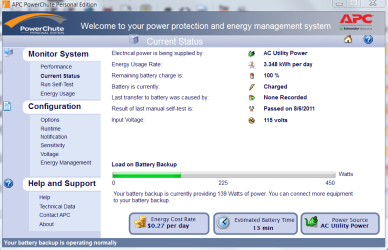
I have been using APC for years and I have three of these. One on my PC system and one each on my large TV's and cable box. This model has added features to show load and power usage and cost and will shutdown your PC gently when the battery is getting low. The price of $81.99 with FREE shipping is a good deal and its a very nice unit.

Newegg.com - APC BE750G 750 VA 450 Watts 10 Outlets Power Saving Back-UPS ES

APS Load.PNG

APC Usage.PNG

Jim :geek:
 

My Computer

Computer type
PC/Desktop
Computer Manufacturer/Model Number
Home Built
OS
Windows 8.1 Pro w/Media Center 64bit, Windows 7 HP 64bit
CPU
Phenom II X6 1100T
Motherboard
ASUS M5A99X EVO
Memory
Crucial Balistic 8gb DDR3-1866 CL9
Graphics Card(s)
MSI R6850 Cyclone IGD5 PE
Sound Card
On Board
Monitor(s) Displays
ASUS VE258Q 25" LED with DVI-HDMI-DisplayPort
Screen Resolution
1920 x 1080
Hard Drives
Two WD Cavier Black 2TB Sata III, WD My Book Essential 2TB USB 3.0
PSU
Seasonic X650 80 Plus GOLD Modular
Case
Corsair 400R
Cooling
Antec Kuhler H2O 620, Two 120mm and four 140mm
Keyboard
Logitech K120
Mouse
Logitech Marble Mouse USB, Logitech Precision Game Pad
Internet Speed
15MB
Antivirus
Norton IS 2013, Malwarebytes Pro Beta 2
Browser
IE-11, FF-27
Other Info
APC UPS ES 750, Netgear WNR3500L Gigabit & Wireless N Router with SamKnows Test Program, Motorola SB6120 Gigabit Cable Modem. Brother HL-2170W Laser Printer, Epson V300 Scanner
you can work out your power usage here for free: eXtreme Power Supply Calculator

Remember TDP is comparable to how hard you are pushing the machine at the time of the outage.

and then just add the nominal wattage of your display (manufacturers website). the UPS you listed above is only rated for 2mins a full load anyway so I wouldnt advise overloading it (it also has an overload alarm).
That thing calculated my SLI build to be 753W

What about the power usage?

Do you think 600W UPS-surge should be able to handle the system I described above? (850W PSU, i7 processor, and 2 GTX 560 cards in SLI.)

Or should I get something closer to my 850W PSU?
 

My Computer

OS
Windows 7 Retail
Thanks for giving the brand. I still don't know if getting 600W is fine according to the information in the post above.
 

My Computer

OS
Windows 7 Retail
753w is your consumption (850w is max your PSU can deliver) so at peak times your machine will be using 753w but normally less so you should be ok with a 600w, although as mentioned by another post on this thread a decent UPS with monitoring via USB will be the best way to give you answers in a real world scenario. Did you actually check the link in the first reply? This will tell you everything you need, it's not important how much you power supply can deliver, you could have a 10million watt PSU but it will only draw what the components demand.
 

My Computer

Computer type
PC/Desktop
Computer Manufacturer/Model Number
Self Build
OS
Windows 7 Ultimate x64
CPU
Intel Core2 Quad Q8300 2.5Ghz
Motherboard
Asus P5QD Turbo
Memory
Kingston HyperX 4x1GB DDR2 1066Mhz
Graphics Card(s)
Asus/Nvidia 9500GT 1GB
Sound Card
On-Board HD
Monitor(s) Displays
22" Widescreen TFT
Screen Resolution
1920x1080
Hard Drives
2x 320Gb Seagate SATAII RAID 0
2x 80Gb Seagate SATAII RAID 0
1x 1tb hybrid (8gb ssd)
PSU
650w
Case
ATX
Cooling
140mm front, 120mm Rear, 80mm Chipset + stock CPU and GPU
Keyboard
Plastic one
Mouse
Plastic one
Internet Speed
4Mbps
Other Info
Laptop: HP Elitebook 2560p
i5 @2.7Ghz 4GB DDR3
Get one for free with a dead battery & replace with external car battery. I've got a couple of used Optima Marine AGM batteries in parallel on an old APC UPS. It'll run for hours on a car battery. Most APC's run on 12V gel cells.
 

My Computer

Computer type
PC/Desktop
Computer Manufacturer/Model Number
Dell Inspiron 660
OS
Windows 7 Home Premium 64bit
CPU
Intel Core i3-3240
Motherboard
Dell 084J0R
Memory
8GB DDR3 SDRAM
Graphics Card(s)
EVGA GeForce GT 620
Sound Card
Intel Panther Point PCH High Definition Audio
Monitor(s) Displays
Acer G205HV
Screen Resolution
1600 x 900
Hard Drives
Sandisk SSD 64GB SDSSDP064G
Seagate HDD 1TB ST1000DM003-1CH162
PSU
Dell 300W
Case
Dell Inspiron
Keyboard
Logitech Wireless K320/B350
Mouse
Microsoft
Internet Speed
25Mbps/4Mbps
Antivirus
Avast
Browser
Mozilla Firefox
I have an APC Back-UPS XS 1300 LCD (cost about $125 a few years ago). My Box is a OCZ Fatal1ty 550W 80Plus PSU, GTX 460 graphics card, Phenom II X4 965 processor, 8GB DDR2-1066Mhz RAM, Asus M3A76-CM Motherboard, Zyxel 635 DSL modem, Samsung 205BW 20.5" LCD, Altec Lansing 221 Speaker System, and Buffalo WHR-G54S Router running DD-WRT v2.4 pre-SP2 (build 14929). The UPS load under maximum CPU and GPU usage peaks at about 350-370W (when doing normal stuff it runs about 180-210W).

This type of UPS can show the total load on the UPS, how much runtime remains on battery, and is great for brownouts or surges in power. I've used it when the power has been off for upwards of 45 minutes...if it looks like the power is going to be off longer than that, I power down my system.
 

My Computer

Computer Manufacturer/Model Number
Home Built
OS
Windows 7 Ultimate x64
CPU
AMD Athlon II X4 630
Motherboard
ASUS M3A76-CM
Memory
8GB DDR2 PC-1066
Graphics Card(s)
nVidia Geforce GT240 (1GB GDDR3)
Sound Card
Via Audio (On-Board)
Monitor(s) Displays
Samsung 205BW
Screen Resolution
1680x1050 (32-bit)
Hard Drives
1TB Seagate (ST31000340AS)
2TB Seagate (ST32000542AS)
PSU
OCZ Fatal1ty 550W 80 Plus
Case
Thermaltake Lanbox Lite
Cooling
Stock Heatsink/Fan
Keyboard
HP Wireless Comfort Desktop
Mouse
HP Wireless Comfort Mouse
Internet Speed
3mbit/sec (down) - 384kb/sec (up)

My Computer

Computer Manufacturer/Model Number
DIY
OS
W7x64 Pro, SuSe 12.1/** W7 x64 Pro, XP MCE
CPU
Phenom II 1090T w/Noctua NH-D14 /**4400+ X2 w/CM Hyper TX 3
Motherboard
ASRock 890FX Deluxe 4/**A8N-SLI
Memory
2 x 2GB Patriot PGS34g1600LLKA/**4x1GB Corsair VS
Graphics Card(s)
EVGA GTX460 SC/**EVGA 8800GTS
Sound Card
Asus Xonar D2X/**Xonar D1
Monitor(s) Displays
Acer X233H, Dell E152FPc /**LG M237-WD
Screen Resolution
1920x1080 & 1024x768/**1980x1080
Hard Drives
WDC 2TB, 1.5TB, 1TB, 500GB,Seagate 500GB , Maxtor 80GB /**500GB Seagate & WDC 1TB Black
PSU
CM RS600 w/ APC BX1000G/**Antec 500 TP w/ APC BX1000
Case
HAF922/**Antec 1040IIB
Cooling
3x200mm, 1x140 and 1x120mm/**5x80mm fans
Keyboard
Logitech Media USB/**Saitek Eclipse
Mouse
Cordless Trackman Wheel/**Ditto
Internet Speed
3.3Mbps
Other Info
SB 560 5.1 w/ Sennheiser RS140/**Creative T20 speakers, Dvico FusionHDTV7 Gold RT, Cisco E3000, HP 5510V AIO, Linksys E3000, Belkin F5U237 hub and **F5D8055 adapter
(** = 2nd rig)
Back
Top