Please Offer Advice on Installation

Why not walk him through it here. Probably help some others while your at it. Just a thought.

Oldewolfe,

You need the version of winrar that you are running it in. So x86 in this case. But the directions given to Yaco won't work for you. He was installing a x64 OS from a x64 OS. You are installing a 64 bit OS from a 32 bit OS and I don't think you can run the x64 setup.exe in the x86 OS. You need to burn the .iso to disk so you have a bootable disk to install from.
This is the "normal" way to install and it is good to have a bootable disk in case you need to do a repair install. As long as you have that other OS to fall back to you can always burn a disk from there if needed.

Hope this helps.

Gary
 

My Computer My Computer

Computer Manufacturer/Model Number
Dell XPS420
OS
Vista Ult 64 bit Seven Ult RTM x64
CPU
Intel Core2 Quad Q6600 2.40 gigahertz
Memory
Crucial Ballistix 4x2GB PC2 6400
Graphics Card(s)
NVIDIA GeForce 8600 GTS 256 MB
Sound Card
Creative SB X-Fi audio
Monitor(s) Displays
HP w2207 + HPvs15
Screen Resolution
1680x1050 + 1024x768
Hard Drives
2-WD5000AAKS-500 GB
WD5000AAV-500 GB external
Keyboard
Microsoft Comfort Curve
Mouse
MX Revolution
Other Info
Wacom Intuos 2 Graphics Tablet
Experience Index=5.5
I got that Program and all it did, was just confuse me further... lol

I'll try the WinRAR thing too, I had it on my other HD when I burned the Disk I'm used to Load Up Win7x86, so we'll have to see what happens... If that don't work, Expect a Page Sly... lol

Thanks... :)

dag nabbit... lol...

That were a Bust... And I already have 3 Win7x64 Disc's Burned, and countless others that never Took Off (Bad Batch of Disc's me thinks- 2 Movie Burns Failed too)- I must be doin' somethin' else wrong... lol
 
Last edited:

My Computer My Computer

Computer Manufacturer/Model Number
Gateway GT5026E
OS
Win7 Home Premium x64
CPU
Pentium D 820 Dual Core Stock Settings
Motherboard
Cortez D945GCZ
Memory
2Gb's at 1-0-1-0
Graphics Card(s)
VisionTek Radeon HD 5670 2gb ddr3 @ Stock Settings
Sound Card
Integrated 5.1 Audio
Monitor(s) Displays
Gateway 19" LCD and LG 37" HD TV
Screen Resolution
19" LCD's @ Native 1280x1024 and 37" LG at Native 1920x1080
Hard Drives
Seagate 500 gb Internal 7200rpm
Iomega/Seagate 500Gb External
WD 250Gb in External USB Enclosure
Seagate 40Gb Misc External
PSU
Thermaltake TR2 550W Modular
Case
Factory BTX
Cooling
Factory
Keyboard
Logitech K520
Mouse
Logitech M310 Laser
Internet Speed
Comcast
Other Info
Need an External Drive for my Media to clear my other drives...
I got W7 running :D

And it asked me if I wanted to boot in W7 or Vista upon startup, perfect! My initial impression is that it is beautiful. One thing that really stood out was how the top menu bar color still matches your Aero theme even when maximized. This always bothered me so much in Vista. I'm going to have so much fun playing around on this. And then I'm going to have to deal with the painstaking task of reinstalling all my software, but I definitely feel liberated now and I thank everyone so much who has given me the confidence and knowledge needed to pull it off. I had never partitioned a hard drive or installed an OS before, and without this forum, that would probably still be true!


glad it worked out :)
 

My Computer My Computer

Computer Manufacturer/Model Number
Myself
OS
Windows 7 64bit Ultimate Build 7268.0.090701-1900
CPU
Quad CPU Q6600 @ 2.4GHz
Memory
4GB 6400 Dual Channel
Graphics Card(s)
1GB DDR3 x16 + 512mb ddr2 x1
Sound Card
I dunno, but it puts out a good 7.1 sur through the fiber :D
Monitor(s) Displays
Quad-Monitor display (check out the photo)
Screen Resolution
1200x1600
Hard Drives
(2 x 1TB) + (1 x 500Gb)

tip: Always run your OS on a small Disk with away from your large storage files, and make sure theirs plenty of Cache (32mb recommnded).
PSU
1000w
Case
a block of wood
Cooling
Intel Standard. tip: Dont overclock with beta win7...
Internet Speed
15meg
Ok ill walk you through how to use EasyBCD right here so if any others have this problem, hopefully this will fix it.
1. Run easyBCD, should be in all programs under Neosmart Technologies.
2. Once run, click the "Manage bootloader" option.
3. make sure the "reinstall the vista bootloader" option is selected, and click "write MBR", you should hear a confirmation sound.
4. Click "Add/Remove Entries" option.
5. Click the "windows" option in the tabs at the bottom.
6. Select the "Vista/Longhorn" option,(the first one).
7. Type a name for what you would like to have appear at boot for selection, if its vista, of course name it Vista, if W7, then Windows 7 should be fine.
8. Select which drive your other boot is on.
9. Click add entry at the bottom.
10. you should see the current OS, and the other OS in the view settings option.
11. go back to add remove entries, and click save.
12. Reboot, and all should fall into place.

Good luck! :D
 

My Computer My Computer

OS
W7 7127 X64
OK, maybe I missed something in my Explaination of my Problem... It sounds like it's already been Assumed that it's Loaded in the other Partition and just not Booting Up, and for that I Apologize... My fault there because that's where my Issue is, I haven't been able to Install it due to the afore mentioned Screen showing up when I try to Install it and the Subsiquent booting in x86 Mode when I follow it's directions...

And that's what's got me Perplexed... I burned these Disc's the same way I did the x86 version I'm running on now, it should be asking me WHERE to Install, but I get that Black Screen and no Definition of what 1 & 2 are and then Told it's not a System Disc and boots me Up in x86... I can Autorun the Disc, but since it's an x64 OS it won't run in x86 and is more than happy to tell me so... lol

Being Computer Stupid is also likely not Working in my Favor and I'm beginning to feel like quite the Retard at the moment... lol :D
 

My Computer My Computer

Computer Manufacturer/Model Number
Gateway GT5026E
OS
Win7 Home Premium x64
CPU
Pentium D 820 Dual Core Stock Settings
Motherboard
Cortez D945GCZ
Memory
2Gb's at 1-0-1-0
Graphics Card(s)
VisionTek Radeon HD 5670 2gb ddr3 @ Stock Settings
Sound Card
Integrated 5.1 Audio
Monitor(s) Displays
Gateway 19" LCD and LG 37" HD TV
Screen Resolution
19" LCD's @ Native 1280x1024 and 37" LG at Native 1920x1080
Hard Drives
Seagate 500 gb Internal 7200rpm
Iomega/Seagate 500Gb External
WD 250Gb in External USB Enclosure
Seagate 40Gb Misc External
PSU
Thermaltake TR2 550W Modular
Case
Factory BTX
Cooling
Factory
Keyboard
Logitech K520
Mouse
Logitech M310 Laser
Internet Speed
Comcast
Other Info
Need an External Drive for my Media to clear my other drives...
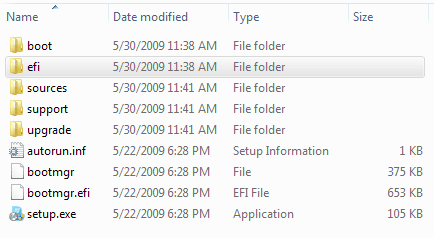
Did you extract the .iso with winrar? It would have created a folder with this contents.
dir.PNG

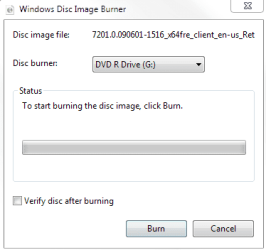
or did you burn the .iso to disk using windows or third party software? To burn the image with windows, right click on the x64 .iso file and select open with and windows disk image burner. Be sure to have a blank dvd in the drive. This box appears. Check verify disk after burning and click burn.
imgburn.PNG

When it's finished reboot with the disk in and you should be able to install from there.

Hope this helps.
Gary
 

My Computer My Computer

Computer Manufacturer/Model Number
Dell XPS420
OS
Vista Ult 64 bit Seven Ult RTM x64
CPU
Intel Core2 Quad Q6600 2.40 gigahertz
Memory
Crucial Ballistix 4x2GB PC2 6400
Graphics Card(s)
NVIDIA GeForce 8600 GTS 256 MB
Sound Card
Creative SB X-Fi audio
Monitor(s) Displays
HP w2207 + HPvs15
Screen Resolution
1680x1050 + 1024x768
Hard Drives
2-WD5000AAKS-500 GB
WD5000AAV-500 GB external
Keyboard
Microsoft Comfort Curve
Mouse
MX Revolution
Other Info
Wacom Intuos 2 Graphics Tablet
Experience Index=5.5
Hahha, mate don't worry about it, we all make mistakes, as long as uve learnt from it, then nothing to worry about, leaving you with some valuable experience. Maybe install x64 then x86?
 

My Computer My Computer

OS
W7 7127 X64
I'd thought about that too.... lol

I just wasn't ready to reload all my Drivers and everything just yet... :)

As to the Question about How I burned the Disc's... I used Windows for the First one, CDBurnerXP for the 2nd (This is what I'd used for my x86 Disc-Which I might Add wants to be Run @ S/U like the others ought to- I tried it just a few ago to see if it'd work), and ISOBuster... All of Which have failed to Start per my x86 Disc... And, I'm officially out of Disc's right now, so it's gonna have to wait a few...
 

My Computer My Computer

Computer Manufacturer/Model Number
Gateway GT5026E
OS
Win7 Home Premium x64
CPU
Pentium D 820 Dual Core Stock Settings
Motherboard
Cortez D945GCZ
Memory
2Gb's at 1-0-1-0
Graphics Card(s)
VisionTek Radeon HD 5670 2gb ddr3 @ Stock Settings
Sound Card
Integrated 5.1 Audio
Monitor(s) Displays
Gateway 19" LCD and LG 37" HD TV
Screen Resolution
19" LCD's @ Native 1280x1024 and 37" LG at Native 1920x1080
Hard Drives
Seagate 500 gb Internal 7200rpm
Iomega/Seagate 500Gb External
WD 250Gb in External USB Enclosure
Seagate 40Gb Misc External
PSU
Thermaltake TR2 550W Modular
Case
Factory BTX
Cooling
Factory
Keyboard
Logitech K520
Mouse
Logitech M310 Laser
Internet Speed
Comcast
Other Info
Need an External Drive for my Media to clear my other drives...
Back
Top