Poor Gaming Performance

Excellent. Okay, I'm going to order the XFX/ATI Radeon HD 5670, and the Corsair CX500 (just to be on the safe side), and see how I get on.

Many thanks for all your help
SlackerITGuy, Solarstarshines, Wishmaster, WolfSoul and stormy13. :)

P.S. Watch this space for desperate cries for help while installing. :p


My Computer

Computer Manufacturer/Model Number
Fujitsu P9900 0-Watt
OS
Windows 7 Professional x64 SP 1
CPU
Intel Core i5 - 3.2 GHz - Dual Core
Motherboard
D2912 - μBTX
Memory
4 GB
Graphics Card(s)
Asus Radeon HD 6770 1 GB
Sound Card
Realtek ALC663
Monitor(s) Displays
Fujitsu SL 3230T 23" LCD TFT
Screen Resolution
1920 x 1080
Hard Drives
500 GB Seagate / 500 GB Western Digital external HDD.
PSU
Corsair CX500
Keyboard
Fujitsu KB400 PS/2
Mouse
Fujitsu OPT FSC BC
Internet Speed
54 Kb/ps
Other Info
Windows Experience Index Score: 5.9 |

Processor: 7.1 |
Memory: 5.9 |
Graphics: 7.3 |
Gaming Graphics 7.3 |
Primary Hard Disk: 5.9
One thing you can do when changing out the power supply that will make it much easier, as you remove the connectors from the motherboard and anywhere they are connected put twist tie and a small label on each. Then when you put the new one in use the labels on the old as a reference as to where to connect everything.
 

My Computer

Computer type
PC/Desktop
Computer Manufacturer/Model Number
Me
OS
Win 7 Ultimate x64
CPU
FX-8350 @ 4.6 GHz so far
Motherboard
Asus M5A97 EVO
Memory
ADATA XPG V1 Series Black 8GB DDR3 1600
Graphics Card(s)
Sapphire R9 270x Dual-X
Sound Card
Xonar DGX w/ Corsair Vengence 1300
Monitor(s) Displays
Acer S232HL Abid
Screen Resolution
1920x1080
Hard Drives
120 GB OCZ Vertex 3
500 GB Seagate 7200.12
PSU
Antec Earthwatts 650W Green
Case
Antec Three Hundred
Cooling
Cooler Master 212 EVO
Keyboard
Logitech G510
Mouse
Logitech G500s
Internet Speed
35000/3000
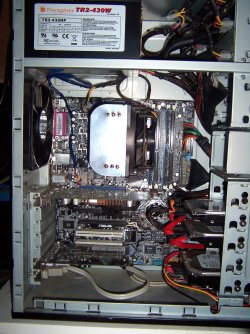
Ahh, good tip! I'll definitely do that. It's a bit of an awkward space to work in, I had the side off the tower earlier, and it's not the most accessible innards I've ever seen. It's going to be difficult to work in there unless I can remove the metal frame which blocks off the motherboard, pretty much. I might post some pics later.
 

My Computer

Computer Manufacturer/Model Number
Fujitsu P9900 0-Watt
OS
Windows 7 Professional x64 SP 1
CPU
Intel Core i5 - 3.2 GHz - Dual Core
Motherboard
D2912 - μBTX
Memory
4 GB
Graphics Card(s)
Asus Radeon HD 6770 1 GB
Sound Card
Realtek ALC663
Monitor(s) Displays
Fujitsu SL 3230T 23" LCD TFT
Screen Resolution
1920 x 1080
Hard Drives
500 GB Seagate / 500 GB Western Digital external HDD.
PSU
Corsair CX500
Keyboard
Fujitsu KB400 PS/2
Mouse
Fujitsu OPT FSC BC
Internet Speed
54 Kb/ps
Other Info
Windows Experience Index Score: 5.9 |

Processor: 7.1 |
Memory: 5.9 |
Graphics: 7.3 |
Gaming Graphics 7.3 |
Primary Hard Disk: 5.9
Run into some problems, I'm afraid!

I got the new PSU today, and immediately set to installing it. I got the machine opened up fine, got the original PSU out. Initially I had problems because the new PSU isn't as deep as the original one, and it wouldn't quite fit the space in the chassis, but I managed to get it in, if a little unsatisfactorily. Then, when I was putting the new one in I put all the cables in the right places, connected the peripherals, the 12 pin plug into the motherboard, etc. I discovered that I was missing a cable. There's an 8 pin male socket on the motherboard, just under the 12 pin socket, which I removed an 8 pin female from when I took the original PSU out. There isn't a corresponding plug on the new PSU. There's one that's the same shape, but it's only a 4-pin female. I found another male socket on the motherboard which had a matching 4-pin, so I plugged it in there and hoped for the best. So, I plugged in the machine and flicked the switch on at the mains, then the PSU, then on the PC. Nothing happened, except a faint, high-pitched whine from the PSU which lasted after I switched off the PSU and the mains.

What on Earth is going on here?! :eek:

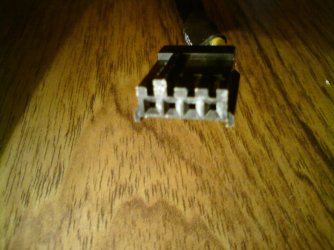
I've removed the new PSU, put the old one back, and got the PC running again (as you can probably tell, since I'm posting to this thread using it). Below I've attached some pictures, since I haven't a clue what these cables are for, and I'd fail at describing them:

DSC01375.JPG

[Another cable which I didn't find a use for. What is it for?]

DSC01377.JPG

[The 4-pin female which]

DSC01380.JPG

[The 4-pin female which]
 

My Computer

Computer Manufacturer/Model Number
Fujitsu P9900 0-Watt
OS
Windows 7 Professional x64 SP 1
CPU
Intel Core i5 - 3.2 GHz - Dual Core
Motherboard
D2912 - μBTX
Memory
4 GB
Graphics Card(s)
Asus Radeon HD 6770 1 GB
Sound Card
Realtek ALC663
Monitor(s) Displays
Fujitsu SL 3230T 23" LCD TFT
Screen Resolution
1920 x 1080
Hard Drives
500 GB Seagate / 500 GB Western Digital external HDD.
PSU
Corsair CX500
Keyboard
Fujitsu KB400 PS/2
Mouse
Fujitsu OPT FSC BC
Internet Speed
54 Kb/ps
Other Info
Windows Experience Index Score: 5.9 |

Processor: 7.1 |
Memory: 5.9 |
Graphics: 7.3 |
Gaming Graphics 7.3 |
Primary Hard Disk: 5.9
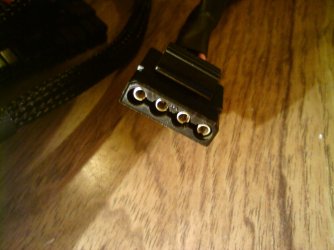
The first one is power for IDE connection hhd dvd/burner drive

The other 2 look like a power adapter for the floppy drive and the other one could be for the usb but from here

it looks like ide and floppy power cords those will defenitly not help you getting the rig on unless your useing that stuff
 

My Computer

Computer type
PC/Desktop
Computer Manufacturer/Model Number
CoreI7-6700K MrFingerIII Special Builds
OS
Windows 10 Home Premium 64bit sp1
CPU
Intel I7-6700K @ 4.6 Ghz 1.344 volts everyday OC
Motherboard
Asrock Fatality K6 Z170 Socket 1151
Memory
32GB G-Skill TridentZ 3200mhz 16-18-18-38 DDR4
Graphics Card(s)
Sli Gigabyte Windforce GTX 980 G1
Sound Card
AC97 Creative Rage Tactic 3D Headphones Bluetooth
Monitor(s) Displays
27" Asus ROG Swift PG278Q G-Sync 48" Vizio Smart HD TV
Screen Resolution
2560x1440p 27"- 48" Currently Gaming at 2560x1440p Res 2K
Hard Drives
250GB Samsung Evo840SSD Seagate baracuda 500 GB WD Mybook 500Gb 1TB Seagate Barracuda
PSU
HX1050w Corsair Silver 80plus certified crosfire/sli
Case
Enthod Pro Full Tower
Cooling
Corsair H110i GT 280 mm High Performance WaterBlock
Keyboard
Logitech wireless keyboard
Mouse
Logitech wireless mouse
Internet Speed
Cox Cable 100+ mb
Antivirus
WebRoot Spysweeper with Antivirus
Browser
IE-10, Chrome, Opera
Other Info
My Other Rig is a AMD FX8320E @4.6Ghz 16GB Ballistic Sport Ram
Mobo Asrock Fatality 990FX 120GB OCZ SSD 1TB Seagate Barracuda Corsair H75 Cooling PSU Corsair CX750
GPU GTX Gigabyte 970G1
To help take out the guess work (click on Resources),

Welcome to Corsair :: Builder Series CX500 Power Supply

The first is a 4 pin molex, and in addition to IDE hard drives is also used on IDE CD/DVD drives, the odd case fan, and some older (usually AGP) video cards.

The second looks like the same connector only from a different angle, which as Solarstarshines said is a floppy power connector (and was also used on some video cards, I have an old Radeon 9800 Pro that uses one).

For any extra cables that don't have any of the connectors being used you can stuff them in an empty drive bay, or if room up in the top of the case sort of like this,

004.JPG
 

My Computer

Computer type
PC/Desktop
Computer Manufacturer/Model Number
Me
OS
Win 7 Ultimate x64
CPU
FX-8350 @ 4.6 GHz so far
Motherboard
Asus M5A97 EVO
Memory
ADATA XPG V1 Series Black 8GB DDR3 1600
Graphics Card(s)
Sapphire R9 270x Dual-X
Sound Card
Xonar DGX w/ Corsair Vengence 1300
Monitor(s) Displays
Acer S232HL Abid
Screen Resolution
1920x1080
Hard Drives
120 GB OCZ Vertex 3
500 GB Seagate 7200.12
PSU
Antec Earthwatts 650W Green
Case
Antec Three Hundred
Cooling
Cooler Master 212 EVO
Keyboard
Logitech G510
Mouse
Logitech G500s
Internet Speed
35000/3000
I don't think you need to plug in that 8-pin.. and like the others said those 2 on the pics are for disks, fans and floppy If you only use SATA drives you won't need these
eps-atx12v_8-4_pin.jpg

Did you manage to get this one into the connector on your board?
 

My Computer

Computer type
PC/Desktop
Computer Manufacturer/Model Number
Black Trooper Rampage
OS
Windows 7 Ultimate 64 Retail
CPU
I7-960
Motherboard
Asus Rampage III Extreme
Memory
4 X 4 GB Kingston DDR3-1600
Graphics Card(s)
Gigabyte GTX670
Sound Card
X-Fi Titanium Fatality Champion
Monitor(s) Displays
Dell U2412M
Screen Resolution
1920 X 1200
Hard Drives
2 X Samsung 830 256 GB
Velociraptor 1TB
2 x 2 TB WD Caviar Black
Seagate Barrcuda 2 TB
PSU
Cooler Master Silent Pro Gold 1000 W
Case
Cooler Master Trooper
Keyboard
Logitech G19
Mouse
Logitech G9x
Internet Speed
30 MBPS +/- VDSL
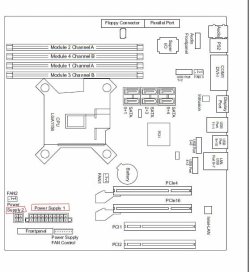
Alright.. I found a technical scheme drawing of your board.. the 8-pin you noticed is for fan-control
The CX500 doesn't have that option so don't connect it, just connect ATX 12-pin and 4-pin
 

Attachments

  • D2912.JPG
    D2912.JPG
    107.4 KB · Views: 8

My Computer

Computer type
PC/Desktop
Computer Manufacturer/Model Number
Black Trooper Rampage
OS
Windows 7 Ultimate 64 Retail
CPU
I7-960
Motherboard
Asus Rampage III Extreme
Memory
4 X 4 GB Kingston DDR3-1600
Graphics Card(s)
Gigabyte GTX670
Sound Card
X-Fi Titanium Fatality Champion
Monitor(s) Displays
Dell U2412M
Screen Resolution
1920 X 1200
Hard Drives
2 X Samsung 830 256 GB
Velociraptor 1TB
2 x 2 TB WD Caviar Black
Seagate Barrcuda 2 TB
PSU
Cooler Master Silent Pro Gold 1000 W
Case
Cooler Master Trooper
Keyboard
Logitech G19
Mouse
Logitech G9x
Internet Speed
30 MBPS +/- VDSL
I don't think you need to plug in that 8-pin.. and like the others said those 2 on the pics are for disks, fans and floppy If you only use SATA drives you won't need these
eps-atx12v_8-4_pin.jpg

Did you manage to get this one into the connector on your board?

Okay! So far, so good! I got that one into the connector, it was a 4-pin socket on the board, so I split the 8-pin connecter as directed in the instructions that came with the machine, and plugged it in.

Judging by what's been said, I've plugged all the necessary connectors into the right places, so, any ideas why the PSU isn't working?
 
Last edited:

My Computer

Computer Manufacturer/Model Number
Fujitsu P9900 0-Watt
OS
Windows 7 Professional x64 SP 1
CPU
Intel Core i5 - 3.2 GHz - Dual Core
Motherboard
D2912 - μBTX
Memory
4 GB
Graphics Card(s)
Asus Radeon HD 6770 1 GB
Sound Card
Realtek ALC663
Monitor(s) Displays
Fujitsu SL 3230T 23" LCD TFT
Screen Resolution
1920 x 1080
Hard Drives
500 GB Seagate / 500 GB Western Digital external HDD.
PSU
Corsair CX500
Keyboard
Fujitsu KB400 PS/2
Mouse
Fujitsu OPT FSC BC
Internet Speed
54 Kb/ps
Other Info
Windows Experience Index Score: 5.9 |

Processor: 7.1 |
Memory: 5.9 |
Graphics: 7.3 |
Gaming Graphics 7.3 |
Primary Hard Disk: 5.9
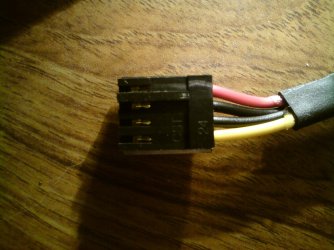
Cancel that! I put the PSU back in, and didn't plug in the connector shown in the 2nd and 3rd photos in my post above, and it's working fine now. Fantastic! Thanks guys, you've been a great help. Hopefully I'll be able to install the video card without too much difficulty, fingers crossed. :p
 

My Computer

Computer Manufacturer/Model Number
Fujitsu P9900 0-Watt
OS
Windows 7 Professional x64 SP 1
CPU
Intel Core i5 - 3.2 GHz - Dual Core
Motherboard
D2912 - μBTX
Memory
4 GB
Graphics Card(s)
Asus Radeon HD 6770 1 GB
Sound Card
Realtek ALC663
Monitor(s) Displays
Fujitsu SL 3230T 23" LCD TFT
Screen Resolution
1920 x 1080
Hard Drives
500 GB Seagate / 500 GB Western Digital external HDD.
PSU
Corsair CX500
Keyboard
Fujitsu KB400 PS/2
Mouse
Fujitsu OPT FSC BC
Internet Speed
54 Kb/ps
Other Info
Windows Experience Index Score: 5.9 |

Processor: 7.1 |
Memory: 5.9 |
Graphics: 7.3 |
Gaming Graphics 7.3 |
Primary Hard Disk: 5.9
Good job and good luck
 

My Computer

Computer type
PC/Desktop
Computer Manufacturer/Model Number
Black Trooper Rampage
OS
Windows 7 Ultimate 64 Retail
CPU
I7-960
Motherboard
Asus Rampage III Extreme
Memory
4 X 4 GB Kingston DDR3-1600
Graphics Card(s)
Gigabyte GTX670
Sound Card
X-Fi Titanium Fatality Champion
Monitor(s) Displays
Dell U2412M
Screen Resolution
1920 X 1200
Hard Drives
2 X Samsung 830 256 GB
Velociraptor 1TB
2 x 2 TB WD Caviar Black
Seagate Barrcuda 2 TB
PSU
Cooler Master Silent Pro Gold 1000 W
Case
Cooler Master Trooper
Keyboard
Logitech G19
Mouse
Logitech G9x
Internet Speed
30 MBPS +/- VDSL
I'm back! There was a massive delay in the video card arriving, but I eventually got it yesterday. I've just installed it, which went without incident, and got the computer up and running.

Then, I started up Assassin's Creed, and it played very well, the audio lag was gone and the game performance was lovely and smooth overall...

... but (and there's always a but)...

... when I get to a certain point in the game, it minimises itself and freezes, so I have to terminate it. And it does this repeatedly, whenever I reach that point in the game. Which is rather infuriating, since AC was the whole reason why I bought the card, at the moment at least, and now it's causing the game to crash! What, why and how can I fix this?! :eek:
 

My Computer

Computer Manufacturer/Model Number
Fujitsu P9900 0-Watt
OS
Windows 7 Professional x64 SP 1
CPU
Intel Core i5 - 3.2 GHz - Dual Core
Motherboard
D2912 - μBTX
Memory
4 GB
Graphics Card(s)
Asus Radeon HD 6770 1 GB
Sound Card
Realtek ALC663
Monitor(s) Displays
Fujitsu SL 3230T 23" LCD TFT
Screen Resolution
1920 x 1080
Hard Drives
500 GB Seagate / 500 GB Western Digital external HDD.
PSU
Corsair CX500
Keyboard
Fujitsu KB400 PS/2
Mouse
Fujitsu OPT FSC BC
Internet Speed
54 Kb/ps
Other Info
Windows Experience Index Score: 5.9 |

Processor: 7.1 |
Memory: 5.9 |
Graphics: 7.3 |
Gaming Graphics 7.3 |
Primary Hard Disk: 5.9
Is it possible it is a multi threading problem. I know steam fo3 can have probs with p55 systems and you have to tweak the game files so the game works right with multi core cpus.

I think some games default to using 1 core during install. Check the game forums and or post in its forums and post your questions, maybe ask about multi threading too. You will get more help faster, or most likely at the games home site.

Hope you get it working right.
 

My Computer

OS
w7
I'm back! There was a massive delay in the video card arriving, but I eventually got it yesterday. I've just installed it, which went without incident, and got the computer up and running.

Then, I started up Assassin's Creed, and it played very well, the audio lag was gone and the game performance was lovely and smooth overall...

... but (and there's always a but)...

... when I get to a certain point in the game, it minimises itself and freezes, so I have to terminate it. And it does this repeatedly, whenever I reach that point in the game. Which is rather infuriating, since AC was the whole reason why I bought the card, at the moment at least, and now it's causing the game to crash! What, why and how can I fix this?! :eek:

I am guessing you have already updated the Video Card drivers to the latest, correct?

If so, it may just be the game hasn't updated its settings.

What may help is to delete the Config Files.

The should be located in you Roaming folder.
C:\Users\AppData\Roaming\Ubisoft/Assasins Creed
(NOTE: You will need to enable "Show Hidden Folders" to see them)

Delete the Assasin.ini and Dare.ini
First one is for graphics settings, second for Audio etc just to be safe.

Restart the game. This will force the game to go through its setup again, hopefully recognizing all the correct hardware.

Beyond that .. the only other thing I can suggest would be try completely uninstalling the game, and do a fresh install of it.

Hopefully others may have something else to share.
 

My Computer

Computer Manufacturer/Model Number
Custom (Self Build)
OS
Windows 7 Home Premium 64bit
CPU
Intel Core i7 2700k
Motherboard
eVGA P67 SLI
Memory
8GB Mushkin Redline Ridgebacks @1866
Graphics Card(s)
EVGA GTX570 SC
Sound Card
XiFi Titanium HD
Monitor(s) Displays
LG W2453V
Screen Resolution
1920x1080
Hard Drives
Intel 320 80GB -- Intel X25-V 40GB --WD Black 1TB x2 -- WD Blue 640GB
PSU
Seasonic x750
Case
Corsair 600T SE White
Cooling
eVGA Superclocked CPU Cooler
Keyboard
Saitek Cyborg
Antivirus
Kaspersky
Browser
IE
Other Info
LG BD/DVD
Back
Top