Poor Gaming Performance

TacticalTimbo

New member
Member
Local time
12:32 AM
Messages
82
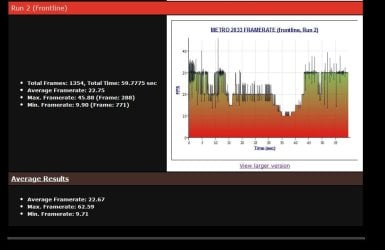
Okay I'm a little vexed as I've felt for a long time now that my PC is under performing for what it is (see my specs below), when it comes to gaming. Basically could anybody tell me if the attached results for the Metro 2033 frontline benchmark test match with what you'd expect for a system like mine.
 

Attachments
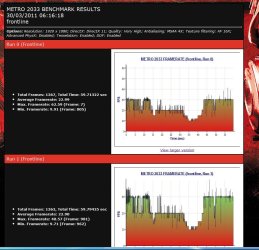
  • metrobenchresults.JPG
    metrobenchresults.JPG
    137.7 KB · Views: 46
  • metrobenchresults1.JPG
    metrobenchresults1.JPG
    70.7 KB · Views: 17

My Computer

Computer Manufacturer/Model Number
Custom build
OS
Windows 7 64-bit
CPU
Core i7 3930K @Stock
Motherboard
Asus Rampage IV Extreme
Memory
G.SKILL Z 1600Mhz 16GB
Graphics Card(s)
Nvidia GTX 580
Sound Card
Asus Xonar DX
Monitor(s) Displays
Dell S2409W
Screen Resolution
1920x1080p
Hard Drives
Crucial M4 128GB, Western Digital WD6400AAKS (X2)
PSU
Corsair Professional Series Gold AX850
Case
CM Storm Trooper
Cooling
Corsair H100
Keyboard
Microsoft Sidewinder X6
Mouse
Logitech G9x
Other Info
HITACHI/LG BH20N Blu-ray Rewriter
Anybody?
 

My Computer

Computer Manufacturer/Model Number
Custom build
OS
Windows 7 64-bit
CPU
Core i7 3930K @Stock
Motherboard
Asus Rampage IV Extreme
Memory
G.SKILL Z 1600Mhz 16GB
Graphics Card(s)
Nvidia GTX 580
Sound Card
Asus Xonar DX
Monitor(s) Displays
Dell S2409W
Screen Resolution
1920x1080p
Hard Drives
Crucial M4 128GB, Western Digital WD6400AAKS (X2)
PSU
Corsair Professional Series Gold AX850
Case
CM Storm Trooper
Cooling
Corsair H100
Keyboard
Microsoft Sidewinder X6
Mouse
Logitech G9x
Other Info
HITACHI/LG BH20N Blu-ray Rewriter

My Computer

Computer Manufacturer/Model Number
WALLONN7 / LIN BLACK SERIES II
OS
Windows 7 Ultimate x64 SP1
CPU
AMD PHENOM II X6 1090T 3.2GHz
Motherboard
GIGABYTE GA-890FXA-UD7
Memory
8GB G.SKILL RIPJAWS - F3-10666CL7D
Graphics Card(s)
SAPPHIRE ATI RADEON HD 5870 VAPOR X OC
Sound Card
REALTEK DOLBY HOME THEATER
Monitor(s) Displays
LED LG W2486L
Screen Resolution
1080p
Hard Drives
SEAGATE 1TB -ST31000528AS - AHCI MODE - AS SATA
PSU
ZALMAN ZM1000-HP 1000W
Case
THERMALTAKE XASER VI VG4000SWA
Cooling
140MM x3 / 120MM x1 AIR COOLING - THERMALTAKE
Keyboard
MICROSOFT DIGITAL MEDIA KEYBOARD 3000 - USB
Mouse
MICROSOFT BASIC OPTICAL MOUSE 2.0 - USB
Internet Speed
600KBPS
Other Info
MICROSOFT XBOX 360 CONTROLLER

My Computer

Computer Manufacturer/Model Number
Custom build
OS
Windows 7 64-bit
CPU
Core i7 3930K @Stock
Motherboard
Asus Rampage IV Extreme
Memory
G.SKILL Z 1600Mhz 16GB
Graphics Card(s)
Nvidia GTX 580
Sound Card
Asus Xonar DX
Monitor(s) Displays
Dell S2409W
Screen Resolution
1920x1080p
Hard Drives
Crucial M4 128GB, Western Digital WD6400AAKS (X2)
PSU
Corsair Professional Series Gold AX850
Case
CM Storm Trooper
Cooling
Corsair H100
Keyboard
Microsoft Sidewinder X6
Mouse
Logitech G9x
Other Info
HITACHI/LG BH20N Blu-ray Rewriter
Right re-ran the frontline bench and got a flat 30fps with their settings as follows:

DX 11
AAA
16xAF
Global settings = High
Physx = off

Okay my i7 920 is running at stock speeds, but I don't think thats a limiting factor, plus at 1920x1080, my vertical lines are 120 less, so there you go....maybe the best minds in the world can come together and tell me why I'm getting such poor results? :(
 

My Computer

Computer Manufacturer/Model Number
Custom build
OS
Windows 7 64-bit
CPU
Core i7 3930K @Stock
Motherboard
Asus Rampage IV Extreme
Memory
G.SKILL Z 1600Mhz 16GB
Graphics Card(s)
Nvidia GTX 580
Sound Card
Asus Xonar DX
Monitor(s) Displays
Dell S2409W
Screen Resolution
1920x1080p
Hard Drives
Crucial M4 128GB, Western Digital WD6400AAKS (X2)
PSU
Corsair Professional Series Gold AX850
Case
CM Storm Trooper
Cooling
Corsair H100
Keyboard
Microsoft Sidewinder X6
Mouse
Logitech G9x
Other Info
HITACHI/LG BH20N Blu-ray Rewriter
Right re-ran the frontline bench and got a flat 30fps with their settings as follows:

DX 11
AAA
16xAF
Global settings = High
Physx = off

Okay my i7 920 is running at stock speeds, but I don't think thats a limiting factor, plus at 1920x1080, my vertical lines are 120 less, so there you go....maybe the best minds in the world can come together and tell me why I'm getting such poor results? :(

Well, you need to have some things in mind:

> are there applications running in the background and how many?
> which the room temperature where you're doing the tests?
> are you using the two hdd in raid mode, or separately? if separately, the cache hdd is a problem.
> how many gigabytes of free space each have? are they defragmented?

At most, I would not say that the results are of a poor performance. At most, I would say they are a little less than you expected.
:)
 

My Computer

Computer Manufacturer/Model Number
WALLONN7 / LIN BLACK SERIES II
OS
Windows 7 Ultimate x64 SP1
CPU
AMD PHENOM II X6 1090T 3.2GHz
Motherboard
GIGABYTE GA-890FXA-UD7
Memory
8GB G.SKILL RIPJAWS - F3-10666CL7D
Graphics Card(s)
SAPPHIRE ATI RADEON HD 5870 VAPOR X OC
Sound Card
REALTEK DOLBY HOME THEATER
Monitor(s) Displays
LED LG W2486L
Screen Resolution
1080p
Hard Drives
SEAGATE 1TB -ST31000528AS - AHCI MODE - AS SATA
PSU
ZALMAN ZM1000-HP 1000W
Case
THERMALTAKE XASER VI VG4000SWA
Cooling
140MM x3 / 120MM x1 AIR COOLING - THERMALTAKE
Keyboard
MICROSOFT DIGITAL MEDIA KEYBOARD 3000 - USB
Mouse
MICROSOFT BASIC OPTICAL MOUSE 2.0 - USB
Internet Speed
600KBPS
Other Info
MICROSOFT XBOX 360 CONTROLLER

Well, you need to have some things in mind:

> are there applications running in the background and how many?
> which the room temperature where you're doing the tests?
> are you using the two hdd in raid mode, or separately? if separately, the cache hdd is a problem.
> how many gigabytes of free space each have? are they defragmented?

At most, I would not say that the results are of a poor performance. At most, I would say they are a little less than you expected.
:)[/QUOTE]

1. Certainly aren't many apps running in the background as I did a fresh install of win last Friday and made sure I only installed bare minimum of core drivers/apps.
2. Room temp is fine; idle temps are about 40c for core i7 and 37-8c for GTX 580.
3. I am only using a single drive setup, I have 2 but use the other for back up; do you really think slow drive performance could be the issue? The drives I have aern't the fastest but are fairly modern 7,200rpm WD's.
4. Vertually all the space is free (new install) and yes fully defragmented. :)
 

My Computer

Computer Manufacturer/Model Number
Custom build
OS
Windows 7 64-bit
CPU
Core i7 3930K @Stock
Motherboard
Asus Rampage IV Extreme
Memory
G.SKILL Z 1600Mhz 16GB
Graphics Card(s)
Nvidia GTX 580
Sound Card
Asus Xonar DX
Monitor(s) Displays
Dell S2409W
Screen Resolution
1920x1080p
Hard Drives
Crucial M4 128GB, Western Digital WD6400AAKS (X2)
PSU
Corsair Professional Series Gold AX850
Case
CM Storm Trooper
Cooling
Corsair H100
Keyboard
Microsoft Sidewinder X6
Mouse
Logitech G9x
Other Info
HITACHI/LG BH20N Blu-ray Rewriter
Well, let's consider the following:
yours vs theirs
Resolution - 1920x1080 vs 1920x1200
HDDs cache - 16mb vs 32mb
Ram timings - 8 8 8 24 vs 6 8 6 24
Mobo - Asus Rampage Extreme III vs MSI Eclipse SLI

Considering the differences between your system and theirs, I believe the difference of 11fps is quite acceptable.
 

My Computer

Computer Manufacturer/Model Number
WALLONN7 / LIN BLACK SERIES II
OS
Windows 7 Ultimate x64 SP1
CPU
AMD PHENOM II X6 1090T 3.2GHz
Motherboard
GIGABYTE GA-890FXA-UD7
Memory
8GB G.SKILL RIPJAWS - F3-10666CL7D
Graphics Card(s)
SAPPHIRE ATI RADEON HD 5870 VAPOR X OC
Sound Card
REALTEK DOLBY HOME THEATER
Monitor(s) Displays
LED LG W2486L
Screen Resolution
1080p
Hard Drives
SEAGATE 1TB -ST31000528AS - AHCI MODE - AS SATA
PSU
ZALMAN ZM1000-HP 1000W
Case
THERMALTAKE XASER VI VG4000SWA
Cooling
140MM x3 / 120MM x1 AIR COOLING - THERMALTAKE
Keyboard
MICROSOFT DIGITAL MEDIA KEYBOARD 3000 - USB
Mouse
MICROSOFT BASIC OPTICAL MOUSE 2.0 - USB
Internet Speed
600KBPS
Other Info
MICROSOFT XBOX 360 CONTROLLER
I have a better mobo & a lower res; so basically it comes down to slightly tighter timings and double the hdd cache. 11fps is actually a massive difference, 1-4fps would be close imo. Would your advice be upgrade my storage then? I have wanted an SSD for a while but the high prices vs relatively low capacity have put me off. If you have a good recommendation for a faster hdd or SSD, then I'm all ears; what do you think of the WD black drives with 32mb cache? Also is Raid a must?

Update:

This review: http://www.extremetech.com/article2/0,2845,2328729,00.asp seems to show that my WD6400AAKS is better in many areas than the WD1001FALS (Caviar Black), gaming bench and single pcmark disk score say the opposite, but for raid0 its worse?
 

My Computer

Computer Manufacturer/Model Number
Custom build
OS
Windows 7 64-bit
CPU
Core i7 3930K @Stock
Motherboard
Asus Rampage IV Extreme
Memory
G.SKILL Z 1600Mhz 16GB
Graphics Card(s)
Nvidia GTX 580
Sound Card
Asus Xonar DX
Monitor(s) Displays
Dell S2409W
Screen Resolution
1920x1080p
Hard Drives
Crucial M4 128GB, Western Digital WD6400AAKS (X2)
PSU
Corsair Professional Series Gold AX850
Case
CM Storm Trooper
Cooling
Corsair H100
Keyboard
Microsoft Sidewinder X6
Mouse
Logitech G9x
Other Info
HITACHI/LG BH20N Blu-ray Rewriter
I do not agree that your Asus is better than MSI, but that is my personal opinion. I agree that the high value of an SSD versus its capacity is a problem for me too, but taking into account that you set up a gaming machine, I think that would be something to consider. :) With respect to WD, I have serious concerns. My brother is an electronics technician and his experience with the brand showing a certain fragility, as the bullish trend of HDDs have their needles damaged by electronic breakdowns. If I were to suggest a brand, Seagate was the only one. The model for the case, Velociraptor ... But indifferent to my opinions, I recommend doing your own analysis, since I believe that they have been taken you to build your machine the way it is, and it is a great building! ;) I'm sure the frustration of today will be the fuel for the achievement of something better that you had not considered before. Go ahead and come back to show us the result. :)
 

My Computer

Computer Manufacturer/Model Number
WALLONN7 / LIN BLACK SERIES II
OS
Windows 7 Ultimate x64 SP1
CPU
AMD PHENOM II X6 1090T 3.2GHz
Motherboard
GIGABYTE GA-890FXA-UD7
Memory
8GB G.SKILL RIPJAWS - F3-10666CL7D
Graphics Card(s)
SAPPHIRE ATI RADEON HD 5870 VAPOR X OC
Sound Card
REALTEK DOLBY HOME THEATER
Monitor(s) Displays
LED LG W2486L
Screen Resolution
1080p
Hard Drives
SEAGATE 1TB -ST31000528AS - AHCI MODE - AS SATA
PSU
ZALMAN ZM1000-HP 1000W
Case
THERMALTAKE XASER VI VG4000SWA
Cooling
140MM x3 / 120MM x1 AIR COOLING - THERMALTAKE
Keyboard
MICROSOFT DIGITAL MEDIA KEYBOARD 3000 - USB
Mouse
MICROSOFT BASIC OPTICAL MOUSE 2.0 - USB
Internet Speed
600KBPS
Other Info
MICROSOFT XBOX 360 CONTROLLER
The VelociRaptor is a Western Digital. As for Seagate, I've heard bad things about them, funny isn't it...lolz; still now that you've recommended them I'll take a closer look. Ultimately though, yes I would really prefer to go SSD, its just that 2-3 years ago I though prices by now would be pretty much at £1 per GB, but at present your looking at about £90 for a half decent 60GB which is tiny! As for the props to my rig, cheers, it's been a long time in the making and a rocky road too; which I'm sure you'll realise if you read some of my other posts from the past :D.
 

My Computer

Computer Manufacturer/Model Number
Custom build
OS
Windows 7 64-bit
CPU
Core i7 3930K @Stock
Motherboard
Asus Rampage IV Extreme
Memory
G.SKILL Z 1600Mhz 16GB
Graphics Card(s)
Nvidia GTX 580
Sound Card
Asus Xonar DX
Monitor(s) Displays
Dell S2409W
Screen Resolution
1920x1080p
Hard Drives
Crucial M4 128GB, Western Digital WD6400AAKS (X2)
PSU
Corsair Professional Series Gold AX850
Case
CM Storm Trooper
Cooling
Corsair H100
Keyboard
Microsoft Sidewinder X6
Mouse
Logitech G9x
Other Info
HITACHI/LG BH20N Blu-ray Rewriter
Hm 40fps is plenty fine and plenty playable 30fps or even 25fps in soc is playable. Unless you need more high for 3d or something- I do not know I have never had or used it. It is fact the human eye can not see or keep up with over 30fps or normal folks anyway. Some games will try and set fps to say 30 or 40 almost like using vsync will try and hold what 60fps. 40fps in any game is fine. As a fact most cut scene run at 30fps and when playing or recording bioshock and using fraps I set it for 30fps and because that is what the cut scenes run at. All is smooth and fine- tho older versions of fraps would lock the game fps to what you was recording at [30 etc] and tho you did not click the box telling it to lock the game and record to 30fps. Fraps did it anyway.

my zdsoft and now fraps- the games can be running 60 or 1000fps and tho I record most of the time at 10fps. Fraps does not lock the game to record settings any more- was fixed or something- Games like stalker will drop my fps in game play a lot when I start recording but 25 is smooth for stalker soc and I think fo3 can run smooth at 25 or so too- I know it is other games that can I have read on it. It makes me laugh sometimes folks are mad he can only get 120fps from q4 or 60 in many other games- maybe the game in the program files is locking it by defaults. 30fps in any game is plenty period- unless as said for 3d or something.

I also think some games run a lower refresh than is set for the monitors too. Games like stalker and borderlands for some reason kill my eyes and on both crt and lcd I am using now- It is something about them I can not figure out. it is like running my games at 60hrz or lower on my crt but up to 75 or 85hrz stops it or most of the time. I still have probs with stalker games or borderlands for some reason. I am thinking something in the engine is doing it or some game fx maybe?- and reading such things from the ut3 or rather ut2.5 engine is nothing new. And some folks eyes are different too. Some folks might not have the same probs or looking at my screen versus his and I might have same probs looking at his screen etc. Stalker games and borderlands strain my eyes for some reason- I have not worried on it or I would google it. I do notice it more lately tho and is only them games.

I prefer seagate over wd- also segate invented scsi and true sata drives wd are hybrids and or was. And I have had more probs with wd going bad than I have with seagate And I own about the same number of both maybe have owned more wd but only because of selection or costs at the time. Folks can find fault in everything- I am an expert at that. The raptors are 10000 rpm I think but is not speed all the time it is burst speeds and then I think only if in raid- in normal use or real time it is probably more like 7200 what ever it is- where a said 7200 in real time is maybe more like 5400- again that 7200 is in burst speeds not 24/7 speeds.

Also most folks do not know but are not even running his sata drives in proper modes and are not as fast as they should be and are not using all the features they could be either- they let the os install at defaults and most all mobos default to ide/ata/raid set up- it is more easy for folks to just slap in a hdd and go. If using sata drives or ssd you should be set up in ahci in the bios then install windows or your hdd can run no faster than 133- tho your said speeds for sata is 1.5 or 3 or 6gigs per sec I think is how it is worded- and the sata drives or most of its features are not running either. You have to manually change settings in your bios for raid or ahci support then install the os or do the reg tweak from w7 and reboot into ahci support and the full speeds or use of the sata drives. Not saying you have this prob just saying is all.. It is folks here now with sata II and III hdd running at 133 because he does not know auto is auto and 99% of the time is ide That is what the mobos default to. AHCI was not native to xp or w7 but was for vista but even then it had to be turned on in the bios or vista would skip it too..

Another thing folks do or a mistake- Many have new and powerful systems- they do not think they have to tweak the systems for best gaming performance- Yes they still do just like systems from 6 years ago. You said you have no extra stuff running in the back ground- thats good- do you turn off your security other than your fire wall. What about anything that uses java it can cause probs with w7. What about xfire it can cause game probs. What about areo or glass what ever it is called it can eat up performance even on great systems like yours and while gaming. Set your desk top etc to standard turn all that extra junk off or when going to game should help. Turn it back on when not gaming.

Metro is of the xray engine tho said not the same. The xray is hard on systems no matter how good and suffers from memory leaks and just being buggy period. Metro and or stalker games and the xray engine prefer good vid cards and lots of system mem. The xray games are of a few games that can and will use over 3 gigs of mem said like up to 4.9 I think it is. Even in xp 32 bit 3 or more gigs of mem was a better playing system when talking stalker games. The xray is less cpu dependent.
 
Last edited:

My Computer

OS
w7
W7 can have probs installing drivers right too. Maybe try and delete both your sound and vid drivers and re install them- it does not take long. Also near half of all game probs are sound related. Folks over look it tho thinking mem or cpu or vid card. And sound probs can cause performance hits too. And many games say in readme and for trouble shooting if your sound card can do ea fx it might be best to disable it and in the game. It is buggy and can cause performance hits. Any creative or type card can do ea fx- try and turn it off in the sound cards control panel and off in game might help.

It is hard to pin point such things and might not be a thing wrong with your system- w7 in its self can be glitchy- Physx might not always install right either. Sorry I do not know right off what might help- if you fix it let us know how you did it so maybe it will help the next person with same probs down the road..

As far as drives go setting up this my new system was not easy and instruction are none in the manual etc. The forums was no help either- I fixed it around and about reading on hdd probs and general and like or other hardware and folks trying to install ssd drives. Many ssd will not work at all or right unless the mobo and windows is set up with ahci support. I guess newer hdd in general prefer ahci support- and many hdd especially wd drives need a fix to work right with w7 and w7 will tell ya it is a update or the hdd site has the update. Both my wd's in my info had updates or fixes in w7- it was not just one update for both drives each had its own update..

What about program or os or security updates. I set all of it to manual. Do you know even tho you have such things set to manual they can still be bumping your system and the programs or os is like what is wrong why cant I update? You can be playing your game and it just starts lagging for no reason. I can end my games and check and see if anything is trying to update sure enough 95% of the time it is windows or my anti virus or something wants to update. I turn back on and or let windows do the updates- bamb all is good again. Just having it set to manual means nothing to your pc or games if something is trying to update. You may not think so but is true. So make sure everything is updated before you start playing- tho that does not mean some update might come out 5 minutes later and after you are playing- but might help believe it or not..

What about clearing your browser cache before you game. If you was browsing a lot each sites page you open takes up memory and you can open task man and your browser exe is running for each site you have gone to and can be eating up memory etc. I clear it all and being I am going to turn off all my security for gaming- all other than my firewall. I use chrome but I also clear my ei8 cache. Anything to do with windows using the native browser or cache. I clear all cookies and never let my browsers hold pass words- I clear it all before gaming- but not every time I close my browser. When surfing I might go back to same sites a lot so I do not worry about it auto clear if closed. If I start having probs I will manually clear it..

Both seagate and wd's are good drives- buy what you think is best or can afford and in the size you want and let it go- I pick drives with 3 or 5 year warranties my self and hope for the best and never buy as my c drive anything over 250 gigs. To much to scan or defrag and lots more to lose if near full and it goes bad. I have storage drives and external for all the extra stuff and only install games or programs I am using or playing at the time. I delete games when not playing them any more and install others to play or record.. See I record a lot- so I have to tweak for even more performance than just gaming and on my older hardware or video card..

Read all info for your hdd make sure it has no jumpers on it. It might not be as new as thought and was a return and could have a jumper on it to run at lower sata speeds. Or things could get mixed up say a sataII jumped and sold as a sataI drive. Remove the jumper it is again a sataII drive. All of them can run 133 or 100- but ide drives can not run at sata speeds. You need to check such things and set your bios for ahci support..


I hope you figure it out.. See ya..
 

My Computer

OS
w7
The VelociRaptor is a Western Digital.

Thanks for the correction. ;)

As for Seagate, I've heard bad things about them, funny isn't it...lolz; still now that you've recommended them I'll take a closer look. Ultimately though, yes I would really prefer to go SSD, its just that 2-3 years ago I though prices by now would be pretty much at £1 per GB, but at present your looking at about £90 for a half decent 60GB which is tiny! As for the props to my rig, cheers, it's been a long time in the making and a rocky road too; which I'm sure you'll realise if you read some of my other posts from the past :D.

Since you chose to buy a SSD, before anything else, it would be a good idea to read this review: Seagate Momentus XT 500GB ST95005620AS Review - Overclockers Club
Tell me what you think!
 

My Computer

Computer Manufacturer/Model Number
WALLONN7 / LIN BLACK SERIES II
OS
Windows 7 Ultimate x64 SP1
CPU
AMD PHENOM II X6 1090T 3.2GHz
Motherboard
GIGABYTE GA-890FXA-UD7
Memory
8GB G.SKILL RIPJAWS - F3-10666CL7D
Graphics Card(s)
SAPPHIRE ATI RADEON HD 5870 VAPOR X OC
Sound Card
REALTEK DOLBY HOME THEATER
Monitor(s) Displays
LED LG W2486L
Screen Resolution
1080p
Hard Drives
SEAGATE 1TB -ST31000528AS - AHCI MODE - AS SATA
PSU
ZALMAN ZM1000-HP 1000W
Case
THERMALTAKE XASER VI VG4000SWA
Cooling
140MM x3 / 120MM x1 AIR COOLING - THERMALTAKE
Keyboard
MICROSOFT DIGITAL MEDIA KEYBOARD 3000 - USB
Mouse
MICROSOFT BASIC OPTICAL MOUSE 2.0 - USB
Internet Speed
600KBPS
Other Info
MICROSOFT XBOX 360 CONTROLLER
Back
Top