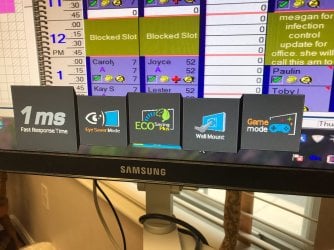
pop up icons, how to disable?

boosbaby

New member
Local time
10:57 AM
Messages
2
these keep popping up, getting in the way of my lower tool bar. how do I get rid of these?? making us crazy
 

Attachments

  • IMG_2594.jpg
    IMG_2594.jpg
    205.2 KB · Views: 2

My Computer My Computer

Computer type
PC/Desktop
OS
Pennsylvania
I think the monitor may be generating those images.

My Samsung has a control legend pop-up that appears (for a few seconds) after the screen starts displaying images.
My pop-up doesn't look like those.

Does it go away after a few seconds?
 

My Computer My Computer

Computer type
PC/Desktop
Computer Manufacturer/Model Number
n/a
OS
W7 Ultimate SP1, LM19.2 MATE, W10 Home 1703, W10 Pro 1703 VM, #All 64 bit
CPU
AMD Phenom II x6 1100T, 3.3 GHz
Motherboard
ASUS M4A88T-M/USB3 (AM3)
Memory
12GB DDR3 1333 G-Skill (4GB x 2), G-Skill (2GB x 2)
Graphics Card(s)
NVIDIA GeForce GTX 660
Sound Card
Realtek?
Monitor(s) Displays
Samsung S23B350
Screen Resolution
1920x1080
Hard Drives
WD Green 2TB (SATA), WD Green 3TB (SATA), WD Blue 4TB (SATA), WD Blue 6TB (SATA)
PSU
Cooler Master
Case
Antec GX300 Tower
Cooling
3x Antec TRICOOL 120mm Fans
Mouse
Wired Optical
Internet Speed
DSL
Antivirus
Avast
Browser
Pale Moon (64 bit)
Other Info
2018-12-27 Upgraded HDDs
2015-12-10 Upgraded case, graphics card, storage
2015-08-15 Upgraded motherboard & RAM
2015-07-15 Upgraded LM17.1 to LM17.2
it stays up for a while and disappears for a minute or so and keeps popping back up! only started a few weeks ago, no idea how :confused:
 

My Computer My Computer

Computer type
PC/Desktop
OS
Pennsylvania
It's the monitor its self. Try going into the monitor's settings and look for anything there to shut that off. If it continues, then I think the monitor is going south.

It actually looks like it's going into store display mode or something.
 

My Computer My Computer

Computer type
PC/Desktop
OS
Windows 7 Ultimate x64
Like F22 said, that is the store display attract mode popping up. If it is still under warranty i would get it checked out as it sounds like the logic board is going bad.
As i had the same thing happen to my samsung syncmaster the store mode would pop up on and off and when i took it in for repair the reapirman said it was the logic board and would cost $125.00 for the logic board and and $75.00 for the repair i told him never mind brought it back home and tossed it in the trash. I did lose out on the $25.00 dollar diagnostic fee though.
Not saying that is what is happening to yours just something to consider.

Try this before going to bed unplug it from the wall and your monitor cable and let it sit over night. It might reset itself and have no more problems with it. Also look at your monitor settings and see if store mode has been enabled. Maybe someone turned it on to play a joke on you.

 

My Computer My Computer

Computer type
PC/Desktop
Computer Manufacturer/Model Number
Custom Built By Yours Truly.
OS
Windows 7 Ultimate x64 SP1
CPU
AMD FX 8350
Motherboard
Gigabyte 990FXA-UD3
Memory
G-Skill Sniper Series 16 GB
Graphics Card(s)
MSI GTX 970
Monitor(s) Displays
Sony Bravia 40 Inch
Screen Resolution
1920x1080 Full Pixel
Hard Drives
Kingston Hyper X Savage SSD 240GB (OS Drive)
Seagate FireCuda 2TB SSHD
Western Digital Black 2TB
PSU
Antec 900 Watt High Current Gamer
Case
Cooler Master Trooper Full Tower With View Window
Cooling
Noctua D14 Push Pull Air Cooler
Keyboard
Razer Blackwidow Chroma v2
Mouse
Logitech G700s 13 Button Gaming Mouse
Internet Speed
250 mB/s
Antivirus
None
Browser
Firefox
Back
Top