
Popup folder from taskbar

kookster

New member
Power User
Local time
7:22 AM
Messages
134
Location
Silicon Valley
Ok so I would like to do something that is like a jumplist and a folder shortcut combined. I don't know if this is possible, that is why I am asking.

So what I am looking for is this:
-a shortcut on the taskbar. (must be able to have a icon)
-when left clicked a popup folder like below appears. (once a item in the popup is clicked the folder should disappear)

I know of similar ways with folder toolbars on the taskbar, but thats not what I am looking for. Thanks for reading.
 

Attachments
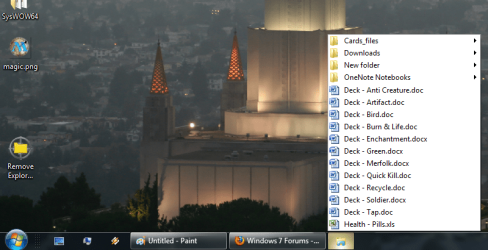
  • popup folder.png
    popup folder.png
    453.7 KB · Views: 105
Last edited:

My Computer

Computer Manufacturer/Model Number
acer timeline 3810t
OS
Windows 7 64-bit Windows 7 32-bit
CPU
Intel Core 2 Solo (1.4 GHz)
Memory
4 GB DDR3 SDRAM - 1066 MHz SO DIMM 204-pin
Graphics Card(s)
Intel GMA 4500MHD Dynamic Video Memory Technology 5.0
Monitor(s) Displays
Widescreen 13.3 in TFT active matrix
Hard Drives
# 250 GB - Serial ATA-150 - 5400 rpm
Case
# Ultraportable (Under 4 lbs.) , Budget
Ok so i found a way using Auto Hotkey its a rather complicated script, but it does it pretty dang well. Only down side so far is you have to manually enter every item you want in the pop up. So if anyone else has a better idea im still all ears.

Found a even better way using Auto Hotkey and Jumplist Launcher together.
 

My Computer

Computer Manufacturer/Model Number
acer timeline 3810t
OS
Windows 7 64-bit Windows 7 32-bit
CPU
Intel Core 2 Solo (1.4 GHz)
Memory
4 GB DDR3 SDRAM - 1066 MHz SO DIMM 204-pin
Graphics Card(s)
Intel GMA 4500MHD Dynamic Video Memory Technology 5.0
Monitor(s) Displays
Widescreen 13.3 in TFT active matrix
Hard Drives
# 250 GB - Serial ATA-150 - 5400 rpm
Case
# Ultraportable (Under 4 lbs.) , Budget
What command in AHK does that? I'd like to know so I can do this myself. I'm somewhat proficient in AHK, but not a guru of any kind. ;)
 

My Computer

Computer type
PC/Desktop
Computer Manufacturer/Model Number
Custom built
OS
Windows 8 Pro 64-bit
CPU
Intel Core i7 950 @4.4GHz
Motherboard
EVGA 131-GT-E767
Memory
12GB DDR3 1333MHz @1400 (9-9-9-24)
Graphics Card(s)
2x AMD Radeon HD 6770
Sound Card
Sound Blaster Audigy
Monitor(s) Displays
Acer S231HL + Acer E19T5W
Screen Resolution
1920x1080 + 1440x900
Hard Drives
128GB Samsung 840 Pro
1TB Seagate Barracuda 7200RPM 64mb
500GB Seagate Barracuda 7200RPM 16mb
PSU
Corsair GS800
Case
Custom-made
Cooling
CM Hyper212+, lots of fans
Keyboard
NMB RT8255C+
Mouse
Func MS-3
Internet Speed
30/1.5
Antivirus
Microsoft Security Essentials/Spybot SD/Malwarebytes
Browser
Google Chrome
Other Info
Onkyo TX-27 receiver & two Realistic Optimus T100s.
It appears to me that Toolbars are a lot easier for what you like to do. Why did you exclude toolbars as an option? Just curious.
 

My Computer

Computer Manufacturer/Model Number
HP, Dell, Gateway, Toshiba - 4 laptops and 2 desktops
OS
Vista, Windows7, Mint Mate, Zorin, Windows 8
CPU
from 1.6GHz Duo to i7
Monitor(s) Displays
2x HP w2207
Hard Drives
5x HDD, 7x SSD, 12x Externals
Keyboard
with trackball - no mices
Mouse
Trackball mice
Internet Speed
DSL 6000
What i do is have jumplist start a simple script from autohotkey when you click it. All the script does is send a right click to the location of the shortcut. so thus right clicking will pop up the jumplist.
Code:
send {click right 170,750} ; "170,750" is the location for my shortcut
You can just have it send a right click, but jumplist isnt always fast enough at starting the script, so if you move your mouse off of the shortcut it does nothing.
I just wish there was a command where you could send a mouse click without moving the actual mouse location.

The reason why I dont want the toolbars is i can only have it on the right or left of the task bar and to have it pop up in the manner i like it doesnt look very nice.
 

My Computer

Computer Manufacturer/Model Number
acer timeline 3810t
OS
Windows 7 64-bit Windows 7 32-bit
CPU
Intel Core 2 Solo (1.4 GHz)
Memory
4 GB DDR3 SDRAM - 1066 MHz SO DIMM 204-pin
Graphics Card(s)
Intel GMA 4500MHD Dynamic Video Memory Technology 5.0
Monitor(s) Displays
Widescreen 13.3 in TFT active matrix
Hard Drives
# 250 GB - Serial ATA-150 - 5400 rpm
Case
# Ultraportable (Under 4 lbs.) , Budget
Oooh, I thought it was a Dllcall or something. Fair enough. xD
 

My Computer

Computer type
PC/Desktop
Computer Manufacturer/Model Number
Custom built
OS
Windows 8 Pro 64-bit
CPU
Intel Core i7 950 @4.4GHz
Motherboard
EVGA 131-GT-E767
Memory
12GB DDR3 1333MHz @1400 (9-9-9-24)
Graphics Card(s)
2x AMD Radeon HD 6770
Sound Card
Sound Blaster Audigy
Monitor(s) Displays
Acer S231HL + Acer E19T5W
Screen Resolution
1920x1080 + 1440x900
Hard Drives
128GB Samsung 840 Pro
1TB Seagate Barracuda 7200RPM 64mb
500GB Seagate Barracuda 7200RPM 16mb
PSU
Corsair GS800
Case
Custom-made
Cooling
CM Hyper212+, lots of fans
Keyboard
NMB RT8255C+
Mouse
Func MS-3
Internet Speed
30/1.5
Antivirus
Microsoft Security Essentials/Spybot SD/Malwarebytes
Browser
Google Chrome
Other Info
Onkyo TX-27 receiver & two Realistic Optimus T100s.
nope, i dont know all that stuff. I just know the simple things.

Looks like you also cant put a exact position, cause sometimes it will get messed up according to what window is active.

So if your interested Prisoner this code works:
Code:
winactivate ahk_class WorkerW
winwaitactive ahk_class WorkerW
send {Click Right 170, 750}
It activates the desktop, waits till its active then sends a right click at the shortcuts location, that way theres never a issue with mouse position.
 

My Computer

Computer Manufacturer/Model Number
acer timeline 3810t
OS
Windows 7 64-bit Windows 7 32-bit
CPU
Intel Core 2 Solo (1.4 GHz)
Memory
4 GB DDR3 SDRAM - 1066 MHz SO DIMM 204-pin
Graphics Card(s)
Intel GMA 4500MHD Dynamic Video Memory Technology 5.0
Monitor(s) Displays
Widescreen 13.3 in TFT active matrix
Hard Drives
# 250 GB - Serial ATA-150 - 5400 rpm
Case
# Ultraportable (Under 4 lbs.) , Budget
Can someone marked this as solved cause I dont know how. Thanks.
 

My Computer

Computer Manufacturer/Model Number
acer timeline 3810t
OS
Windows 7 64-bit Windows 7 32-bit
CPU
Intel Core 2 Solo (1.4 GHz)
Memory
4 GB DDR3 SDRAM - 1066 MHz SO DIMM 204-pin
Graphics Card(s)
Intel GMA 4500MHD Dynamic Video Memory Technology 5.0
Monitor(s) Displays
Widescreen 13.3 in TFT active matrix
Hard Drives
# 250 GB - Serial ATA-150 - 5400 rpm
Case
# Ultraportable (Under 4 lbs.) , Budget
The reason why I dont want the toolbars is i can only have it on the right or left of the task bar and to have it pop up in the manner i like it doesnt look very nice.
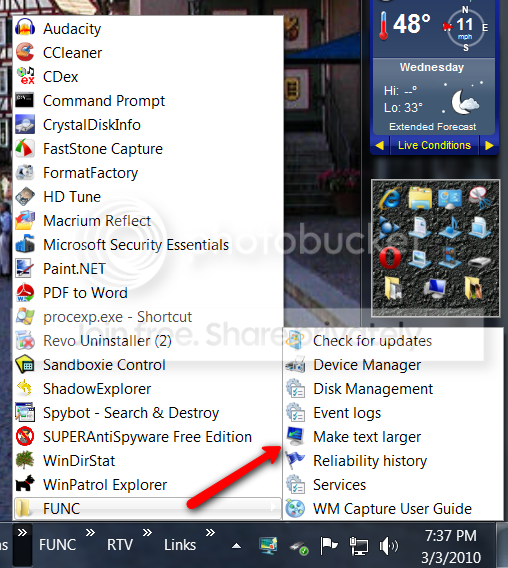
I really do not want to convince you of taskbars, but mine look pretty nice.

2010-03-03_1938.png
 

My Computer

Computer Manufacturer/Model Number
HP, Dell, Gateway, Toshiba - 4 laptops and 2 desktops
OS
Vista, Windows7, Mint Mate, Zorin, Windows 8
CPU
from 1.6GHz Duo to i7
Monitor(s) Displays
2x HP w2207
Hard Drives
5x HDD, 7x SSD, 12x Externals
Keyboard
with trackball - no mices
Mouse
Trackball mice
Internet Speed
DSL 6000
not bad but not my thing, i like the icons
 

My Computer

Computer Manufacturer/Model Number
acer timeline 3810t
OS
Windows 7 64-bit Windows 7 32-bit
CPU
Intel Core 2 Solo (1.4 GHz)
Memory
4 GB DDR3 SDRAM - 1066 MHz SO DIMM 204-pin
Graphics Card(s)
Intel GMA 4500MHD Dynamic Video Memory Technology 5.0
Monitor(s) Displays
Widescreen 13.3 in TFT active matrix
Hard Drives
# 250 GB - Serial ATA-150 - 5400 rpm
Case
# Ultraportable (Under 4 lbs.) , Budget
This works perfectly:

Code:
ControlClick, x173 y15, ahk_class Shell_TrayWnd, , Right, 1
exitapp
 

My Computer

Computer Manufacturer/Model Number
acer timeline 3810t
OS
Windows 7 64-bit Windows 7 32-bit
CPU
Intel Core 2 Solo (1.4 GHz)
Memory
4 GB DDR3 SDRAM - 1066 MHz SO DIMM 204-pin
Graphics Card(s)
Intel GMA 4500MHD Dynamic Video Memory Technology 5.0
Monitor(s) Displays
Widescreen 13.3 in TFT active matrix
Hard Drives
# 250 GB - Serial ATA-150 - 5400 rpm
Case
# Ultraportable (Under 4 lbs.) , Budget
Back
Top