Solved Windows 7 - popup leak??

CSGREEN

New member
Member
Local time
7:52 PM
Messages
12
Occasionally, I get a popup in the lower right-hand corner of the desktop and I thought for a long time it was from an internal program because a lot are from Advanced Systemcare program but recently, I got a Netflix ad, just after I dumped Netflix account.

They were jacking their price again and changed from 'family' account to 'household' account so that if a member of the family is traveling, you have to buy an additional traveling account?? HA! They haven't been worth their exorbitant fee since they went National. So I dumped them. Then I got a popup notice about a new video??

So, now I think it has to be a backdoor allowing notices from the product owners of things I use to send NAG notices?

Anyone have any idea what I am referring to, the name of it, how to stop it, block it, plug the hole? Maybe I missed a switch some place while looking for it?

It isn't critical, I know, but it's driving me crazy that they an pop stuff up . . . just got one from a VPN I used one time until I found that it blocked my email program from collecting my email.
 

My Computers

System One System Two

  • Computer type
    PC/Desktop
    Computer Manufacturer/Model Number
    custom build
    OS
    Windows 7 Professional
    CPU
    i5 CPU 760@ 2.80GHz
    Motherboard
    ASUS P7P55D-E LX
    Memory
    16 gig
    Graphics Card(s)
    ATI Radeon HD 5700 Series
    Hard Drives
    C, D, E, F Western Digital and Seagate
    Antivirus
    Bit Defender
    Browser
    Chrome
  • Computer type
    PC/Desktop
This sounds like an adware program.
I would suggest to download malwarebytes and run a scan.
Random pop ups are not normal and I am unsure of any program that has popups like that.
Do you have any antivirus installed? If not, just install microsoft security essentials as that is still receiving updates and is from microsoft.
I would also suggest removing advanced system care. Malwarebytes lists it as adware.
Hopes this helps.
 

My Computers

System One System Two

  • OS
    Windows 7 POSREADY x64
  • Computer type
    PC/Desktop
    Antivirus
    Microsoft security essentials + malwarebytes
Yeah, or you have some program installed doing it. You could run Autoruns, go to File and save the ARN file. Zip that ARN file and upload it here and I'll take a look. Don't mess with anything in Autoruns or you could mess things up.

Autoruns for Windows - Sysinternals | Microsoft Learn
 

My Computer

Computer type
PC/Desktop
OS
Windows 7 Ultimate x64
Websites sometimes do show some popups if the user allow it to display notifications on the browser, while this is normally used to display some real-time notification to the user, malicious pages abuse it to show ads or try to sneak a virus. If that's the case, getting rid of them is as simple as revoking the permission on the browser for the site.

Can you show a screenshot of a popup, if you happen to catch one? It may help to identify where it's actually coming from.
 

My Computer

Computer type
Laptop
Computer Manufacturer/Model Number
Toshiba Sattelite A665-S6092
OS
Windows 7 Ultimate x64
CPU
Intel Core i7-740QM
Memory
8 GB DDR3
Graphics Card(s)
NVIDIA GeForce 330GT
Screen Resolution
1366x768
Hard Drives
Samsung 840 SSD 500GB
1TB USB3 external HD
Cooling
Coolermaster Notepal U3 notebook cooling pad
Internet Speed
3mbps ASDL
Antivirus
ClamWin 0.98.7
Browser
Opera 12.17 x86 (main), Firefox 38 (sec), IE11 (last resort)
Like I said, it is random and I never know when it will show, it did just now and reminded me I had asked about it. I think it is in the notification spot . . . any way to shut off notifications?

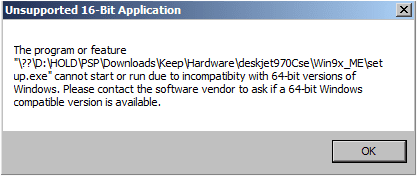
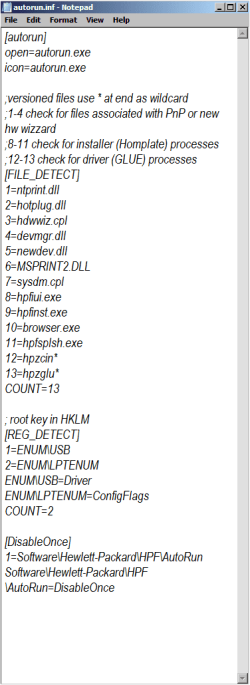
Autorun exe file got this popup . . / autorun inf got this file and 2 other autorun files were part of graphic programs that I have used and know what they do.

- - - Updated - - -

nex time one pops up, I will screenShot it . . . and I don't think I have autorun for Windows.
 

Attachments

  • AutorunEXEfile.png
    AutorunEXEfile.png
    9.3 KB · Views: 10
  • autorunINF.png
    autorunINF.png
    49.8 KB · Views: 0

My Computers

System One System Two

  • Computer type
    PC/Desktop
    Computer Manufacturer/Model Number
    custom build
    OS
    Windows 7 Professional
    CPU
    i5 CPU 760@ 2.80GHz
    Motherboard
    ASUS P7P55D-E LX
    Memory
    16 gig
    Graphics Card(s)
    ATI Radeon HD 5700 Series
    Hard Drives
    C, D, E, F Western Digital and Seagate
    Antivirus
    Bit Defender
    Browser
    Chrome
  • Computer type
    PC/Desktop
it is called notifications and I can't find a place to stop them . . . sorry about not being on top of this , , , i fell recently and left hand is injured.

Just want to shout off notifications.

- - - Updated - - -

Found it! Got hit by a scam on McAfee and when I got hold of them, they walked me right to notifications and I disallowed completely. It is in the browsers, in my case Chrome settings under Privacy & Security/ site settings.

Thank you to all of you.
 

My Computers

System One System Two

  • Computer type
    PC/Desktop
    Computer Manufacturer/Model Number
    custom build
    OS
    Windows 7 Professional
    CPU
    i5 CPU 760@ 2.80GHz
    Motherboard
    ASUS P7P55D-E LX
    Memory
    16 gig
    Graphics Card(s)
    ATI Radeon HD 5700 Series
    Hard Drives
    C, D, E, F Western Digital and Seagate
    Antivirus
    Bit Defender
    Browser
    Chrome
  • Computer type
    PC/Desktop
Back
Top