
billybag
New member
i posted not too long ago on how to hook up a secondary router to the primary router so that i could get my own wi-fi signal in my room. My room is separated from the house so the signal barely reached. Turned out to be really simple.
Originally, before i connected an additional router, i successfully had a port forwarded (so my friends and i could play Minecraft) on the Netgear router. School got in the way, eventually added this new router (Linksys running tomato firmware). Well, we are ready to play Minecraft again but i am unable to forward the proper port using the new setup.
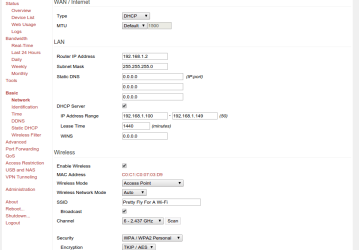
i have no idea where to begin or what info will be useful, but here is my basic settings on the second router:
Other info: i tried to edit the port forward settings on the primary router but it no longer lets me. It no longer lets me forward that specific port, saying it is already in use. So it seems to at least acknowledge that the additional router is already forwarding that port?
i am assuming that i need to somehow forward my IP address or the IP address of the additional router. i also read that maybe i need to set one router to bridge mode? i am just worried whatever i try is going to screw everything up. i had a hell of a time trying to connect the two in the first place.
Thanks in advance.
EDIT: Okay even after removing the forwarded port on the linksys, Netgear still wont let me re-add it. Continues to say it is being used by another configuration
EDIT 2: So from what i understand after watching a video, is i need to give my router 2 a STATIC IP address. When i do that; however, it breaks my internet connection.
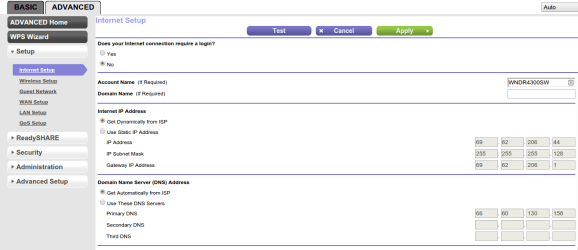
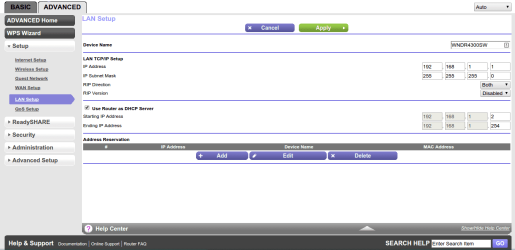
i have attached screenshots of my current WORKING settings. i am using the WAN port
Originally, before i connected an additional router, i successfully had a port forwarded (so my friends and i could play Minecraft) on the Netgear router. School got in the way, eventually added this new router (Linksys running tomato firmware). Well, we are ready to play Minecraft again but i am unable to forward the proper port using the new setup.
i have no idea where to begin or what info will be useful, but here is my basic settings on the second router:
Code:
WAN/Internet
Type: DHCP
MTU: Default

LAN
Router Address: 192.168.1.2 (The primary router is set to 192.168.1.1)
Subnet Mask: 255.255.255.0
No static DNS
DHCP Server: Yes
IP Address Range: 192.168.1.100 - 192.168.1.149 (Don't know if it matters, but my computer has a staic IP of 192.168.1.150)
Other info: i tried to edit the port forward settings on the primary router but it no longer lets me. It no longer lets me forward that specific port, saying it is already in use. So it seems to at least acknowledge that the additional router is already forwarding that port?
i am assuming that i need to somehow forward my IP address or the IP address of the additional router. i also read that maybe i need to set one router to bridge mode? i am just worried whatever i try is going to screw everything up. i had a hell of a time trying to connect the two in the first place.
Thanks in advance.
EDIT: Okay even after removing the forwarded port on the linksys, Netgear still wont let me re-add it. Continues to say it is being used by another configuration
EDIT 2: So from what i understand after watching a video, is i need to give my router 2 a STATIC IP address. When i do that; however, it breaks my internet connection.
i have attached screenshots of my current WORKING settings. i am using the WAN port
Attachments


Last edited:
My Computer
- Computer type
- PC/Desktop
- Computer Manufacturer/Model Number
- Alienware Aurora
- OS
- windows 7 64bit
- CPU
- Intel(R) Core(TM) i7-2600K CPU @ 3.40GHz
- Motherboard
- Alienware 046MHW
- Memory
- 8.00 GB
- Graphics Card(s)
- (1) NVIDIA GeForce GTX 590 (2) NVIDIA GeForce GTX 590
- Sound Card
- (1) Webcam 250 (2) NVIDIA High Definition Audio (3) NVID
- Monitor(s) Displays
- DELL ST2420L
- Screen Resolution
- 1920 x 1080 x 32 bits (4294967296 colors) @ 60 Hz
- Hard Drives
- MODEL: ARRAY0
MEDIA TYPE: Fixed hard disk media
PARTITIONS: 3
SN: ARRAY0
SIZE: 931.51 GB
- Case
- Aurora R3
- Keyboard
- Razer Lycosa
- Mouse
- Razer Naga
- Internet Speed
- 19.5Mbps
- Antivirus
- Avira Free
- Browser
- Primary: Google Chrome, Secondary: Firefox


