
Portable Minitab

Ashtabujam

New member
Local time
2:40 AM
Messages
8
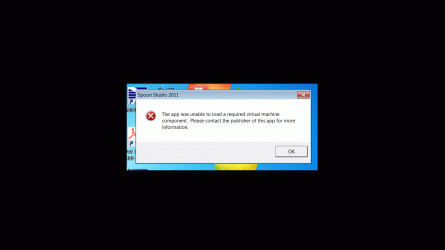
Portable Minitab was working fine till last windows 7 update. After the windows 7 update it stopped working. Following message pops up
================================

Spoon studio 2011

Unable to load a a virtual machine Component. Please contact the publisher.

=====================================
Any help to revive Portable Minitab will be appreciated
 

Attachments
  • Portable Minitab.gif
    Portable Minitab.gif
    27.9 KB · Views: 4

My Computer

Computer type
PC/Desktop
Computer Manufacturer/Model Number
Unknown
OS
Windows 7 Ultimate x32
CPU
Pentium 4
Motherboard
Intel
Memory
2.5GB
Graphics Card(s)
None
Hard Drives
Seagate and Samsung
Antivirus
MSE
Browser
IE/CHROME

My Computer

Computer type
Laptop
Computer Manufacturer/Model Number
Asus K52F or Lenovo B51-80
OS
Win 7 x64 Home Premium (and x86 VirtualBox VM)/Win10
CPU
i3 370M/i7 6500U
Motherboard
Asus/Lenovo
Memory
8GB - finally :)/8GB
Graphics Card(s)
it's an i3, dude!/dual Intel&nVidia
Sound Card
onboard
Monitor(s) Displays
15.6" built-in
Screen Resolution
1366x768/1920x1080
Hard Drives
750GB Seagate internal
Sundry external drives attached to other computers on the local network
1TB SSD on the Lenovo
PSU
n/a
Internet Speed
as much as I can get - usually on a dongle/phone, so <1MB/s
Antivirus
MSE/Defender
Browser
IE11/12/Edge/Chrome/FF(if I must)
Thanks a lot. I will post my question to the forum suggested. I will update you with results soon
 

My Computer

Computer type
PC/Desktop
Computer Manufacturer/Model Number
Unknown
OS
Windows 7 Ultimate x32
CPU
Pentium 4
Motherboard
Intel
Memory
2.5GB
Graphics Card(s)
None
Hard Drives
Seagate and Samsung
Antivirus
MSE
Browser
IE/CHROME
I am waiting for a solution from spoon forum. Meanwhile I distinctly remember that only a Windows 7 update made it inoperable. I was running fine. After a Windows 7 update , the PC rebooted and I wanted to continue with my work in Portable Minitab but it did not respond. Also the windows update modified several registry keys while rebooting
 

My Computer

Computer type
PC/Desktop
Computer Manufacturer/Model Number
Unknown
OS
Windows 7 Ultimate x32
CPU
Pentium 4
Motherboard
Intel
Memory
2.5GB
Graphics Card(s)
None
Hard Drives
Seagate and Samsung
Antivirus
MSE
Browser
IE/CHROME
Exact same problem. Have you found a way to solve it?
 

My Computer

Computer type
PC/Desktop
OS
Windows 7 ultimate 64 bits
Not yet. Though spoon studio have registered a case, yet a solution has not been delivered.
 

My Computer

Computer type
PC/Desktop
Computer Manufacturer/Model Number
Unknown
OS
Windows 7 Ultimate x32
CPU
Pentium 4
Motherboard
Intel
Memory
2.5GB
Graphics Card(s)
None
Hard Drives
Seagate and Samsung
Antivirus
MSE
Browser
IE/CHROME
Thank you,
Searched your thread at Spoon studio forum and followed the advice to uninstall the windows update that caused the problem.. I know it's not a real solution but at least I can keep on working until I recompile the program with a newer version of spoon studio.
 

My Computer

Computer type
PC/Desktop
OS
Windows 7 ultimate 64 bits
Thanks a lot. Would you let me know which Windows 7 update , you have removed so that I can continue working with it. Later when you find a permanent solution you can can let me know the same
 

My Computer

Computer type
PC/Desktop
Computer Manufacturer/Model Number
Unknown
OS
Windows 7 Ultimate x32
CPU
Pentium 4
Motherboard
Intel
Memory
2.5GB
Graphics Card(s)
None
Hard Drives
Seagate and Samsung
Antivirus
MSE
Browser
IE/CHROME
Sure, it was:

Security Update for Windows 7 for x64-based Systems (KB3045999)

Installation date: ‎27/‎04/‎2015 09:17 a.m.

Installation status: Successful

Update type: Important

A security issue has been identified in a Microsoft software product that could affect your system. You can help protect your system by installing this update from Microsoft. For a complete listing of the issues that are included in this update, see the associated Microsoft Knowledge Base article. After you install this update, you may have to restart your system.

More information:
MS15-038: Description of the security update for Windows: April 14, 2015

Help and Support:
Microsoft Support


After removing it, it worked again without a problem
 

My Computer

Computer type
PC/Desktop
OS
Windows 7 ultimate 64 bits
Excellent. The program works .Kudos to you. When you create a permanent solution please post your solution.
 

My Computer

Computer type
PC/Desktop
Computer Manufacturer/Model Number
Unknown
OS
Windows 7 Ultimate x32
CPU
Pentium 4
Motherboard
Intel
Memory
2.5GB
Graphics Card(s)
None
Hard Drives
Seagate and Samsung
Antivirus
MSE
Browser
IE/CHROME
The only solution seems to be to recompile the program with a newer version of Spoon. My problem was with ZOC terminal emulator which, even though I have a licence for a normal installation, I love being able to carry it around in order to use it in "any" PC without the need to install it. I made it portable myself with Spoon Studio 11 but I might switch to thinapp if I can put my hands on it. I guess your best bet is to look around for a newer compilation of yours. Good luck and kudos to YOU cause it was your post the one who solved my problem. Have a nice day.
 

My Computer

Computer type
PC/Desktop
OS
Windows 7 ultimate 64 bits
I do not how to recompile the program using Thinapp. I will continue to use Windows without the Security update. I am hoping Microsoft will issue a new Security update removing the flaws in the earlier Security update . Till then this temporary solution is okay. Still I appreciate your acumen to provide this interim solution.
 

My Computer

Computer type
PC/Desktop
Computer Manufacturer/Model Number
Unknown
OS
Windows 7 Ultimate x32
CPU
Pentium 4
Motherboard
Intel
Memory
2.5GB
Graphics Card(s)
None
Hard Drives
Seagate and Samsung
Antivirus
MSE
Browser
IE/CHROME
After removal of KB3045999, portable minitab was working fine. Again about 25 updates were installed (including Office) on 12 August 2015 . It looks one of the updates deactivated portable minitab again. Please help me to fix this issue.
 

My Computer

Computer type
PC/Desktop
Computer Manufacturer/Model Number
Unknown
OS
Windows 7 Ultimate x32
CPU
Pentium 4
Motherboard
Intel
Memory
2.5GB
Graphics Card(s)
None
Hard Drives
Seagate and Samsung
Antivirus
MSE
Browser
IE/CHROME
Back
Top