Possible implications of this proposed backup method?

teckneeculler

Member
Power User
VIP
Local time
2:52 AM
Messages
512
My main PC (W7 Ult) has three drives installed.
Disk 0 (SATA 2TB) has two partitions, P and S. Used space is 486G and 495G respectively.
Disk 1 (SATA 2TB) has 1122G of used space.
Disk 2 (NVME.M2 250G) has two partitions, C and E Used space is 120G and 30MB respectively.

The system is fairly elaborate and I'd rather not have to re-establish it piecemeal in the event of a crash. Life's too short, lol. It'd probably take me a month.
So I'm wondering if a possible (emergency) backup method might be to copy all of the used space (2253GB) into several partitions of a new 3TB drive in such a way that the whole new thing would run on boot-up, given that the BIOS would need amending, of course.
Your comments would be appreciated.
 

My Computer My Computer

Computer type
PC/Desktop
Computer Manufacturer/Model Number
My build
OS
Win7 Ultimate SP1
CPU
Intel Core i5 9400 Coffee Lake 14nm
Motherboard
Asus Prime H310M-E R2.0 (LGA1151)
Memory
16G DDR4
Graphics Card(s)
NVidia GeForce GTX 960
Sound Card
Realtek High Definition Audio (mobo)
Monitor(s) Displays
Asus PA248 24" 16:10 format
Screen Resolution
1920x1200@59Hz
Hard Drives
1863GB Seagate ST2000DM
3726GB Seagate ST4000DM
1863GB Seagate ST2000DM
6TB Seagate
465GB NVMe Samsung SSD 970
PSU
750G2
Case
Tower
Cooling
Standard
Keyboard
USB
Mouse
USB
Internet Speed
920Mbs/480Mbs
Antivirus
Malwarebytes
Browser
Firefox
So I'm wondering if a possible (emergency) backup method might be to copy all of the used space (2253GB) into several partitions of a new 3TB drive in such a way that the whole new thing would run on boot-up,


It is doable, might take a while.

One way is to use diskgenius ( free version will do ).
Free Download DiskGenius Online


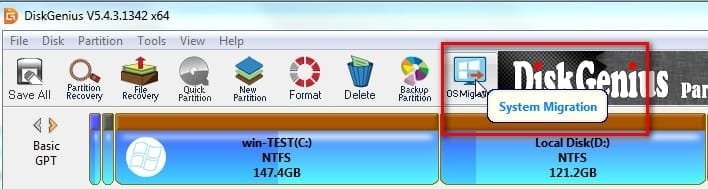
First do OS migration to the 3tb.

dg-osmigrate.jpg

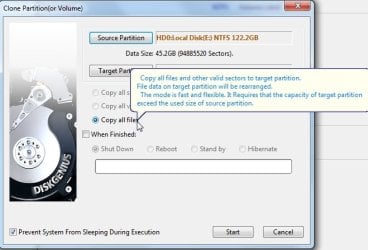
Then clone ( copy all files ) from the data partitions to the 3tb when you have time.

dg-copy-all-files.jpg
 

My Computers My Computers

System One System Two

  • Computer type
    PC/Desktop
    OS
    7 X64
    CPU
    i5 8400
    Motherboard
    gigabyte b365m ds3h
    Memory
    2x8gb 3200mhz
    Hard Drives
    various
    PSU
    pure power 11 400w cm
    Case
    Coolermaster
    Cooling
    cryorig m9i
  • Computer type
    PC/Desktop
    OS
    7x64
    CPU
    g5400
    Motherboard
    ga b365m ds3h
    Memory
    8gb ddr4 2400
    PSU
    xfx pro 450w
SIW2: Thanks for the comments, your suggestion looks very dooable. The 3TB is cheapish (for NZ-$118) but it's only a 5400 rpm, so once I got it up and running, I'd clone its partitions back to the original separate drives.
It'd be ideal if it were possible to incrementally or differentially update the 3TB, once its partitions had been cloned, and it was again outside the system, but maybe that'd be a bridge too far :eek:
 

My Computer My Computer

Computer type
PC/Desktop
Computer Manufacturer/Model Number
My build
OS
Win7 Ultimate SP1
CPU
Intel Core i5 9400 Coffee Lake 14nm
Motherboard
Asus Prime H310M-E R2.0 (LGA1151)
Memory
16G DDR4
Graphics Card(s)
NVidia GeForce GTX 960
Sound Card
Realtek High Definition Audio (mobo)
Monitor(s) Displays
Asus PA248 24" 16:10 format
Screen Resolution
1920x1200@59Hz
Hard Drives
1863GB Seagate ST2000DM
3726GB Seagate ST4000DM
1863GB Seagate ST2000DM
6TB Seagate
465GB NVMe Samsung SSD 970
PSU
750G2
Case
Tower
Cooling
Standard
Keyboard
USB
Mouse
USB
Internet Speed
920Mbs/480Mbs
Antivirus
Malwarebytes
Browser
Firefox
incrementally or differentially update the 3TB, once its partitions had been cloned

I dont know any free tools that can differentially update a cloned partition. I believe Casper does that, it is used by radiology labs and similar. Most programs that make disk/partition images can do it with the image files.

Another way could be to do the os migration with diskgenius, then create images of the other partitions which can then be updated.

If you get a big enough disk, you could have the migrated os partitions at the beginning of the disk, and create a partition at the end to store the image files.

Then in an emergency you would be able to boot into the migrated os on the new disk and restore those image files as and when needed .
 

My Computers My Computers

System One System Two

  • Computer type
    PC/Desktop
    OS
    7 X64
    CPU
    i5 8400
    Motherboard
    gigabyte b365m ds3h
    Memory
    2x8gb 3200mhz
    Hard Drives
    various
    PSU
    pure power 11 400w cm
    Case
    Coolermaster
    Cooling
    cryorig m9i
  • Computer type
    PC/Desktop
    OS
    7x64
    CPU
    g5400
    Motherboard
    ga b365m ds3h
    Memory
    8gb ddr4 2400
    PSU
    xfx pro 450w
Just note that a backup in the computer its self may get destroyed via a power issue or nearby or direct lightning strike. Never mind the biggest issue of a possible malware infection.

You'll want to store your HDDs out of the computer and in a fire proof safe. Not really necessary, but data is pretty damn important today to not invest in a ~$35 fire proof safe. I have three. The locks on these can be opened very easily with a flat head screw driver or what ever, but that's not their interned purpose. The purpose is fire and water mitigation with my data and paper documents like car title, school diplomas, etc. Note that you should store paper in plastic sleeves and thumb drives, HDDs etc in sandwich bags. Reason is because if God forbid there was a fire the contents inside the safe will get moist.


For a hard drive I'd look into some of the Hitachi enterprise platter versions. Even used will suffice. Why? Because they are documented to be great drives and have a very good MTBF (Mean Time Before Failure). I have three or four (can't remember off hand) for air gaped backups. They didn't cost very much and I did buy them used on eBay which of course have several thousand hours on them already but knowing full well what a reliable drive they were it didn't concern me in the slightest. And my sentiments have been proved correct because it's been several years and still going. Also, it's not like they are powered on constantly either. Only for the duration of the backup then powered off and stored away. Actually, one of them now (a 2TB) is on all the time when the computer is running as drive "G" serving the function of the downloads location of files, data spill over and minor backup purposes. It currently has over 26,600 hours on it thus far.


You might be interested in FreeFileSync. I have this setup to fire off its batch file on PC boot up for backup purposes to the aforementioned "G" drive. It's just one of many in a line of duplicate backups. I also backup individual tier 1 data independent and dependent of the full HDD clone. So, there's the clones and there's the data backups. And the clones also have the data that was backed up. You'll also want to test your backup strategy by deploying it and making sure it works as intended.

You might be interested in my two massive posts on my unorthodox method here. LOL! ( I admit. I felt like part Ambrose Bierce and Isaac Asimov when I wrote that). HAHAHAHA!

No, it's not gonna address your piecemeal needs, but HDD Raw Copy Tool used for the OS HDD and deploying FreeFileSync could be a solution.
 

My Computer My Computer

Computer type
PC/Desktop
OS
Windows 7 Ultimate x64
If you get a big enough disk, you could have the migrated os partitions at the beginning of the disk, and create a partition at the end to store the image files.
SIW2: Good call, I'll do it that way. I'd previously bought a 4TB SATA 7200 that I'd intended to mount in an Orico USB3 case for file backup. Instead, I've mounted it directly in the PC case, so, as you suggested, I can backup the OS to a first partition there and increment it as needed, with other file backups going to other partitions.

F22 Simpilot: Thanks for the tips, I'll check out the FileSync software.
 
Last edited:

My Computer My Computer

Computer type
PC/Desktop
Computer Manufacturer/Model Number
My build
OS
Win7 Ultimate SP1
CPU
Intel Core i5 9400 Coffee Lake 14nm
Motherboard
Asus Prime H310M-E R2.0 (LGA1151)
Memory
16G DDR4
Graphics Card(s)
NVidia GeForce GTX 960
Sound Card
Realtek High Definition Audio (mobo)
Monitor(s) Displays
Asus PA248 24" 16:10 format
Screen Resolution
1920x1200@59Hz
Hard Drives
1863GB Seagate ST2000DM
3726GB Seagate ST4000DM
1863GB Seagate ST2000DM
6TB Seagate
465GB NVMe Samsung SSD 970
PSU
750G2
Case
Tower
Cooling
Standard
Keyboard
USB
Mouse
USB
Internet Speed
920Mbs/480Mbs
Antivirus
Malwarebytes
Browser
Firefox

My Computers My Computers

System One System Two

  • Computer type
    PC/Desktop
    OS
    7 X64
    CPU
    i5 8400
    Motherboard
    gigabyte b365m ds3h
    Memory
    2x8gb 3200mhz
    Hard Drives
    various
    PSU
    pure power 11 400w cm
    Case
    Coolermaster
    Cooling
    cryorig m9i
  • Computer type
    PC/Desktop
    OS
    7x64
    CPU
    g5400
    Motherboard
    ga b365m ds3h
    Memory
    8gb ddr4 2400
    PSU
    xfx pro 450w
Yeah, I have one of these. It's nice to boot different OSs because my preferred way to do that is in a clean state without other hard drives running at the same time and not the use of partitions that can go *poof* and disappear and what have you. But, and this is a big "but." It's still not something one would want to consider for backup purposes unless it augments another backup HDD that is in cold storage, i.e. air gaped and in a fireproof safe. Might be a little extreme, but even though the power to the HDD is turned on or off via the switch, the SATA connectors are still connected which is a perfect channel for electrical chaos should it enter the connector. And of course fire and water mitigation is not there.

Those fireproof safes are only about $35 American on eBay. Less than a stick of RAM or even a dedicated sound card or the price of some basic mouse. Well worth the investment in my opinion. If one had the money you could put the fireproof safe in a bigger safe meant for security and is bolted to the floor and preferably hidden in plain sight. Think false closet wall and what have you. Security through obscurity is a layer I use. The United States Secret Service uses layers... Concentric circles of protection layers... (it's also math) Anyway... LOL I'm into this stuff and read books on it al all the time. At one time I wanted to work for the CIA or the U.S. Secret Service. Today, I got smarter... LOL!
 

My Computer My Computer

Computer type
PC/Desktop
OS
Windows 7 Ultimate x64
That is very different. The point of of the front caddies is to pop disks in and out easily. No need to dig around inside the machine.

Slide in a disk, do the backup to it, then either leave it there and only power on when needed. Or slide it out and put it in the nuclear shelter..
 

My Computers My Computers

System One System Two

  • Computer type
    PC/Desktop
    OS
    7 X64
    CPU
    i5 8400
    Motherboard
    gigabyte b365m ds3h
    Memory
    2x8gb 3200mhz
    Hard Drives
    various
    PSU
    pure power 11 400w cm
    Case
    Coolermaster
    Cooling
    cryorig m9i
  • Computer type
    PC/Desktop
    OS
    7x64
    CPU
    g5400
    Motherboard
    ga b365m ds3h
    Memory
    8gb ddr4 2400
    PSU
    xfx pro 450w
These things are useful, fit into a 5.25 bay on the front of the pc, has sata connections and is only turned on when needed. I have a couple and they are very convenient.
There once were similar items available in NZ and I've used them myself, although the hot swap capability wasn't reliable. But I've never seen a double height caddy like that one. I also used the the earlier IDE models extensively, one of my old workshop machines was set up to run a selection of OS's that were mounted in caddies.
 

My Computer My Computer

Computer type
PC/Desktop
Computer Manufacturer/Model Number
My build
OS
Win7 Ultimate SP1
CPU
Intel Core i5 9400 Coffee Lake 14nm
Motherboard
Asus Prime H310M-E R2.0 (LGA1151)
Memory
16G DDR4
Graphics Card(s)
NVidia GeForce GTX 960
Sound Card
Realtek High Definition Audio (mobo)
Monitor(s) Displays
Asus PA248 24" 16:10 format
Screen Resolution
1920x1200@59Hz
Hard Drives
1863GB Seagate ST2000DM
3726GB Seagate ST4000DM
1863GB Seagate ST2000DM
6TB Seagate
465GB NVMe Samsung SSD 970
PSU
750G2
Case
Tower
Cooling
Standard
Keyboard
USB
Mouse
USB
Internet Speed
920Mbs/480Mbs
Antivirus
Malwarebytes
Browser
Firefox
Ah, that's interesting. I may have to check one of those out. LOL I already used all three of my 5.25" bays though. LOL


ethr.gif

Pffft Inches... More like follow the order of the water droplet and convert that crap to metric, yo. 13.34 cm = 5.25"
 

My Computer My Computer

Computer type
PC/Desktop
OS
Windows 7 Ultimate x64
Back
Top