Possible Memory Leak Virus - Anti-virus detects nothing?

SabrinaChorlton

New member
Local time
5:43 AM
Messages
2
svchost.exe - Possible Memory Leak Virus - Anti-virus detects nothing?

Hello, I am needing some support on what is exactly taking up all the RAM on my brother's PC as after about 8 hours of uptime, 65% of my Physical Memory is being used up with nothing really open. I did some research and found out it was a possible memory leak or virus, so I first tried to run Norton, my main anti-virus and it came up with nothing, I then tried Malwarebytes as a second source but it came up with nothing as well.

* 16GB RAM
* Windows 7 Home Premium 64 Bit
* Main Anti-Virus - Norton Security Suite

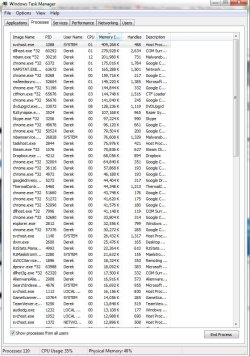
The processes list
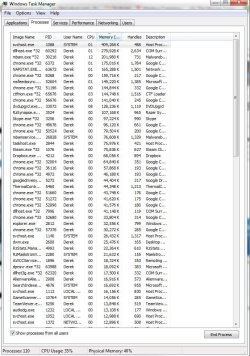
Capture.JPG


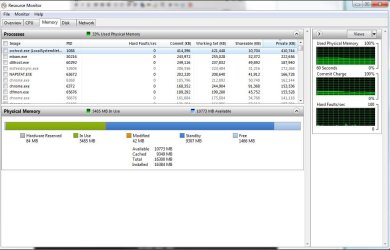
The resource monitor

Capture2.JPG

I'm at a total loss on what I can do and as a last resort I might reinstall Windows since I tried a system restore but it was pretty recent at about the time when it was having this problem.
 
Last edited:

My Computer My Computer

At a glance

Windows 7 Home Premium x64Intel(R) Core(TM) i7-3820 CPU @ 3.60GHz16 GB(1) AMD Radeon HD 7800 Series (2) AMD Radeon ...
Computer type
PC/Desktop
Computer Manufacturer/Model Number
Alienware
OS
Windows 7 Home Premium x64
CPU
Intel(R) Core(TM) i7-3820 CPU @ 3.60GHz
Motherboard
Alienware 07JNH0
Memory
16 GB
Graphics Card(s)
(1) AMD Radeon HD 7800 Series (2) AMD Radeon HD 7800 Serie
Sound Card
(1) AMD High Definition Audio Device (2) Razer Surround
Hard Drives
(1) ATA ST3000DM001-1CH1 SCSI Disk Device (2) Generic Ultra HS-SD/MMC USB Device
Antivirus
Norton Security Suite
Browser
Google Chrome

My Computer My Computer

At a glance

Windows 10 Pro. 64/ version 1709 Windows 7 Pr...Intel i7-6800K @ 4.3Corsair Platinum 16 gig @2400EVGA GTX 1070 OC
Computer type
PC/Desktop
Computer Manufacturer/Model Number
Home made Desktop
OS
Windows 10 Pro. 64/ version 1709 Windows 7 Pro/64
CPU
Intel i7-6800K @ 4.3
Motherboard
ASUS X-99 Deluxe II
Memory
Corsair Platinum 16 gig @2400
Graphics Card(s)
EVGA GTX 1070 OC
Monitor(s) Displays
Asus 27" LED LCD/VE278Q
Screen Resolution
1920-1080 or 1280-720 HDMI
Hard Drives
INTEL SSD 730-240 Gb Sata 3.0/
PSU
EVGA Platium 1200W
Case
Phanteks Luxe Tempered Glass 8 fans/ one radiator
Cooling
XSPC/ Water Cooled CPU
Keyboard
Das 4 Professional
Mouse
Logitech M705/MX Anywhere 2-S
Internet Speed
100 mbits
Antivirus
Microsoft Security Essentials/ Malwarebytes Premium 3.0/ SAS
Browser
I.E. 11 default/Firefox/ ISP Time Warner Cable/Spectrum
Other Info
LG BluRay Burner/
Sound system-KLipsch-THX/
Icy Dock ssd Hot Swap bays.
Welcome to the forums SabrinaChorlton!

Correct me if I'm wrong, but I'm assuming that by saying your memory is 60'ish % used/gone you're referring to the total of "used" and "standby" in your pictures. Am I correct? Well, "used" memory is just what it says, in use. "Standby", on the other hand means Windows has used it and has moved from a working process set. "Standby" memory is sort of like page file/list or cache for application code / data. When a program needs pages not in its working set, if these pages are in standby its faster than if Windows would have to get them from the paging file, the exe. on a disk or a mapped file. Standby is able to be used by any programs/app.'s but they don't control it. Neither can you, only the Windows memory manager can. SO...... you are O.K. as far as that aspect imho.

Have you noticed any performance issues? From my understanding , you shouldn't. At least much. You could try actually closing some of your things when not using them. Skype etc. That would flush them so to speak and make more "free" memory.
 

My Computer My Computer

At a glance

Windows 10x64 Build 1709Intel i7 7700HQ Kaby Lake16 GB DDR4 @2400Nvidia Geforce GTX 1060
Computer type
Laptop
Computer Manufacturer/Model Number
MSI GE72VR Apache Pro-416
OS
Windows 10x64 Build 1709
CPU
Intel i7 7700HQ Kaby Lake
Motherboard
Micro-Star Intl. MS-179B (U3C1)
Memory
16 GB DDR4 @2400
Graphics Card(s)
Nvidia Geforce GTX 1060
Screen Resolution
1920x1080 120Hz
Hard Drives
256 GB Nvme M.2 SSD

1TB HDD@7200
Cooling
Cooler Blast 4
Keyboard
Steel Series
Antivirus
Bit Defender Free
Browser
Edge
You have 16 gigs of ram and you are using a little over 5 gig.

Where does this 65% figure come from.

Reboot and take another look at your ram before you start opening a bunch of things.
 

My Computer My Computer

At a glance

Windows 10 Pro. 64/ version 1709 Windows 7 Pr...Intel i7-6800K @ 4.3Corsair Platinum 16 gig @2400EVGA GTX 1070 OC
Computer type
PC/Desktop
Computer Manufacturer/Model Number
Home made Desktop
OS
Windows 10 Pro. 64/ version 1709 Windows 7 Pro/64
CPU
Intel i7-6800K @ 4.3
Motherboard
ASUS X-99 Deluxe II
Memory
Corsair Platinum 16 gig @2400
Graphics Card(s)
EVGA GTX 1070 OC
Monitor(s) Displays
Asus 27" LED LCD/VE278Q
Screen Resolution
1920-1080 or 1280-720 HDMI
Hard Drives
INTEL SSD 730-240 Gb Sata 3.0/
PSU
EVGA Platium 1200W
Case
Phanteks Luxe Tempered Glass 8 fans/ one radiator
Cooling
XSPC/ Water Cooled CPU
Keyboard
Das 4 Professional
Mouse
Logitech M705/MX Anywhere 2-S
Internet Speed
100 mbits
Antivirus
Microsoft Security Essentials/ Malwarebytes Premium 3.0/ SAS
Browser
I.E. 11 default/Firefox/ ISP Time Warner Cable/Spectrum
Other Info
LG BluRay Burner/
Sound system-KLipsch-THX/
Icy Dock ssd Hot Swap bays.
You have 16 gigs of ram and you are using a little over 5 gig.

Where does this 65% figure come from.

Reboot and take another look at your ram before you start opening a bunch of things.

Ah, sorry my bad I forgot to edit the post after rebooting before; my bad. So I just rebooted and things look pretty normal to me it's currently floating at about 32% (5 gigs) so I think I am good on that part.


One concerning question from me though is about svchost.exe; is it supposed to be that high in my processes? it seems a bit suspicious to me when I was rebooting and saw that svchost.exe was slowly gaining more and more memory. Should I be concerned about this?

Capture.JPG
 

My Computer My Computer

At a glance

Windows 7 Home Premium x64Intel(R) Core(TM) i7-3820 CPU @ 3.60GHz16 GB(1) AMD Radeon HD 7800 Series (2) AMD Radeon ...
Computer type
PC/Desktop
Computer Manufacturer/Model Number
Alienware
OS
Windows 7 Home Premium x64
CPU
Intel(R) Core(TM) i7-3820 CPU @ 3.60GHz
Motherboard
Alienware 07JNH0
Memory
16 GB
Graphics Card(s)
(1) AMD Radeon HD 7800 Series (2) AMD Radeon HD 7800 Serie
Sound Card
(1) AMD High Definition Audio Device (2) Razer Surround
Hard Drives
(1) ATA ST3000DM001-1CH1 SCSI Disk Device (2) Generic Ultra HS-SD/MMC USB Device
Antivirus
Norton Security Suite
Browser
Google Chrome
Well you have a 110 process running and that is high compared to my two computers.

Your cpu and memory is more than normal but you seem to have many things running in the background. That would cause these readings.

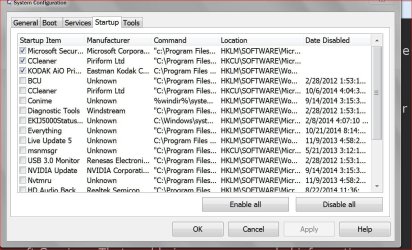
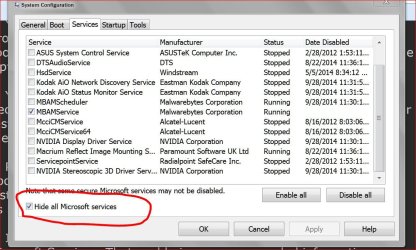
Another picture please.

Start Ups.JPG

Services.JPG
 

My Computer My Computer

At a glance

Windows 10 Pro. 64/ version 1709 Windows 7 Pr...Intel i7-6800K @ 4.3Corsair Platinum 16 gig @2400EVGA GTX 1070 OC
Computer type
PC/Desktop
Computer Manufacturer/Model Number
Home made Desktop
OS
Windows 10 Pro. 64/ version 1709 Windows 7 Pro/64
CPU
Intel i7-6800K @ 4.3
Motherboard
ASUS X-99 Deluxe II
Memory
Corsair Platinum 16 gig @2400
Graphics Card(s)
EVGA GTX 1070 OC
Monitor(s) Displays
Asus 27" LED LCD/VE278Q
Screen Resolution
1920-1080 or 1280-720 HDMI
Hard Drives
INTEL SSD 730-240 Gb Sata 3.0/
PSU
EVGA Platium 1200W
Case
Phanteks Luxe Tempered Glass 8 fans/ one radiator
Cooling
XSPC/ Water Cooled CPU
Keyboard
Das 4 Professional
Mouse
Logitech M705/MX Anywhere 2-S
Internet Speed
100 mbits
Antivirus
Microsoft Security Essentials/ Malwarebytes Premium 3.0/ SAS
Browser
I.E. 11 default/Firefox/ ISP Time Warner Cable/Spectrum
Other Info
LG BluRay Burner/
Sound system-KLipsch-THX/
Icy Dock ssd Hot Swap bays.
Back
Top