Can Mac OS X Snow Leopard be installed in Virtual PC via this method?
When you go to Start > All Programs > Windows Virtual PC > Windows Virtual PC a folder will open up. That folder will contain your XP Mode VM. The menu bar of that folder will have the option for Create virtual machine. Select that option to create a new (Linux or other) virtual machine. The machine you create will be "empty" as you said. Just follow the instructions after you press the Create virtual machine button. Installing the stand alone version of Virtual PC is not required after all, this can all be done with the XP Mode version of Virtual PC.
My Computer
Computer Manufacturer/Model Number
Acer Aspire 4730Z
OS
Windows 7 Ultimate
CPU
Intel Pentium Dual CPU T3400 @ 2.16GHz
Motherboard
Acer Aspire 4730Z V1.22 GL40
Memory
4.0GB Dual-Channel DDR2 @ 332MHz
Graphics Card(s)
Mobile Intel(R) 4 Series Express Chipset Family 1309 MB
The VPC requirement is Vista or 7 while the previous Virtual PC 2007 supported XP on a VM there. You would need a 3rd program like VM ware to see Mac run on a VM with that since the VPC only supports Windows.
W7 Ultimate x64/W10 Pro x64/W11 Pro Triple Boot - Main PC W7 Remote PC Micro ATX W7 Pro x64/W11 Pro
CPU
AMD Phenom II X4 975 Deneb 3.6ghz - 965 2nd remote pc
Motherboard
Gigabyte GA-790XTA-UD4-Gigabyte GA-880GM-D2H remote pc
Memory
Kingston Hyper X DDR3 1600 1.5v 16gb - Hyper X Fury 8gb 2nd
Graphics Card(s)
MSI HD Radeon 5750 1gb - MSI HD Radeon 6450 on mini tower
Sound Card
Creative Labs X-Fi Xtreme Audio P - Realtek onooard 2nd case
Monitor(s) Displays
ASUS VW199T-P 19" HP 2082a Main-HP 2082a 20" remote pc
Screen Resolution
Asus 1440x900 - HP 1600x900
Hard Drives
WD Black 1TB HD per OS W7, W10, and pending W11 presently on 500gb OS Drive - Pending Triple 1TB HDs for Spanned Storage/backup volume
Single 2TB external USB enclosure, single 1TB System 7 Host/Boot drive, Pending 8TB external HD for system image b
PSU
Corsair 750TX - primary / Corsair CX600 - second
Case
Antec 900-2 - SSD compatible / NZXT Vulcan mini tower
Mac itself has a UNIX base to start with much like any Linux distro or even the SUN OS Solaris or OpenSolaris. The VPC is strictly MS there. For the SUN Oracle Virtual Box or VM ware Lite or full retail you would likely run into the exact same problems due to the Apple hardware requirements!
VM ware is supposedly working on adding support in order to run the other guy's OS on a virtual machine now that running a virtualized form is legal. But the hardware requirements unfortunately are still for the "fruit bearing" OS and not simply any non Apple wares.
Note some of this goes back a few years however. The latest for things like running parallel desktops and running 7 on Mac instead would be the reports and other information seen at the MacWindows site. Special Report: Running Windows on a Mac with VMware
W7 Ultimate x64/W10 Pro x64/W11 Pro Triple Boot - Main PC W7 Remote PC Micro ATX W7 Pro x64/W11 Pro
CPU
AMD Phenom II X4 975 Deneb 3.6ghz - 965 2nd remote pc
Motherboard
Gigabyte GA-790XTA-UD4-Gigabyte GA-880GM-D2H remote pc
Memory
Kingston Hyper X DDR3 1600 1.5v 16gb - Hyper X Fury 8gb 2nd
Graphics Card(s)
MSI HD Radeon 5750 1gb - MSI HD Radeon 6450 on mini tower
Sound Card
Creative Labs X-Fi Xtreme Audio P - Realtek onooard 2nd case
Monitor(s) Displays
ASUS VW199T-P 19" HP 2082a Main-HP 2082a 20" remote pc
Screen Resolution
Asus 1440x900 - HP 1600x900
Hard Drives
WD Black 1TB HD per OS W7, W10, and pending W11 presently on 500gb OS Drive - Pending Triple 1TB HDs for Spanned Storage/backup volume
Single 2TB external USB enclosure, single 1TB System 7 Host/Boot drive, Pending 8TB external HD for system image b
PSU
Corsair 750TX - primary / Corsair CX600 - second
Case
Antec 900-2 - SSD compatible / NZXT Vulcan mini tower
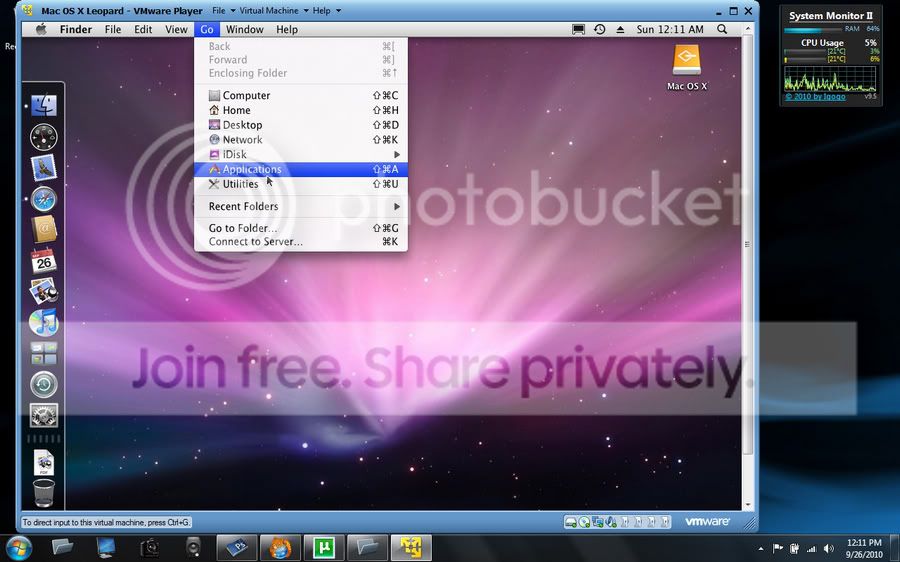
I couldn't figure out how to get it running in Virtual Box without VT, so, I've given VMWare Player a try with 10.5. Pretty slow, but workable for now.
My Computer
Computer Manufacturer/Model Number
Acer Aspire 4730Z
OS
Windows 7 Ultimate
CPU
Intel Pentium Dual CPU T3400 @ 2.16GHz
Motherboard
Acer Aspire 4730Z V1.22 GL40
Memory
4.0GB Dual-Channel DDR2 @ 332MHz
Graphics Card(s)
Mobile Intel(R) 4 Series Express Chipset Family 1309 MB
At least you got it running! Now you have to work out the "bugs" to some extent as far as configurations for memory and other things.
VBox can be a little touchy at times if you are not working with bootable media to start with. I've run into the "previously working well VM" simply refusing to start up after so long or you need the live cd in the drive and forgot to put it in type error!
W7 Ultimate x64/W10 Pro x64/W11 Pro Triple Boot - Main PC W7 Remote PC Micro ATX W7 Pro x64/W11 Pro
CPU
AMD Phenom II X4 975 Deneb 3.6ghz - 965 2nd remote pc
Motherboard
Gigabyte GA-790XTA-UD4-Gigabyte GA-880GM-D2H remote pc
Memory
Kingston Hyper X DDR3 1600 1.5v 16gb - Hyper X Fury 8gb 2nd
Graphics Card(s)
MSI HD Radeon 5750 1gb - MSI HD Radeon 6450 on mini tower
Sound Card
Creative Labs X-Fi Xtreme Audio P - Realtek onooard 2nd case
Monitor(s) Displays
ASUS VW199T-P 19" HP 2082a Main-HP 2082a 20" remote pc
Screen Resolution
Asus 1440x900 - HP 1600x900
Hard Drives
WD Black 1TB HD per OS W7, W10, and pending W11 presently on 500gb OS Drive - Pending Triple 1TB HDs for Spanned Storage/backup volume
Single 2TB external USB enclosure, single 1TB System 7 Host/Boot drive, Pending 8TB external HD for system image b
PSU
Corsair 750TX - primary / Corsair CX600 - second
Case
Antec 900-2 - SSD compatible / NZXT Vulcan mini tower