Possible Phishing

kbbgood

New member
Local time
11:22 PM
Messages
71
I have been getting a pop up that says I need to call a phone number cause I have a virus. First of all how do they know and then ???? Are they a phishing problem for me and how do I make them go away? There is also a voice just starts up talking how I really need to make that call as soon as possible.

Also I have paid Viper for a virus program. Is it good and is there a better one for free out there?
 

My Computer

Computer type
PC/Desktop
Computer Manufacturer/Model Number
Custom Build
OS
Windows 7 Home Premium 64bit.
CPU
AMD Athlon 64 X2 6000*
Motherboard
ECS 6100
Memory
4.0 Gig
Monitor(s) Displays
AOC
Hard Drives
250gig
PSU
AMD 3.0 gig
Cooling
Factory and coolermaster
Keyboard
Logitech combo
Internet Speed
Highspeed from the local phone company.
Antivirus
VIPRE
Browser
IE and Firefox
You need to download and install Malwarebytes free.
Update it and scan with it.
You need to un-tick trial version to get Free.
There is a chance that you can't install because the malware has embedded itself into your PC.
So you will need to install in Safe Mode.

I know nothing about Viper sorry but Malwarebytes is a malware scanner and not a Virus scanner and will run hand in hand with Viper.
 

My Computer

Computer type
PC/Desktop
Computer Manufacturer/Model Number
Owner Builder
OS
Windows 7 Ultimate x64 SP1 OEM
CPU
Intel i7 3930K
Motherboard
Asus X79 Deluxe
Memory
Kingston Genesis KHX2133C11D3K4/32G
Graphics Card(s)
Asus RTX 2070 Ti Turbo fan series
Sound Card
Creative Sound Blaster ZXR
Monitor(s) Displays
Samsung U32J39 UHD
Screen Resolution
3840 x 2160
Hard Drives
Samsung 860 Pro 256 GB
OCZ Vertex 4 512GB
Western Digital Black 4TB
PSU
Corsair AX850
Case
Gigabyte
Cooling
Push - Pull 120 mm Noctua PWM, Scythe Big Shuriken 2 Rev. B
Keyboard
Logitech K800 Backlit
Mouse
Logitech MX2 Master
Internet Speed
NBN 25 Mbps
Antivirus
Kaspersky Internet Security
Browser
Mozilla FireFox
Other Info
TP-Link Archer VR600v
Sennheiser TR220 WiFi Head Phones.
It's a scam. Don't click anything and close your browser using the X top right. If you click anywhere, you may get a virus. It's a similar racket to 'you need to update flash/codecs/whatever'.

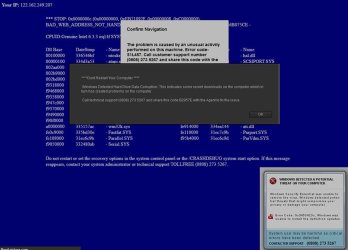
You might want to scan with Malwarebytes free and your usual A/V just to be sure. I had a similar fake warning recently - was so amateurish I took a screenshot -

fake_error.jpg
 

My Computer

Computer type
PC/Desktop
Computer Manufacturer/Model Number
self build
OS
W10 Pro x64, W7 Pro x64 in VMware
CPU
i7 2600K @ 4.4GHz
Motherboard
MSI Z68A-GD80
Memory
8GB Mushkin @ 1600MHz
Graphics Card(s)
Nvidia GTX 750 Ti
Monitor(s) Displays
27" Benq + 27" LG
Screen Resolution
1080p
Hard Drives
500GB 850 Evo SSD + 3 * 2TB Seagate
PSU
EVGA 650 GS modular
Case
Antec 300
Cooling
Seidon 120V v2
Internet Speed
62/18 Mbps
Antivirus
Defender (W10) + MSE (W7)
Browser
Firefox
I have been getting a pop up that says I need to call a phone number cause I have a virus. First of all how do they know and then ???? Are they a phishing problem for me and how do I make them go away? There is also a voice just starts up talking how I really need to make that call as soon as possible. Also I have paid Viper for a virus program. Is it good and is there a better one for free out there?
Viper Anti-Virus may not have an anti-malware module, thus not picking up this malware piece. Do not call any such displayed phone number ever, it is a phishing expedition/malware. Rather try this: boot into Safe Mode, and have your browser clean out all cache files, all history files, all download history, keeping only your password and fill-in files. See if that malware returns during Safe Mode.
** I see three of us posted at the same time; go with the flow. **
 

My Computer

Computer type
PC/Desktop
Computer Manufacturer/Model Number
Antec desktop; Acer Aspire laptops
OS
Windows 7 Professional 64-bit
CPU
Desktop i5; Acers i5 & i7
Memory
desktop 16GB; 1 Acer 8GB & 1 Acer 16GB
Hard Drives
1TB split into 2 equal partitions [OS and data] usable by RJS
Internet Speed
AT&T DSL
Browser
FF, GChrome, msIE
Other Info
Windows 7 Firewall, Emsisoft AM/AV, MSE [scan-only], SpywareBlaster, Ruiware/BillP combine
It sounds to me you are infected. Probably by downloading something that came with the infection or opening a email you shouldn't of.

Two programs I use and suggest.

Malwarebytes Anti Malware
Eset free online scan
They both have free or paid for versions

https://www.malwarebytes.org/mwb-download/

Free Virus Scan | ESET Online Scanner | ESET

Both run in normal mode (boot)

Edit:
Looks like you got a lot of help/suggestions all at one time.
 
Last edited:

My Computer

Computer type
PC/Desktop
Computer Manufacturer/Model Number
Home made Desktop
OS
Windows 10 Pro. 64/ version 1709 Windows 7 Pro/64
CPU
Intel i7-6800K @ 4.3
Motherboard
ASUS X-99 Deluxe II
Memory
Corsair Platinum 16 gig @2400
Graphics Card(s)
EVGA GTX 1070 OC
Monitor(s) Displays
Asus 27" LED LCD/VE278Q
Screen Resolution
1920-1080 or 1280-720 HDMI
Hard Drives
INTEL SSD 730-240 Gb Sata 3.0/
PSU
EVGA Platium 1200W
Case
Phanteks Luxe Tempered Glass 8 fans/ one radiator
Cooling
XSPC/ Water Cooled CPU
Keyboard
Das 4 Professional
Mouse
Logitech M705/MX Anywhere 2-S
Internet Speed
100 mbits
Antivirus
Microsoft Security Essentials/ Malwarebytes Premium 3.0/ SAS
Browser
I.E. 11 default/Firefox/ ISP Time Warner Cable/Spectrum
Other Info
LG BluRay Burner/
Sound system-KLipsch-THX/
Icy Dock ssd Hot Swap bays.
Thanks you guys. I will load the stuff you say right now. I always know to come here for help.
 

My Computer

Computer type
PC/Desktop
Computer Manufacturer/Model Number
Custom Build
OS
Windows 7 Home Premium 64bit.
CPU
AMD Athlon 64 X2 6000*
Motherboard
ECS 6100
Memory
4.0 Gig
Monitor(s) Displays
AOC
Hard Drives
250gig
PSU
AMD 3.0 gig
Cooling
Factory and coolermaster
Keyboard
Logitech combo
Internet Speed
Highspeed from the local phone company.
Antivirus
VIPRE
Browser
IE and Firefox
I have been getting a pop up....
You have been given lots of good advice. I'll not suggest any more programs to scan with at this point.

If you can, please upload a screenshot of the popup.
(Here is some info on how to do that: http://www.sevenforums.com/tutorials/9733-screenshots-files-upload-post-seven-forums.html)

It is fine if you don't get a screenshot - I am just curious about what you are seeing. I wonder if it is all web/browser based - in which case, Viper, ESET and Malwarebytes might not pick it up.


I got a call a few days ago from a person that I don't normally do computer support for. He too got a popup like you mentioned, but it was all web/browser based.
 

My Computer

Computer type
Laptop
Computer Manufacturer/Model Number
Employer provided Dell Latitude
OS
W7 Pro SP1 64bit
CPU
i7
Memory
8GB
Graphics Card(s)
Intel HD Graphics
Hard Drives
crappy SSD
Antivirus
Employer mandated Symantec Endpoint Protection
Browser
Pale Moon 64bit, IE11 64bit & Chrome 64bit
It's the same as posted above from wasnotwas.
 

My Computer

Computer type
PC/Desktop
Computer Manufacturer/Model Number
Custom Build
OS
Windows 7 Home Premium 64bit.
CPU
AMD Athlon 64 X2 6000*
Motherboard
ECS 6100
Memory
4.0 Gig
Monitor(s) Displays
AOC
Hard Drives
250gig
PSU
AMD 3.0 gig
Cooling
Factory and coolermaster
Keyboard
Logitech combo
Internet Speed
Highspeed from the local phone company.
Antivirus
VIPRE
Browser
IE and Firefox
I did download malwarebytes and run it last night. It found 646 whatever on system. Then removed them. Hope it did the trick. I guess I will buy it when the time comes. Just have to wait and see if it comes back.
 

My Computer

Computer type
PC/Desktop
Computer Manufacturer/Model Number
Custom Build
OS
Windows 7 Home Premium 64bit.
CPU
AMD Athlon 64 X2 6000*
Motherboard
ECS 6100
Memory
4.0 Gig
Monitor(s) Displays
AOC
Hard Drives
250gig
PSU
AMD 3.0 gig
Cooling
Factory and coolermaster
Keyboard
Logitech combo
Internet Speed
Highspeed from the local phone company.
Antivirus
VIPRE
Browser
IE and Firefox

My Computer

Computer type
PC/Desktop
Computer Manufacturer/Model Number
Home made Desktop
OS
Windows 10 Pro. 64/ version 1709 Windows 7 Pro/64
CPU
Intel i7-6800K @ 4.3
Motherboard
ASUS X-99 Deluxe II
Memory
Corsair Platinum 16 gig @2400
Graphics Card(s)
EVGA GTX 1070 OC
Monitor(s) Displays
Asus 27" LED LCD/VE278Q
Screen Resolution
1920-1080 or 1280-720 HDMI
Hard Drives
INTEL SSD 730-240 Gb Sata 3.0/
PSU
EVGA Platium 1200W
Case
Phanteks Luxe Tempered Glass 8 fans/ one radiator
Cooling
XSPC/ Water Cooled CPU
Keyboard
Das 4 Professional
Mouse
Logitech M705/MX Anywhere 2-S
Internet Speed
100 mbits
Antivirus
Microsoft Security Essentials/ Malwarebytes Premium 3.0/ SAS
Browser
I.E. 11 default/Firefox/ ISP Time Warner Cable/Spectrum
Other Info
LG BluRay Burner/
Sound system-KLipsch-THX/
Icy Dock ssd Hot Swap bays.
If you ever get a pop-up on your browser, and suspect any type of malware
>>>> DO NOT <<< use the X to close the window

STOP the process from Task Manager, (ctrl+alt+delete).

Roy
 

My Computer

Computer type
PC/Desktop
Computer Manufacturer/Model Number
medionl/Aspire 6930G/acer x55a
OS
W7 home premium 32bit/W7HP 64bit/w10 tp insider ring
CPU
E5300 dual core
Motherboard
medion MS7366
Memory
3gb
Graphics Card(s)
Nvidia Geforce 7100 Nforce 630i
Monitor(s) Displays
avixc
Internet Speed
n (isp resticted to 72)
Antivirus
mse/pands
Browser
palemoon
Other Info
Belkin Fd7050 n USB using Railink RT2870 drivers, more upto date
If you ever get a pop-up on your browser, and suspect any type of malware
>>>> DO NOT <<< use the X to close the window. STOP the process from Task Manager, (ctrl+alt+delete).
Roy
Thanks for the reminder, Roy! I'll remember that if such ever happens to me again.
 

My Computer

Computer type
PC/Desktop
Computer Manufacturer/Model Number
Antec desktop; Acer Aspire laptops
OS
Windows 7 Professional 64-bit
CPU
Desktop i5; Acers i5 & i7
Memory
desktop 16GB; 1 Acer 8GB & 1 Acer 16GB
Hard Drives
1TB split into 2 equal partitions [OS and data] usable by RJS
Internet Speed
AT&T DSL
Browser
FF, GChrome, msIE
Other Info
Windows 7 Firewall, Emsisoft AM/AV, MSE [scan-only], SpywareBlaster, Ruiware/BillP combine
If you ever get a pop-up on your browser, and suspect any type of malware
>>>> DO NOT <<< use the X to close the window

STOP the process from Task Manager, (ctrl+alt+delete).

Roy

Agreed. Now I don't know who you are supposedly getting this from (who they claim to be) however I will say that Microsoft will not call or email you or cause any other pop up other than from Windows defender or MSE (if installed). Microsoft waits for you to call them. Whomever that was either wanted you to allow them to install a virus or wanted you to allow them to remote connect to your computer so that they could look for passwords or financial information. It's a good thing that you came here first.
 

My Computers

System One System Two

Back
Top