
Solved Possible PSU Failure?

The PSU most likely seems to be causing the GPU to crash.

Oh okay. That would actually be better because Power Supplies are much cheaper that Graphics Cards. :D Thanks for looking at this for us!

Those voltages are perfect. It is normal for the CPU voltage to go up and down as the speed changes or cores go on or off (power saving when idle).

Awesome, that's what I want to hear. I ended up installing the NVidia 331.58 graphics driver last night but I didn't have time to actually test it. I will check it out today when I get home and report if there is anything different.
 

My Computer My Computer

Computer type
PC/Desktop
Computer Manufacturer/Model Number
Custom Build
OS
Windows 7 Ultimate x64
CPU
Intel Core i7-2700K Sandy Bridge 3.5GHz
Motherboard
Asus P8Z68-V Pro
Memory
Corsair Vengeance 16GB DDR3 1600Mhz
Graphics Card(s)
Asus GeForce GTX 670 2GB
Sound Card
Creative Sound Blaster X-Fi Xtreme 7.1
Monitor(s) Displays
Samsung 24" LED Monitor
Screen Resolution
1920 x 1080
Hard Drives
Corsair Force GT 240GB SSD
Western Digital 3TB HDD
PSU
Corsair AX860i Fully-Modular
Case
Cooler Master HAF 922 Powder Coated White
Cooling
Noctua NH-U12S
Keyboard
Razer BlackWidow Ultimate Stealth Edition
Mouse
Razer Mamba
Internet Speed
Verizon FiOS 20Mbps
Antivirus
Microsoft Security Essentials
Browser
Internet Explorer
Other Info
Razer Tiamat 7.1 Surround Sound Headset
Did you ever do the simple thing like looking in BIOS for the voltages? :confused:
 

My Computer My Computer

Computer type
PC/Desktop
Computer Manufacturer/Model Number
Home Built Desktop By DataTech
OS
Windows 7 Ultimate X64 SP1
CPU
Intel i5-2550K, Differing ~4.4-4.8GHz No built in GPU
Motherboard
ASUS P8Z68-V PRO/GEN3
Memory
16GB G.Skill Sniper 1866MHz @ 2133MHz 2x8GB
Graphics Card(s)
ASUS GTX650TIB-DC2OC-2GD5, (650TI Boost)
Sound Card
Onboard Realtek 5-1
Monitor(s) Displays
Samsung P2570HD
Screen Resolution
1920x1080
Hard Drives
Samsung 840 Pro 256GB SSD for OS, 500GB Seagate Constellation (Enterprise drive) for Data
PSU
Corsair HX650W
Case
Inwin Dragon Rider
Cooling
Hyper 212 EVO w/two Noctua fans, push-pull, @1300 RPM
Keyboard
E-Z Eyes, bright yellow keys with large characters
Mouse
steelseries SENSEI Laser Pro Gaming
Internet Speed
48-51Mbs Mbs down, 11 Mbs up Xfinity Cable
Antivirus
Norton Internet Security 2013
Browser
IE 10, Opera, Pale Moon if needed
Other Info
4 case fans, LG BluRay-RE, ASUS DVD-RW, Mr. Fusion power supply, 1.21 gigawatts.
Did you ever do the simple thing like looking in BIOS for the voltages? :confused:

Yup, 8 posts back. :) Indianatone said they were normal so we went forward. Thanks for following up.
 

My Computer My Computer

Computer type
PC/Desktop
Computer Manufacturer/Model Number
Custom Build
OS
Windows 7 Ultimate x64
CPU
Intel Core i7-2700K Sandy Bridge 3.5GHz
Motherboard
Asus P8Z68-V Pro
Memory
Corsair Vengeance 16GB DDR3 1600Mhz
Graphics Card(s)
Asus GeForce GTX 670 2GB
Sound Card
Creative Sound Blaster X-Fi Xtreme 7.1
Monitor(s) Displays
Samsung 24" LED Monitor
Screen Resolution
1920 x 1080
Hard Drives
Corsair Force GT 240GB SSD
Western Digital 3TB HDD
PSU
Corsair AX860i Fully-Modular
Case
Cooler Master HAF 922 Powder Coated White
Cooling
Noctua NH-U12S
Keyboard
Razer BlackWidow Ultimate Stealth Edition
Mouse
Razer Mamba
Internet Speed
Verizon FiOS 20Mbps
Antivirus
Microsoft Security Essentials
Browser
Internet Explorer
Other Info
Razer Tiamat 7.1 Surround Sound Headset

My Computer My Computer

Computer type
PC/Desktop
Computer Manufacturer/Model Number
Home Built Desktop By DataTech
OS
Windows 7 Ultimate X64 SP1
CPU
Intel i5-2550K, Differing ~4.4-4.8GHz No built in GPU
Motherboard
ASUS P8Z68-V PRO/GEN3
Memory
16GB G.Skill Sniper 1866MHz @ 2133MHz 2x8GB
Graphics Card(s)
ASUS GTX650TIB-DC2OC-2GD5, (650TI Boost)
Sound Card
Onboard Realtek 5-1
Monitor(s) Displays
Samsung P2570HD
Screen Resolution
1920x1080
Hard Drives
Samsung 840 Pro 256GB SSD for OS, 500GB Seagate Constellation (Enterprise drive) for Data
PSU
Corsair HX650W
Case
Inwin Dragon Rider
Cooling
Hyper 212 EVO w/two Noctua fans, push-pull, @1300 RPM
Keyboard
E-Z Eyes, bright yellow keys with large characters
Mouse
steelseries SENSEI Laser Pro Gaming
Internet Speed
48-51Mbs Mbs down, 11 Mbs up Xfinity Cable
Antivirus
Norton Internet Security 2013
Browser
IE 10, Opera, Pale Moon if needed
Other Info
4 case fans, LG BluRay-RE, ASUS DVD-RW, Mr. Fusion power supply, 1.21 gigawatts.
Jack for my two cents worth try testing the volts at pin 8 (grey cable) on the 24 pin plug.
This is known as Power_Good see link.

If that fluctuates less than 2.4v or above 6v then the PSU is failing its own self test which starts every time you power up and if the self test does not come u with the correct volts etc it will not allow the timer chip to power the board and CPU on as the volts are probably in the board damaging range/s

Power Supply 101: A Reference Of Specifications - Power Supplies see page 2.

PS I meant to add that the problem may be due to the PSU deviating from that safe volts level and causing the machine to shut off.
 

My Computer My Computer

Computer type
PC/Desktop
Computer Manufacturer/Model Number
Own build (new) Desk1 / Asus ROG Win 7 / Desk2 1st build
OS
Desk1 7 Home Prem / Desk2 10 Pro / Main lap Asus ROG 10 Pro 2 laptop Toshiba 7 Pro Asus P2520 7 & 10
CPU
Desk1 i5 3750K / Laptop i7 GTX 860M / Desk2 i5 2500
Motherboard
Desk1 Asus P877-V / Desk2 Gigabyte H67 UD3H / Laptop ?
Memory
Desk1 8GB (1866) / Desk2 16GB (1333) / Laptop 8Gb DDR3
Graphics Card(s)
Desk 1& 2NVidia GTX 650 & Laptops on board Intel
Sound Card
Desk 1 & 2 -XONAR DG Realtek High Def audio Laptop
Monitor(s) Displays
Desk 1 Benq HD 2450 / Desk2 Philips 24" / Laptop 17.5"
Screen Resolution
1920x1080 D1 & D2 & Laptop 1
Hard Drives
Desk1 Samsung 120GB 830 SSD
Asus ROG 256GB 850 Pro SSD
Desk2 Samsung 840 256 SSD
Toshiba 120GB EVO
PSU
Desk 1 Corsair HX 1050/ Laptop ? / Desk 2 Corsair HX 650
Case
Desk 1 Cooler HAF XM ? Toshiba laptop / Desk2 Coolermaster
Cooling
Fans on all Desk1 -2 Desk2 - all Coolermasters 5 Laptop ?
Keyboard
Desk 1 MS Sidewinder X6 Desk 2 MS Sidewinder X 4
Mouse
Desk 1&2 - Gigabyte MS 900 gamer - laptop - Logitec wireless
Internet Speed
ADSL2+
Other Info
One other Desktop (tester) and spare Toshba laptop both with SSD's
Running Kaspersky 2016 ISS on all machines config'd identically
Logitec audio stereo systems on each machine (x3)
Canon MG5250MFC
Router/modem TP-Link running WPA2SK
Hey Gang,

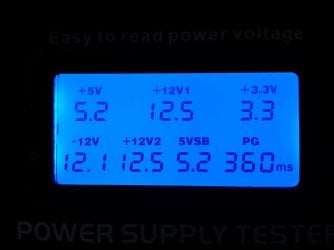
So I was able to test the PSU tonight with the Power Supply Tester that I ordered the other day. I tested the 24-pin Motherboard connector, the 8-pin CPU connector, both 6-pin connectors, all the SATA cables, and the Molex cable. The frustrating thing is that all the voltages read normal. I attached a picture of the reading for the 24-pin and 8-pin connectors just so you could see.

Since the PSU is testing fine, what else could causing this? Is it a faulty graphics card or motherboard? I am kind of out of ideas on this one. Anymore help would be much appreciated and thanks for sticking with me on this. :D
 

Attachments

  • PSU Tester Reading.jpg
    PSU Tester Reading.jpg
    134.6 KB · Views: 2

My Computer My Computer

Computer type
PC/Desktop
Computer Manufacturer/Model Number
Custom Build
OS
Windows 7 Ultimate x64
CPU
Intel Core i7-2700K Sandy Bridge 3.5GHz
Motherboard
Asus P8Z68-V Pro
Memory
Corsair Vengeance 16GB DDR3 1600Mhz
Graphics Card(s)
Asus GeForce GTX 670 2GB
Sound Card
Creative Sound Blaster X-Fi Xtreme 7.1
Monitor(s) Displays
Samsung 24" LED Monitor
Screen Resolution
1920 x 1080
Hard Drives
Corsair Force GT 240GB SSD
Western Digital 3TB HDD
PSU
Corsair AX860i Fully-Modular
Case
Cooler Master HAF 922 Powder Coated White
Cooling
Noctua NH-U12S
Keyboard
Razer BlackWidow Ultimate Stealth Edition
Mouse
Razer Mamba
Internet Speed
Verizon FiOS 20Mbps
Antivirus
Microsoft Security Essentials
Browser
Internet Explorer
Other Info
Razer Tiamat 7.1 Surround Sound Headset
Jack did you try attaching a lead to pin 8 as I suggested and if so what did it read when running and if it actually dropped out.

Now you have to remember of course correct volts does not alway mean correct current.

Think of it as a car with a flat battery it may test perfect at 12 - 13v but try and crank the engine it may do that but leave no available current for the ignition and other essential circuits.

To test though you will need a fairly good ammeter and run a known current draw though it.

The other things are also possible too are any of the suspect components under warranty??
 

My Computer My Computer

Computer type
PC/Desktop
Computer Manufacturer/Model Number
Own build (new) Desk1 / Asus ROG Win 7 / Desk2 1st build
OS
Desk1 7 Home Prem / Desk2 10 Pro / Main lap Asus ROG 10 Pro 2 laptop Toshiba 7 Pro Asus P2520 7 & 10
CPU
Desk1 i5 3750K / Laptop i7 GTX 860M / Desk2 i5 2500
Motherboard
Desk1 Asus P877-V / Desk2 Gigabyte H67 UD3H / Laptop ?
Memory
Desk1 8GB (1866) / Desk2 16GB (1333) / Laptop 8Gb DDR3
Graphics Card(s)
Desk 1& 2NVidia GTX 650 & Laptops on board Intel
Sound Card
Desk 1 & 2 -XONAR DG Realtek High Def audio Laptop
Monitor(s) Displays
Desk 1 Benq HD 2450 / Desk2 Philips 24" / Laptop 17.5"
Screen Resolution
1920x1080 D1 & D2 & Laptop 1
Hard Drives
Desk1 Samsung 120GB 830 SSD
Asus ROG 256GB 850 Pro SSD
Desk2 Samsung 840 256 SSD
Toshiba 120GB EVO
PSU
Desk 1 Corsair HX 1050/ Laptop ? / Desk 2 Corsair HX 650
Case
Desk 1 Cooler HAF XM ? Toshiba laptop / Desk2 Coolermaster
Cooling
Fans on all Desk1 -2 Desk2 - all Coolermasters 5 Laptop ?
Keyboard
Desk 1 MS Sidewinder X6 Desk 2 MS Sidewinder X 4
Mouse
Desk 1&2 - Gigabyte MS 900 gamer - laptop - Logitec wireless
Internet Speed
ADSL2+
Other Info
One other Desktop (tester) and spare Toshba laptop both with SSD's
Running Kaspersky 2016 ISS on all machines config'd identically
Logitec audio stereo systems on each machine (x3)
Canon MG5250MFC
Router/modem TP-Link running WPA2SK
Hey Gang,

So I was able to test the PSU tonight with the Power Supply Tester that I ordered the other day. I tested the 24-pin Motherboard connector, the 8-pin CPU connector, both 6-pin connectors, all the SATA cables, and the Molex cable. The frustrating thing is that all the voltages read normal. I attached a picture of the reading for the 24-pin and 8-pin connectors just so you could see.

Since the PSU is testing fine, what else could causing this? Is it a faulty graphics card or motherboard? I am kind of out of ideas on this one. Anymore help would be much appreciated and thanks for sticking with me on this. :D
Have you had any issues since you updated the video driver?
 

My Computer My Computer

Computer type
PC/Desktop
Computer Manufacturer/Model Number
Bluethunder II
OS
Windows 7 x64 Ultimate and numerous virtual machines
CPU
AMD FX-8350 Vishera 32nm Technology @ 4.2 GHz default
Motherboard
ASUSTeK COMPUTER INC. SABERTOOTH 990FX R2.0 (Socket 942)
Memory
G Skill 32.0GB Dual-Channel DDR3 @ 1204MHz (11-13-13-31)
Graphics Card(s)
EVGA GeForce GTX 960 4GB Super SC ACX 2.0+ with Back Plate
Sound Card
Creative X-Fi Titanium HD Audiophile PCIe
Monitor(s) Displays
LG L227WTG x 3
Screen Resolution
1680 x 1050 16:10
Hard Drives
238GB Samsung850 PRO SATA Disk Device (SSD)
1863GB Seagate ST2000DM 001-1CH164 (SATA)
1397GB Seagate ST1500DL 003-9VT16L(SATA)
466GB Western Digital WDC WD50 03AZEX-00K1GA0 (SATA) x 2
932GB Seagate ST310005 28AS SATA Disk Device (SATA)
PSU
Enermax Revolution87+ 1000 Watts Gold Certified Power Supply
Case
Rocketfish Full Tower
Cooling
Cooler Master Hyper 212 EVO Push Pull 120mm Fans
Keyboard
Logitech K740
Mouse
Logitech G100S Laser LED + Logitech Gamepad F310
Internet Speed
500 mbs down and 30mbs up
Antivirus
Malwarebytes Pro & Avast and MSE on certain Virtual Machines
Browser
Firefox (Main) Chrome, Internet Explorer (Back Up)
Other Info
Logitech X 230 2.1 Stereo System and 5.1 Yamaha RX V2090
B&W DM6 Monitor Speakers + Center and Surround Speakers
Using Mouse Without Borders (Google it)
The PSU most likely seems to be causing the GPU to crash.

Oh okay. That would actually be better because Power Supplies are much cheaper that Graphics Cards. :D Thanks for looking at this for us!

Welcome :)

Amazon.com: Enermax Revolution87+ 1000 Watts Gold Certified Power Supply ERV1000EWT-G: Computers & Accessories
Sometimes they are not, ordered this to power my upgraded rig, now got to call Utility company every-time I switch on the PC.....:geek::roflmao:
 

My Computer My Computer

Computer type
PC/Desktop
Computer Manufacturer/Model Number
Bluethunder II
OS
Windows 7 x64 Ultimate and numerous virtual machines
CPU
AMD FX-8350 Vishera 32nm Technology @ 4.2 GHz default
Motherboard
ASUSTeK COMPUTER INC. SABERTOOTH 990FX R2.0 (Socket 942)
Memory
G Skill 32.0GB Dual-Channel DDR3 @ 1204MHz (11-13-13-31)
Graphics Card(s)
EVGA GeForce GTX 960 4GB Super SC ACX 2.0+ with Back Plate
Sound Card
Creative X-Fi Titanium HD Audiophile PCIe
Monitor(s) Displays
LG L227WTG x 3
Screen Resolution
1680 x 1050 16:10
Hard Drives
238GB Samsung850 PRO SATA Disk Device (SSD)
1863GB Seagate ST2000DM 001-1CH164 (SATA)
1397GB Seagate ST1500DL 003-9VT16L(SATA)
466GB Western Digital WDC WD50 03AZEX-00K1GA0 (SATA) x 2
932GB Seagate ST310005 28AS SATA Disk Device (SATA)
PSU
Enermax Revolution87+ 1000 Watts Gold Certified Power Supply
Case
Rocketfish Full Tower
Cooling
Cooler Master Hyper 212 EVO Push Pull 120mm Fans
Keyboard
Logitech K740
Mouse
Logitech G100S Laser LED + Logitech Gamepad F310
Internet Speed
500 mbs down and 30mbs up
Antivirus
Malwarebytes Pro & Avast and MSE on certain Virtual Machines
Browser
Firefox (Main) Chrome, Internet Explorer (Back Up)
Other Info
Logitech X 230 2.1 Stereo System and 5.1 Yamaha RX V2090
B&W DM6 Monitor Speakers + Center and Surround Speakers
Using Mouse Without Borders (Google it)
Jack did you try attaching a lead to pin 8 as I suggested and if so what did it read when running and if it actually dropped out.

Now you have to remember of course correct volts does not alway mean correct current.

Think of it as a car with a flat battery it may test perfect at 12 - 13v but try and crank the engine it may do that but leave no available current for the ignition and other essential circuits.

To test though you will need a fairly good ammeter and run a known current draw though it.

The other things are also possible too are any of the suspect components under warranty??
Hey John, thanks for the reply! I am sorry, I completely missed your original post the last time I replied. Thanks for the link, it was very informative. It does seem to be a Power_Good issue. I would be fine with testing the wire but the problem is I don't have a ammeter / voltmeter. Is there another way to test it without any devices like that? I would have no problem buying one because it is one of those things that everyone should have BUT if it can be done with out one that would be preferred due to the convenience factor.

Also no. None of the components are still under warranty. If they were I would have gone to the manufacture first instead of bugging you guys. :p
 

My Computer My Computer

Computer type
PC/Desktop
Computer Manufacturer/Model Number
Custom Build
OS
Windows 7 Ultimate x64
CPU
Intel Core i7-2700K Sandy Bridge 3.5GHz
Motherboard
Asus P8Z68-V Pro
Memory
Corsair Vengeance 16GB DDR3 1600Mhz
Graphics Card(s)
Asus GeForce GTX 670 2GB
Sound Card
Creative Sound Blaster X-Fi Xtreme 7.1
Monitor(s) Displays
Samsung 24" LED Monitor
Screen Resolution
1920 x 1080
Hard Drives
Corsair Force GT 240GB SSD
Western Digital 3TB HDD
PSU
Corsair AX860i Fully-Modular
Case
Cooler Master HAF 922 Powder Coated White
Cooling
Noctua NH-U12S
Keyboard
Razer BlackWidow Ultimate Stealth Edition
Mouse
Razer Mamba
Internet Speed
Verizon FiOS 20Mbps
Antivirus
Microsoft Security Essentials
Browser
Internet Explorer
Other Info
Razer Tiamat 7.1 Surround Sound Headset
Hey Gang,

So I was able to test the PSU tonight with the Power Supply Tester that I ordered the other day. I tested the 24-pin Motherboard connector, the 8-pin CPU connector, both 6-pin connectors, all the SATA cables, and the Molex cable. The frustrating thing is that all the voltages read normal. I attached a picture of the reading for the 24-pin and 8-pin connectors just so you could see.

Since the PSU is testing fine, what else could causing this? Is it a faulty graphics card or motherboard? I am kind of out of ideas on this one. Anymore help would be much appreciated and thanks for sticking with me on this. :D
Have you had any issues since you updated the video driver?

Yeah, it doesn't seem like the driver update changed anything. It is a bummer because the free fix would have been nice. Thanks for the tip anyways, it was most definitely worth the try.
 

My Computer My Computer

Computer type
PC/Desktop
Computer Manufacturer/Model Number
Custom Build
OS
Windows 7 Ultimate x64
CPU
Intel Core i7-2700K Sandy Bridge 3.5GHz
Motherboard
Asus P8Z68-V Pro
Memory
Corsair Vengeance 16GB DDR3 1600Mhz
Graphics Card(s)
Asus GeForce GTX 670 2GB
Sound Card
Creative Sound Blaster X-Fi Xtreme 7.1
Monitor(s) Displays
Samsung 24" LED Monitor
Screen Resolution
1920 x 1080
Hard Drives
Corsair Force GT 240GB SSD
Western Digital 3TB HDD
PSU
Corsair AX860i Fully-Modular
Case
Cooler Master HAF 922 Powder Coated White
Cooling
Noctua NH-U12S
Keyboard
Razer BlackWidow Ultimate Stealth Edition
Mouse
Razer Mamba
Internet Speed
Verizon FiOS 20Mbps
Antivirus
Microsoft Security Essentials
Browser
Internet Explorer
Other Info
Razer Tiamat 7.1 Surround Sound Headset
Jack just as a matter of info the meter you need are very cheap these days you you need a digital one because an analogue one injects 9v into a circuit which I am sure will know will do no good the the board!!

Something like this is ideal Newegg.com - Digital Multimeter

Plus when testing place the black lead to the case or one of the board fixing screws try not to use the blacks in the 24 socket - you can but the other site are for more reliable for preciseness. In fact you can get crocodile clips to fit the black probe to attach and forget leaving one hand free
 

My Computer My Computer

Computer type
PC/Desktop
Computer Manufacturer/Model Number
Own build (new) Desk1 / Asus ROG Win 7 / Desk2 1st build
OS
Desk1 7 Home Prem / Desk2 10 Pro / Main lap Asus ROG 10 Pro 2 laptop Toshiba 7 Pro Asus P2520 7 & 10
CPU
Desk1 i5 3750K / Laptop i7 GTX 860M / Desk2 i5 2500
Motherboard
Desk1 Asus P877-V / Desk2 Gigabyte H67 UD3H / Laptop ?
Memory
Desk1 8GB (1866) / Desk2 16GB (1333) / Laptop 8Gb DDR3
Graphics Card(s)
Desk 1& 2NVidia GTX 650 & Laptops on board Intel
Sound Card
Desk 1 & 2 -XONAR DG Realtek High Def audio Laptop
Monitor(s) Displays
Desk 1 Benq HD 2450 / Desk2 Philips 24" / Laptop 17.5"
Screen Resolution
1920x1080 D1 & D2 & Laptop 1
Hard Drives
Desk1 Samsung 120GB 830 SSD
Asus ROG 256GB 850 Pro SSD
Desk2 Samsung 840 256 SSD
Toshiba 120GB EVO
PSU
Desk 1 Corsair HX 1050/ Laptop ? / Desk 2 Corsair HX 650
Case
Desk 1 Cooler HAF XM ? Toshiba laptop / Desk2 Coolermaster
Cooling
Fans on all Desk1 -2 Desk2 - all Coolermasters 5 Laptop ?
Keyboard
Desk 1 MS Sidewinder X6 Desk 2 MS Sidewinder X 4
Mouse
Desk 1&2 - Gigabyte MS 900 gamer - laptop - Logitec wireless
Internet Speed
ADSL2+
Other Info
One other Desktop (tester) and spare Toshba laptop both with SSD's
Running Kaspersky 2016 ISS on all machines config'd identically
Logitec audio stereo systems on each machine (x3)
Canon MG5250MFC
Router/modem TP-Link running WPA2SK
Jack just as a matter of info the meter you need are very cheap these days you you need a digital one because an analogue one injects 9v into a circuit which I am sure will know will do no good the the board!!

Something like this is ideal Newegg.com - Digital Multimeter

Plus when testing place the black lead to the case or one of the board fixing screws try not to use the blacks in the 24 socket - you can but the other site are for more reliable for preciseness. In fact you can get crocodile clips to fit the black probe to attach and forget leaving one hand free

Awesome, thanks for providing a link. I figured they would be more expensive ($40 - $50). I think I can spare $9. :p I will look around and order one tonight. The best thing about Newegg is that I live about 15 miles from their warehouse so it only takes a day or two for shipments to get to me. :party:
 

My Computer My Computer

Computer type
PC/Desktop
Computer Manufacturer/Model Number
Custom Build
OS
Windows 7 Ultimate x64
CPU
Intel Core i7-2700K Sandy Bridge 3.5GHz
Motherboard
Asus P8Z68-V Pro
Memory
Corsair Vengeance 16GB DDR3 1600Mhz
Graphics Card(s)
Asus GeForce GTX 670 2GB
Sound Card
Creative Sound Blaster X-Fi Xtreme 7.1
Monitor(s) Displays
Samsung 24" LED Monitor
Screen Resolution
1920 x 1080
Hard Drives
Corsair Force GT 240GB SSD
Western Digital 3TB HDD
PSU
Corsair AX860i Fully-Modular
Case
Cooler Master HAF 922 Powder Coated White
Cooling
Noctua NH-U12S
Keyboard
Razer BlackWidow Ultimate Stealth Edition
Mouse
Razer Mamba
Internet Speed
Verizon FiOS 20Mbps
Antivirus
Microsoft Security Essentials
Browser
Internet Explorer
Other Info
Razer Tiamat 7.1 Surround Sound Headset
No mate some of the el cheapo shops you would pick them up for around $4-5 :)

They also good for measuring resistances to so if you need to know say a connection is patent set the meter to resistance and touch the two ends of that connection for example a cable or one of its leads but not while there is power on :)
 

My Computer My Computer

Computer type
PC/Desktop
Computer Manufacturer/Model Number
Own build (new) Desk1 / Asus ROG Win 7 / Desk2 1st build
OS
Desk1 7 Home Prem / Desk2 10 Pro / Main lap Asus ROG 10 Pro 2 laptop Toshiba 7 Pro Asus P2520 7 & 10
CPU
Desk1 i5 3750K / Laptop i7 GTX 860M / Desk2 i5 2500
Motherboard
Desk1 Asus P877-V / Desk2 Gigabyte H67 UD3H / Laptop ?
Memory
Desk1 8GB (1866) / Desk2 16GB (1333) / Laptop 8Gb DDR3
Graphics Card(s)
Desk 1& 2NVidia GTX 650 & Laptops on board Intel
Sound Card
Desk 1 & 2 -XONAR DG Realtek High Def audio Laptop
Monitor(s) Displays
Desk 1 Benq HD 2450 / Desk2 Philips 24" / Laptop 17.5"
Screen Resolution
1920x1080 D1 & D2 & Laptop 1
Hard Drives
Desk1 Samsung 120GB 830 SSD
Asus ROG 256GB 850 Pro SSD
Desk2 Samsung 840 256 SSD
Toshiba 120GB EVO
PSU
Desk 1 Corsair HX 1050/ Laptop ? / Desk 2 Corsair HX 650
Case
Desk 1 Cooler HAF XM ? Toshiba laptop / Desk2 Coolermaster
Cooling
Fans on all Desk1 -2 Desk2 - all Coolermasters 5 Laptop ?
Keyboard
Desk 1 MS Sidewinder X6 Desk 2 MS Sidewinder X 4
Mouse
Desk 1&2 - Gigabyte MS 900 gamer - laptop - Logitec wireless
Internet Speed
ADSL2+
Other Info
One other Desktop (tester) and spare Toshba laptop both with SSD's
Running Kaspersky 2016 ISS on all machines config'd identically
Logitec audio stereo systems on each machine (x3)
Canon MG5250MFC
Router/modem TP-Link running WPA2SK

My Computer My Computer

Computer type
PC/Desktop
Computer Manufacturer/Model Number
Skylake Special #666
OS
Windows 10 Pro x64
CPU
Intel Core i7 6700K
Motherboard
Asus Sabertooth Z170 Mark 1
Memory
GSkill TridentZ RGB 16GB 3600 16-16-16-36
Graphics Card(s)
EVGA GTX 980 Ti SC x2
Sound Card
Realtek High Definition
Monitor(s) Displays
AOC G2460PG
Screen Resolution
1920 x 1080 144Hz
Hard Drives
Samsung 860 Pro 256GB, Seagate Barracuda 4TB x2
PSU
EVGA 1000 P2, EVGA White Custom Braided Cables
Case
Corsair Vengeance C70 Gunmetal Black
Cooling
Corsair H100i v2, Corsair ML120 x2, Thermal Grizzly Kryonaut
Keyboard
Logitech G910 Orion Spectrum
Mouse
Logitech G700s
Internet Speed
Verizon Fios Quantum Gateway 75/75
Antivirus
Windows Defender, Malwarebytes Free 3.8.3
Browser
Chrome
Other Info
Corsair SP120 x4, LG Blu-ray Drive, Durabrand HT-395 100 Watt Dolby Digital Amp, Corsair H2100 Wireless 7.1 Headset
Cripes Jack that is such a good price I have two HX's a 650 and a 1050 the latter was on offer and the only reason I bought it. The 650 powers the Sandy Bridge without batting an eyelid I'd get it in a heartbeat mate if it were me they are just shy of $300 out here!!:)
 

My Computer My Computer

Computer type
PC/Desktop
Computer Manufacturer/Model Number
Own build (new) Desk1 / Asus ROG Win 7 / Desk2 1st build
OS
Desk1 7 Home Prem / Desk2 10 Pro / Main lap Asus ROG 10 Pro 2 laptop Toshiba 7 Pro Asus P2520 7 & 10
CPU
Desk1 i5 3750K / Laptop i7 GTX 860M / Desk2 i5 2500
Motherboard
Desk1 Asus P877-V / Desk2 Gigabyte H67 UD3H / Laptop ?
Memory
Desk1 8GB (1866) / Desk2 16GB (1333) / Laptop 8Gb DDR3
Graphics Card(s)
Desk 1& 2NVidia GTX 650 & Laptops on board Intel
Sound Card
Desk 1 & 2 -XONAR DG Realtek High Def audio Laptop
Monitor(s) Displays
Desk 1 Benq HD 2450 / Desk2 Philips 24" / Laptop 17.5"
Screen Resolution
1920x1080 D1 & D2 & Laptop 1
Hard Drives
Desk1 Samsung 120GB 830 SSD
Asus ROG 256GB 850 Pro SSD
Desk2 Samsung 840 256 SSD
Toshiba 120GB EVO
PSU
Desk 1 Corsair HX 1050/ Laptop ? / Desk 2 Corsair HX 650
Case
Desk 1 Cooler HAF XM ? Toshiba laptop / Desk2 Coolermaster
Cooling
Fans on all Desk1 -2 Desk2 - all Coolermasters 5 Laptop ?
Keyboard
Desk 1 MS Sidewinder X6 Desk 2 MS Sidewinder X 4
Mouse
Desk 1&2 - Gigabyte MS 900 gamer - laptop - Logitec wireless
Internet Speed
ADSL2+
Other Info
One other Desktop (tester) and spare Toshba laptop both with SSD's
Running Kaspersky 2016 ISS on all machines config'd identically
Logitec audio stereo systems on each machine (x3)
Canon MG5250MFC
Router/modem TP-Link running WPA2SK

Thanks for the link AddRAM. I see that that is your resolution to the problem. :p

Cripes Jack that is such a good price I have two HX's a 650 and a 1050 the latter was on offer and the only reason I bought it. The 650 powers the Sandy Bridge without batting an eyelid I'd get it in a heartbeat mate if it were me they are just shy of $300 out here!!:)

Agreed, that is an amazing price. Before I jump the gun though, I was going to test out the POWER_GOOD cable on the PSU like you suggested. I called my old man and figured out that he has a pretty nice Multimeter. I was going to pick it up tonight so I could test the power supply.

Quick question though. If the cable tests OK, does that mean my PSU probably isn't the issue? The PSU Tester showed proper voltages and didn't register issues. Again, I do believe the problem is the power supply BUT I would like to have at least a little hard evidence to prove that before I go out and get another one. Sorry if I am dragging this on and sounding repetitive.

Thanks again everyone for all your help so far,
JackALope
 

My Computer My Computer

Computer type
PC/Desktop
Computer Manufacturer/Model Number
Custom Build
OS
Windows 7 Ultimate x64
CPU
Intel Core i7-2700K Sandy Bridge 3.5GHz
Motherboard
Asus P8Z68-V Pro
Memory
Corsair Vengeance 16GB DDR3 1600Mhz
Graphics Card(s)
Asus GeForce GTX 670 2GB
Sound Card
Creative Sound Blaster X-Fi Xtreme 7.1
Monitor(s) Displays
Samsung 24" LED Monitor
Screen Resolution
1920 x 1080
Hard Drives
Corsair Force GT 240GB SSD
Western Digital 3TB HDD
PSU
Corsair AX860i Fully-Modular
Case
Cooler Master HAF 922 Powder Coated White
Cooling
Noctua NH-U12S
Keyboard
Razer BlackWidow Ultimate Stealth Edition
Mouse
Razer Mamba
Internet Speed
Verizon FiOS 20Mbps
Antivirus
Microsoft Security Essentials
Browser
Internet Explorer
Other Info
Razer Tiamat 7.1 Surround Sound Headset
The shot of the PSU tester showed your voltages OK which may mean the PSU is OK and the PWR_OK is working.
Power Good Signal - Wikipedia, the free encyclopedia
Have you tried a hardware monitor software such as HWinfo to read volts under full loads? Sorry if I missed it.
 

My Computer My Computer

Computer type
PC/Desktop
Computer Manufacturer/Model Number
Home Built Desktop By DataTech
OS
Windows 7 Ultimate X64 SP1
CPU
Intel i5-2550K, Differing ~4.4-4.8GHz No built in GPU
Motherboard
ASUS P8Z68-V PRO/GEN3
Memory
16GB G.Skill Sniper 1866MHz @ 2133MHz 2x8GB
Graphics Card(s)
ASUS GTX650TIB-DC2OC-2GD5, (650TI Boost)
Sound Card
Onboard Realtek 5-1
Monitor(s) Displays
Samsung P2570HD
Screen Resolution
1920x1080
Hard Drives
Samsung 840 Pro 256GB SSD for OS, 500GB Seagate Constellation (Enterprise drive) for Data
PSU
Corsair HX650W
Case
Inwin Dragon Rider
Cooling
Hyper 212 EVO w/two Noctua fans, push-pull, @1300 RPM
Keyboard
E-Z Eyes, bright yellow keys with large characters
Mouse
steelseries SENSEI Laser Pro Gaming
Internet Speed
48-51Mbs Mbs down, 11 Mbs up Xfinity Cable
Antivirus
Norton Internet Security 2013
Browser
IE 10, Opera, Pale Moon if needed
Other Info
4 case fans, LG BluRay-RE, ASUS DVD-RW, Mr. Fusion power supply, 1.21 gigawatts.
The shot of the PSU tester showed your voltages OK which may mean the PSU is OK and the PWR_OK is working.
Power Good Signal - Wikipedia, the free encyclopedia
Have you tried a hardware monitor software such as HWinfo to read volts under full loads? Sorry if I missed it.
I agree Gary but I am still saying that correct volts do not necessarily mean correct current plus at that price the PSU is a steal - for me out here I would not give it a second thought.

I did find this though it is 2009 PSU stress test program? - Overclockers Australia Forums I am going to try some of the tests on the test machine just out of curiosity but for teh time being it might be worth looking at.
 

My Computer My Computer

Computer type
PC/Desktop
Computer Manufacturer/Model Number
Own build (new) Desk1 / Asus ROG Win 7 / Desk2 1st build
OS
Desk1 7 Home Prem / Desk2 10 Pro / Main lap Asus ROG 10 Pro 2 laptop Toshiba 7 Pro Asus P2520 7 & 10
CPU
Desk1 i5 3750K / Laptop i7 GTX 860M / Desk2 i5 2500
Motherboard
Desk1 Asus P877-V / Desk2 Gigabyte H67 UD3H / Laptop ?
Memory
Desk1 8GB (1866) / Desk2 16GB (1333) / Laptop 8Gb DDR3
Graphics Card(s)
Desk 1& 2NVidia GTX 650 & Laptops on board Intel
Sound Card
Desk 1 & 2 -XONAR DG Realtek High Def audio Laptop
Monitor(s) Displays
Desk 1 Benq HD 2450 / Desk2 Philips 24" / Laptop 17.5"
Screen Resolution
1920x1080 D1 & D2 & Laptop 1
Hard Drives
Desk1 Samsung 120GB 830 SSD
Asus ROG 256GB 850 Pro SSD
Desk2 Samsung 840 256 SSD
Toshiba 120GB EVO
PSU
Desk 1 Corsair HX 1050/ Laptop ? / Desk 2 Corsair HX 650
Case
Desk 1 Cooler HAF XM ? Toshiba laptop / Desk2 Coolermaster
Cooling
Fans on all Desk1 -2 Desk2 - all Coolermasters 5 Laptop ?
Keyboard
Desk 1 MS Sidewinder X6 Desk 2 MS Sidewinder X 4
Mouse
Desk 1&2 - Gigabyte MS 900 gamer - laptop - Logitec wireless
Internet Speed
ADSL2+
Other Info
One other Desktop (tester) and spare Toshba laptop both with SSD's
Running Kaspersky 2016 ISS on all machines config'd identically
Logitec audio stereo systems on each machine (x3)
Canon MG5250MFC
Router/modem TP-Link running WPA2SK
Back
Top