
Possible PSU issues, how to tell.

Brendan M

New member
Member
Local time
4:12 PM
Messages
44
Hi there,
As per a previous post, my computer died and I ended up installing a new MB, CPU and 32 GB Ram.
http://www.sevenforums.com/performance-maintenance/358818-new-motherboard-ram.html

Anyway, now my computer is having startup and running issues.

By this I mean that my pc might run fine for hours and then suddenly shutdown and the cooling fan go ballistic,
OR it may just shutdown,
OR it might not start at all but give a few pathetic beeps and spin the fan a bit then go quiet and then repeat, OR upon hitting the power button the cooling fan might go Billy bananas and nothing else, just the crazy fan, OR it might run perfectly.

So, could this be a psu issue? My problem is I lack testing equipment or spare psu to check it out and as i live in Cairo/Egypt, I will be forced to bite the bullet and buy a new psu without really knowing if there is something wrong with my current psu.

Any hints/tips/ideas i should try first?

Cheers
B
 

My Computer My Computer

Computer type
PC/Desktop
OS
Windows 7 Ultimate
CPU
iNTEL i5 4440
Motherboard
Gigabyte Z97X-UD3H
Memory
32GB
Graphics Card(s)
MSI GTX 970
Hard Drives
1 times Samsung SSD 500 GB
2 times Western Digital 1TB
PSU
Corsair ATX 850W
Case
Cooler Master 690 Advanced
Cooling
Zalman CNPS9900 LED
Do you think it's possible that your new motherboard might be defective? Did you have a similar problem when you had the old motherboard?

Normally, I'd suspect the PSU. But they are hard to test meaningfully and you have no known good spare to swap in. So the new motherboard can't be ruled out.

I don't think there is much you can do as a test unless you have sophisticated testing equipment. You can test PSUs to see if they will turn on and are not outright DOA, but that doesn't help you with an intermittent problem.

It's a tough call. I'd probably assume it is a PSU issue and buy a replacement. If that didn't fix it, then the motherboard becomes suspect.

I assume you've reseated all cables.

Have you run memtest86+ on the RAM?

Have you been monitoring CPU and motherboard temperatures and fan speeds with an application designed for that purpose?

What PSU brands and models do you have available at local dealers? There are a small handful (4 or 5) brands that are likely to be good to high quality, but the rest can be average to horrible.
 

My Computer My Computer

Computer type
PC/Desktop
Computer Manufacturer/Model Number
Ignatz Special; 4 speed manual gearbox; factory air conditioning; one of one
OS
Windows 7 Home Premium SP1, 64-bit
CPU
Intel Skylake i5-6600K, not overclocked
Motherboard
AsRock Z170M Extreme 4, micro ATX
Memory
8 GB HyperX DDR4-2666 (2 x 4 GB)
Graphics Card(s)
none; graphics are integrated on CPU
Sound Card
onboard: Realtek ALC1150; external: USB Behringer UF0-202
Monitor(s) Displays
Dell S2340M 23 inch IPS
Screen Resolution
1600 x 900
Hard Drives
System: Crucial MX100 series SSD, 128 GB;
Data: Samsung Spinpoint 103SJ, 1 TB;
Backup: WD Caviar Green WD30EZRX-00D8PB0, 3 TB
PSU
Rosewill SilentNight 500 watt fanless, semi-modular
Case
Antec Solo II
Cooling
Noctua NH-U12S; Noctua F12 intake, Noctua S12A exhaust
Keyboard
Microsoft 200 6JH-00001 USB
Mouse
Dell or Microsoft optical wired; USB
Antivirus
Microsoft Security Essentials and Malwarebytes Premium
Browser
Pale Moon
Other Info
All fans PWM; speeds at idle: CPU circa 500 rpm; intake circa 600 rpm; exhaust circa 600 rpm; CPU temps 27 idle and 47 C load in a warm room (27 C/81 F) when running Intel Extreme Tuning Utility stress test.
Thank you for your reply ignatzarsonic.

If/when i do purchase a new PSU, what are the brands I should stick to?
Also how do i tell what power rating i should purchase? Stick to the same power rating as the current one, 850W?
 

My Computer My Computer

Computer type
PC/Desktop
OS
Windows 7 Ultimate
CPU
iNTEL i5 4440
Motherboard
Gigabyte Z97X-UD3H
Memory
32GB
Graphics Card(s)
MSI GTX 970
Hard Drives
1 times Samsung SSD 500 GB
2 times Western Digital 1TB
PSU
Corsair ATX 850W
Case
Cooler Master 690 Advanced
Cooling
Zalman CNPS9900 LED
You don't need anywhere near an 850 watt PSU. Did someone tell you that you needed that much power? Did you have any choice when you bought the PC?

Some Corsairs are OK, some are average.

Look for a 500 to 550 watt standard ATX PSU from any of these brands:

Seasonic, XFX, EVGA, Super Flower, Corsair, or Antec.

Make a list of those you see and report back with prices and I'll try to give you specific advice.
 

My Computer My Computer

Computer type
PC/Desktop
Computer Manufacturer/Model Number
Ignatz Special; 4 speed manual gearbox; factory air conditioning; one of one
OS
Windows 7 Home Premium SP1, 64-bit
CPU
Intel Skylake i5-6600K, not overclocked
Motherboard
AsRock Z170M Extreme 4, micro ATX
Memory
8 GB HyperX DDR4-2666 (2 x 4 GB)
Graphics Card(s)
none; graphics are integrated on CPU
Sound Card
onboard: Realtek ALC1150; external: USB Behringer UF0-202
Monitor(s) Displays
Dell S2340M 23 inch IPS
Screen Resolution
1600 x 900
Hard Drives
System: Crucial MX100 series SSD, 128 GB;
Data: Samsung Spinpoint 103SJ, 1 TB;
Backup: WD Caviar Green WD30EZRX-00D8PB0, 3 TB
PSU
Rosewill SilentNight 500 watt fanless, semi-modular
Case
Antec Solo II
Cooling
Noctua NH-U12S; Noctua F12 intake, Noctua S12A exhaust
Keyboard
Microsoft 200 6JH-00001 USB
Mouse
Dell or Microsoft optical wired; USB
Antivirus
Microsoft Security Essentials and Malwarebytes Premium
Browser
Pale Moon
Other Info
All fans PWM; speeds at idle: CPU circa 500 rpm; intake circa 600 rpm; exhaust circa 600 rpm; CPU temps 27 idle and 47 C load in a warm room (27 C/81 F) when running Intel Extreme Tuning Utility stress test.

My Computer My Computer

Computer type
PC/Desktop
Computer Manufacturer/Model Number
Skylake Special #666
OS
Windows 10 Pro x64
CPU
Intel Core i7 6700K
Motherboard
Asus Sabertooth Z170 Mark 1
Memory
GSkill TridentZ RGB 16GB 3600 16-16-16-36
Graphics Card(s)
EVGA GTX 980 Ti SC x2
Sound Card
Realtek High Definition
Monitor(s) Displays
AOC G2460PG
Screen Resolution
1920 x 1080 144Hz
Hard Drives
Samsung 860 Pro 256GB, Seagate Barracuda 4TB x2
PSU
EVGA 1000 P2, EVGA White Custom Braided Cables
Case
Corsair Vengeance C70 Gunmetal Black
Cooling
Corsair H100i v2, Corsair ML120 x2, Thermal Grizzly Kryonaut
Keyboard
Logitech G910 Orion Spectrum
Mouse
Logitech G700s
Internet Speed
Verizon Fios Quantum Gateway 75/75
Antivirus
Windows Defender, Malwarebytes Free 3.8.3
Browser
Chrome
Other Info
Corsair SP120 x4, LG Blu-ray Drive, Durabrand HT-395 100 Watt Dolby Digital Amp, Corsair H2100 Wireless 7.1 Headset
Hello Brendan now mate this is what I always suggest folks use to try out the PSU now depending on the brand of motherboard the section for the PSU output be different to the one in the pic which is my Asus Ivy Bridge one - Nuvoton another common one is ITE but in any case (no pun;)) the reference to Vbatt is the give away so see my little ditty for doing the test run
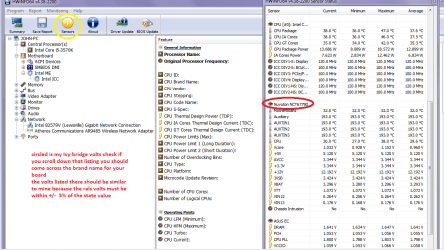
Using HW Info
PART A:
You can test the volts on the PSU with HW Info HWiNFO, HWiNFO32/64 - Download < download the right bit version and close the right hand window select Sensors and scroll down to the power section where you will see what the volts are doing see my pic. In my pic the section (Nuvoton) with VBATT is a dead give away you are in the section for the rail voltages. There are other section titles and one that pops up often is ITE
Now the voltage on the different rails have to be within 5% =+/- of what is required or the machine will not work properly if at all.
See this for the rail voltage info
http://www.tomshardware.com/reviews/power-supply-specifications-atx-reference,3061.html (Section 2.)
The original right hand window shows the machine running and is handy for that but for looking at the components in some detail close it and use the main left hand side panel
FOR OTHER COMPONENTS
PART B:
Open each small square with + in it on the section the components are in and then click on the individual component/s (it will highlight in blue) - in the right hand side will appear all sorts of details including brands speeds and other essential info that particular device. See pic for example.
Use PART A:
 

Attachments

  • HW Info PSU VOLTS DESKTOP.PNG
    HW Info PSU VOLTS DESKTOP.PNG
    51.7 KB · Views: 1

My Computer My Computer

Computer type
PC/Desktop
Computer Manufacturer/Model Number
Own build (new) Desk1 / Asus ROG Win 7 / Desk2 1st build
OS
Desk1 7 Home Prem / Desk2 10 Pro / Main lap Asus ROG 10 Pro 2 laptop Toshiba 7 Pro Asus P2520 7 & 10
CPU
Desk1 i5 3750K / Laptop i7 GTX 860M / Desk2 i5 2500
Motherboard
Desk1 Asus P877-V / Desk2 Gigabyte H67 UD3H / Laptop ?
Memory
Desk1 8GB (1866) / Desk2 16GB (1333) / Laptop 8Gb DDR3
Graphics Card(s)
Desk 1& 2NVidia GTX 650 & Laptops on board Intel
Sound Card
Desk 1 & 2 -XONAR DG Realtek High Def audio Laptop
Monitor(s) Displays
Desk 1 Benq HD 2450 / Desk2 Philips 24" / Laptop 17.5"
Screen Resolution
1920x1080 D1 & D2 & Laptop 1
Hard Drives
Desk1 Samsung 120GB 830 SSD
Asus ROG 256GB 850 Pro SSD
Desk2 Samsung 840 256 SSD
Toshiba 120GB EVO
PSU
Desk 1 Corsair HX 1050/ Laptop ? / Desk 2 Corsair HX 650
Case
Desk 1 Cooler HAF XM ? Toshiba laptop / Desk2 Coolermaster
Cooling
Fans on all Desk1 -2 Desk2 - all Coolermasters 5 Laptop ?
Keyboard
Desk 1 MS Sidewinder X6 Desk 2 MS Sidewinder X 4
Mouse
Desk 1&2 - Gigabyte MS 900 gamer - laptop - Logitec wireless
Internet Speed
ADSL2+
Other Info
One other Desktop (tester) and spare Toshba laptop both with SSD's
Running Kaspersky 2016 ISS on all machines config'd identically
Logitec audio stereo systems on each machine (x3)
Canon MG5250MFC
Router/modem TP-Link running WPA2SK
Back
Top