Possible Software Issue? Conflict?

Swizz

New member
Local time
10:50 PM
Messages
181
Hello all...

I wonder if somebody could shed me a little light here, I have been experiencing this issue on and off since last Feb 2014. Randomly I see horizontal flickering at the bottom of my monitor, from a mixture coloration of purple and grey. Like I stated this will happen randomly, but only when I type in-to the search browser Or recently I have noticed when I click on a game icon on the desktop, for it to load the flickering will show for no more then maybe 2 seconds. Just to add there is no sign of the flickering when actually playing a game. I also keep up-to date with the video drivers. Since March, gone... the issue vanished then came back again 2 weeks ago. I was browsing Pinterest & Tumblr at the time and the flickering showed it's ugly face once more.

Any idea's/suggestions would be appreciated.

Cheers.

Carl.
 

My Computer

Computer type
PC/Desktop
Computer Manufacturer/Model Number
Custom
OS
Windows 7 Ultimate x64
CPU
Intel i5-4670k @ 4.30GHz
Motherboard
GByte Z87X-UD4H MOBO
Memory
8gb
Graphics Card(s)
3GB EVGA NVIDIA GeForce GTX 780 OC
Sound Card
ASUS Xonar Essence STX
Monitor(s) Displays
ASUS VG248QE 144hz
Screen Resolution
1920x1080
Hard Drives
Samsung SSD 840 Pro Series 256gb & Seagate 3TB Performance SATA 3 Hard Drive ST3000DM001 7200rpm
PSU
XFX 750w P1-750B-BEFX
Case
Silverstone SST-FT02B-W
Cooling
Noctua NH-D14 Dual
Internet Speed
150mb
Antivirus
ESET Smart Security 8 / Malwarebytes
Browser
Firefox/Chrome
performance

Hi Swizz,
Run your WEI, (controlpanel>performance info and tools>rate and improve).
Any suggestions from it.

If not when your prob re-appears run it immediately and see if it reports any differences then.

Roy
 

My Computer

Computer type
PC/Desktop
Computer Manufacturer/Model Number
medionl/Aspire 6930G/acer x55a
OS
W7 home premium 32bit/W7HP 64bit/w10 tp insider ring
CPU
E5300 dual core
Motherboard
medion MS7366
Memory
3gb
Graphics Card(s)
Nvidia Geforce 7100 Nforce 630i
Monitor(s) Displays
avixc
Internet Speed
n (isp resticted to 72)
Antivirus
mse/pands
Browser
palemoon
Other Info
Belkin Fd7050 n USB using Railink RT2870 drivers, more upto date
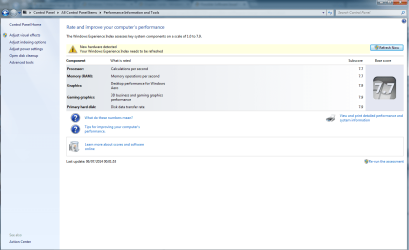
Hi Torchwood and thank you for responding. I have taken a screen shot of the WEI, and uploaded it. It showing me that "New hardware detected" Which is strange because this system was put together in 2013 around June. I will immediately report back with another screen shot of the WEI when the flickering reappears.

Cheers Roy.
 

Attachments

  • WEI.png
    WEI.png
    66.8 KB · Views: 4

My Computer

Computer type
PC/Desktop
Computer Manufacturer/Model Number
Custom
OS
Windows 7 Ultimate x64
CPU
Intel i5-4670k @ 4.30GHz
Motherboard
GByte Z87X-UD4H MOBO
Memory
8gb
Graphics Card(s)
3GB EVGA NVIDIA GeForce GTX 780 OC
Sound Card
ASUS Xonar Essence STX
Monitor(s) Displays
ASUS VG248QE 144hz
Screen Resolution
1920x1080
Hard Drives
Samsung SSD 840 Pro Series 256gb & Seagate 3TB Performance SATA 3 Hard Drive ST3000DM001 7200rpm
PSU
XFX 750w P1-750B-BEFX
Case
Silverstone SST-FT02B-W
Cooling
Noctua NH-D14 Dual
Internet Speed
150mb
Antivirus
ESET Smart Security 8 / Malwarebytes
Browser
Firefox/Chrome
The Jumping/Flashing from the bottom of the screen has just happened again. I went back into the WEI..And it's still showing the exact same as above.

Would you like me to "Refresh" To see if that will make any difference at all?

Cheers.
 
Last edited:

My Computer

Computer type
PC/Desktop
Computer Manufacturer/Model Number
Custom
OS
Windows 7 Ultimate x64
CPU
Intel i5-4670k @ 4.30GHz
Motherboard
GByte Z87X-UD4H MOBO
Memory
8gb
Graphics Card(s)
3GB EVGA NVIDIA GeForce GTX 780 OC
Sound Card
ASUS Xonar Essence STX
Monitor(s) Displays
ASUS VG248QE 144hz
Screen Resolution
1920x1080
Hard Drives
Samsung SSD 840 Pro Series 256gb & Seagate 3TB Performance SATA 3 Hard Drive ST3000DM001 7200rpm
PSU
XFX 750w P1-750B-BEFX
Case
Silverstone SST-FT02B-W
Cooling
Noctua NH-D14 Dual
Internet Speed
150mb
Antivirus
ESET Smart Security 8 / Malwarebytes
Browser
Firefox/Chrome

My Computer

Computer type
PC/Desktop
Computer Manufacturer/Model Number
Custom
OS
Windows 7 Ultimate x64
CPU
Intel i5-4670k @ 4.30GHz
Motherboard
GByte Z87X-UD4H MOBO
Memory
8gb
Graphics Card(s)
3GB EVGA NVIDIA GeForce GTX 780 OC
Sound Card
ASUS Xonar Essence STX
Monitor(s) Displays
ASUS VG248QE 144hz
Screen Resolution
1920x1080
Hard Drives
Samsung SSD 840 Pro Series 256gb & Seagate 3TB Performance SATA 3 Hard Drive ST3000DM001 7200rpm
PSU
XFX 750w P1-750B-BEFX
Case
Silverstone SST-FT02B-W
Cooling
Noctua NH-D14 Dual
Internet Speed
150mb
Antivirus
ESET Smart Security 8 / Malwarebytes
Browser
Firefox/Chrome
SSD

Looking back over your ealier posts, i see that you updated the firmware on your SSD(APRIL), I suspect this is why that comment is on your WEI.

Please refresh as it should point us in the right direction for our next move.

Did you ever use the Macafee removal tool as requested in previous thread,
if not Please run it.

Roy
 

My Computer

Computer type
PC/Desktop
Computer Manufacturer/Model Number
medionl/Aspire 6930G/acer x55a
OS
W7 home premium 32bit/W7HP 64bit/w10 tp insider ring
CPU
E5300 dual core
Motherboard
medion MS7366
Memory
3gb
Graphics Card(s)
Nvidia Geforce 7100 Nforce 630i
Monitor(s) Displays
avixc
Internet Speed
n (isp resticted to 72)
Antivirus
mse/pands
Browser
palemoon
Other Info
Belkin Fd7050 n USB using Railink RT2870 drivers, more upto date
I have just applied a refresh to the WEI as instructed. I will report back with any on screen report.

As for the MCPR tool...I did use that particular tool to scrape away any leftovers back when, Arc asked me too. To be double sure I downloaded the tool again, no more then 5 minutes ago and used it.

Cheers, Roy..I will update as soon as I see any more type of flickering.
 
Last edited:

My Computer

Computer type
PC/Desktop
Computer Manufacturer/Model Number
Custom
OS
Windows 7 Ultimate x64
CPU
Intel i5-4670k @ 4.30GHz
Motherboard
GByte Z87X-UD4H MOBO
Memory
8gb
Graphics Card(s)
3GB EVGA NVIDIA GeForce GTX 780 OC
Sound Card
ASUS Xonar Essence STX
Monitor(s) Displays
ASUS VG248QE 144hz
Screen Resolution
1920x1080
Hard Drives
Samsung SSD 840 Pro Series 256gb & Seagate 3TB Performance SATA 3 Hard Drive ST3000DM001 7200rpm
PSU
XFX 750w P1-750B-BEFX
Case
Silverstone SST-FT02B-W
Cooling
Noctua NH-D14 Dual
Internet Speed
150mb
Antivirus
ESET Smart Security 8 / Malwarebytes
Browser
Firefox/Chrome
I was just browsing through Pinterest then minimized the browser to click on a game icon, once I clicked on the icon the flickering reappeared for no more then two seconds, here is another shot of the WEI.
 

Attachments

  • WEI.png
    WEI.png
    59.7 KB · Views: 2

My Computer

Computer type
PC/Desktop
Computer Manufacturer/Model Number
Custom
OS
Windows 7 Ultimate x64
CPU
Intel i5-4670k @ 4.30GHz
Motherboard
GByte Z87X-UD4H MOBO
Memory
8gb
Graphics Card(s)
3GB EVGA NVIDIA GeForce GTX 780 OC
Sound Card
ASUS Xonar Essence STX
Monitor(s) Displays
ASUS VG248QE 144hz
Screen Resolution
1920x1080
Hard Drives
Samsung SSD 840 Pro Series 256gb & Seagate 3TB Performance SATA 3 Hard Drive ST3000DM001 7200rpm
PSU
XFX 750w P1-750B-BEFX
Case
Silverstone SST-FT02B-W
Cooling
Noctua NH-D14 Dual
Internet Speed
150mb
Antivirus
ESET Smart Security 8 / Malwarebytes
Browser
Firefox/Chrome
Ready and set for my next instruction. :)
 

My Computer

Computer type
PC/Desktop
Computer Manufacturer/Model Number
Custom
OS
Windows 7 Ultimate x64
CPU
Intel i5-4670k @ 4.30GHz
Motherboard
GByte Z87X-UD4H MOBO
Memory
8gb
Graphics Card(s)
3GB EVGA NVIDIA GeForce GTX 780 OC
Sound Card
ASUS Xonar Essence STX
Monitor(s) Displays
ASUS VG248QE 144hz
Screen Resolution
1920x1080
Hard Drives
Samsung SSD 840 Pro Series 256gb & Seagate 3TB Performance SATA 3 Hard Drive ST3000DM001 7200rpm
PSU
XFX 750w P1-750B-BEFX
Case
Silverstone SST-FT02B-W
Cooling
Noctua NH-D14 Dual
Internet Speed
150mb
Antivirus
ESET Smart Security 8 / Malwarebytes
Browser
Firefox/Chrome
power options

was hoping for somthing more :(

Ok lets have a look at your power option are they like this.

Roy
 

Attachments

  • power.PNG
    power.PNG
    14.5 KB · Views: 15

My Computer

Computer type
PC/Desktop
Computer Manufacturer/Model Number
medionl/Aspire 6930G/acer x55a
OS
W7 home premium 32bit/W7HP 64bit/w10 tp insider ring
CPU
E5300 dual core
Motherboard
medion MS7366
Memory
3gb
Graphics Card(s)
Nvidia Geforce 7100 Nforce 630i
Monitor(s) Displays
avixc
Internet Speed
n (isp resticted to 72)
Antivirus
mse/pands
Browser
palemoon
Other Info
Belkin Fd7050 n USB using Railink RT2870 drivers, more upto date
I have attached a screen shot of my Power Options

Thanks, Roy.
 

Attachments

  • Power Options.png
    Power Options.png
    12.4 KB · Views: 14

My Computer

Computer type
PC/Desktop
Computer Manufacturer/Model Number
Custom
OS
Windows 7 Ultimate x64
CPU
Intel i5-4670k @ 4.30GHz
Motherboard
GByte Z87X-UD4H MOBO
Memory
8gb
Graphics Card(s)
3GB EVGA NVIDIA GeForce GTX 780 OC
Sound Card
ASUS Xonar Essence STX
Monitor(s) Displays
ASUS VG248QE 144hz
Screen Resolution
1920x1080
Hard Drives
Samsung SSD 840 Pro Series 256gb & Seagate 3TB Performance SATA 3 Hard Drive ST3000DM001 7200rpm
PSU
XFX 750w P1-750B-BEFX
Case
Silverstone SST-FT02B-W
Cooling
Noctua NH-D14 Dual
Internet Speed
150mb
Antivirus
ESET Smart Security 8 / Malwarebytes
Browser
Firefox/Chrome
The WEB is unrelated. Please run a stress test of the graphics card using Fur mark....search for the tutorial in our Tutorial section of the forums.
 

My Computer

Computer type
PC/Desktop
Computer Manufacturer/Model Number
Golden Mk. I.4
OS
Windows 10 Pro x64 ; Xubuntu x64
CPU
Intel i7 860 @ 2.80 GHz O/C'ed to 4.0GHz
Motherboard
Gigabyte P55A-UD3R Rev.1. Award BIOS F13
Memory
16GB Corsair Vengance DDR3 @ 661 MHz Dual Channel (9-9-9-24)
Graphics Card(s)
EVGA NVidia GTX 560 1024MB
Sound Card
Realtek Integrated
Monitor(s) Displays
Dual Samsung SyncMaster 2494HS
Screen Resolution
1920*1080 and 1920*1080
Hard Drives
1*Samsung 840 EVO 120GB SSD;
1*OCZ Vertex 2 60GB SSD;
2*Samsung F3 SpinPoint 1TB in RAID0;
1*Samsung F1 SpinPoint 1TB;
2*Western Digital 1TB External USB 3.0
1*Western Digital 500GB External USB 3.0
1*Seagate 500GB External USB 2.0
PSU
Thermaltake ToughPower QFan 750W
Case
Thermaltake Element S VK60001W2Z
Cooling
Corsair H60 Water Cooling, 2*230mm and 2*80mm case fans
Keyboard
Logitech G110
Mouse
Logitech MX518
Thank you, Golden. I am downloading it now. I will report straight back when it has finished
 

My Computer

Computer type
PC/Desktop
Computer Manufacturer/Model Number
Custom
OS
Windows 7 Ultimate x64
CPU
Intel i5-4670k @ 4.30GHz
Motherboard
GByte Z87X-UD4H MOBO
Memory
8gb
Graphics Card(s)
3GB EVGA NVIDIA GeForce GTX 780 OC
Sound Card
ASUS Xonar Essence STX
Monitor(s) Displays
ASUS VG248QE 144hz
Screen Resolution
1920x1080
Hard Drives
Samsung SSD 840 Pro Series 256gb & Seagate 3TB Performance SATA 3 Hard Drive ST3000DM001 7200rpm
PSU
XFX 750w P1-750B-BEFX
Case
Silverstone SST-FT02B-W
Cooling
Noctua NH-D14 Dual
Internet Speed
150mb
Antivirus
ESET Smart Security 8 / Malwarebytes
Browser
Firefox/Chrome
I ran the test for just over 55 minutes without no crashing Or any type of artifacts. Here is a screen shot of the finishing result.

Thank you.

Carl.
 

Attachments

  • FurMark Test.jpg
    FurMark Test.jpg
    275.4 KB · Views: 1

My Computer

Computer type
PC/Desktop
Computer Manufacturer/Model Number
Custom
OS
Windows 7 Ultimate x64
CPU
Intel i5-4670k @ 4.30GHz
Motherboard
GByte Z87X-UD4H MOBO
Memory
8gb
Graphics Card(s)
3GB EVGA NVIDIA GeForce GTX 780 OC
Sound Card
ASUS Xonar Essence STX
Monitor(s) Displays
ASUS VG248QE 144hz
Screen Resolution
1920x1080
Hard Drives
Samsung SSD 840 Pro Series 256gb & Seagate 3TB Performance SATA 3 Hard Drive ST3000DM001 7200rpm
PSU
XFX 750w P1-750B-BEFX
Case
Silverstone SST-FT02B-W
Cooling
Noctua NH-D14 Dual
Internet Speed
150mb
Antivirus
ESET Smart Security 8 / Malwarebytes
Browser
Firefox/Chrome
Is the video driver the most up to date available from the video card vendor?
 

My Computer

Computer type
PC/Desktop
Computer Manufacturer/Model Number
Golden Mk. I.4
OS
Windows 10 Pro x64 ; Xubuntu x64
CPU
Intel i7 860 @ 2.80 GHz O/C'ed to 4.0GHz
Motherboard
Gigabyte P55A-UD3R Rev.1. Award BIOS F13
Memory
16GB Corsair Vengance DDR3 @ 661 MHz Dual Channel (9-9-9-24)
Graphics Card(s)
EVGA NVidia GTX 560 1024MB
Sound Card
Realtek Integrated
Monitor(s) Displays
Dual Samsung SyncMaster 2494HS
Screen Resolution
1920*1080 and 1920*1080
Hard Drives
1*Samsung 840 EVO 120GB SSD;
1*OCZ Vertex 2 60GB SSD;
2*Samsung F3 SpinPoint 1TB in RAID0;
1*Samsung F1 SpinPoint 1TB;
2*Western Digital 1TB External USB 3.0
1*Western Digital 500GB External USB 3.0
1*Seagate 500GB External USB 2.0
PSU
Thermaltake ToughPower QFan 750W
Case
Thermaltake Element S VK60001W2Z
Cooling
Corsair H60 Water Cooling, 2*230mm and 2*80mm case fans
Keyboard
Logitech G110
Mouse
Logitech MX518
Yes..I currently have the latest driver which is 358.91
 

My Computer

Computer type
PC/Desktop
Computer Manufacturer/Model Number
Custom
OS
Windows 7 Ultimate x64
CPU
Intel i5-4670k @ 4.30GHz
Motherboard
GByte Z87X-UD4H MOBO
Memory
8gb
Graphics Card(s)
3GB EVGA NVIDIA GeForce GTX 780 OC
Sound Card
ASUS Xonar Essence STX
Monitor(s) Displays
ASUS VG248QE 144hz
Screen Resolution
1920x1080
Hard Drives
Samsung SSD 840 Pro Series 256gb & Seagate 3TB Performance SATA 3 Hard Drive ST3000DM001 7200rpm
PSU
XFX 750w P1-750B-BEFX
Case
Silverstone SST-FT02B-W
Cooling
Noctua NH-D14 Dual
Internet Speed
150mb
Antivirus
ESET Smart Security 8 / Malwarebytes
Browser
Firefox/Chrome
How old is the monitor?
 

My Computer

Computer type
PC/Desktop
Computer Manufacturer/Model Number
Golden Mk. I.4
OS
Windows 10 Pro x64 ; Xubuntu x64
CPU
Intel i7 860 @ 2.80 GHz O/C'ed to 4.0GHz
Motherboard
Gigabyte P55A-UD3R Rev.1. Award BIOS F13
Memory
16GB Corsair Vengance DDR3 @ 661 MHz Dual Channel (9-9-9-24)
Graphics Card(s)
EVGA NVidia GTX 560 1024MB
Sound Card
Realtek Integrated
Monitor(s) Displays
Dual Samsung SyncMaster 2494HS
Screen Resolution
1920*1080 and 1920*1080
Hard Drives
1*Samsung 840 EVO 120GB SSD;
1*OCZ Vertex 2 60GB SSD;
2*Samsung F3 SpinPoint 1TB in RAID0;
1*Samsung F1 SpinPoint 1TB;
2*Western Digital 1TB External USB 3.0
1*Western Digital 500GB External USB 3.0
1*Seagate 500GB External USB 2.0
PSU
Thermaltake ToughPower QFan 750W
Case
Thermaltake Element S VK60001W2Z
Cooling
Corsair H60 Water Cooling, 2*230mm and 2*80mm case fans
Keyboard
Logitech G110
Mouse
Logitech MX518
I would say a good few years old. I have had it for around 4 years now
 

My Computer

Computer type
PC/Desktop
Computer Manufacturer/Model Number
Custom
OS
Windows 7 Ultimate x64
CPU
Intel i5-4670k @ 4.30GHz
Motherboard
GByte Z87X-UD4H MOBO
Memory
8gb
Graphics Card(s)
3GB EVGA NVIDIA GeForce GTX 780 OC
Sound Card
ASUS Xonar Essence STX
Monitor(s) Displays
ASUS VG248QE 144hz
Screen Resolution
1920x1080
Hard Drives
Samsung SSD 840 Pro Series 256gb & Seagate 3TB Performance SATA 3 Hard Drive ST3000DM001 7200rpm
PSU
XFX 750w P1-750B-BEFX
Case
Silverstone SST-FT02B-W
Cooling
Noctua NH-D14 Dual
Internet Speed
150mb
Antivirus
ESET Smart Security 8 / Malwarebytes
Browser
Firefox/Chrome
Mmmmmm.......try this:

1. Uninstall the existing video drivers
2. Reboot
3. Run Windows Update and install the video driver offered in Optional Updates

See if the issue is still present.
 

My Computer

Computer type
PC/Desktop
Computer Manufacturer/Model Number
Golden Mk. I.4
OS
Windows 10 Pro x64 ; Xubuntu x64
CPU
Intel i7 860 @ 2.80 GHz O/C'ed to 4.0GHz
Motherboard
Gigabyte P55A-UD3R Rev.1. Award BIOS F13
Memory
16GB Corsair Vengance DDR3 @ 661 MHz Dual Channel (9-9-9-24)
Graphics Card(s)
EVGA NVidia GTX 560 1024MB
Sound Card
Realtek Integrated
Monitor(s) Displays
Dual Samsung SyncMaster 2494HS
Screen Resolution
1920*1080 and 1920*1080
Hard Drives
1*Samsung 840 EVO 120GB SSD;
1*OCZ Vertex 2 60GB SSD;
2*Samsung F3 SpinPoint 1TB in RAID0;
1*Samsung F1 SpinPoint 1TB;
2*Western Digital 1TB External USB 3.0
1*Western Digital 500GB External USB 3.0
1*Seagate 500GB External USB 2.0
PSU
Thermaltake ToughPower QFan 750W
Case
Thermaltake Element S VK60001W2Z
Cooling
Corsair H60 Water Cooling, 2*230mm and 2*80mm case fans
Keyboard
Logitech G110
Mouse
Logitech MX518
Sorry for the delay I was cut short from my connection last night. I uninstalled the driver. Rebooted then I run Windows update which pointed out an update for the video card. The file was around the 300mb mark. (355.82) Version I noticed straight after I rebooted, it did not install the NVIDA PhysX System. Should I download that from the Nvidia site? Or shall I leave it for the time being?

I will report back once more, if the random flickering returns Or not.

I did notice something else, C: NVIDIA Folder, there are no files in the DisplayDriver folder, is that normal?

Thanks.

Carl.
 
Last edited:

My Computer

Computer type
PC/Desktop
Computer Manufacturer/Model Number
Custom
OS
Windows 7 Ultimate x64
CPU
Intel i5-4670k @ 4.30GHz
Motherboard
GByte Z87X-UD4H MOBO
Memory
8gb
Graphics Card(s)
3GB EVGA NVIDIA GeForce GTX 780 OC
Sound Card
ASUS Xonar Essence STX
Monitor(s) Displays
ASUS VG248QE 144hz
Screen Resolution
1920x1080
Hard Drives
Samsung SSD 840 Pro Series 256gb & Seagate 3TB Performance SATA 3 Hard Drive ST3000DM001 7200rpm
PSU
XFX 750w P1-750B-BEFX
Case
Silverstone SST-FT02B-W
Cooling
Noctua NH-D14 Dual
Internet Speed
150mb
Antivirus
ESET Smart Security 8 / Malwarebytes
Browser
Firefox/Chrome
Back
Top