Possible to Restore Photos/Documents from Formatted USB Or Old Laptop?

okay diskdigger is finished. I opened infanview thumbnail but not sure what to do now.
 

My Computer My Computer

At a glance

Windows 10 Pro
Computer type
Laptop
OS
Windows 10 Pro
OKay this is confusing. I look at those thumbilas on infanview thumbnail but i dont see any photos that were on diskdigger that i see 1 by 1. Example pictures that i saw on diskdigger, i didnt see any of them on infanview...
 

My Computer My Computer

At a glance

Windows 10 Pro
Computer type
Laptop
OS
Windows 10 Pro
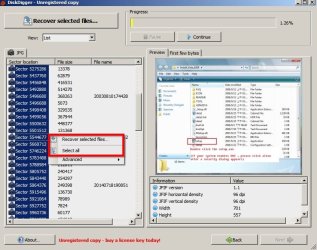
DiskDigger results

I stupidly assumed that you'd know or figure out how to save the recovered files. Anyway here's more info.

When the scan finished right click on any result in the left pane and choose "Select All" then "Recover Selected Files" then in the window that opens up choose where to save them. Create a new folder if you need to.

DiskDigger Results.jpg

If you've got thousands of files - open the folder in "list view" and break the contents down into smaller folders and that will make it easier to deal with. You can check each folder with Irfanview to see the images.
 

My Computer My Computer

At a glance

Microsoft Windows 7 Home Premium 64-bit 7601 ...AMD C-60 APU with Radeon(tm) HD Graphics4.00 GBAMD Radeon HD 6290 Graphics
Computer type
Laptop
Computer Manufacturer/Model Number
ASUS
OS
Microsoft Windows 7 Home Premium 64-bit 7601 Multiprocessor Free Service Pack 1
CPU
AMD C-60 APU with Radeon(tm) HD Graphics
Motherboard
ASUSTeK COMPUTER INC. X501U
Memory
4.00 GB
Graphics Card(s)
AMD Radeon HD 6290 Graphics
Sound Card
(1) AMD High Definition Audio Device (2) Realtek High Defi
Screen Resolution
1366 x 768 x 32 bits (4294967296 colors) @ 60 Hz
Hard Drives
Hitachi HTS545050A7E380 SATA Disk Device
Antivirus
Comodo CIS & FW, SecureAplus App Whitelisting, Threatfire
Browser
Cyberfox 64bit, Opera 64bit, Airfox
Other Info
Spy-The-Spy, HitmanPro.Alert, Norton Connect Safe, MJRegWatcher, BitDefender TrafficLight, Voodoo Shield, Zemana AntiMalware
Hi. Well im going to have to scan it yet again. I have to do the deeper scan and it takes like 2 hours or so. Is there a way for me to have saved it earlier so i wouldnt need to scan it every single time? I know if i left the box open, then i wouldn't had this issue but since i didn't see u back online earlier, i just closed the box.


I have over 1 million imagees when i did the scan earlier...


Also based on what you saying in the above post, that means infanview thumbnail isn't even necessarry??

 

My Computer My Computer

At a glance

Windows 10 Pro
Computer type
Laptop
OS
Windows 10 Pro
Irfanview Thumbnails

If you want to look through a million images it will take forever. If you see file names maybe you can figure out what some of them are. You were complaining that you couldn't view many images at the same time and Irfanview will allow you to view multiple thumbnails at once. - Stick to using windows explorer or windows photo viewer if that's what you prefer.

Well I suppose that if you save the DiskDigger results then if those images actually still exist they'll be there somewhere.

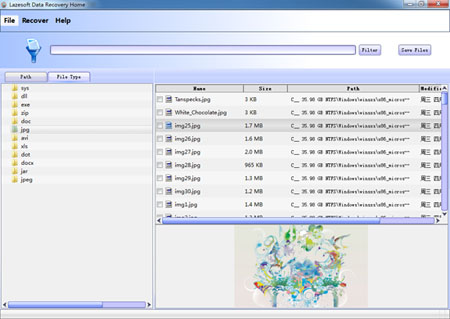
If those images existed in folders that had easy to remember names then perhaps you should check out Lazesoft Recovery Suite Free. Like I said. I've used it in the past but don't use it currently.

It does show the original folder structure possibly making it easier to find specific images.

http://www.lazesoft.com/images/data_recovery_home_screenshot.jpg

data_recovery_home_screenshot.jpg
 
Last edited:

My Computer My Computer

At a glance

Microsoft Windows 7 Home Premium 64-bit 7601 ...AMD C-60 APU with Radeon(tm) HD Graphics4.00 GBAMD Radeon HD 6290 Graphics
Computer type
Laptop
Computer Manufacturer/Model Number
ASUS
OS
Microsoft Windows 7 Home Premium 64-bit 7601 Multiprocessor Free Service Pack 1
CPU
AMD C-60 APU with Radeon(tm) HD Graphics
Motherboard
ASUSTeK COMPUTER INC. X501U
Memory
4.00 GB
Graphics Card(s)
AMD Radeon HD 6290 Graphics
Sound Card
(1) AMD High Definition Audio Device (2) Realtek High Defi
Screen Resolution
1366 x 768 x 32 bits (4294967296 colors) @ 60 Hz
Hard Drives
Hitachi HTS545050A7E380 SATA Disk Device
Antivirus
Comodo CIS & FW, SecureAplus App Whitelisting, Threatfire
Browser
Cyberfox 64bit, Opera 64bit, Airfox
Other Info
Spy-The-Spy, HitmanPro.Alert, Norton Connect Safe, MJRegWatcher, BitDefender TrafficLight, Voodoo Shield, Zemana AntiMalware
Are you saying that i couldn't just click recover selected files and then put all those files to one folder like what you did in the post before this?
 

My Computer My Computer

At a glance

Windows 10 Pro
Computer type
Laptop
OS
Windows 10 Pro
Recover deleted images

You can put recovered deleted files in one folder or however many folders you like. If you put them in one huge folder it will take time to load the contents.

What I'm saying is the it's possible to view the original file location in Lasesoft Recovery Suite assuming that you know where the files were originally stored it should be possible to filter the results and narrow down the huge list of images that will be recovered. I can't help you with that software as I'm not currently using it.

I'd suggest asking a friend or colleague to help you - preferably someone who will understand file paths and directory structure.
 

My Computer My Computer

At a glance

Microsoft Windows 7 Home Premium 64-bit 7601 ...AMD C-60 APU with Radeon(tm) HD Graphics4.00 GBAMD Radeon HD 6290 Graphics
Computer type
Laptop
Computer Manufacturer/Model Number
ASUS
OS
Microsoft Windows 7 Home Premium 64-bit 7601 Multiprocessor Free Service Pack 1
CPU
AMD C-60 APU with Radeon(tm) HD Graphics
Motherboard
ASUSTeK COMPUTER INC. X501U
Memory
4.00 GB
Graphics Card(s)
AMD Radeon HD 6290 Graphics
Sound Card
(1) AMD High Definition Audio Device (2) Realtek High Defi
Screen Resolution
1366 x 768 x 32 bits (4294967296 colors) @ 60 Hz
Hard Drives
Hitachi HTS545050A7E380 SATA Disk Device
Antivirus
Comodo CIS & FW, SecureAplus App Whitelisting, Threatfire
Browser
Cyberfox 64bit, Opera 64bit, Airfox
Other Info
Spy-The-Spy, HitmanPro.Alert, Norton Connect Safe, MJRegWatcher, BitDefender TrafficLight, Voodoo Shield, Zemana AntiMalware
Back
Top