Possibly bad HDD motor?

outlawstar15a2

New member
Local time
4:19 PM
Messages
14
Recently whenever I bring the computer out of sleep mode or restart it after a proper shut down one of the HDD gives off this creepy noise the kind when a motor is strained it lasts for a short second while the HDD spins up but it stops. Otherwise the HDDs themselves are fine no clicking, can run indefinitely, no bluescreens. There is three HDDs in total I disconnected the third in an attempt to figure out which one it is (also I rarely used it) and I'll have to shut down the computer again to find the culprit. The first two are about two years old I put them together with this PC the third is merely the HDD from my previous PC it's about eight years old I thought it would be the one with the noise. Lol. Other then the noise on initial spin up I can't seem to find anything wrong with them.
 

My Computer

Computer Manufacturer/Model Number
N/A
OS
Windows 7 Ultimate 64 bit
CPU
AMD Phenom 2 X6 1100T Black Edition Thuban 3.3GHz
Motherboard
ASUS Crosshair V Formula 990FX
Memory
Corsair Veneance 16GB DDR3 PC12800
Graphics Card(s)
2x Sapphire Toxic Radeon HD 6950 2GB 256 bit GDDR5 PCIx 2.1
Sound Card
Creative PCIx Sound Blaster X-FI Titanium Fatal1ty Champion
Monitor(s) Displays
ASUS VW246H 24" 2ms(GTG) HDMI Widescreen LCD Monitor
Hard Drives
Seagate Constellation ES STS500NM0011 500GB (Drive with OS)
HITACHI Deskstar 7K3000 HDS723020BLA642 2TB (Drive with most user files)
WDC (Western Digital) WD5000AAKS-00TMA0 500GB (Drive from previous PC)
PSU
Thermaltake Toughpower Grand TPG-1050M 1050Watt
Case
Cooler Master HAF X RC-942-KKN1 ATX Full Tower
Cooling
140mm Rear Fan, 200mm Top Fan, 200mm Side Fan, 230mm Front
Keyboard
Saitek Eclipse
Mouse
Logitech G300
Internet Speed
Verizon FiOS 20/20 Mbps
I did a chkdsk /f earlier and it no longer seems to grind on start up. Still I will get a external HDD as soon as possible and back both of them up just to be on the safe side. I also want to run the diagnostics for each HDD to see if it finds anything.
 

My Computer

Computer Manufacturer/Model Number
N/A
OS
Windows 7 Ultimate 64 bit
CPU
AMD Phenom 2 X6 1100T Black Edition Thuban 3.3GHz
Motherboard
ASUS Crosshair V Formula 990FX
Memory
Corsair Veneance 16GB DDR3 PC12800
Graphics Card(s)
2x Sapphire Toxic Radeon HD 6950 2GB 256 bit GDDR5 PCIx 2.1
Sound Card
Creative PCIx Sound Blaster X-FI Titanium Fatal1ty Champion
Monitor(s) Displays
ASUS VW246H 24" 2ms(GTG) HDMI Widescreen LCD Monitor
Hard Drives
Seagate Constellation ES STS500NM0011 500GB (Drive with OS)
HITACHI Deskstar 7K3000 HDS723020BLA642 2TB (Drive with most user files)
WDC (Western Digital) WD5000AAKS-00TMA0 500GB (Drive from previous PC)
PSU
Thermaltake Toughpower Grand TPG-1050M 1050Watt
Case
Cooler Master HAF X RC-942-KKN1 ATX Full Tower
Cooling
140mm Rear Fan, 200mm Top Fan, 200mm Side Fan, 230mm Front
Keyboard
Saitek Eclipse
Mouse
Logitech G300
Internet Speed
Verizon FiOS 20/20 Mbps
I did a chkdsk /f earlier and it no longer seems to grind on start up. Still I will get a external HDD as soon as possible and back both of them up just to be on the safe side. I also want to run the diagnostics for each HDD to see if it finds anything.
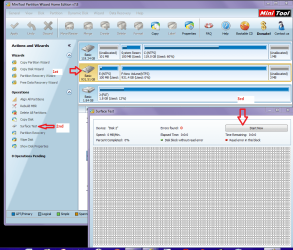
Outlaw download this and run a surface test see pic Just click on the drive not the partition/s then Surface test then start - it takes some time so allow a while for it to complete. It is a physical test rather than looking for file corruptions.
Undoubtedly you will get a plethora of other advice it is up to you which you want to but there are other drive tests around.

Best Free Partition Manager Freeware and free partition magic for Windows 7, Windows 8, Windows Vista and Windows XP 32 bit & 64 bit. MiniTool Free Partition Manager Software Home Edition.
 

Attachments

  • TEST2.PNG
    TEST2.PNG
    72.2 KB · Views: 6

My Computer

Computer type
PC/Desktop
Computer Manufacturer/Model Number
Own build (new) Desk1 / Asus ROG Win 7 / Desk2 1st build
OS
Desk1 7 Home Prem / Desk2 10 Pro / Main lap Asus ROG 10 Pro 2 laptop Toshiba 7 Pro Asus P2520 7 & 10
CPU
Desk1 i5 3750K / Laptop i7 GTX 860M / Desk2 i5 2500
Motherboard
Desk1 Asus P877-V / Desk2 Gigabyte H67 UD3H / Laptop ?
Memory
Desk1 8GB (1866) / Desk2 16GB (1333) / Laptop 8Gb DDR3
Graphics Card(s)
Desk 1& 2NVidia GTX 650 & Laptops on board Intel
Sound Card
Desk 1 & 2 -XONAR DG Realtek High Def audio Laptop
Monitor(s) Displays
Desk 1 Benq HD 2450 / Desk2 Philips 24" / Laptop 17.5"
Screen Resolution
1920x1080 D1 & D2 & Laptop 1
Hard Drives
Desk1 Samsung 120GB 830 SSD
Asus ROG 256GB 850 Pro SSD
Desk2 Samsung 840 256 SSD
Toshiba 120GB EVO
PSU
Desk 1 Corsair HX 1050/ Laptop ? / Desk 2 Corsair HX 650
Case
Desk 1 Cooler HAF XM ? Toshiba laptop / Desk2 Coolermaster
Cooling
Fans on all Desk1 -2 Desk2 - all Coolermasters 5 Laptop ?
Keyboard
Desk 1 MS Sidewinder X6 Desk 2 MS Sidewinder X 4
Mouse
Desk 1&2 - Gigabyte MS 900 gamer - laptop - Logitec wireless
Internet Speed
ADSL2+
Other Info
One other Desktop (tester) and spare Toshba laptop both with SSD's
Running Kaspersky 2016 ISS on all machines config'd identically
Logitec audio stereo systems on each machine (x3)
Canon MG5250MFC
Router/modem TP-Link running WPA2SK
If it is the hard drive that is making that sound I would replace it before it fails completely. Case cooling fans can make similar noises too. Once you think you know what is making that sound you can temporarily unplug its power cable to see if the sound goes away when you power the PC back up. You can do this with your system/OS drive too. You'll get a no OS found message, but plugging it back in will restore things back to normal again and no harm will be done.
 

My Computer

Computer type
PC/Desktop
Computer Manufacturer/Model Number
Home Built
OS
Windows 10 Education 64 bit
CPU
AMD Phenom II X4 980 Black Edition Deneb 3.7GHz
Motherboard
Asus M4N68T-M V2 µATX Motherboard
Memory
8GB 4GBx2 Kingston PC10600 DDR3 1333 Memory
Graphics Card(s)
Zotac NVIDIA Geforce GT640 2 Gig DDR3 PCIe
Sound Card
VIA VT1708s High Definition Audio 8-channel Onboard
Monitor(s) Displays
22" LG E2242 1080p and 2 19" I-INC AG191D
Screen Resolution
1280x1024 - 1920x1080 - 1280x1024
Hard Drives
Crucial M100 256 GB SSD and 500 GB WD Blue SATA
PSU
Thermaltake TR 620
Case
Power Up Black ATX Mid-Tower Case
Cooling
Stock heatsink and fan
Keyboard
Logitech Wireless K350 Wave
Mouse
Logitech Wireless M570 Trackman Wheel
Internet Speed
80 Mbps Down 30 Mbps Up
Antivirus
Windows Defender
Browser
Internet Explorer 11
Other Info
HP DVD1040e Lightscribe - External USB2
@Icit: I ran a test on both drives. Both came back with zero errors. @Alpha: The noise stopped after I ran a chkdsk. Though I still have every intention of backing up both drives just to be on the safe side. I don't plan on taking any chances.
 

My Computer

Computer Manufacturer/Model Number
N/A
OS
Windows 7 Ultimate 64 bit
CPU
AMD Phenom 2 X6 1100T Black Edition Thuban 3.3GHz
Motherboard
ASUS Crosshair V Formula 990FX
Memory
Corsair Veneance 16GB DDR3 PC12800
Graphics Card(s)
2x Sapphire Toxic Radeon HD 6950 2GB 256 bit GDDR5 PCIx 2.1
Sound Card
Creative PCIx Sound Blaster X-FI Titanium Fatal1ty Champion
Monitor(s) Displays
ASUS VW246H 24" 2ms(GTG) HDMI Widescreen LCD Monitor
Hard Drives
Seagate Constellation ES STS500NM0011 500GB (Drive with OS)
HITACHI Deskstar 7K3000 HDS723020BLA642 2TB (Drive with most user files)
WDC (Western Digital) WD5000AAKS-00TMA0 500GB (Drive from previous PC)
PSU
Thermaltake Toughpower Grand TPG-1050M 1050Watt
Case
Cooler Master HAF X RC-942-KKN1 ATX Full Tower
Cooling
140mm Rear Fan, 200mm Top Fan, 200mm Side Fan, 230mm Front
Keyboard
Saitek Eclipse
Mouse
Logitech G300
Internet Speed
Verizon FiOS 20/20 Mbps
That's a good plan, better safe than sorry.
 

My Computer

Computer type
PC/Desktop
Computer Manufacturer/Model Number
Home Built
OS
Windows 10 Education 64 bit
CPU
AMD Phenom II X4 980 Black Edition Deneb 3.7GHz
Motherboard
Asus M4N68T-M V2 µATX Motherboard
Memory
8GB 4GBx2 Kingston PC10600 DDR3 1333 Memory
Graphics Card(s)
Zotac NVIDIA Geforce GT640 2 Gig DDR3 PCIe
Sound Card
VIA VT1708s High Definition Audio 8-channel Onboard
Monitor(s) Displays
22" LG E2242 1080p and 2 19" I-INC AG191D
Screen Resolution
1280x1024 - 1920x1080 - 1280x1024
Hard Drives
Crucial M100 256 GB SSD and 500 GB WD Blue SATA
PSU
Thermaltake TR 620
Case
Power Up Black ATX Mid-Tower Case
Cooling
Stock heatsink and fan
Keyboard
Logitech Wireless K350 Wave
Mouse
Logitech Wireless M570 Trackman Wheel
Internet Speed
80 Mbps Down 30 Mbps Up
Antivirus
Windows Defender
Browser
Internet Explorer 11
Other Info
HP DVD1040e Lightscribe - External USB2

My Computer

Computer type
PC/Desktop
Computer Manufacturer/Model Number
Own build (new) Desk1 / Asus ROG Win 7 / Desk2 1st build
OS
Desk1 7 Home Prem / Desk2 10 Pro / Main lap Asus ROG 10 Pro 2 laptop Toshiba 7 Pro Asus P2520 7 & 10
CPU
Desk1 i5 3750K / Laptop i7 GTX 860M / Desk2 i5 2500
Motherboard
Desk1 Asus P877-V / Desk2 Gigabyte H67 UD3H / Laptop ?
Memory
Desk1 8GB (1866) / Desk2 16GB (1333) / Laptop 8Gb DDR3
Graphics Card(s)
Desk 1& 2NVidia GTX 650 & Laptops on board Intel
Sound Card
Desk 1 & 2 -XONAR DG Realtek High Def audio Laptop
Monitor(s) Displays
Desk 1 Benq HD 2450 / Desk2 Philips 24" / Laptop 17.5"
Screen Resolution
1920x1080 D1 & D2 & Laptop 1
Hard Drives
Desk1 Samsung 120GB 830 SSD
Asus ROG 256GB 850 Pro SSD
Desk2 Samsung 840 256 SSD
Toshiba 120GB EVO
PSU
Desk 1 Corsair HX 1050/ Laptop ? / Desk 2 Corsair HX 650
Case
Desk 1 Cooler HAF XM ? Toshiba laptop / Desk2 Coolermaster
Cooling
Fans on all Desk1 -2 Desk2 - all Coolermasters 5 Laptop ?
Keyboard
Desk 1 MS Sidewinder X6 Desk 2 MS Sidewinder X 4
Mouse
Desk 1&2 - Gigabyte MS 900 gamer - laptop - Logitec wireless
Internet Speed
ADSL2+
Other Info
One other Desktop (tester) and spare Toshba laptop both with SSD's
Running Kaspersky 2016 ISS on all machines config'd identically
Logitec audio stereo systems on each machine (x3)
Canon MG5250MFC
Router/modem TP-Link running WPA2SK
Once I get me a external HDD drive to back things up to is there a easy to use program I can use to back up my C: and D: drives? They're both on separate physical hard drives. Ones a 2TB and the other is a 500GB Also is there anything about external HDDs in general I should know? This would be my first one. And this was the one http://www.newegg.com/Product/Product.aspx?Item=N82E16822178117 I was thinking about getting as it's just inside my affordable price range (thank god for tax refunds).
 

My Computer

Computer Manufacturer/Model Number
N/A
OS
Windows 7 Ultimate 64 bit
CPU
AMD Phenom 2 X6 1100T Black Edition Thuban 3.3GHz
Motherboard
ASUS Crosshair V Formula 990FX
Memory
Corsair Veneance 16GB DDR3 PC12800
Graphics Card(s)
2x Sapphire Toxic Radeon HD 6950 2GB 256 bit GDDR5 PCIx 2.1
Sound Card
Creative PCIx Sound Blaster X-FI Titanium Fatal1ty Champion
Monitor(s) Displays
ASUS VW246H 24" 2ms(GTG) HDMI Widescreen LCD Monitor
Hard Drives
Seagate Constellation ES STS500NM0011 500GB (Drive with OS)
HITACHI Deskstar 7K3000 HDS723020BLA642 2TB (Drive with most user files)
WDC (Western Digital) WD5000AAKS-00TMA0 500GB (Drive from previous PC)
PSU
Thermaltake Toughpower Grand TPG-1050M 1050Watt
Case
Cooler Master HAF X RC-942-KKN1 ATX Full Tower
Cooling
140mm Rear Fan, 200mm Top Fan, 200mm Side Fan, 230mm Front
Keyboard
Saitek Eclipse
Mouse
Logitech G300
Internet Speed
Verizon FiOS 20/20 Mbps
Back
Top