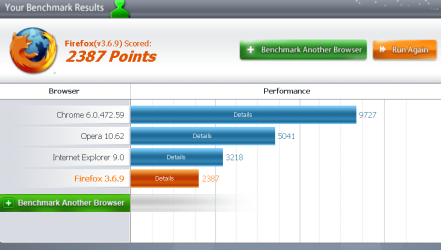
Post your Internet Browser Benchmark

Without System Scan.
 

Attachments

  • fur.PNG
    fur.PNG
    32.6 KB · Views: 34

My Computer

Computer type
PC/Desktop
Computer Manufacturer/Model Number
Home Built
OS
Windows 7 Ultimate SP1 64- bit
CPU
Intel Core i7-3770K @3.50ghz
Motherboard
EVGA Z77 FTW
Memory
Kingston Technology 16GB (2x 8GB) 2133MHz DDR3 Non-ECC
Graphics Card(s)
EVGA GTX 670 4gb SC
Sound Card
Nil
Monitor(s) Displays
Samsung 22"
Screen Resolution
1920 x 1080 60hz
Hard Drives
OCZ Vertex 4 SSD 128GB
SAMSUNG Spinpoint F3 HD502HJ 500GB 7200 RPM
PSU
Enermax Platinax EPM1000EWT Special OC Edition
Case
Cooler Master HAF Full Tower nVIDIA Edition
Cooling
CoolerMaster Hyper 212 Plus
Keyboard
HP Wireless Keyboard
Mouse
Corsair Vengeance M90
Internet Speed
20 Mb
Other Info
ASUS DRW-24B1ST/BLK/B/AS Black SATA 24X DVD Burner
Its all cloud cuckoo land, there is such a variation between similar browsers as to make ALL results garbage.

Can't you understand there is no basic standard, results can only be compared accurately it everyone had everything identical,
System
Time
Site
ISP details.
Etc,Etc,Etc.
 

My Computer

Computer Manufacturer/Model Number
Home build.
OS
Vista Ultimate 32 bit, Win 7 Pro 32 bit, Win 7 Pro 64 bit
CPU
Intel i5 CPU 750 @ 2.67 GHZ, OC 3.7 GHZ
Motherboard
Asus P7P55D
Memory
4 Gig
Graphics Card(s)
Nvidia GeForce GTS450
Monitor(s) Displays
Acer 24"
Screen Resolution
1440 x 900
Hard Drives
1000 GIG
1000 GIG
PSU
650
Case
Antec Nine Hundred Two
Internet Speed
14 MB (APPROX)
-__-

The (second) point of this thread is to give users feedback on how a single person's benchmark results of one web browser is compared to another, from the same user, not just showing off.
 

My Computer

Computer type
Laptop
Computer Manufacturer/Model Number
Custom
OS
Windows 7 Home Premium x64
CPU
Intel Core i5 2500K
Motherboard
MSI MS-7750
Memory
8GB DDR3
Graphics Card(s)
nVidia GeForce GTX650 Ti BOOST
Sound Card
Realtek
Monitor(s) Displays
21' Philips
Screen Resolution
Full HD
Hard Drives
1TB
PSU
500W
So that means no browser is better than any other, only to the individual. so what are all the fanboys and their browsers, going to do now that the rugs been pulled from under them.
:D

I use IE8 by the way and I'm totally satified with the speed.
 

My Computer

Computer Manufacturer/Model Number
Home build.
OS
Vista Ultimate 32 bit, Win 7 Pro 32 bit, Win 7 Pro 64 bit
CPU
Intel i5 CPU 750 @ 2.67 GHZ, OC 3.7 GHZ
Motherboard
Asus P7P55D
Memory
4 Gig
Graphics Card(s)
Nvidia GeForce GTS450
Monitor(s) Displays
Acer 24"
Screen Resolution
1440 x 900
Hard Drives
1000 GIG
1000 GIG
PSU
650
Case
Antec Nine Hundred Two
Internet Speed
14 MB (APPROX)
I completely agree. And I always say to people "there is no such thing as the best _____" (fill in with browser/player/software in gerenal).

Personally, I usea different browser every month: IE, FF, GC, Safari, MX. Haven't used opera since the first v10 versions. Now I stick with IE9 for the purpose of seeing how long till it gets me mad and I switch to another browser. So far so good :)
 

My Computer

Computer type
Laptop
Computer Manufacturer/Model Number
Custom
OS
Windows 7 Home Premium x64
CPU
Intel Core i5 2500K
Motherboard
MSI MS-7750
Memory
8GB DDR3
Graphics Card(s)
nVidia GeForce GTX650 Ti BOOST
Sound Card
Realtek
Monitor(s) Displays
21' Philips
Screen Resolution
Full HD
Hard Drives
1TB
PSU
500W
35b272db.png


Browsers serve a very functional and measurable purpose on the internet and I have found a browser that will function at download bandwidths very close to the 37 Mbps limit of my Motorola 501SB modem. I choose to use the Opera browser because it delivers a very acceptable level of performance for my personal use as a photographer uploading and downloading fairly large files some of which are in the .psd format and are in the 320 to 400 Mb size range.

As far as browser benchmarks are concerned it can be clearly seen from all of the results posted on this thread that all browsers are clearly do not offer the same performance when compared side bu side on the same computer. That said the greatest source of difference between different user results is primarily due to the hardware that their computer is using.

The bottom line for many users though is not blazing fast speeds or nearly instantaneous rendering but rather the number and type of features a browser offers which can not be measured with a series of benchmark tests and accounts for a wide variety of opinions as to which browser is the best.

~Maxx~
.

da59fa57.png
 

My Computer

Computer Manufacturer/Model Number
HP HPE 270f
OS
Windows 7 x64 Home Premium
CPU
Intel Core i7 930 @ 2.8 Ghz Socket 1366 LGA
Motherboard
Pegatron Truckee v1.04E41
Memory
8 GB 1366 Mhz DDR3 (PC3-10700) RAM
Graphics Card(s)
ATI Radeon 5770 1 GB DDR5 RAM
Sound Card
Realtech High Definition
Monitor(s) Displays
32" Sony Bravia
Screen Resolution
1366 X 768
Hard Drives
Intel 25nm 120 GB Series 320 SSD HD Tune- 265 MBps Read/ 130 MBps Write

LaCie 1TB + 1TB RAID 0 eSATA Drive HD Tune- 160 MBps Read/ 90 MBps Write
Keyboard
Logitech Illuminated
Mouse
Logitech MX Revolution
Internet Speed
36.4 Mbps Maximum on a 37 Mbps Motorola SB501 Modem
Was on IE8. Now using FF 64 with IE 9 64 bit which is rocken :party:
 

My Computer

Computer type
PC/Desktop
Computer Manufacturer/Model Number
Micro Stars Int. / U230 Light-087US
OS
Windows 7 Home Premium 64bit SP1
CPU
AMD Athlon™ Neo MV-40 Processor Technology 1.60 GHz
Motherboard
AMD RS-880MN+SB710
Memory
4 GB
Graphics Card(s)
ATI Radeon HD3200
Monitor(s) Displays
LCD 11.6" HD
Screen Resolution
1366 x 768
Hard Drives
250GB SATA
Internet Speed
Gigabit LAN 10/100/1000
Other Info
3.3 lbs (with 4hour 6 cell battery)
1.3 MP Webcam
USB2.0 X 3
HDMI out
So that means no browser is better than any other, only to the individual. so what are all the fanboys and their browsers, going to do now that the rugs been pulled from under them.
:D

I use IE8 by the way and I'm totally satified with the speed.

Everyone knows different 'Browser Tests' favor different browsers.

Most companies have their own browser test.

The only results that are valid is the preference of the user on their system.
Use what works for you, has the features and plug-in's you want, the one you like.

I tend to use the browser, I like the 'feel' of, and is fast and/or fast with the few plug-ins I use.
IE8 was generally a bit slower for me, IE9 beta does run faster on this site, but is even or slower than Chrome on other sites.

I really don't understand these 'browser wars', if anyone wants to stay with a particular browser they like, that's great and obviously their choice, what's the big deal...
 

My Computer

Computer type
PC/Desktop
Computer Manufacturer/Model Number
76~2.0
OS
Windows 7 Ult x64 - SP1/ Windows 8 Pro x64
CPU
Intel Core i5-3570K 4.6GHz
Motherboard
Gigabyte GA-Z77X UD3H, f18
Memory
8GB (2X4GB) DDR3 1600 Corsair Vengeance CL8 1.5v
Graphics Card(s)
Sapphire HD 7770 Vapor-X OC 1GB DDR5
Sound Card
Onboard VIA VT2021
Monitor(s) Displays
22" LCD Dell
Screen Resolution
1680x1050
Hard Drives
Samsung 840Pro 128GB SSD,
Seagate Barracuda 500GB SATA2 7200rpm 32MB cache, Seagate Barracuda 1TB SATA2 7200rpm 32MB cache,
PSU
Corsair HX650W
Case
Cooler Master Storm Scout
Cooling
Corsair H80 2x12cm Noctua NF P12 , 2x14cm case fans
Keyboard
Logitech Wave
Mouse
CM Sentinel
Internet Speed
Dismal
Antivirus
Avast
Browser
Opera Next
Other Info
Haswell laptop: HP Envy 17t-j, i7-4700MQ, GeForce 740M 2GB DDR3, 17.3" Full HD 1920x1080, 16GB RAM, Samsung 840 Pro 128GB, 1TB Hitachi 7200 HDD,
Desktop: eSATA ports,
External eSATA Seagate 500GB SATA2 7200rpm,
External WD USB 500GB
I really don't understand these 'browser wars', if anyone wants to stay with a particular browser they like, that's great and obviously their choice, what's the big deal...

Neither do I. I know people who run Firefox strictly because there are certain add-ons that perform specific functions that no other browser will. I think that it is just great that there are so many choices of browsers these days to to cater to the needs of so many different people.

~Maxx~
.
938af360.png
 

My Computer

Computer Manufacturer/Model Number
HP HPE 270f
OS
Windows 7 x64 Home Premium
CPU
Intel Core i7 930 @ 2.8 Ghz Socket 1366 LGA
Motherboard
Pegatron Truckee v1.04E41
Memory
8 GB 1366 Mhz DDR3 (PC3-10700) RAM
Graphics Card(s)
ATI Radeon 5770 1 GB DDR5 RAM
Sound Card
Realtech High Definition
Monitor(s) Displays
32" Sony Bravia
Screen Resolution
1366 X 768
Hard Drives
Intel 25nm 120 GB Series 320 SSD HD Tune- 265 MBps Read/ 130 MBps Write

LaCie 1TB + 1TB RAID 0 eSATA Drive HD Tune- 160 MBps Read/ 90 MBps Write
Keyboard
Logitech Illuminated
Mouse
Logitech MX Revolution
Internet Speed
36.4 Mbps Maximum on a 37 Mbps Motorola SB501 Modem
I can remember when there wasn't any choice.

Today's choices makes it better for everyone.

So let's enjoy them.
 

My Computer

Computer type
PC/Desktop
Computer Manufacturer/Model Number
76~2.0
OS
Windows 7 Ult x64 - SP1/ Windows 8 Pro x64
CPU
Intel Core i5-3570K 4.6GHz
Motherboard
Gigabyte GA-Z77X UD3H, f18
Memory
8GB (2X4GB) DDR3 1600 Corsair Vengeance CL8 1.5v
Graphics Card(s)
Sapphire HD 7770 Vapor-X OC 1GB DDR5
Sound Card
Onboard VIA VT2021
Monitor(s) Displays
22" LCD Dell
Screen Resolution
1680x1050
Hard Drives
Samsung 840Pro 128GB SSD,
Seagate Barracuda 500GB SATA2 7200rpm 32MB cache, Seagate Barracuda 1TB SATA2 7200rpm 32MB cache,
PSU
Corsair HX650W
Case
Cooler Master Storm Scout
Cooling
Corsair H80 2x12cm Noctua NF P12 , 2x14cm case fans
Keyboard
Logitech Wave
Mouse
CM Sentinel
Internet Speed
Dismal
Antivirus
Avast
Browser
Opera Next
Other Info
Haswell laptop: HP Envy 17t-j, i7-4700MQ, GeForce 740M 2GB DDR3, 17.3" Full HD 1920x1080, 16GB RAM, Samsung 840 Pro 128GB, 1TB Hitachi 7200 HDD,
Desktop: eSATA ports,
External eSATA Seagate 500GB SATA2 7200rpm,
External WD USB 500GB
35b272db.png


Browsers serve a very functional and measurable purpose on the internet and I have found a browser that will function at download bandwidths very close to the 37 Mbps limit of my Motorola 501SB modem. I choose to use the Opera browser because it delivers a very acceptable level of performance for my personal use as a photographer uploading and downloading fairly large files some of which are in the .psd format and are in the 320 to 400 Mb size range.

As far as browser benchmarks are concerned it can be clearly seen from all of the results posted on this thread that all browsers are clearly do not offer the same performance when compared side bu side on the same computer. That said the greatest source of difference between different user results is primarily due to the hardware that their computer is using.

The bottom line for many users though is not blazing fast speeds or nearly instantaneous rendering but rather the number and type of features a browser offers which can not be measured with a series of benchmark tests and accounts for a wide variety of opinions as to which browser is the best.

~Maxx~
.
da59fa57.png


My b/band was limit was 17mb I regularly get, depending on time of day, 14.9 to 15.2 and I use IE8, in the ratio I think our results are on a par so that really puts the kybosh on this falacy that its the browser that matters, its the broadband quality.
 

My Computer

Computer Manufacturer/Model Number
Home build.
OS
Vista Ultimate 32 bit, Win 7 Pro 32 bit, Win 7 Pro 64 bit
CPU
Intel i5 CPU 750 @ 2.67 GHZ, OC 3.7 GHZ
Motherboard
Asus P7P55D
Memory
4 Gig
Graphics Card(s)
Nvidia GeForce GTS450
Monitor(s) Displays
Acer 24"
Screen Resolution
1440 x 900
Hard Drives
1000 GIG
1000 GIG
PSU
650
Case
Antec Nine Hundred Two
Internet Speed
14 MB (APPROX)
74bf010d.png


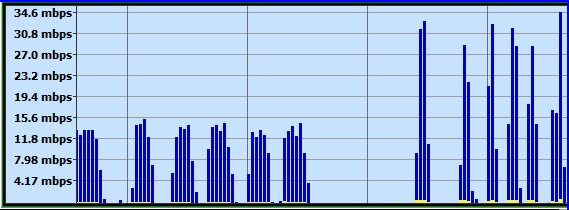
......................Firefox...................................Opera......

You're right Bandwidth is very important, but as this screencapture from Bandwidth Meter Pro shows using the same available Bandwith in back to back tests downloading the identical set of 64 Mb to 100 Mb files Firefox downloaded at a maximum Bandwidth of 15.5 Mbps and Opera had a peak download rate of 34.6 Mbps. The available bandwidth is equal, but the ability to access and employ that Bandwidth differs from browser to browser especially with the Opera browser which can be dramatically accelerated using simple performance adjustments in its GUI.

~Maxx~
.
938af360.png
 

My Computer

Computer Manufacturer/Model Number
HP HPE 270f
OS
Windows 7 x64 Home Premium
CPU
Intel Core i7 930 @ 2.8 Ghz Socket 1366 LGA
Motherboard
Pegatron Truckee v1.04E41
Memory
8 GB 1366 Mhz DDR3 (PC3-10700) RAM
Graphics Card(s)
ATI Radeon 5770 1 GB DDR5 RAM
Sound Card
Realtech High Definition
Monitor(s) Displays
32" Sony Bravia
Screen Resolution
1366 X 768
Hard Drives
Intel 25nm 120 GB Series 320 SSD HD Tune- 265 MBps Read/ 130 MBps Write

LaCie 1TB + 1TB RAID 0 eSATA Drive HD Tune- 160 MBps Read/ 90 MBps Write
Keyboard
Logitech Illuminated
Mouse
Logitech MX Revolution
Internet Speed
36.4 Mbps Maximum on a 37 Mbps Motorola SB501 Modem
With System Scan.
 

Attachments

  • fur.PNG
    fur.PNG
    34.5 KB · Views: 18

My Computer

Computer type
PC/Desktop
Computer Manufacturer/Model Number
Home Built
OS
Windows 7 Ultimate SP1 64- bit
CPU
Intel Core i7-3770K @3.50ghz
Motherboard
EVGA Z77 FTW
Memory
Kingston Technology 16GB (2x 8GB) 2133MHz DDR3 Non-ECC
Graphics Card(s)
EVGA GTX 670 4gb SC
Sound Card
Nil
Monitor(s) Displays
Samsung 22"
Screen Resolution
1920 x 1080 60hz
Hard Drives
OCZ Vertex 4 SSD 128GB
SAMSUNG Spinpoint F3 HD502HJ 500GB 7200 RPM
PSU
Enermax Platinax EPM1000EWT Special OC Edition
Case
Cooler Master HAF Full Tower nVIDIA Edition
Cooling
CoolerMaster Hyper 212 Plus
Keyboard
HP Wireless Keyboard
Mouse
Corsair Vengeance M90
Internet Speed
20 Mb
Other Info
ASUS DRW-24B1ST/BLK/B/AS Black SATA 24X DVD Burner
xXSevenXx- Have you taken a minute and used Opera's on board network tools to allow it to tune it so that it will run as fast an efficiently as possible?

~Maxx~
.
da59fa57.png
 

My Computer

Computer Manufacturer/Model Number
HP HPE 270f
OS
Windows 7 x64 Home Premium
CPU
Intel Core i7 930 @ 2.8 Ghz Socket 1366 LGA
Motherboard
Pegatron Truckee v1.04E41
Memory
8 GB 1366 Mhz DDR3 (PC3-10700) RAM
Graphics Card(s)
ATI Radeon 5770 1 GB DDR5 RAM
Sound Card
Realtech High Definition
Monitor(s) Displays
32" Sony Bravia
Screen Resolution
1366 X 768
Hard Drives
Intel 25nm 120 GB Series 320 SSD HD Tune- 265 MBps Read/ 130 MBps Write

LaCie 1TB + 1TB RAID 0 eSATA Drive HD Tune- 160 MBps Read/ 90 MBps Write
Keyboard
Logitech Illuminated
Mouse
Logitech MX Revolution
Internet Speed
36.4 Mbps Maximum on a 37 Mbps Motorola SB501 Modem
xXSevenXx- Have you taken a minute and used Opera's on board network tools to allow it to tune it so that it will run as fast an efficiently as possible?

~Maxx~
.
da59fa57.png
How?
 

My Computer

Computer type
PC/Desktop
Computer Manufacturer/Model Number
Home Built
OS
Windows 7 Ultimate SP1 64- bit
CPU
Intel Core i7-3770K @3.50ghz
Motherboard
EVGA Z77 FTW
Memory
Kingston Technology 16GB (2x 8GB) 2133MHz DDR3 Non-ECC
Graphics Card(s)
EVGA GTX 670 4gb SC
Sound Card
Nil
Monitor(s) Displays
Samsung 22"
Screen Resolution
1920 x 1080 60hz
Hard Drives
OCZ Vertex 4 SSD 128GB
SAMSUNG Spinpoint F3 HD502HJ 500GB 7200 RPM
PSU
Enermax Platinax EPM1000EWT Special OC Edition
Case
Cooler Master HAF Full Tower nVIDIA Edition
Cooling
CoolerMaster Hyper 212 Plus
Keyboard
HP Wireless Keyboard
Mouse
Corsair Vengeance M90
Internet Speed
20 Mb
Other Info
ASUS DRW-24B1ST/BLK/B/AS Black SATA 24X DVD Burner
6a576369.jpg


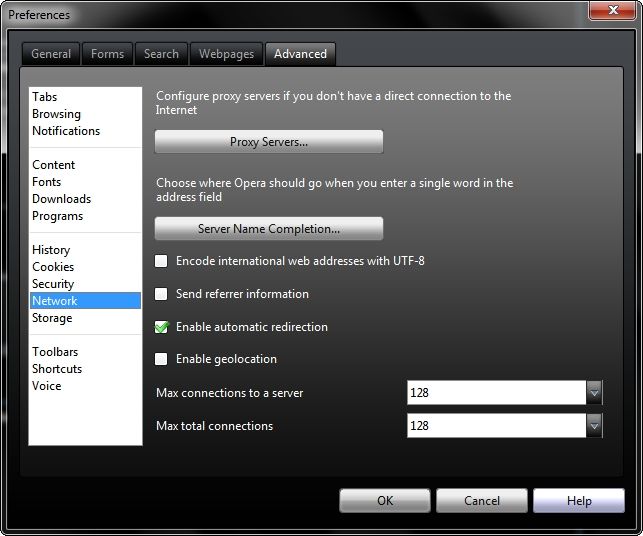
In the Opera Menu go to Settings> Preferences> Advanced> Network and change the Max connections to a server and Max total connections settings from their defaults of 16 and 64 to 128 and 128 respectively literally doubled the speed that the Opera had with its default 'out of the box' settings when I first ran it. You may want to try other settings to see if they work better for you with your ISP, but these settings work best for me with Opera on Comcast Broadband...
f9cf3207.gif


~Maxx~
.
da59fa57.png
 

My Computer

Computer Manufacturer/Model Number
HP HPE 270f
OS
Windows 7 x64 Home Premium
CPU
Intel Core i7 930 @ 2.8 Ghz Socket 1366 LGA
Motherboard
Pegatron Truckee v1.04E41
Memory
8 GB 1366 Mhz DDR3 (PC3-10700) RAM
Graphics Card(s)
ATI Radeon 5770 1 GB DDR5 RAM
Sound Card
Realtech High Definition
Monitor(s) Displays
32" Sony Bravia
Screen Resolution
1366 X 768
Hard Drives
Intel 25nm 120 GB Series 320 SSD HD Tune- 265 MBps Read/ 130 MBps Write

LaCie 1TB + 1TB RAID 0 eSATA Drive HD Tune- 160 MBps Read/ 90 MBps Write
Keyboard
Logitech Illuminated
Mouse
Logitech MX Revolution
Internet Speed
36.4 Mbps Maximum on a 37 Mbps Motorola SB501 Modem
6a576369.jpg


In the Opera Menu go to Settings> Preferences> Advanced> Network and change the Max connections to a server and Max total connections settings from their defaults of 16 and 64 to 128 and 128 respectively literally doubled the speed that the Opera had with its default 'out of the box' settings when I first ran it. You may want to try other settings to see if they work better for you with your ISP, but these settings work best for me with Opera on Comcast Broadband...
f9cf3207.gif


~Maxx~
.
da59fa57.png
I tried the settings you suggested, and they haven't improved anything. It has actually made things worse as it's unable to even finish the benchmark test.
 

My Computer

Computer type
PC/Desktop
Computer Manufacturer/Model Number
Home Built
OS
Windows 7 Ultimate SP1 64- bit
CPU
Intel Core i7-3770K @3.50ghz
Motherboard
EVGA Z77 FTW
Memory
Kingston Technology 16GB (2x 8GB) 2133MHz DDR3 Non-ECC
Graphics Card(s)
EVGA GTX 670 4gb SC
Sound Card
Nil
Monitor(s) Displays
Samsung 22"
Screen Resolution
1920 x 1080 60hz
Hard Drives
OCZ Vertex 4 SSD 128GB
SAMSUNG Spinpoint F3 HD502HJ 500GB 7200 RPM
PSU
Enermax Platinax EPM1000EWT Special OC Edition
Case
Cooler Master HAF Full Tower nVIDIA Edition
Cooling
CoolerMaster Hyper 212 Plus
Keyboard
HP Wireless Keyboard
Mouse
Corsair Vengeance M90
Internet Speed
20 Mb
Other Info
ASUS DRW-24B1ST/BLK/B/AS Black SATA 24X DVD Burner
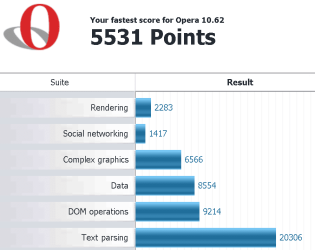
I managed to get it to work by enabling Turbo, and this is the result with the settings you suggested.
 

Attachments

  • fur.PNG
    fur.PNG
    31.7 KB · Views: 4

My Computer

Computer type
PC/Desktop
Computer Manufacturer/Model Number
Home Built
OS
Windows 7 Ultimate SP1 64- bit
CPU
Intel Core i7-3770K @3.50ghz
Motherboard
EVGA Z77 FTW
Memory
Kingston Technology 16GB (2x 8GB) 2133MHz DDR3 Non-ECC
Graphics Card(s)
EVGA GTX 670 4gb SC
Sound Card
Nil
Monitor(s) Displays
Samsung 22"
Screen Resolution
1920 x 1080 60hz
Hard Drives
OCZ Vertex 4 SSD 128GB
SAMSUNG Spinpoint F3 HD502HJ 500GB 7200 RPM
PSU
Enermax Platinax EPM1000EWT Special OC Edition
Case
Cooler Master HAF Full Tower nVIDIA Edition
Cooling
CoolerMaster Hyper 212 Plus
Keyboard
HP Wireless Keyboard
Mouse
Corsair Vengeance M90
Internet Speed
20 Mb
Other Info
ASUS DRW-24B1ST/BLK/B/AS Black SATA 24X DVD Burner
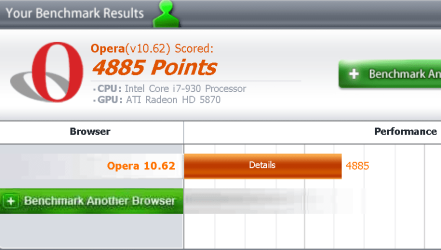
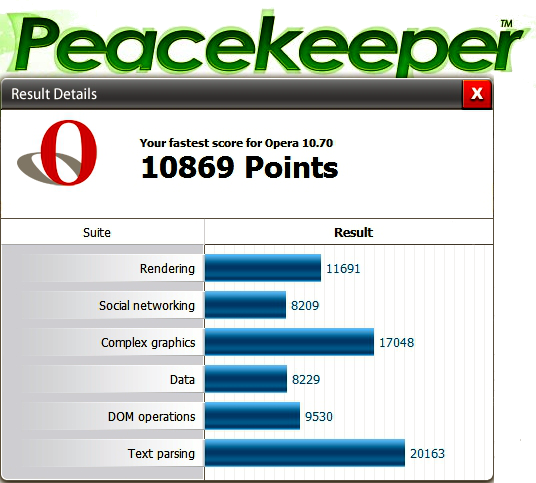
xXSevenXx- Opera Turbo enables server side compression that speeds up low bandwidth connections, but should not be used if you have a high speed internet connection. My computer has the same Core i7 930 processor and an ATI 5770 video card and this is how Opera 10.70 b9049 runs at Peacekeeper using Comcast Broadband...

0d696244.png


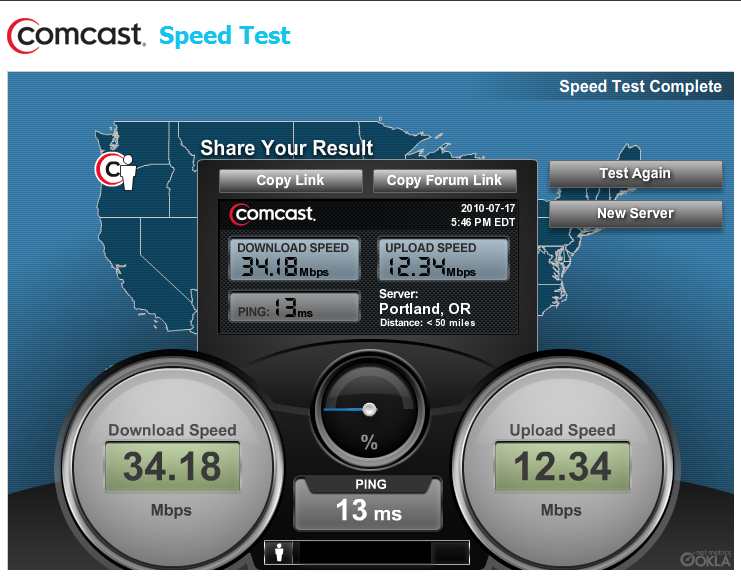
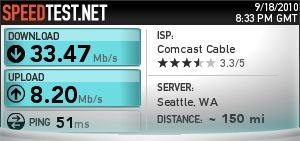
Have you checked the download and upload bandwidth of your ISP at SpeedTest.net? Here's the result of the SpeedTest.net benchmark I ran on my ISP just a few minutes ago...

f902c822.jpg


The results can vary somewhat throughout the day based on usage loads, but if you are using a similar bandwidth the Opera Turbo will slow Opera's performance down considerably.

9d3e30e5.jpg


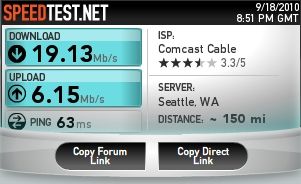
This is my diminished ISP bandwidth with Opera Turbo enabled. On a low bandwidth wi-fi connection I have seen Opera Turbo speed up bandwidths as much as 8X, but it impedes a high speed broadband connection because of the same server side compression that speeds up a low bandwidth connection.

~Maxx~
.
da59fa57.png
 

My Computer

Computer Manufacturer/Model Number
HP HPE 270f
OS
Windows 7 x64 Home Premium
CPU
Intel Core i7 930 @ 2.8 Ghz Socket 1366 LGA
Motherboard
Pegatron Truckee v1.04E41
Memory
8 GB 1366 Mhz DDR3 (PC3-10700) RAM
Graphics Card(s)
ATI Radeon 5770 1 GB DDR5 RAM
Sound Card
Realtech High Definition
Monitor(s) Displays
32" Sony Bravia
Screen Resolution
1366 X 768
Hard Drives
Intel 25nm 120 GB Series 320 SSD HD Tune- 265 MBps Read/ 130 MBps Write

LaCie 1TB + 1TB RAID 0 eSATA Drive HD Tune- 160 MBps Read/ 90 MBps Write
Keyboard
Logitech Illuminated
Mouse
Logitech MX Revolution
Internet Speed
36.4 Mbps Maximum on a 37 Mbps Motorola SB501 Modem
Maxxwire Opera Turbo enables server side compression that speeds up low bandwidth connections, but should not be used if you have a high speed internet connection. My computer has the same Core i7 930 processor and an ATI 5770 video card and this is how Opera 10.70 b9049 runs at Peacekeeper using Comcast Broadband...
I have Turbo on automatic, but I switched it on to do the benchmark test.
Any way I reinstalled it, adjusted the settings, and I got a slight improvement.
Turbo was on auto and went to x3
As for Broadband speed your upload speed is faster than my D/L speed, I usually average 5.7
 

Attachments

  • fur.PNG
    fur.PNG
    25.5 KB · Views: 0

My Computer

Computer type
PC/Desktop
Computer Manufacturer/Model Number
Home Built
OS
Windows 7 Ultimate SP1 64- bit
CPU
Intel Core i7-3770K @3.50ghz
Motherboard
EVGA Z77 FTW
Memory
Kingston Technology 16GB (2x 8GB) 2133MHz DDR3 Non-ECC
Graphics Card(s)
EVGA GTX 670 4gb SC
Sound Card
Nil
Monitor(s) Displays
Samsung 22"
Screen Resolution
1920 x 1080 60hz
Hard Drives
OCZ Vertex 4 SSD 128GB
SAMSUNG Spinpoint F3 HD502HJ 500GB 7200 RPM
PSU
Enermax Platinax EPM1000EWT Special OC Edition
Case
Cooler Master HAF Full Tower nVIDIA Edition
Cooling
CoolerMaster Hyper 212 Plus
Keyboard
HP Wireless Keyboard
Mouse
Corsair Vengeance M90
Internet Speed
20 Mb
Other Info
ASUS DRW-24B1ST/BLK/B/AS Black SATA 24X DVD Burner
Back
Top