Post Your Overclock!

Status
Not open for further replies.
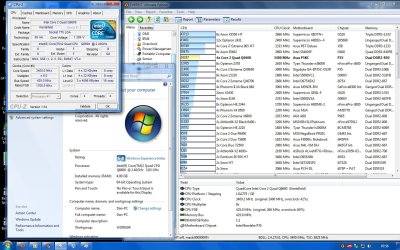
I dropped my multiplier to x8 bumped up the FSB to 425mhz = 3.4ghz system seems ok havent started benching yet but in control panel where it tells you CPU info etc its saying my CPU is 3.83ghz but cpuz says 3.4ghz. Has anyone had that before :S

Does the everest scores matter much. My cpu doesnt do too bad in the CPU Queen test
 

Attachments
  • overclock2.jpg
    overclock2.jpg
    222.1 KB · Views: 22
Last edited:
I dropped my multiplier to x8 bumped up the FSB to 425mhz = 3.4ghz system seems ok havent started benching yet but in control panel where it tells you CPU info etc its saying my CPU is 3.83ghz but cpuz says 3.4ghz. Has anyone had that before :S

Does the everest scores matter much. My cpu doesnt do too bad in the CPU Queen test

Not sure why Windows is reporting it as 3.83 :confused:
What are your temps like?
 

My Computer

Computer Manufacturer/Model Number
tw33k
OS
Windows 7 Ultimate (x64) SP1
CPU
Intel 3770k 4.6GHz
Motherboard
ASUS Maximus V Formula
Memory
8GB (2x 4GB) Crucial Ballistix
Graphics Card(s)
Sapphire 7950 (1060/1600)
Sound Card
On Board Realtek HD Audio
Monitor(s) Displays
27" Acer B273HU (via HDMI)
Screen Resolution
2048 x 1152
Hard Drives
Crucial M4 128GB
2TB WD Black
1TB Samsung F3 SATA
1TB WD Elite External
2TB WD USB 3.0
PSU
Corsair AX750 Gold
Case
Corsair Obsidian 800DW
Cooling
Corsair H100 (2x AP-121/2x UK-3000 push/pull)
Keyboard
Microsoft Wireless 5000
Mouse
Microsoft Wireless 5000
Internet Speed
5mb/s
Other Info
Logitech z-2300 2.1 speakers
Lamptron FC-5 v2
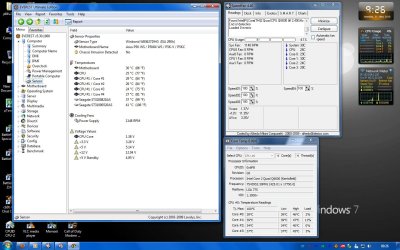
Temps is another weird one lol. Coretemp reporting odd results while speedfan/everest are the same. Temps arent "high" tho.

Cheers
 

Attachments

  • temps.jpg
    temps.jpg
    163.2 KB · Views: 17
Your temps are good! I only OC'd my chip 7% and the temps rose 2-3 degrees.
 

My Computer

Computer Manufacturer/Model Number
tw33k
OS
Windows 7 Ultimate (x64) SP1
CPU
Intel 3770k 4.6GHz
Motherboard
ASUS Maximus V Formula
Memory
8GB (2x 4GB) Crucial Ballistix
Graphics Card(s)
Sapphire 7950 (1060/1600)
Sound Card
On Board Realtek HD Audio
Monitor(s) Displays
27" Acer B273HU (via HDMI)
Screen Resolution
2048 x 1152
Hard Drives
Crucial M4 128GB
2TB WD Black
1TB Samsung F3 SATA
1TB WD Elite External
2TB WD USB 3.0
PSU
Corsair AX750 Gold
Case
Corsair Obsidian 800DW
Cooling
Corsair H100 (2x AP-121/2x UK-3000 push/pull)
Keyboard
Microsoft Wireless 5000
Mouse
Microsoft Wireless 5000
Internet Speed
5mb/s
Other Info
Logitech z-2300 2.1 speakers
Lamptron FC-5 v2
Your temps are good! I only OC'd my chip 7% and the temps rose 2-3 degrees.


Yeah the watercooling does a decent job :D, I was going to try pushing for 3.6Ghz as i have read people got to that on air cooling. So i should get more really with WC but i dont want to risk killing my computer lol & im not sure my ram will go much further.

Cheers
 

My Computer

Computer type
PC/Desktop
Computer Manufacturer/Model Number
Systems by SmartEyeball
OS
8 Pro x64
CPU
i7 3770K 4.6GHz
Motherboard
ASUS P8Z77 WS
Memory
16GB G.Skill Trident X 2666mhz
Graphics Card(s)
x2 EVGA 780 Ti Superclocked SLI
Sound Card
SB X-FI Surround 5.1 PRO USB / ATH-AD900 Headphones
Monitor(s) Displays
x3 Dell U2410 / 58" Samsung
Screen Resolution
5760*1200/ 1920*1200
Hard Drives
2x Intel 520 240GB (RAID 0) * 2x WD Caviar Blacks 2TB (RAID 0) * 2TB WD Caviar Black * Sony Optirac DVD
PSU
Silverstone Strider Evolution 1200W
Case
Thermaltake Level 10 GT Snow Edition
Cooling
Noctua NH-D14
Keyboard
Topre Realforce // Ducky Shine MX Black // Filco Ninja TKL
Mouse
Thermaltake Theron (Highly Recommended) + Razer Imperator
Antivirus
MSE
Browser
IE, FF, WaterFox
Other Info
GT Extreme V2 Sim Racing Cockpit + 40" LCD and K/B Mouse stand ▼
Fanatec CSR Elite Wheel + Clubsport V1 Pedals + CSR shifter/7G-H ▼Saitek X52 Pro ▼ TrackIR 5 Pro
Buttkicker v2 Seat Rumbler with Dedicated 5.1 and Sub Woofer attached to frame ▼
=
Bloody Big Grin
Hey again lol.

After changing my FSB to 425mhz when i go to do the experience test on win7 it BSOD's with the code 0x00000124 is that because my voltage need raising?. Its set to auto in the bios & cpuz reports 1.376V. Is there anyone that can tell me what id need to set it to. My HDD made a weird noise after the pc rebooted sp done a test with seatools (making sure my hdd isnt dying lol) & it passed on the short tests. I havent done a long test yet. Also in event viewer i have this...

A fatal hardware error has occurred.

Reported by component: Processor Core
Error Source: Machine Check Exception
Error Type: Cache Hierarchy Error
Processor ID: 3

Wich makes me think it could be the vcore after reading smarteyeball's post.

Thanks :)
 
here is my 860....

2qkqr1v.png

ab33u9.png
 

My Computer

Computer Manufacturer/Model Number
Intel
OS
Windows 7 64 bit
CPU
i7-860
Motherboard
ASUS Maximus III Formula
Memory
GSkill 1600 7-7-7-24
Graphics Card(s)
Sapphire Vapor X 5770
Monitor(s) Displays
24inch
Case
Antec 900
Cooling
Custom Water, Koolance 360
Not much of an OC (2.66 to 3.15) but it is on stock cooling and, to be honest, I didn't realize it was even OC'd until I looked at the comp properties lol

Edit: Pushed it up a bit more...got it to over 3.3, but temps jumped into the 90s within seconds of starting Prime95.
 

Attachments

  • Untitled.jpg
    Untitled.jpg
    105.5 KB · Views: 10
Last edited:

My Computer

Computer type
PC/Desktop
Computer Manufacturer/Model Number
SuperBeast
OS
Windows 10 Tech Preview 9926 x64
CPU
AMD FX-8350
Motherboard
Gigabyte GA-990FXA-UD3
Memory
16GB DDR3 1333
Graphics Card(s)
Asus R9 290 DirectCU II OC, Gigabyte Windforce R9 290 OC
Sound Card
Integrated w/ Creative A250 2.1 speakers
Monitor(s) Displays
Main: Asus VN289H 28" Secondary: Acer G246HL 24"
Screen Resolution
1920x1080
Hard Drives
128 GB SanDisk Ultra Plus (Windows drive)

240 GB Crucial M500 SSD (Games drive)

1 TB WDC WD10EACS 7200RPM HDD (Data drive)

2 TB Seagate Expansion Desktop external HDD (Backup drive)
PSU
900w Antec HCG-900
Case
Raidmax Agusta Full ATX
Cooling
Corsair H80
Keyboard
Cooler Master Devastator MB24
Mouse
Cooler Master Devastator MS2K 1000/1600/2000 DPI
Internet Speed
100Mbps cable
Antivirus
Avast!
Browser
Chrome
ok guys i do have a question i have 1066 ram that to run at 1066 im sapose to set the fallowing 5-5-5-15 at 2.1 Volts. i down clocked my ram to the safe 800 before i started to over clock im currently setting my 2.83 at 2.97 and my ram is running at 840 cuz im upping the FSB

this is my question at what speed of my ram should i up the voltage to it? i fig when i get to 1066 is better be on 2.1 volt but at what point do i start raising it??

her is a link to the thread i started

http://www.sevenforums.com/overclocking-case-mods/88484-over-clocking-my-q9550.html
 

My Computer

Computer Manufacturer/Model Number
Custom built by myself
OS
Windows 7 Ultimate 64 bit
CPU
Intel Core 2 quad Q9550 2.83 12 MB Cache 95 Watt OC to 3.4
Motherboard
Gigabyte GA-EP45-UD3P Rev 1.6 Socket 775 Running 1600 FSB
Memory
4 GB Patriot Viper II 1066 2X2GB Memory PV224G8500ELKB
Graphics Card(s)
NVIDIA GeForce 9500 GT GV-N95TOC-1GI overclocked to 650 MHz
Sound Card
Realtec HD on board
Monitor(s) Displays
LG W2053TQ
Screen Resolution
1600X900
Hard Drives
Hatchi 160 GB SATA II System drive
Hatchi 400 GB SATA II Data
Hatchi 500 GB SATA II Data
Hitachi 2 TB SATA II Backup
PSU
Ultra LSP750 750-Watt
Case
Leadertek FX626 or Foxconn FX-626BKH
Cooling
Cool Master V-8 (its Big),1 80 MM Fan and 2 92 MM Fan
Keyboard
Dell Quietkey (POS)
Mouse
GE PS2 Optical
Internet Speed
8 down 1 up
Other Info
LS-120 Drive(IDE) - Lite-on iHOS104 Blu-ray(SATA) - HP DVD Burner with lightscribe(IDE) - media card reader
ok guys i do have a question i have 1066 ram that to run at 1066 im sapose to set the fallowing 5-5-5-15 at 2.1 Volts. i down clocked my ram to the safe 800 before i started to over clock im currently setting my 2.83 at 2.97 and my ram is running at 840 cuz im upping the FSB

this is my question at what speed of my ram should i up the voltage to it? i fig when i get to 1066 is better be on 2.1 volt but at what point do i start raising it??

her is a link to the thread i started

http://www.sevenforums.com/overclocking-case-mods/88484-over-clocking-my-q9550.html
If you look at CPU-z (under the 'Spd' tab I think), you should see the rated timings and voltages for your RAM at the different speeds it supports.
 

My Computer

Computer type
PC/Desktop
OS
Win 10 x64 Pro x64 / Ubuntu 15.10 x64
CPU
Intel i7-4960X
Motherboard
Asus Rampage IV Black Edition
Memory
4x8GB Corsair Dominator Platinum @2400MHz 10-12-12-31
Graphics Card(s)
2x MSI GTX780Ti 3GB (SLI)
Sound Card
Onboard SupremeFX (Cirrus Logic CS4398)
Monitor(s) Displays
3x LG Cinema 27" IPS LED (27MP65)
Screen Resolution
[1920x1080]x3
Hard Drives
Crucial M500 120GB, Crucial M500 480GB, Toshiba DT01ACA200 2TB
PSU
CoolerMaster V1000
Case
Corsair Obsidian 750D
Cooling
ThermalTake Water 3.0 Extreme, 4xSP120, 3xAF120
Keyboard
Moshi Luna
Mouse
Logitech G700s / Roccat Tyon
Internet Speed
4Mb uncapped ADSL (Afrihost)
Antivirus
MS Security Essentials
Browser
Chrome... Duh. (:
ok so i wate till i hit the 1066 to up the voltage to 2.1 or should i star uping it as it goes up aka then i get to say 900 up it to 1.9 or 2.0?
 

My Computer

Computer Manufacturer/Model Number
Custom built by myself
OS
Windows 7 Ultimate 64 bit
CPU
Intel Core 2 quad Q9550 2.83 12 MB Cache 95 Watt OC to 3.4
Motherboard
Gigabyte GA-EP45-UD3P Rev 1.6 Socket 775 Running 1600 FSB
Memory
4 GB Patriot Viper II 1066 2X2GB Memory PV224G8500ELKB
Graphics Card(s)
NVIDIA GeForce 9500 GT GV-N95TOC-1GI overclocked to 650 MHz
Sound Card
Realtec HD on board
Monitor(s) Displays
LG W2053TQ
Screen Resolution
1600X900
Hard Drives
Hatchi 160 GB SATA II System drive
Hatchi 400 GB SATA II Data
Hatchi 500 GB SATA II Data
Hitachi 2 TB SATA II Backup
PSU
Ultra LSP750 750-Watt
Case
Leadertek FX626 or Foxconn FX-626BKH
Cooling
Cool Master V-8 (its Big),1 80 MM Fan and 2 92 MM Fan
Keyboard
Dell Quietkey (POS)
Mouse
GE PS2 Optical
Internet Speed
8 down 1 up
Other Info
LS-120 Drive(IDE) - Lite-on iHOS104 Blu-ray(SATA) - HP DVD Burner with lightscribe(IDE) - media card reader
go get the V-8 or V-10 from cool master tiger selling V-8 for only 50 bucks

Not much of an OC (2.66 to 3.15) but it is on stock cooling and, to be honest, I didn't realize it was even OC'd until I looked at the comp properties lol

Edit: Pushed it up a bit more...got it to over 3.3, but temps jumped into the 90s within seconds of starting Prime95.
 

My Computer

Computer Manufacturer/Model Number
Custom built by myself
OS
Windows 7 Ultimate 64 bit
CPU
Intel Core 2 quad Q9550 2.83 12 MB Cache 95 Watt OC to 3.4
Motherboard
Gigabyte GA-EP45-UD3P Rev 1.6 Socket 775 Running 1600 FSB
Memory
4 GB Patriot Viper II 1066 2X2GB Memory PV224G8500ELKB
Graphics Card(s)
NVIDIA GeForce 9500 GT GV-N95TOC-1GI overclocked to 650 MHz
Sound Card
Realtec HD on board
Monitor(s) Displays
LG W2053TQ
Screen Resolution
1600X900
Hard Drives
Hatchi 160 GB SATA II System drive
Hatchi 400 GB SATA II Data
Hatchi 500 GB SATA II Data
Hitachi 2 TB SATA II Backup
PSU
Ultra LSP750 750-Watt
Case
Leadertek FX626 or Foxconn FX-626BKH
Cooling
Cool Master V-8 (its Big),1 80 MM Fan and 2 92 MM Fan
Keyboard
Dell Quietkey (POS)
Mouse
GE PS2 Optical
Internet Speed
8 down 1 up
Other Info
LS-120 Drive(IDE) - Lite-on iHOS104 Blu-ray(SATA) - HP DVD Burner with lightscribe(IDE) - media card reader
ok so i wate till i hit the 1066 to up the voltage to 2.1 or should i star uping it as it goes up aka then i get to say 900 up it to 1.9 or 2.0?
Well, from personal experience I'd say the voltage shown for a specific speed in CPU-z (as picked up from data stored on the RAM modules themselves) is the required voltage for that speed or higher.

So if you require 1.8v for 800MHz (that's the usual value) and higher, and 2.1 for 1066 and higher, if you're running it at 880 or even 900 leaving it at 1.8v wouldn't be a problem. However, having said that you can push the voltage up a little bit for peace of mind. I'm running my PC-6400 Corsair XMS2-DHX RAM at 1.8v and 880MHz with timings of 5-5-5-15-2T without any issues.

If I could suggest something; download MemTest86 (select 'Free Download' on the left) and write that to CD. Leave the default voltage and boot from the MemTest86 CD to test your RAM. If it runs fine at 1.9v (or 1.8v if that's what it defaults to), then you're all set. If it gives errors, try push it up by 0.05v at a time and test again until it's stable.
 

My Computer

Computer type
PC/Desktop
OS
Win 10 x64 Pro x64 / Ubuntu 15.10 x64
CPU
Intel i7-4960X
Motherboard
Asus Rampage IV Black Edition
Memory
4x8GB Corsair Dominator Platinum @2400MHz 10-12-12-31
Graphics Card(s)
2x MSI GTX780Ti 3GB (SLI)
Sound Card
Onboard SupremeFX (Cirrus Logic CS4398)
Monitor(s) Displays
3x LG Cinema 27" IPS LED (27MP65)
Screen Resolution
[1920x1080]x3
Hard Drives
Crucial M500 120GB, Crucial M500 480GB, Toshiba DT01ACA200 2TB
PSU
CoolerMaster V1000
Case
Corsair Obsidian 750D
Cooling
ThermalTake Water 3.0 Extreme, 4xSP120, 3xAF120
Keyboard
Moshi Luna
Mouse
Logitech G700s / Roccat Tyon
Internet Speed
4Mb uncapped ADSL (Afrihost)
Antivirus
MS Security Essentials
Browser
Chrome... Duh. (:
i have tried a few times to download and run memtest86 version 4.0
i download file burn iso to CD and restart computer but it wont read i have done it 5 times already all 5 times the same thing yet UBCD and parted magic work fine
 

My Computer

Computer Manufacturer/Model Number
Custom built by myself
OS
Windows 7 Ultimate 64 bit
CPU
Intel Core 2 quad Q9550 2.83 12 MB Cache 95 Watt OC to 3.4
Motherboard
Gigabyte GA-EP45-UD3P Rev 1.6 Socket 775 Running 1600 FSB
Memory
4 GB Patriot Viper II 1066 2X2GB Memory PV224G8500ELKB
Graphics Card(s)
NVIDIA GeForce 9500 GT GV-N95TOC-1GI overclocked to 650 MHz
Sound Card
Realtec HD on board
Monitor(s) Displays
LG W2053TQ
Screen Resolution
1600X900
Hard Drives
Hatchi 160 GB SATA II System drive
Hatchi 400 GB SATA II Data
Hatchi 500 GB SATA II Data
Hitachi 2 TB SATA II Backup
PSU
Ultra LSP750 750-Watt
Case
Leadertek FX626 or Foxconn FX-626BKH
Cooling
Cool Master V-8 (its Big),1 80 MM Fan and 2 92 MM Fan
Keyboard
Dell Quietkey (POS)
Mouse
GE PS2 Optical
Internet Speed
8 down 1 up
Other Info
LS-120 Drive(IDE) - Lite-on iHOS104 Blu-ray(SATA) - HP DVD Burner with lightscribe(IDE) - media card reader
Not much of an OC (2.66 to 3.15) but it is on stock cooling and, to be honest, I didn't realize it was even OC'd until I looked at the comp properties lol

Edit: Pushed it up a bit more...got it to over 3.3, but temps jumped into the 90s within seconds of starting Prime95.

Was running 3.36 (Turbo enabled) with the HDD, EIST enabled it was idling at 1.44 all 4 cores, 29-30c. During Prime95 58c.

When I installed Win7 on the SSD, one core stayed at 3.8, the others at 1.44, about 31c at idle, 62c during Prime95. Using about 1.18v.
(Turned off the Turbo and it's running at 3.36 again. Kinda strange.)

Point being, a $35 CPU cooler keeps the temps way down.

A good CPU cooler will help alot.

COOLER MASTER Hyper 212 Plus - Intel Core i5 - Hyper 212 Plus wins a 10/10 review from Maximum PC

If you look around you can get it for $30-35.
 

My Computer

Computer type
PC/Desktop
Computer Manufacturer/Model Number
76~2.0
OS
Windows 7 Ult x64 - SP1/ Windows 8 Pro x64
CPU
Intel Core i5-3570K 4.6GHz
Motherboard
Gigabyte GA-Z77X UD3H, f18
Memory
8GB (2X4GB) DDR3 1600 Corsair Vengeance CL8 1.5v
Graphics Card(s)
Sapphire HD 7770 Vapor-X OC 1GB DDR5
Sound Card
Onboard VIA VT2021
Monitor(s) Displays
22" LCD Dell
Screen Resolution
1680x1050
Hard Drives
Samsung 840Pro 128GB SSD,
Seagate Barracuda 500GB SATA2 7200rpm 32MB cache, Seagate Barracuda 1TB SATA2 7200rpm 32MB cache,
PSU
Corsair HX650W
Case
Cooler Master Storm Scout
Cooling
Corsair H80 2x12cm Noctua NF P12 , 2x14cm case fans
Keyboard
Logitech Wave
Mouse
CM Sentinel
Internet Speed
Dismal
Antivirus
Avast
Browser
Opera Next
Other Info
Haswell laptop: HP Envy 17t-j, i7-4700MQ, GeForce 740M 2GB DDR3, 17.3" Full HD 1920x1080, 16GB RAM, Samsung 840 Pro 128GB, 1TB Hitachi 7200 HDD,
Desktop: eSATA ports,
External eSATA Seagate 500GB SATA2 7200rpm,
External WD USB 500GB
Yeah. In another thread, someone pointed me towards this: Corsair H50 Hdryo CPU Cooler

A water cooling kit for $80. The reviews are pretty good, so I think I'm gonna get it with my next check. I'll post back here once I have it installed.
 

My Computer

Computer type
PC/Desktop
Computer Manufacturer/Model Number
SuperBeast
OS
Windows 10 Tech Preview 9926 x64
CPU
AMD FX-8350
Motherboard
Gigabyte GA-990FXA-UD3
Memory
16GB DDR3 1333
Graphics Card(s)
Asus R9 290 DirectCU II OC, Gigabyte Windforce R9 290 OC
Sound Card
Integrated w/ Creative A250 2.1 speakers
Monitor(s) Displays
Main: Asus VN289H 28" Secondary: Acer G246HL 24"
Screen Resolution
1920x1080
Hard Drives
128 GB SanDisk Ultra Plus (Windows drive)

240 GB Crucial M500 SSD (Games drive)

1 TB WDC WD10EACS 7200RPM HDD (Data drive)

2 TB Seagate Expansion Desktop external HDD (Backup drive)
PSU
900w Antec HCG-900
Case
Raidmax Agusta Full ATX
Cooling
Corsair H80
Keyboard
Cooler Master Devastator MB24
Mouse
Cooler Master Devastator MS2K 1000/1600/2000 DPI
Internet Speed
100Mbps cable
Antivirus
Avast!
Browser
Chrome
my buddy had 3 of those each one leaked try the Thermaltake symphony mini thats what hes using now and he says it really nice just be careful in cold weather he froze and cracked one of this chips he was out in the garage with it in winter
 

My Computer

Computer Manufacturer/Model Number
Custom built by myself
OS
Windows 7 Ultimate 64 bit
CPU
Intel Core 2 quad Q9550 2.83 12 MB Cache 95 Watt OC to 3.4
Motherboard
Gigabyte GA-EP45-UD3P Rev 1.6 Socket 775 Running 1600 FSB
Memory
4 GB Patriot Viper II 1066 2X2GB Memory PV224G8500ELKB
Graphics Card(s)
NVIDIA GeForce 9500 GT GV-N95TOC-1GI overclocked to 650 MHz
Sound Card
Realtec HD on board
Monitor(s) Displays
LG W2053TQ
Screen Resolution
1600X900
Hard Drives
Hatchi 160 GB SATA II System drive
Hatchi 400 GB SATA II Data
Hatchi 500 GB SATA II Data
Hitachi 2 TB SATA II Backup
PSU
Ultra LSP750 750-Watt
Case
Leadertek FX626 or Foxconn FX-626BKH
Cooling
Cool Master V-8 (its Big),1 80 MM Fan and 2 92 MM Fan
Keyboard
Dell Quietkey (POS)
Mouse
GE PS2 Optical
Internet Speed
8 down 1 up
Other Info
LS-120 Drive(IDE) - Lite-on iHOS104 Blu-ray(SATA) - HP DVD Burner with lightscribe(IDE) - media card reader
my buddy had 3 of those each one leaked try the Thermaltake symphony mini thats what hes using now and he says it really nice just be careful in cold weather he froze and cracked one of this chips he was out in the garage with it in winter

I'll check out the Thermaltake. Don't think I have to worry about the cold weather though, I live in San Diego. :p
 

My Computer

Computer type
PC/Desktop
Computer Manufacturer/Model Number
SuperBeast
OS
Windows 10 Tech Preview 9926 x64
CPU
AMD FX-8350
Motherboard
Gigabyte GA-990FXA-UD3
Memory
16GB DDR3 1333
Graphics Card(s)
Asus R9 290 DirectCU II OC, Gigabyte Windforce R9 290 OC
Sound Card
Integrated w/ Creative A250 2.1 speakers
Monitor(s) Displays
Main: Asus VN289H 28" Secondary: Acer G246HL 24"
Screen Resolution
1920x1080
Hard Drives
128 GB SanDisk Ultra Plus (Windows drive)

240 GB Crucial M500 SSD (Games drive)

1 TB WDC WD10EACS 7200RPM HDD (Data drive)

2 TB Seagate Expansion Desktop external HDD (Backup drive)
PSU
900w Antec HCG-900
Case
Raidmax Agusta Full ATX
Cooling
Corsair H80
Keyboard
Cooler Master Devastator MB24
Mouse
Cooler Master Devastator MS2K 1000/1600/2000 DPI
Internet Speed
100Mbps cable
Antivirus
Avast!
Browser
Chrome
ya true we live in Chicago so.. all i do know is he overclocked a chip from 2.1 to 3.0 and it was still room temp
 

My Computer

Computer Manufacturer/Model Number
Custom built by myself
OS
Windows 7 Ultimate 64 bit
CPU
Intel Core 2 quad Q9550 2.83 12 MB Cache 95 Watt OC to 3.4
Motherboard
Gigabyte GA-EP45-UD3P Rev 1.6 Socket 775 Running 1600 FSB
Memory
4 GB Patriot Viper II 1066 2X2GB Memory PV224G8500ELKB
Graphics Card(s)
NVIDIA GeForce 9500 GT GV-N95TOC-1GI overclocked to 650 MHz
Sound Card
Realtec HD on board
Monitor(s) Displays
LG W2053TQ
Screen Resolution
1600X900
Hard Drives
Hatchi 160 GB SATA II System drive
Hatchi 400 GB SATA II Data
Hatchi 500 GB SATA II Data
Hitachi 2 TB SATA II Backup
PSU
Ultra LSP750 750-Watt
Case
Leadertek FX626 or Foxconn FX-626BKH
Cooling
Cool Master V-8 (its Big),1 80 MM Fan and 2 92 MM Fan
Keyboard
Dell Quietkey (POS)
Mouse
GE PS2 Optical
Internet Speed
8 down 1 up
Other Info
LS-120 Drive(IDE) - Lite-on iHOS104 Blu-ray(SATA) - HP DVD Burner with lightscribe(IDE) - media card reader
Status
Not open for further replies.
Back
Top